

August shipped in two halves. The first made partner governance readable: one organisation-wide default that segments override only when you say so. The second made the program act on its own, with a Workflows canvas you build your automations on and conditional rules that decide what a partner sees.June made segments the one audience model. July put the partner’s own tools at the centre. August did both ends of the same job. Early in the month the answer to “what does this partner actually get, and why” became a three-layer cascade you can read on one screen. Later in the month that same model became something you can act on: a workflow watches for a change and does the work, and a form field or a deal action can decide for itself whether it belongs on screen. Both halves are the low total cost of ownership bet, which is that the person who understands the program is the person who should be able to change it.
Build your own automations on a canvas
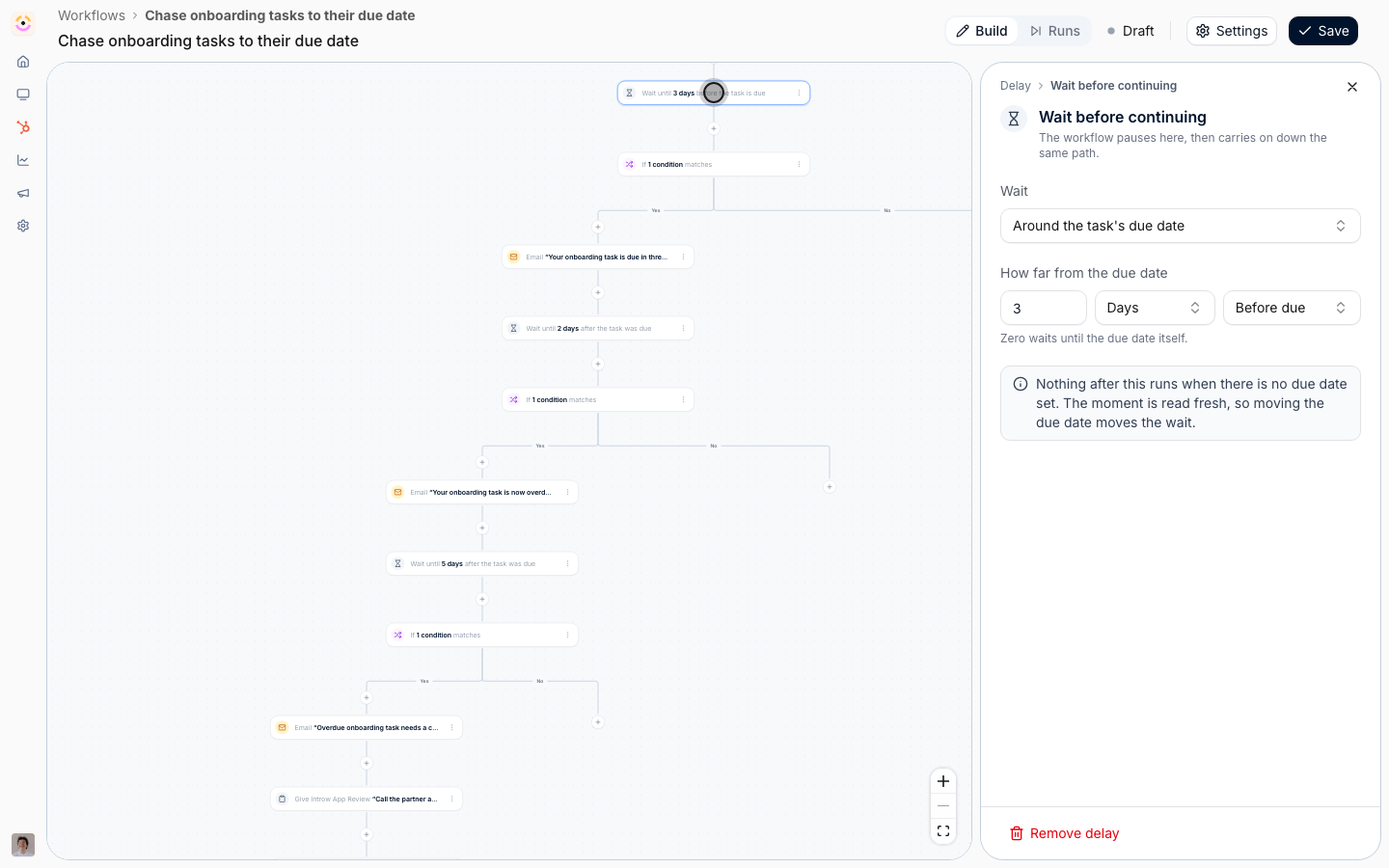
Introw automated a lot already: partners detect themselves from CRM filters, segments keep themselves current, forms write your CRM records, notifications and nudges go out. What it could not do was the handful of rules that are specific to your program, the ones that live in a partner manager’s head. Workflows is where you build those, on a canvas, with no code. You pick a trigger from twelve of them: a task assigned or completed, a journey started or finished, a course started or finished, a certificate earned, a partner or contact created or updated, or a partner entering or leaving a segment. You narrow it to the partners and events you actually mean, with segments or the partner’s own Introw and CRM fields for the partners, and conditions on the event’s own fields for the events. Then you lay out what happens: write fields on the partner, move them to another portal experience, add them to a segment, enroll them in a journey, give them or your own team a task, issue a certificate, book a commission line, email their contacts, post a Slack or Teams nudge, or log a note on their CRM record. The email action has its own subject line and renders on your organisation’s email design, and if you would rather not start from a blank canvas the AI drafts the email, and names and describes the workflow, for you.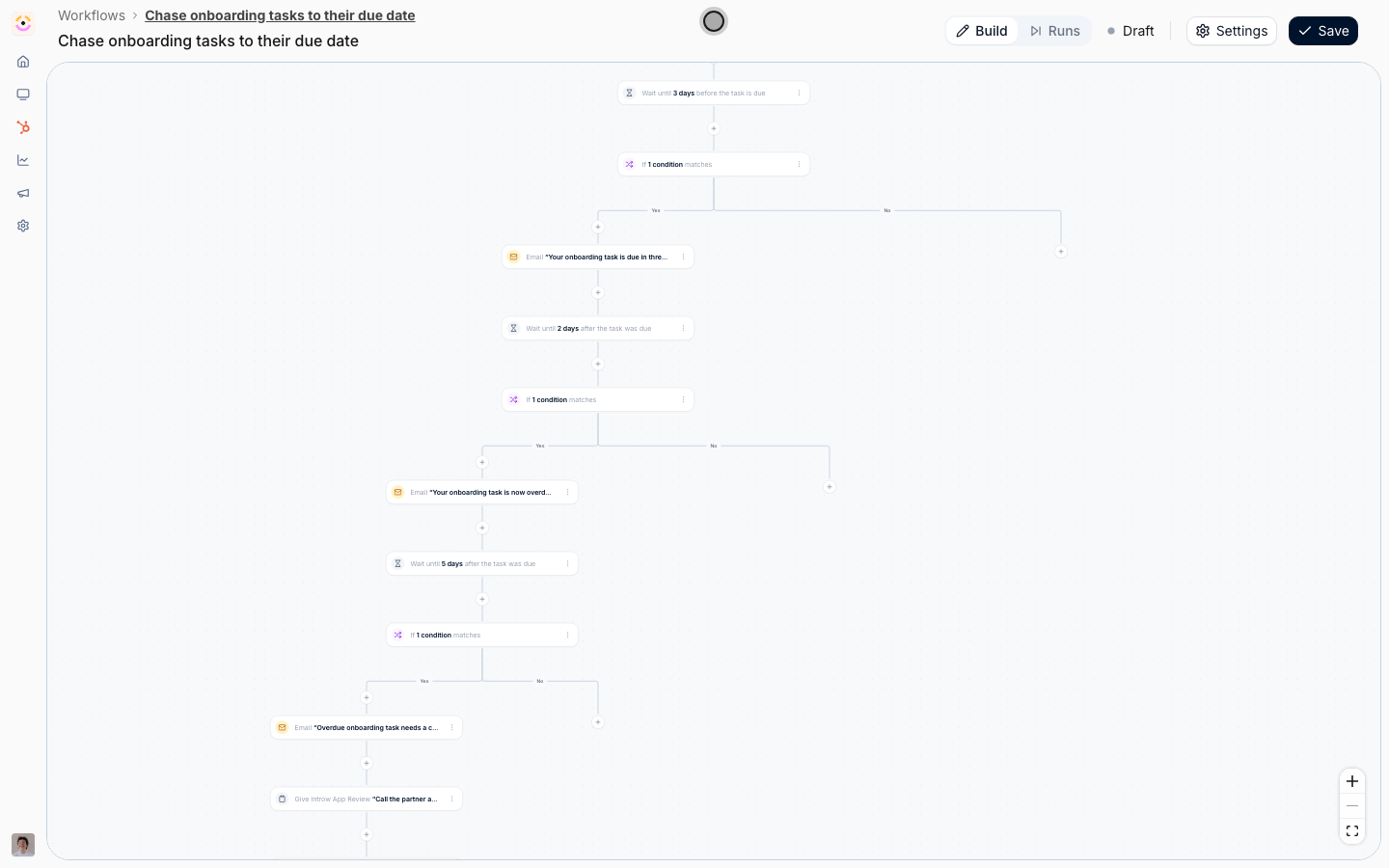
- Click through
Fields and deal actions that decide for themselves
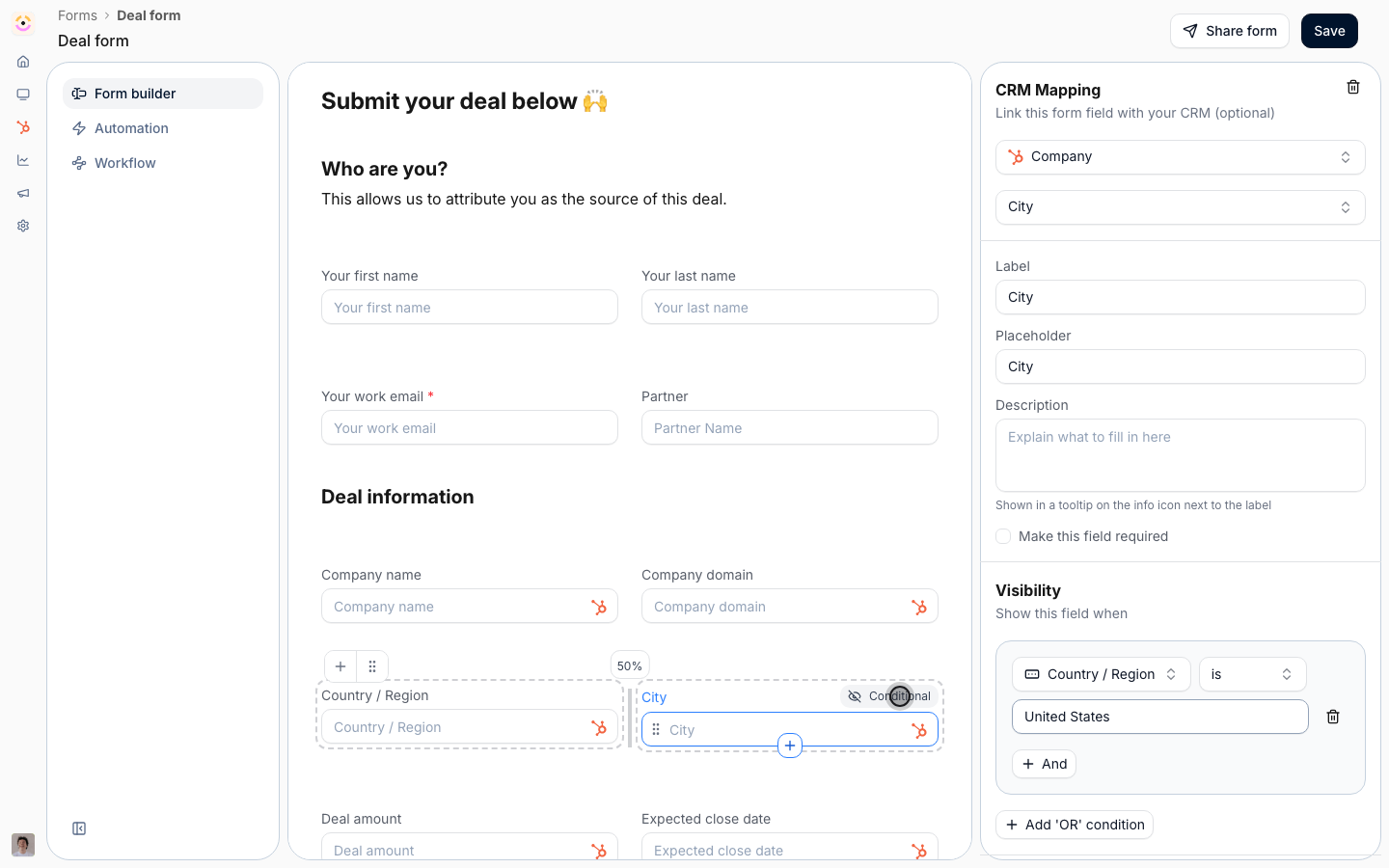
A form field can now be shown only when other answers on the same form match a rule. Open the field, add one or more visibility conditions pointing at sibling fields, and the field appears when they match. Fields with conditions carry a Conditional pill in the builder so the branching is visible without opening anything.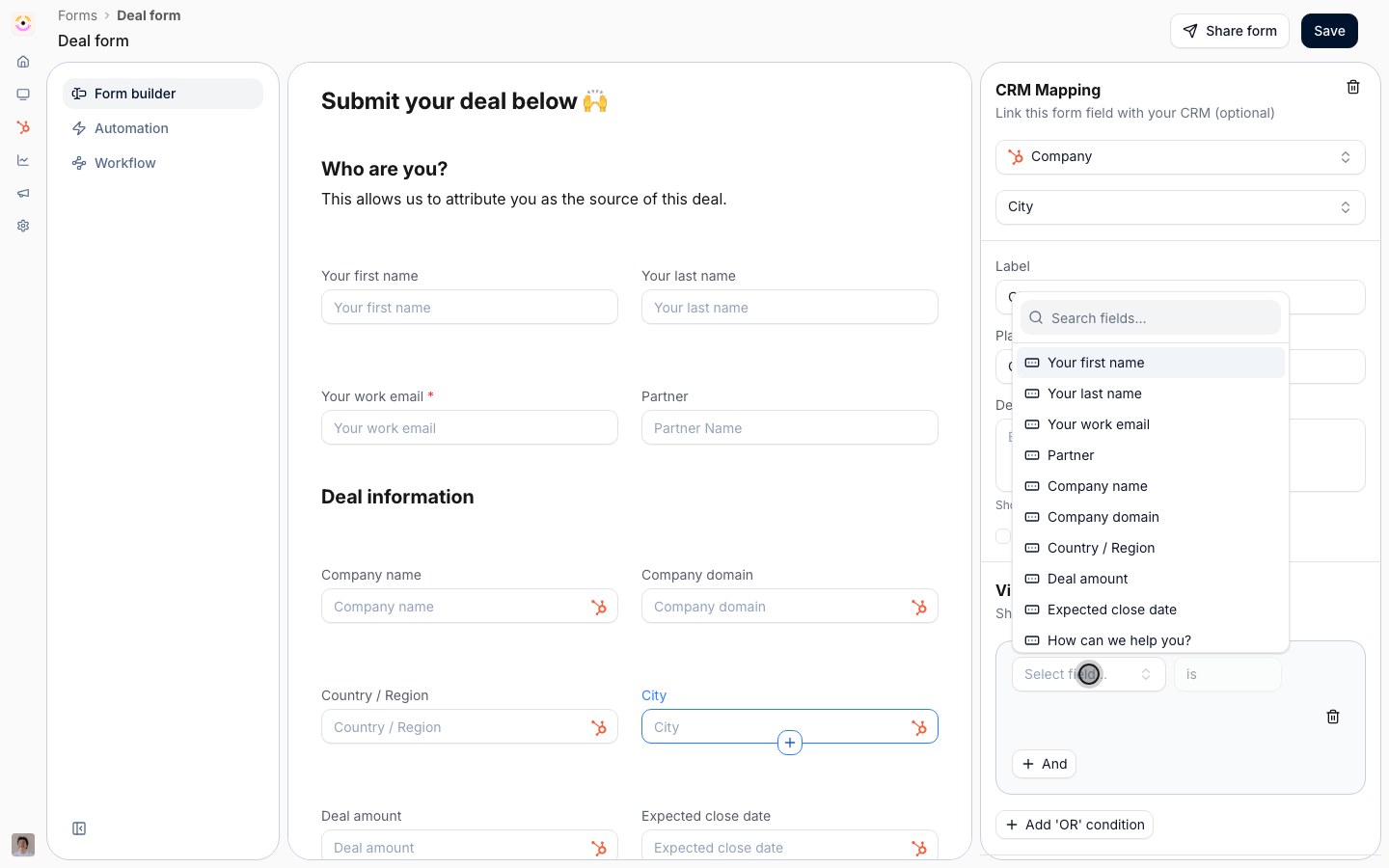
One default, and overrides you opted into
Partner permissions and email notifications now resolve through one cascade: an organisation-wide All partners default, then only the segments that switched on Override the default for this segment, then the contact’s own opt-outs. The default is pinned as the first row of your segments table and opens its own Default settings editor, so you no longer create a conditionless segment to stand in for “everyone”. The practical change is that a segment carries nothing until you say it does. Creating one to target an announcement used to be able to switch notifications back on for your whole program; now it has no side effects at all. That holds per setting, not just per segment: a segment states a permission only when you move it off the default value, so one that grants invites says nothing about record visibility and cannot change it by accident. Where a segment does state something, that value replaces the default in either direction. Where a contact matches several segments that disagree, the most permissive one wins on every setting, so qualifying for more groups never takes a capability away. Both columns on the segments list are a live diff against the current default, so a segment that changes nothing reads Default and a segment that changes something tells you exactly what, and auditing forty segments is one screen rather than forty.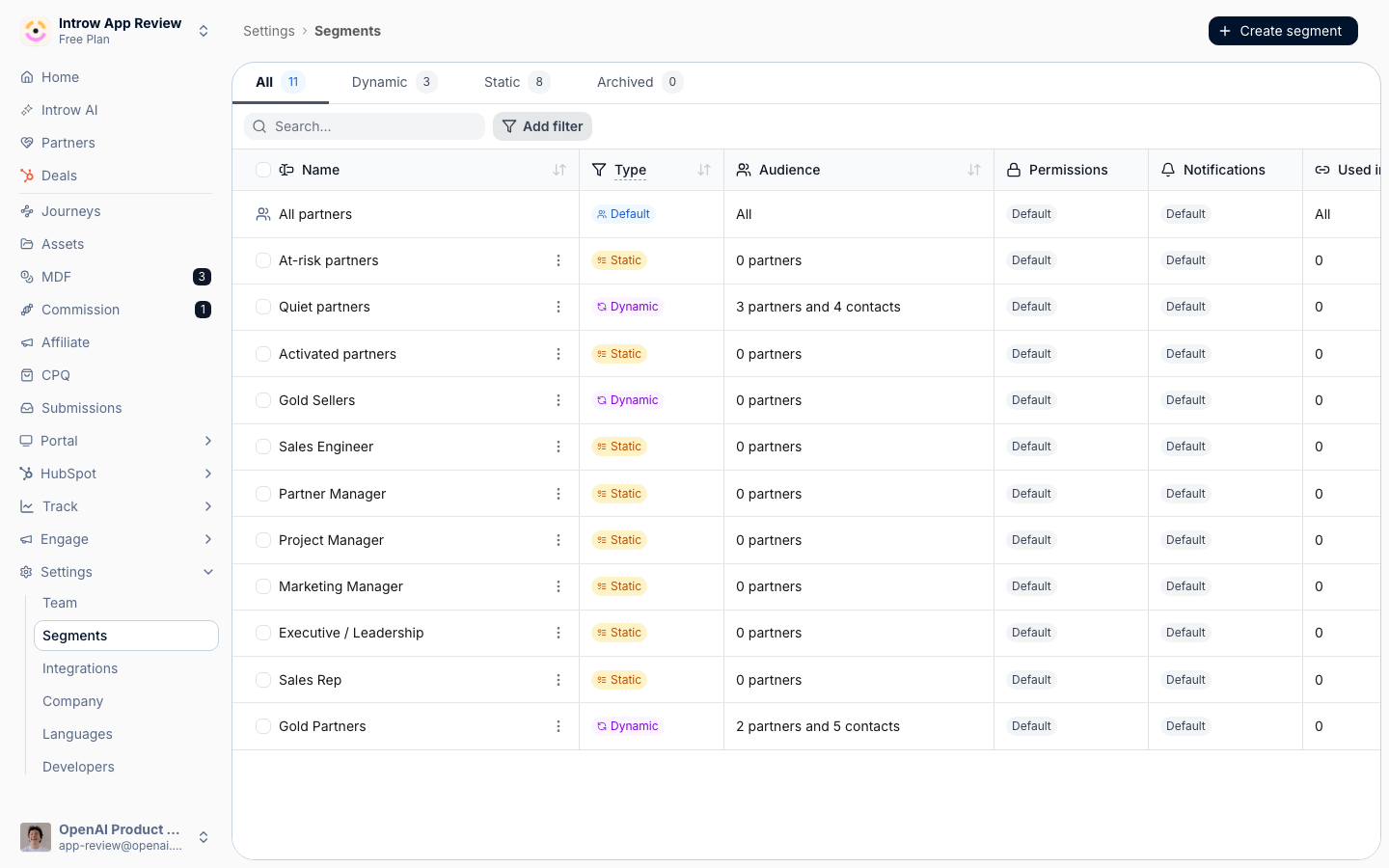
All partners is pinned as the first row, and both policy columns read as a live diff against it.
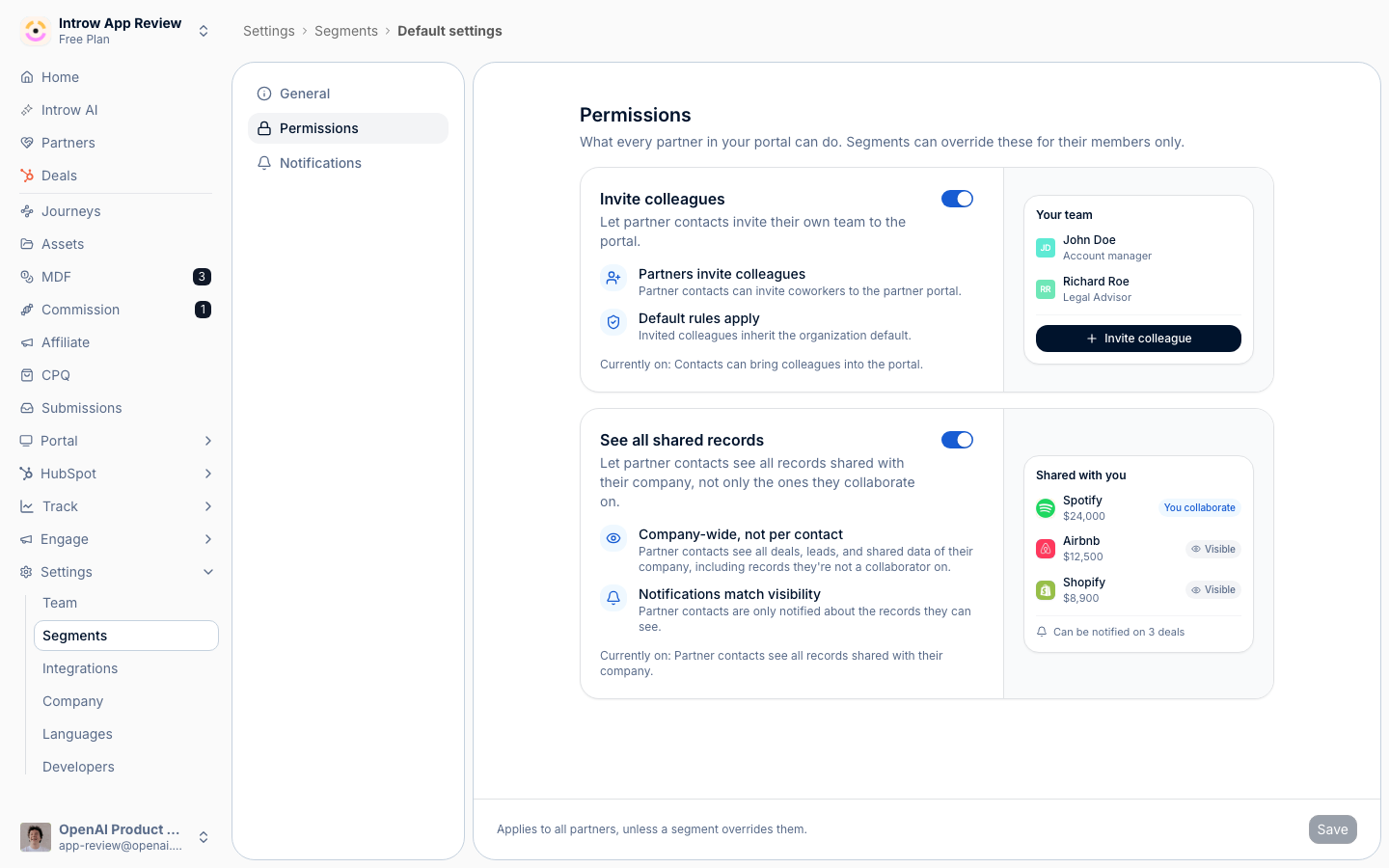
Default settings > Permissions: each card states the rule, then previews the portal the partner gets.
Partner chat is its own system now, per platform
Which partner events reach a partner’s Slack or Teams channel used to ride on the same per-event checkbox as email. It is now configured on the chat integration itself, on its Partner channels tab, one setting per platform. That split is deliberate rather than cosmetic. An email is addressed to a person, so it takes the full cascade including that contact’s own preference; a chat channel belongs to a whole partner organisation, so it has no per-person layer and its config belongs with the integration that owns the channel. The upside is immediate for anyone running both platforms: Slack and Teams can now differ, which one shared checkbox could never express. See Channels and Control who gets notified.Why a contact gets what they get
A partner contact’s Notifications tab is now a derived view that shows its own reasoning. A card at the top walks the three layers for that contact: how many events the default leaves on, which override segments they matched and how many events each decides, and how many they opted out of themselves, each segment a link straight to it. Every event row carries a badge naming the layer that decided it, and rows your policy switched off are locked with a tooltip saying which layer locked them. The same drawer gained a Permissions tab that does the same job for each permission, naming the segment or the default that decided it, and its Engagement tab was renamed Activity. Only the contact’s own opt-outs are editable there, which is the honest version of that screen: it used to offer toggles that could not actually grant anything. The rule is enforced on save, not just hidden in the interface, so no screen can record an opinion on an event a higher layer owns.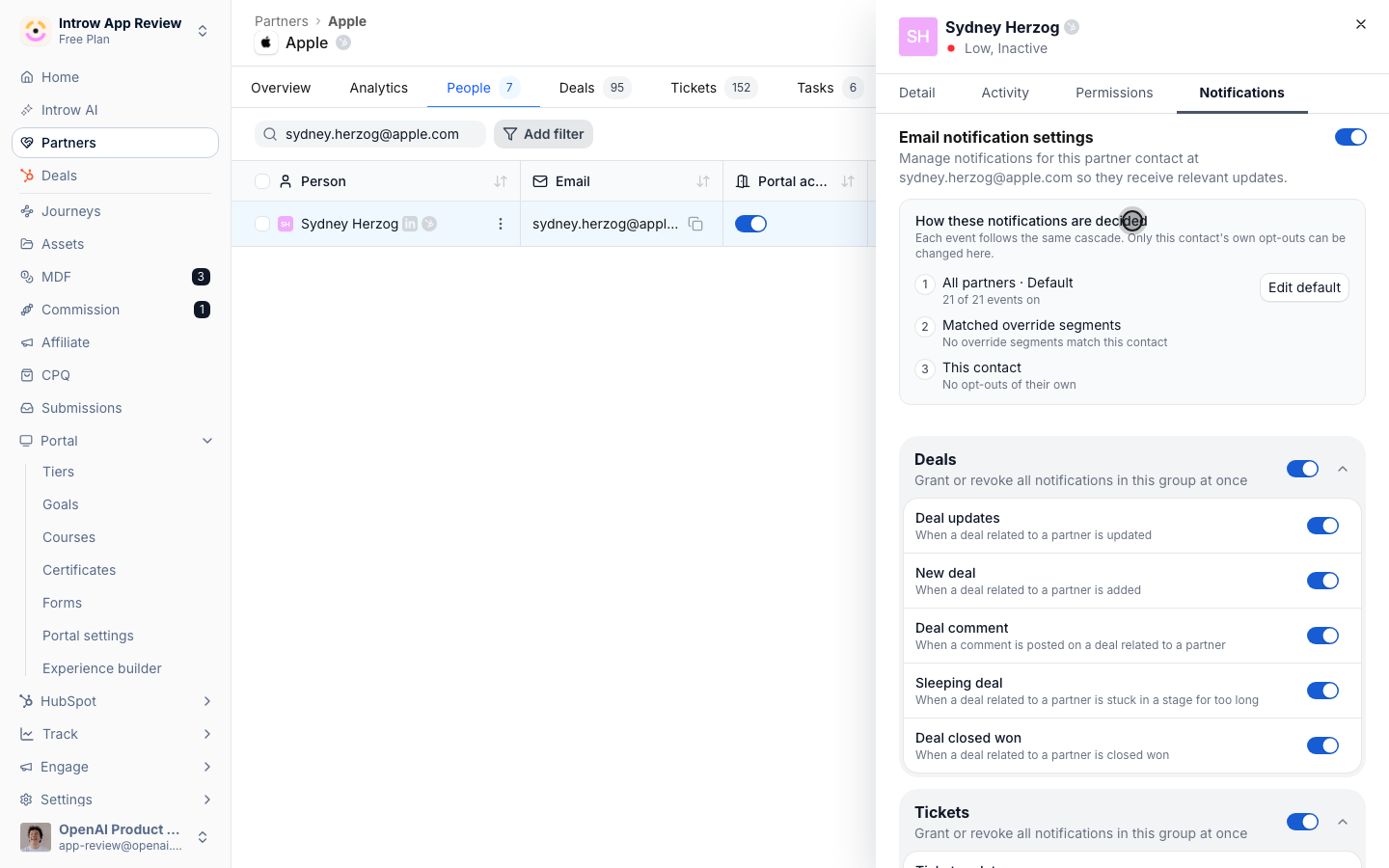
The contact's Notifications tab, leading with the three layers that decided it.
Segment membership is stored, not recalculated on every read
Segment membership used to be worked out from scratch every time something asked. It is now a stored snapshot that Introw keeps in step as segments and partner data change, and every product read comes off it: portal access gates, the counts on the segments list, and everything scoped to a segment. The builder’s own preview still evaluates live, so what you see while writing conditions is the current answer. The reason to care is what happens at scale. A gating read on a portal page load no longer costs more because your organisation has more partners in it, which is the difference between a portal that stays fast at three thousand partners and one that degrades as the program succeeds. That is the enterprise-grade bet in the least glamorous and most useful place. Two behaviour changes came with it, both worth knowing before you audit your own segments. A static segment that hand-picks contacts and carries a partner filter now requires the contact row: a contact you deliberately left out no longer gets in through their partner. Segments that only enroll partners are unaffected, and all of that partner’s contacts still match. And a notification lock set by a segment now applies to a brand-new invitee at the moment they are invited, rather than being dropped because their row was a fraction of a second old. See Segments and Layer segments to progressively unlock capabilities.Channel conflict arrives with the notification
When a partner submission overlaps a deal already in your CRM, the AI’s assessment no longer waits for someone to open the Submissions inbox. The Form submitted notification your reviewers already receive leads with a Channel conflict section carrying the assessment and recommendation, and its button reads Resolve conflict instead of View submission. Conflict is time-sensitive in a way most notifications are not: the cost of finding out late is a partner dispute, not a slow reply. It reaches your internal reviewers and internal chat channels only, never a channel shared with the partner who submitted. Detection and triage are the agent’s; the decision stays with your team, which is the AI-native bet with the human where it belongs. See Catch and resolve channel conflict.MDF requests and claims can live on your own CRM objects
If your finance team already tracks marketing funding on a CRM object of their own, Introw can now use it instead of its own. Point MDF requests, MDF claims, or both at one of your HubSpot or Salesforce objects and that object owns the record end to end: its schema, its properties, its record creation, and its label, which then replaces “MDF Request” everywhere the object is picked.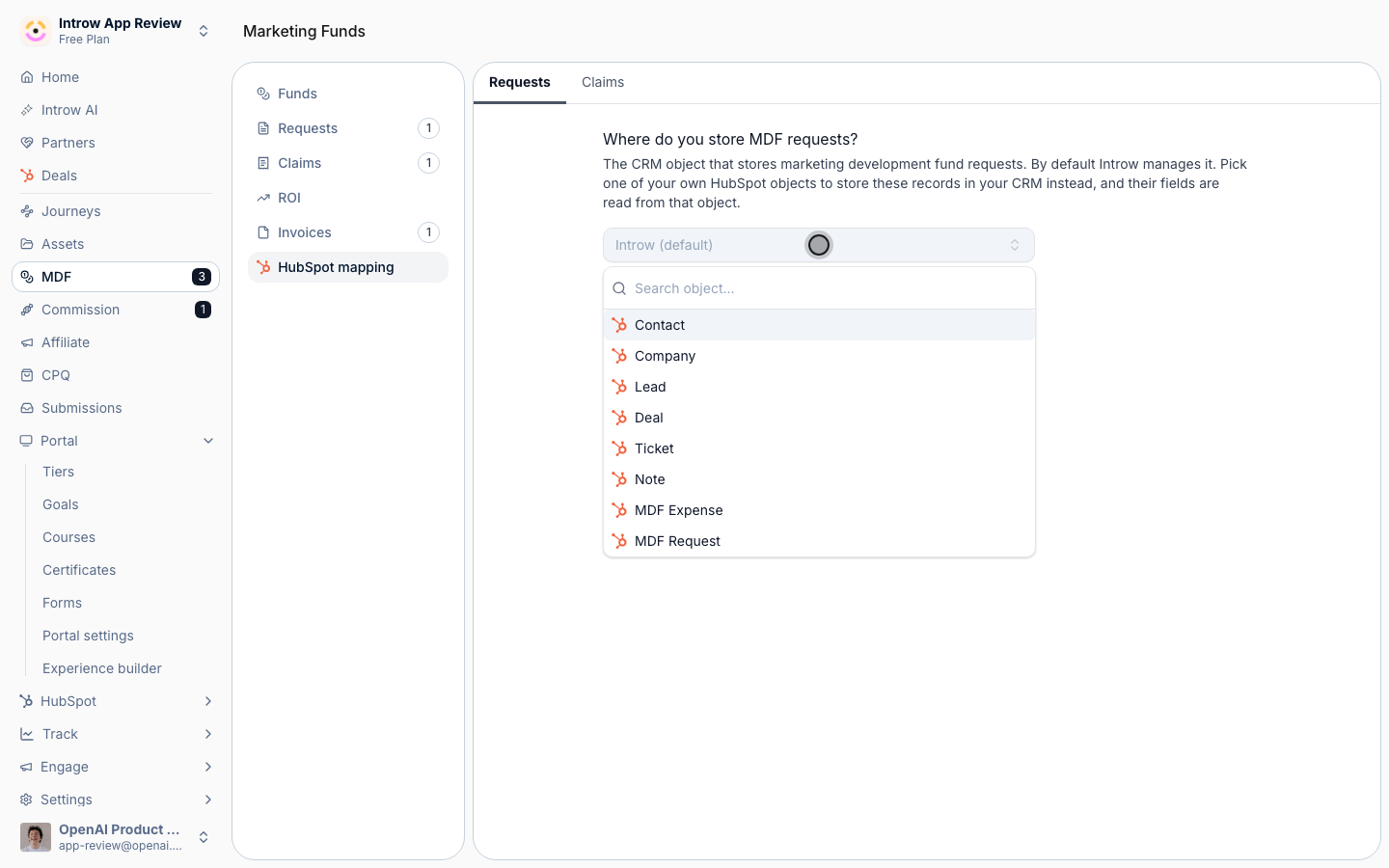
Marketing Funds > your CRM's mapping tab: point requests at one of your own objects, or leave them with Introw.
Affiliate links provision themselves
A partner who could see an affiliate section but had no link to share was the most common way an affiliate program quietly failed. Links are now minted automatically: publishing an experience that carries a campaign’s affiliate block gives every partner in that publish a link, and a partner who opens the block without one gets it created on the spot, so campaigns and portals that predate this heal themselves without a republish. Both routes are safe to repeat, never issue a second link, and never reissue a link you revoked. Generate links stays on the campaign for pre-provisioning partners you want to reach before they ever open the portal. See Launch an affiliate campaign.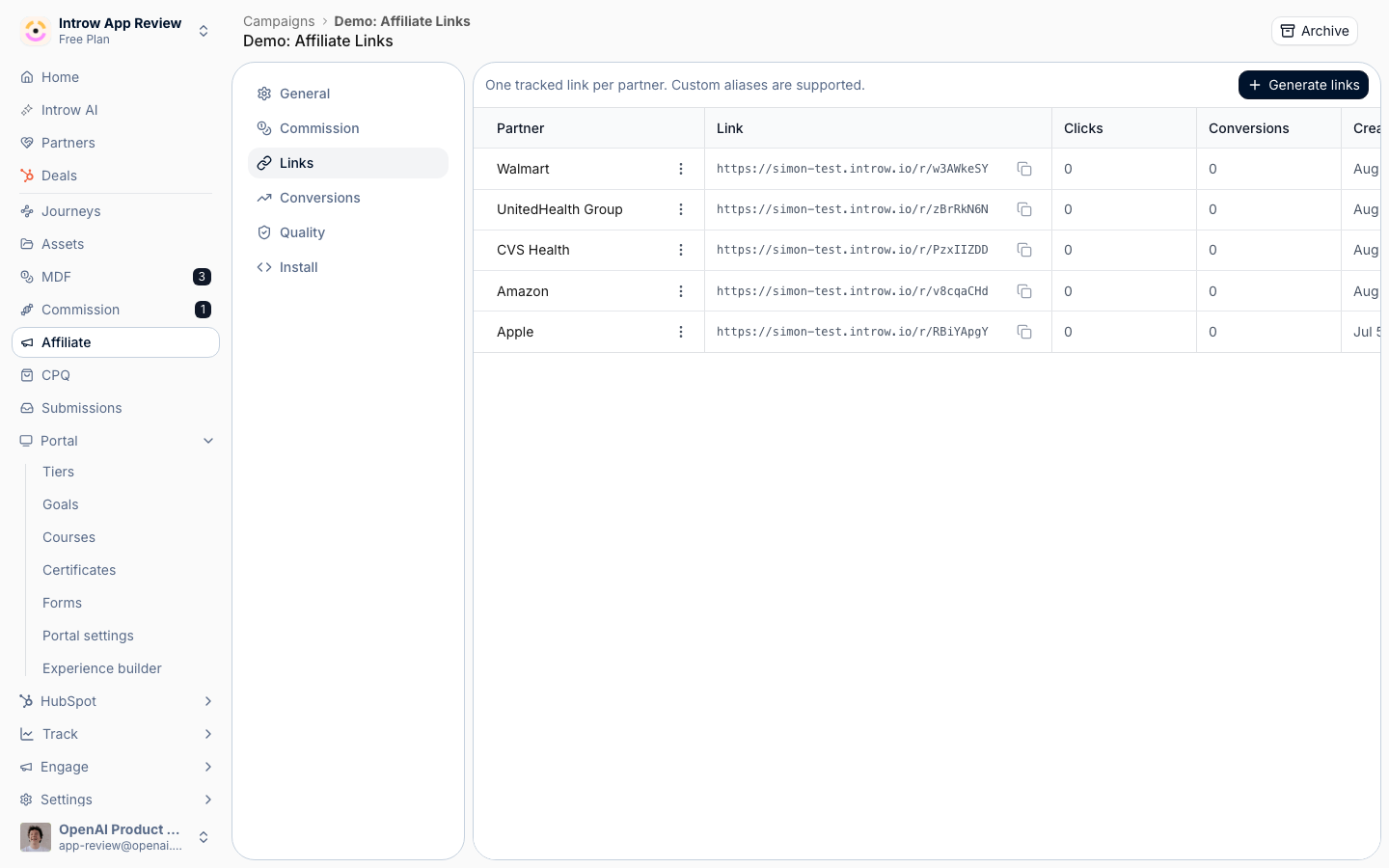
A campaign's Links tab: one tracked link per partner, with Generate links kept for pre-provisioning.
The CRM connection tells you who it runs as
A CRM integration’s detail header now names the CRM user the OAuth grant authenticates as, with their id, the portal or instance it points at, and the connection date behind it. That is the identity every Introw call to your CRM runs under, so it is the first thing to check when an object syncs for some records and not others, or a write-back silently does nothing, and it is how you confirm a connection is on your dedicated integration user rather than whoever happened to click connect. Reconnect is now always available rather than appearing only once something breaks, so moving a connection to a different user is self-serve. It and Disconnect moved into a three-dots menu, leaving the header one call to action. See Troubleshoot a CRM connection.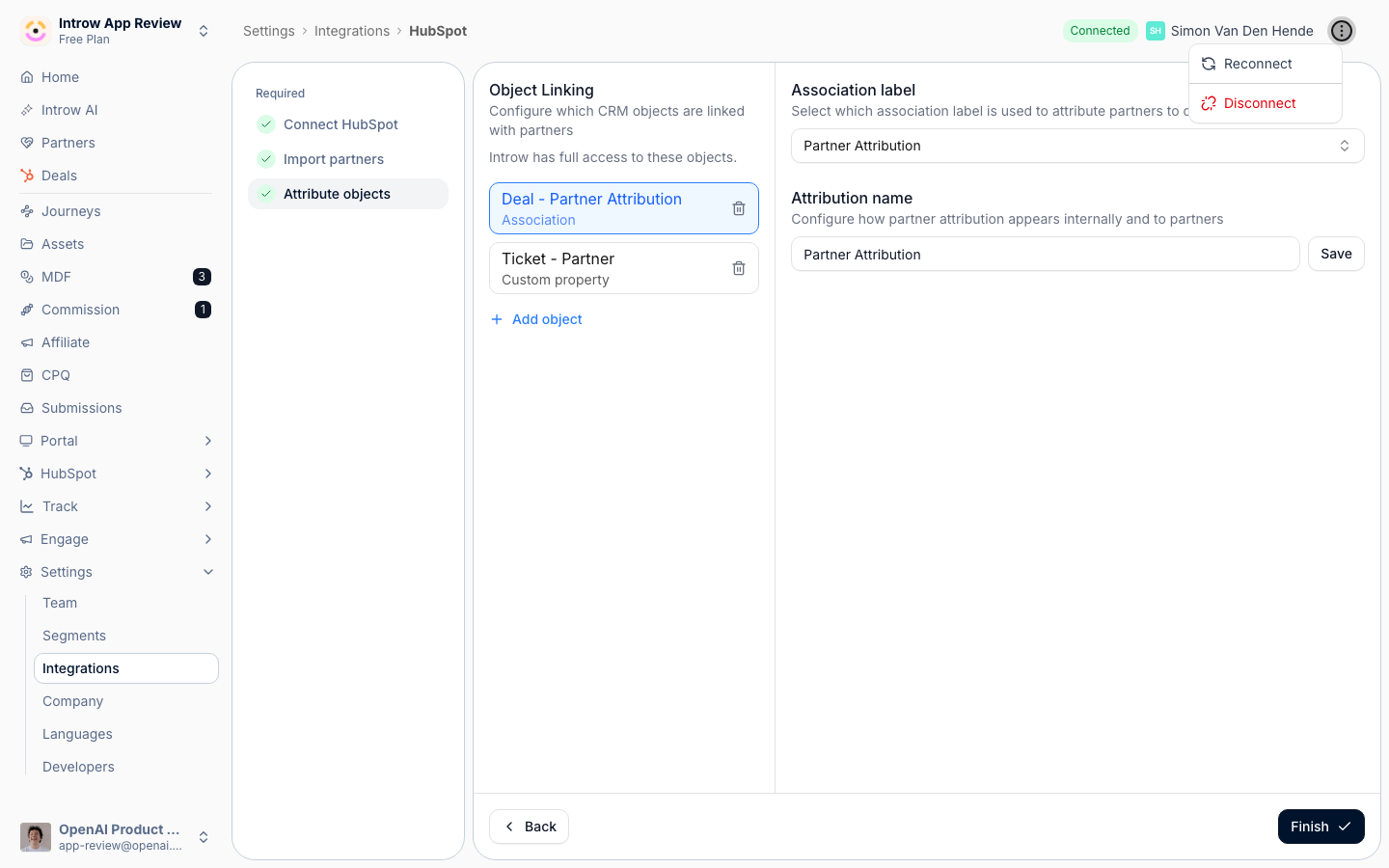
The connection header names the CRM user it runs as, with Reconnect and Disconnect in the actions menu.
Videos in forms
The form builder’s Add to form menu, and the/ command inside the form body, now offer YouTube, Loom, Vimeo, and Vidyard embeds, plus Embed other for anything else. A deal registration form can carry the thirty-second explainer of what qualifies, where it gets read, instead of in an enablement email nobody opens. Video is the visible half of a bigger change: the form body now takes the same editor kit as announcements, so images, call-to-action buttons, documents and variables go in the same way. See Build and publish a form.
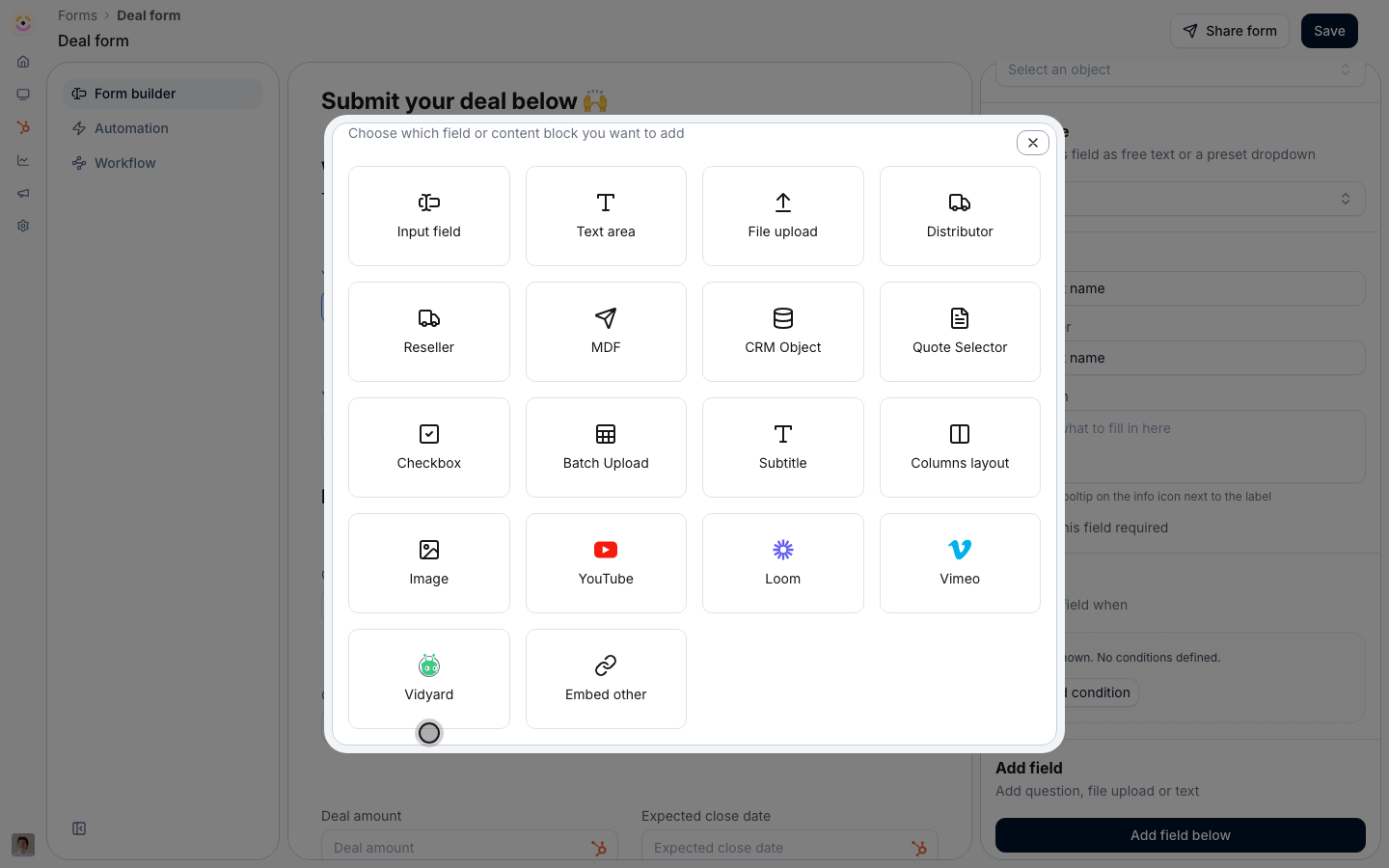
Add to form, scrolled to the new video providers.
Free API credits on every plan
Every Introw plan now includes API access with a free monthly allowance of API credits. There is no add-on to buy and no commercial conversation to have first: create a scoped key in Settings > Developers > API keys and start calling. The allowance belongs to your organisation rather than to your plan, so an integration that outgrows it can have it raised without changing anything else you pay for. The Developers sidebar now carries an API Credits bar showing the share of this month’s allowance you have spent, and clicking it gives you the date your credits reset, in UTC. Integrations get the absolute numbers where they can act on them instead: every metered response carries your allowance and what is left of it, and once the allowance is spent, requests return402 with the reset time rather than failing vaguely.
Being able to build against the API before anyone signs anything is the low-TCO bet applied to the platform: the building block is there when your team needs it, not after a procurement cycle. See API Keys & REST API, API credits, and Authentication.
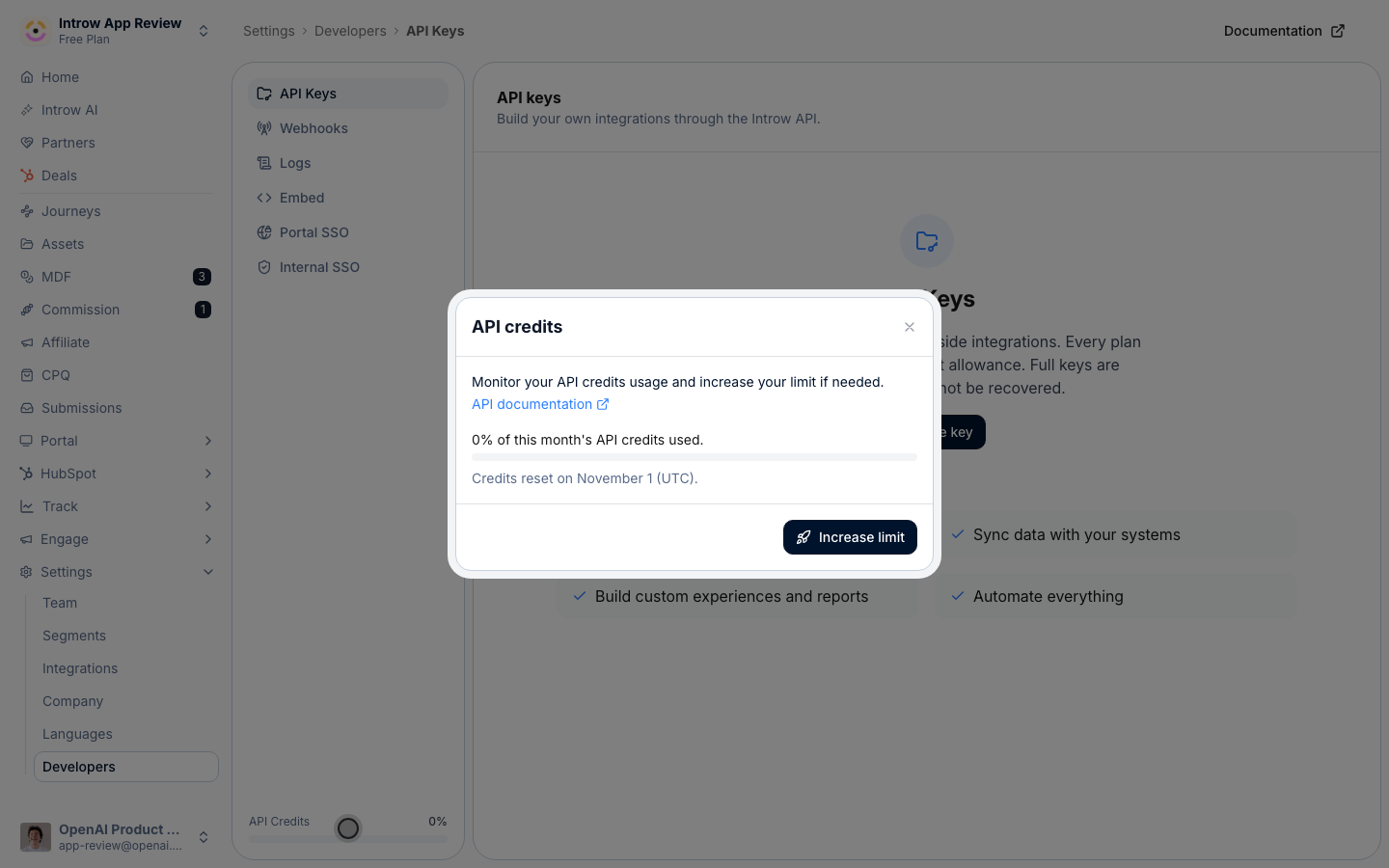
Settings > Developers: the API Credits bar sits bottom left, and holds the share used and the reset date.
Table reports, and record tables on a dashboard
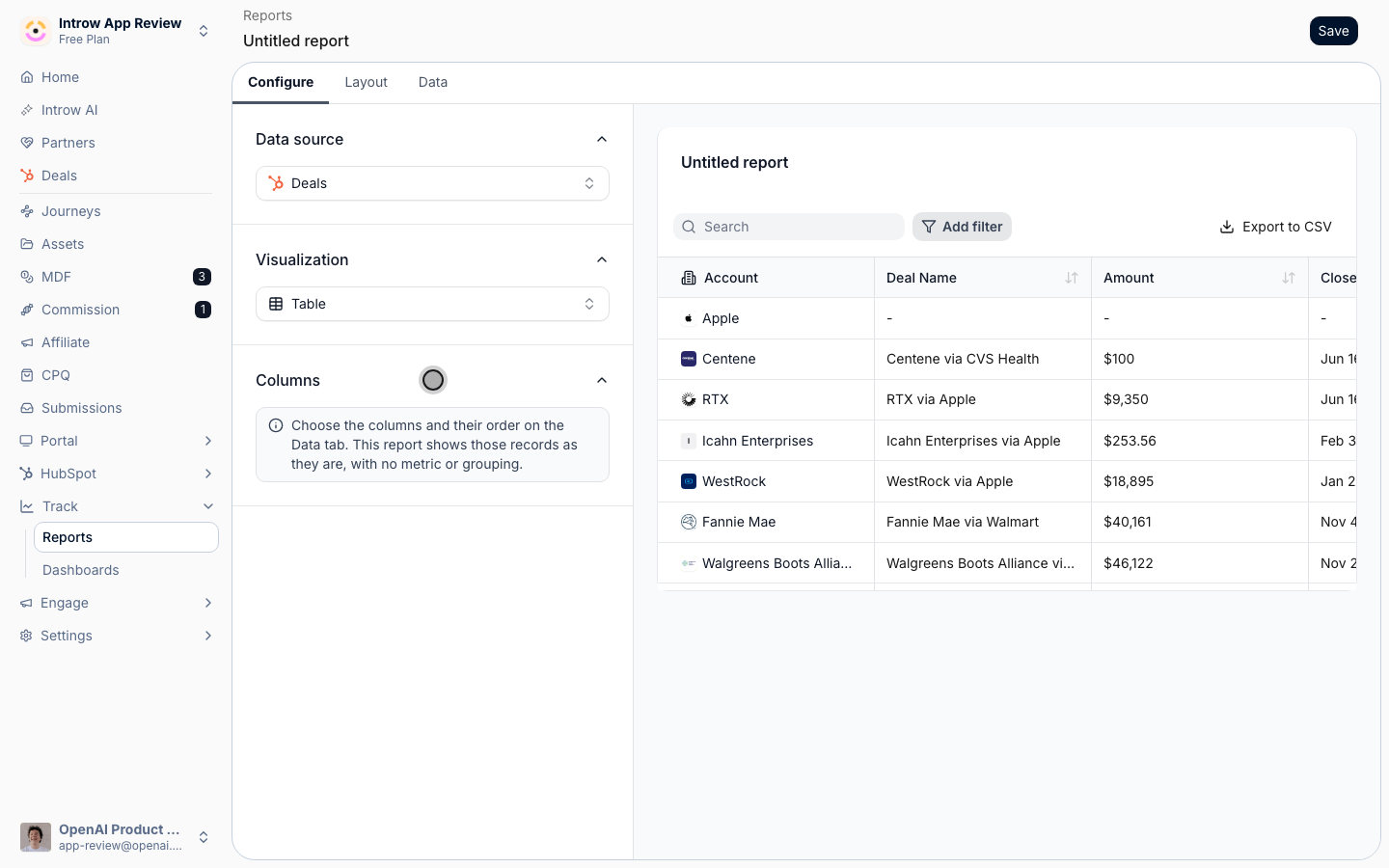
A report’s table visualization now renders the report’s own records with the columns you pick on the Data tab, rather than a two-column summary of a grouping and a metric. So “the deals my partners registered this quarter” can be a dashboard tile that lists the deals, instead of a chart you have to click through to reach them.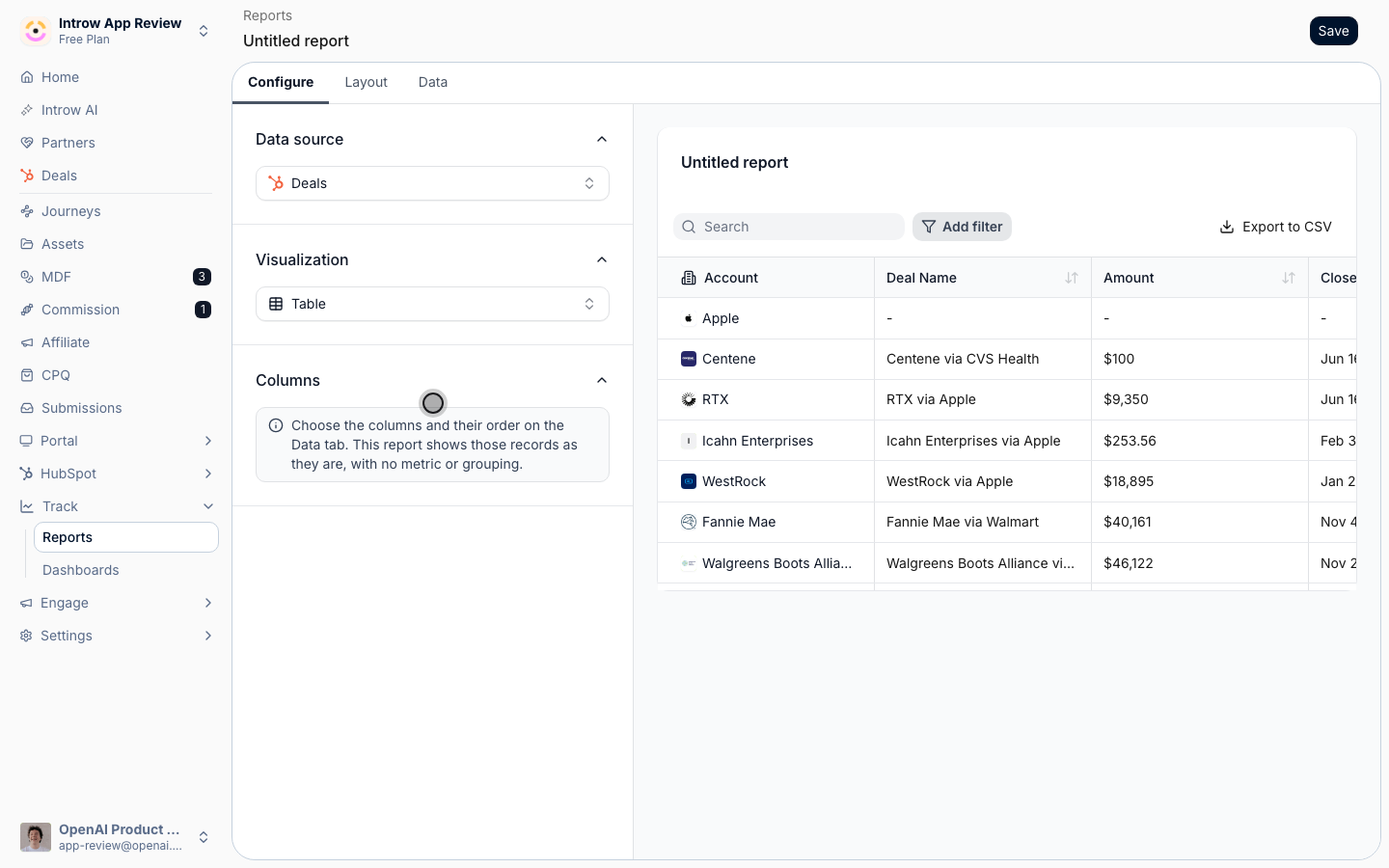
Report on the numbers that live on the partner account
Most programs already roll a number up onto the partner account in the CRM: total ARR, sourced revenue, headcount, certified engineers, a health score. The Partners data source could only count partners, so that number was readable one record at a time and never as a total. It now aggregates: set the metric to Sum or Average of any numeric or currency field on the partner’s CRM record, and break it down by Tier, Phase, Experience, a partner team role, any CRM property on the partner record, or time. Add a Breakdown to cross two of them, so ARR by region split by tier is one chart. The same Introw partner fields, tier, phase, categories, country and partner manager among them, are now offered as an X-axis or Breakdown on every data source, so deals report per tier without a CRM property carrying the tier.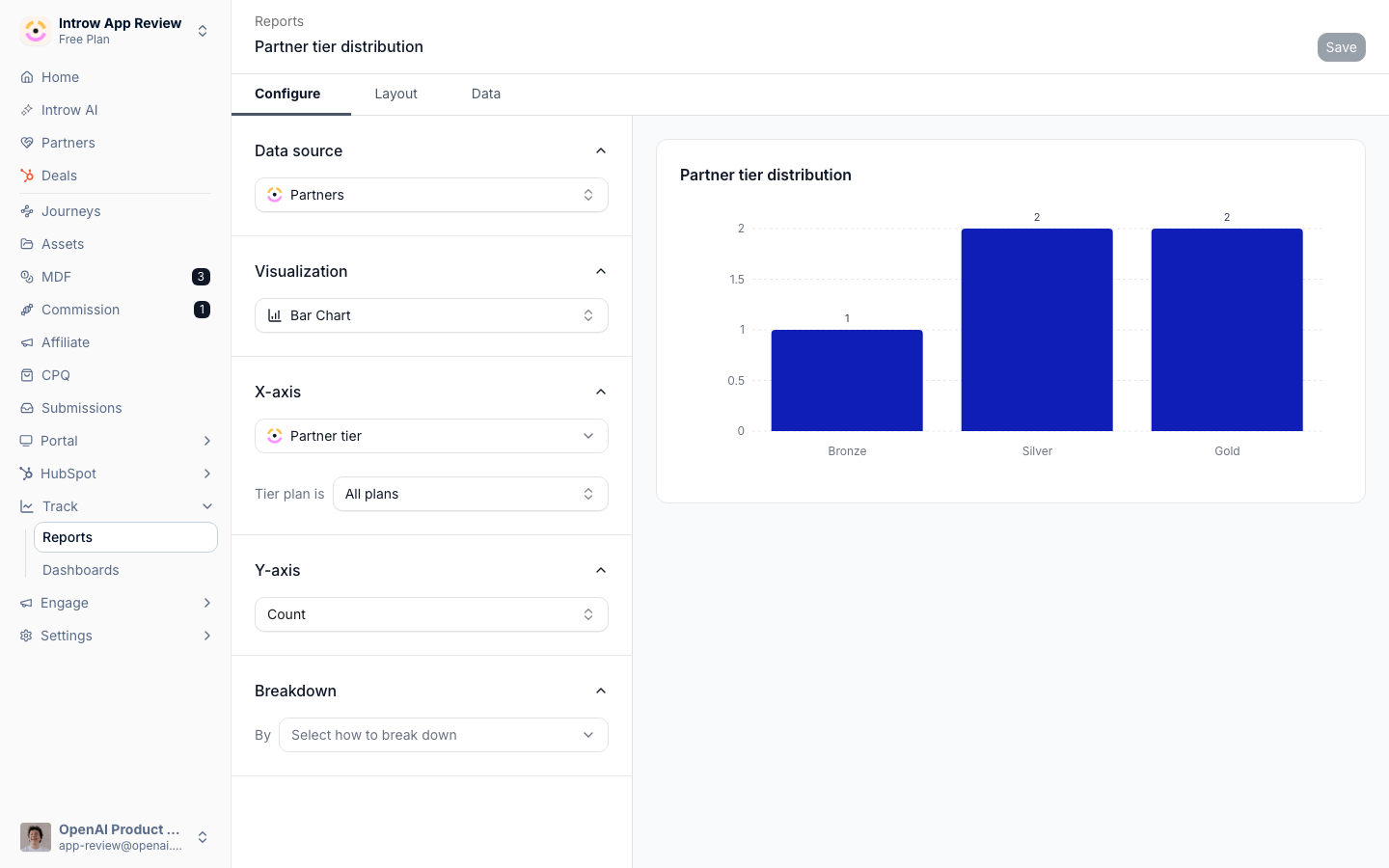
A Partners report with its metric set to a field on the partner account, grouped by partner tier.
Salesforce tells you what Introw cannot see
The Salesforce user your connection runs as does not always have field-level access to everything your program touches, and until now that surfaced as a sync that silently skipped a field or a deal that would not open. Introw now checks that user’s permissions and says so where it matters. A Permission limitations notice on a form’s CRM automation steps and on the partner attribution setup lists the properties Introw cannot see or change, with the reason per property, such as Read-only in your CRM, and property pickers mark the limited fields. Fix the permission set in Salesforce, then re-check from the same notice; there is nothing to reconnect. Two behaviours changed with it. A mapped property the integration user cannot see no longer flips the whole connection into an error state; it is reported as a limitation and everything else keeps syncing. And the shared-deal collaboration view leaves out fields that user cannot read instead of failing to open when a contact’s phone or a line item’s price is hidden. Knowing what the CRM will and will not let Introw do, before a partner runs into it, is the CRM-native bet stated honestly. See Salesforce permissions and scopes.Generate any image with AI, at the right size
Every place you upload an image now offers Generate with AI next to the file picker: announcement, asset and folder thumbnails, course banners, certificate backgrounds, portal and company branding including logos and login artwork, tier images, people photos and the agent’s avatar. Introw reads the content the image will sit next to and your brand colours, then creates one at the aspect ratio that slot needs. Add a line of direction if you want something specific. Each uploader also states the ratio and recommended size it wants, such as 16:9 at 1200 by 675 for a thumbnail or 3:1 at 1200 by 400 for a course banner, and crops to it, so a portal stops looking like a collage of whatever was to hand. July brought this to certificate backgrounds; August made it the default for every image in the product. Getting a presentable announcement out without a designer in the loop is the AI-native bet applied to the unglamorous half of enablement. See Branding and Send an announcement.Also in this release
- The invite permission holds everywhere. Invite colleagues is now enforced on every route a partner has to add someone, including their own team page at partners.introw.io, where the action explains why it is unavailable rather than failing after the fact.
- Archiving a segment stops it applying immediately, its grants and its restrictions alike, so the default decides for its members again. Restoring brings its policy back with its targeting.
- An override segment has to target a subset. A dynamic segment with no conditions matches everyone, so it can no longer set policy for your whole program. It keeps working for targeting announcements, tabs, assets, courses, forms, and reports.
- Partner Notifications became a report. It still tells you what went out, who it reached, and what they did with it, and it now says in a banner where recipients are configured instead of offering a second place to write them.
- A returned submission can actually be resubmitted. Returning a submission asks the partner to revise it, and the notification deep-links them into it, but the partner had no way to edit from there. The submission now carries a returned-for-changes card with Update and resubmit, and saving the revision puts it back in your queue. See Run a submission approval workflow.
- Team role and CRM owner columns are editable on the partners list. Pick the person straight in the column, with the same picker and replace-confirmation the bulk edit and the partner’s own team dialog use, instead of opening each partner. Covers linked team roles and CRM owner fields on either CRM. See Wire partner ownership.
- Goals follow your fiscal year. Yearly and quarterly KPI periods now bucket on your organisation’s fiscal year start, so a February to January goal is one FY2026 column rather than being split across two calendar years. Calendar-year organisations are unchanged. See Launch a partner goal.
- A CRM event that omits a property no longer clears it. A sync payload that simply did not mention a partner’s tier was being read as “clear the tier”. An omitted property is now left alone, and only a stated empty value clears one. See CRM integrations.
- Deleting a form field no longer wipes that form’s CRM automation. Removing one field used to take the form’s CRM object mapping with it. See CRM automations.
- SCORM scores show on portal course cards. A SCORM module’s reported score now appears where partners see their progress, instead of only inside the player, and a package whose manifest is not at its root is refused before it is stored, with a message that says so. See Progress tracking and Import a SCORM course.
- Files uploaded through a form are clickable in the activity feed. The filename links to the file rather than reading as plain text. See Sharing and submitting.
- The asset library filters by access level, so you can pull up everything restricted, or everything public, while auditing what partners can reach. See Build the asset library.
- Announcements and Tasks columns are customized the same way as Assets. One Configure control across the three lists rather than three different affordances.
- Introw is in the Claude and ChatGPT directories. Connect in Claude and Install in ChatGPT on the connector pages open Introw’s listing, so connecting is one install and a sign-in with no server URL to copy, and Copy MCP Server URL covers clients without a listing. See Connect Claude and Connect ChatGPT.
- Comments posted over the API or from an AI assistant can @mention people. A mention written by name in a public API or MCP comment resolves to the person and notifies them, the same as one typed in the portal. See Collaborate on a shared deal.
- Preview a course in any of your languages. The course preview carries a language switcher, so you check each translation before partners see it. See Multilingual.
- The Microsoft Teams connection is self-serve. The connect dialog offers the Introw app package to download and the steps to upload it as a custom app, and the Introw bot answers help and setup as soon as it is installed. See Connect Microsoft Teams.
- The public API knows a partner’s portal. Partners carry the experience template published to their portal, and the partner endpoints accept the partner’s CRM record id as well as the Introw id. See API Keys & REST API.
- See all shared records now scopes every number a partner sees. A contact without it sees only their own records in dashboards, report and goal drilldowns, partner analytics and the commission section, never a colleague’s. See What partners can see.
- Form fields take a description. An info icon next to the label shows it to submitters on hover, and it is translated with the rest of the form. See Form builder.
- Update forms pick deal stages from the right pipeline. A deal stage field on an update form lists the stages of the pipeline you chose for it, and only the stages a partner may see. See Let partners update a deal with guardrails.
- A Journey column on the partner’s Tasks tab. Each task shows the journey it belongs to with a Flexible or Sequential pill, with a journey filter and status as the default sort. See Assign a journey and track progress.
- Batch upload detects the CSV delimiter. Comma, semicolon or tab all work, so a file saved from a European Excel imports as is. See Bulk upload multiple records.
- A contact’s last activity can sync to your CRM. From the Last activity column’s configure menu in People, pick a date-time property on your contacts and Introw keeps it current, so a HubSpot or Salesforce workflow can act on partner engagement.
- Submitting a form no longer grants portal access on its own. An unknown submitter gets access only when the form’s Partner automation is set to invite them. See Connect a form to your CRM.
- A submission whose CRM write failed can be edited and retried. Saving the edit retries creating the record and restarts the approval from its first step. See Run a submission approval workflow.
- Deal cards, breadcrumbs and the Partner Connect button show the deal’s own name, read from the property you crowned as the header, rather than the associated company’s.
- Certificates render on every background. WebP backgrounds no longer come out white, logo transparency is kept, and a validity period is checked against a ten-year cap. See Create a certificate.
- Match rules on company and contact automations no longer wait for a name, domain or email. The dedupe section appears as soon as any field is mapped, so a custom key such as a company id works. See Connect a form to your CRM.
- The partner agent knows your custom deal actions. Asked for something a shared pipeline button covers, it starts that action for the partner instead of describing where to click. See Shared pipelines.
- Partner team members can set up their own AI connectors. Any active member of a partner team connects Claude or ChatGPT at partners.introw.io, while CRM connections stay with the partner’s admin. See Get started at partners.introw.io.
- A deleted CRM record takes its open commission with it. Expected commission lines on a hard-deleted deal are cleared, so expected commission stops counting deals that no longer exist. See Commission lines.
- A quote can be created on a deal with no line items, and the add-products dialog lists products by name first. See Enable partner quoting.
- Tier labels stay translated after an edit, instead of going stale and shifting rows in the portal’s comparison table.
- Salesforce writes got four fixes. Date fields keep the calendar day on every write path, adding a person sets the account on the contact, opportunity stages carry their closed flag on import, and invites no longer write placeholder names. See Connect Salesforce.
- Saving a synced section updates every portal that embeds it, instead of leaving them on the old version until someone restores it. See Synced sections.
- Segment filters got stricter at the edges. Archiving a partner no longer drops it from audiences, Salesforce 18-character ids survive a save, and “starts with” on a CRM property works. See Segments.
- A new Introw logo across the app, the partner join page and certificates.
- A failed Google or Microsoft sign-in lands back on your portal’s lobby with an explanation, instead of a blank error page.
- The Introw support assistant answers from the product docs first, so what it tells you matches what is documented.
- The built-in Contact role column left the People overview. Roles from your CRM mapping still drive segments and reports.
- Okta works for SSO and SCIM after we allowed the TLS version Okta requires. See Set up internal SSO.