

Where it lives
Shared Pipelines sits under Track, at Deals.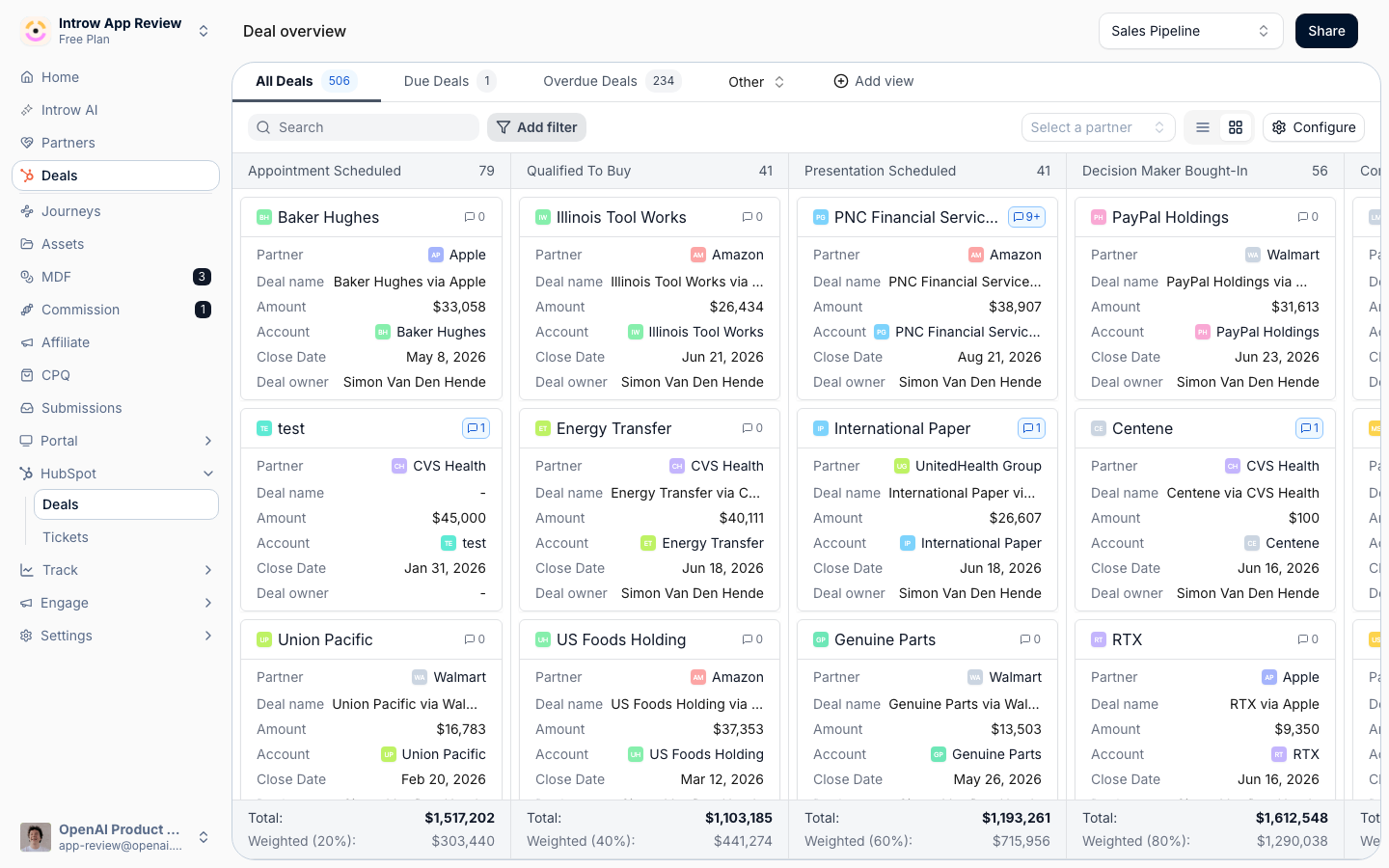
Before you start
How it works
A shared pipeline is the same set of CRM deals shown to both your team and your partners, scoped by attribution. Attribution links each deal to the partner who should see it. Once deals are attributed, you add a pipeline view to a partner experience so partners see their deals in the portal, and your team reads the same deals from the deal overview, either org-wide or filtered to a single partner. Each deal - and any other attributed CRM object - can also be opened as a collaboration surface, with a shared Activity feed for comments, a Files area, Tasks, and a set of properties you decide to show. Your team opens it from an overview page, a partner record, or the CRM embed; partners open it from the portal. You control scope in a few places: attribution decides which deals belong to which partner, the pipeline view’s filters decide which of those deals appear, collaborators decide which partner contacts are in the loop on a record, and property visibility decides which fields partners can see and which they can edit.Settings & configuration
Attribution is configured in CRM setup; the pipeline view and embed are configured in a partner experience; and your team reads pipeline from Deals.Deal attribution
Attribution links deals to partners so they can appear in a shared pipeline. It is set up on your CRM connection in Settings, then Integrations, where you define how deals relate to partners. Until deals are attributed, there is nothing to share.The pipeline view in the partner portal
In a partner experience, add a pipeline view (a CRM list of deals) and configure it: pick the pipeline and record type, choose the properties partners see, and set the filters that scope which deals appear. The view can be shown as a board by stage or as a table, and you can save more than one view. Any object with at least one visible stage gets the board, HubSpot custom objects with a pipeline included, so a pipeline narrowed to a single stage shows as a one-column board. With no visible stage the view is a table only.Totals on the property you choose
Board columns and the pipeline bar total on the deal amount by default. Point them at a different numeric or currency property instead - MRR, ACV, a partner-facing value that differs from the revenue your team books - and both the stage totals and the value on each card follow it. The same setting exists on the internal deal overview, where the property is flagged as the aggregation property on the view.Saved views and filters
One embed can carry several named views, each with its own filter set, so a single tab covers “open”, “closed this quarter”, or one view per currency without a second embed. Filters accept any CRM property, and every property type offers Is known / Is not known, text adds does-not-contain, and dropdowns add Is any of / Is none of. A filter on a property that points at another CRM record, such as the primary contact on an opportunity, lets you pick that record by name. A filter on a date or a number compares it as a date or a number even when the property is not a column on the view, and a date filter covers the whole of its last day.Which stages partners see
Configure stages lists the pipeline’s stages in the order partners read them. Drag to reorder, rename any stage to partner-facing wording (display only, with your CRM’s own label kept as a tooltip), and remove a stage from the view entirely. Removing a stage does two things at once, which is what makes it a guardrail rather than a cosmetic choice. The stage stops being a column on the board, and it also stops being an option anywhere a partner changes the stage: the board’s drag targets, inline editing in the list, and the stage picker on the record. Drop Closed Won and partners can move a deal forward through the pipeline without being able to close it themselves. Add stage brings a removed stage back.Editing from the board
Partners edit the fields you marked editable inline in the list view, and drag a card between stages on the board when stage editing is allowed on the view. Every edit is written straight through to the CRM, and your CRM’s own property validation rules are applied first - a value the CRM would reject is refused in the portal with the property named, rather than failing silently later. A card can be dropped on any visible stage column. When a HubSpot pipeline rule refuses the move, for example an approval stage that cannot be skipped, the card goes back to where it was and the partner reads that a pipeline rule in the CRM blocks this stage change, with a pointer to their partner manager.Bulk actions in the table view
In the table view, partners tick records and act on all of them at once. A checkbox sits on every row, and the header checkbox selects the whole page. The header then reads<n> selected, followed by the actions that apply to the whole selection:
- Edit opens Bulk edit
<n>deals (or whatever the object is called). The partner picks one Property to update, enters one value, and Update<property>writes it to every selected record. Only properties you marked editable on this view are offered, and only those shown on every selected record. A partial failure says how many records were updated and how many were not. - Each custom action on the view appears as its own button. Its form opens with every selected record listed under
<n>deals selected and the note This form is submitted once for each selected record. On submit, Introw sends one submission per record, each with its own record filled in, so every submission runs the form’s approval gate and CRM automation on its own. If some fail, the form stays open, says how many landed, and Submit again retries only the rest.
Reading pipeline in Introw
Your team reads pipeline from the deal overview, which can be viewed org-wide or scoped to a single partner from that partner’s record. Saved views let you set the columns and filters your team needs.Collaborating on a record
Share, top right on every record overview and on each record tab of a partner, hands a record to a partner: you pick the partner and the record, add context, review the email, and send. Introw writes the partner onto the CRM record with that type’s attribution method, posts the share on the record’s Activity, emails the partner contacts you tick, and opens the collaboration view. It is how you send a lead to a reseller, and the manual way to attribute any record. See Share a lead or any CRM record with a partner. Collaborators are the partner contacts in the loop on a record; add or remove them to control who can see and act on the object. The Activity feed carries comments, Files holds shared attachments, and Tasks tracks next steps. Comment visibility. Your team members choose per comment whether it goes to Everyone or stays Internal, using the control on the composer. Everyone is the default. An internal comment is hidden from every partner-facing surface and never triggers a partner notification, and it is marked as internal in the activity log so your team can tell shared notes from private ones. Partner contacts have no such control; everything they post is visible to both sides. Comments from your own systems. The same comments can be posted over the API, targeting a deal, ticket, task, submission, payout, or the partner directly - including internal ones. See Nudge partners at scale via the API. Which objects can be shared. Collaboration is not limited to deals. Any CRM object type you have mapped to partners can be opened up the same way, which is what lets a program run on the record its business actually lives on: tickets for a support-led partnership, orders or line items for a reseller, and custom objects for anything your CRM models itself. Installations, projects, sites, assets, subscriptions and renewals are all common, and a partner sees them as a scoped list or pipeline in the portal exactly as they see deals. Two things to know. Custom-object collaboration is a plan module, so check what yours includes at introw.io/pricing. Without it, a partner who edits a custom-object record sees “Editing this type of record isn’t included in this organization’s plan. Ask your partner manager to unlock custom object collaboration.”, and your own team sees an upgrade button next to it. And the object needs an attribution method before it can be shared, since collaboration resolves through the partner link. See Configure deal attribution and add the object on the Object Linking screen of your CRM integration.Deals with several partners
A deal can carry several partners, such as a reseller, a distributor and a referral partner, each linked through its own attribution. Introw groups those links per partner, so a partner holding two roles appears once with both roles, and orders the partners by the order of the attributions in your CRM integration, then by name. That order decides the deal’s first partner, and the list, the board, the commission and the deal dialog all agree on it. Your team sees every partner. In Deals, the table’s Partner column shows the first partner plus +N, with the others and their roles on hover, and each board card shows one line per attribution, labelled with the attribution’s name. Filtering the overview to one partner puts that partner first and opens the deal on it. The deal dialog works one partner at a time: the conversation, Tasks and collaborators belong to that partner, Collaborators lists every partner with its roles and people, and Open conversation on a partner’s card switches to it. Commission shows one block per partner. Collaborate on the HubSpot card and the Salesforce panel opens the same dialog, starting on the partner whose tile you used. A teammate restricted to certain partners only sees those partners on the deal. One comment, several partners. In the deal dialog, the Everyone / Internal control next to Send becomes an audience picker. It starts on the current conversation and readsTo <partner>, To 2 of 3 partners, To everyone, or Internal when no partner is ticked.
Each picked partner gets its own copy in its own portal, which never names the other recipients.
Editing or deleting the comment changes every copy, each person is emailed once, and your internal Slack or Teams channel gets one post.
A mention of someone on a picked partner stays a mention in that partner’s copy and shows as plain text in the others, and mentions of people on partners outside the audience are dropped.
A partner without a portal cannot receive a comment and is left out of the picker.
What partners see of each other is set on the deal embed’s Configuration tab, under Multi-partner deals, which appears on any embed whose object type has partner attribution.
Both settings are off by default, and neither ever limits your own team.
Partners see each other on a deal only when every partner on it has Show other collaborating partners on in its own portal’s embed for that object type.
A partner with no portal or no such embed counts as off, and then the deal looks single-partner to every partner.
Allow cross-partner communication is checked on the sending partner’s own embed only, and a comment only reaches partners that have a portal.
So with a reseller and a distributor on different experiences, turn it on in both for a two-way conversation: on in the reseller’s only, the reseller can write to the distributor, but the distributor cannot write back.
A partner who writes to other partners is added as a collaborator under its own partner only, so it never shows up in another partner’s Collaborators.
Partners never see another partner’s roles or commission, and multi-partner deals are not a plan module.
See Collaborate with several partners on one deal.
Visible, editable, and renamed properties
Property visibility is set on the CRM embed configuration for the object - and on the pipeline view for deals. For each object you can:- Add any synced CRM field - standard or custom, from the deal (or any attributed object) - not just a fixed default set.
- Choose what partners see and edit - mark each field visible and, independently, editable, so partners get the context they need without exposing internal fields.
- Rename each field to partner-friendly terminology - override the label a partner sees (for
example show
dealstage/StageNameas “Stage” or “Where we are”). This is display-only: the value keeps coming live from the CRM, and the original label is kept as a tooltip. It’s what lets the portal read in your partners’ language instead of your internal property names.
Show a property only when it matters
A property’s three-dots menu carries Configure visibility, which opens Property visibility:Show <property> when, followed by the same condition builder the custom actions use.
Conditions read the record’s own CRM values, limited to the properties exposed on this view, and group with and / or.
A property with no conditions is always shown, which is the default, and a property with conditions shows a small count beside it.
The same dialog carries the Show on card switch, which keeps a property off the board card while it stays on the record.
Conditions are checked per record, so one view can show a discount field only once a deal reaches negotiation, and a loss reason only on a deal that is Closed Lost.
They apply on the board card and the record in the portal, in the table view, where a hidden cell reads as a dash, and on the HubSpot partner card.
The Salesforce embed does not apply them yet.
The properties that run the view itself are always shown, and the menu item is greyed out with the reason: the primary property that titles the card, the sorting property, the aggregation property behind the stage totals, the stage and the pipeline, and Introw’s own properties.
Making a conditioned property the header, the sort or the total clears its conditions, and a toast says so.
Like custom action visibility, this is a relevance control, not a permission: it decides what is worth showing on a record, not what a partner may read through other means.
Related items like contacts and line items can be shown or hidden the same way, with line items and
quotes depending on your plan. The same add-any-field-and-rename model applies to Introw’s internal
tables and object overviews too - see Show and rename CRM fields.
Custom actions
Editable properties decide what a partner can change directly on the record. Custom actions put your own buttons on that record, each opening one of your forms in a dialog, already carrying the record’s context so the partner does not re-pick the deal they are looking at. The two are independent, and that is the useful part. A form writes the properties you map on it whether or not those properties are marked editable here, so a field can be read-only on the record and still changeable through a form. That is how you make a change conditional: leave the property non-editable, so inline editing, dragging a card between stage columns, and the built-in Edit dialog are all off the table, and route the change through a form that can narrow the options, ask a follow-up question, and make it mandatory. Marking the same property editable as well simply reopens the unguarded path beside the guarded one. Configure them on the embed’s Configuration tab, under Custom actions. Each action takes two things:- Form - the form the button opens. Anything in your form list qualifies, so the same update form can serve several pipelines.
- Button label - what partners read on the button. Write the action, not the object: Request an order, Update the deal, Ask for support.
Show a button only when it is relevant
An action’s three-dots menu carries Configure visibility, which opens Custom action visibility:Show <label> button when, followed by the same condition builder used elsewhere in Introw.
Conditions read that record’s own properties, limited to the ones you exposed on this embed, and group with and / or.
An action with no conditions is always shown, which is the default.
Once an action has conditions, the list shows a small count beside it so you can see at a glance which buttons are conditional.
A record whose only actions are all hidden shows no empty action bar at all.
This is what turns a generic button into a stage-aware one.
Request an order appears only from the stage where an order makes sense, and Update the deal disappears once the deal is Closed Won or Closed Lost, so partners are never invited to reopen a decision that is already made.
Collaborating from the CRM
With the Introw embed installed in HubSpot or Salesforce, your reps open the same collaboration view from inside the CRM record, so they never leave the tool they work in.How-to guides
Troubleshooting
Partners see no pipeline
Partners see no pipeline
Deals are not attributed yet, or the view’s filters exclude them.
A field is missing for partners
A field is missing for partners
It is not set to visible on the object’s embed or pipeline view configuration.
A deal shows for the wrong partner
A deal shows for the wrong partner
Its attribution points to that partner; correct the attribution on the record.
A rep cannot collaborate from the CRM
A rep cannot collaborate from the CRM
The Introw embed is not installed in that CRM.