

Where it lives
Experiences sit under Portal, at Experience builder. Each one is a set of tabs you compose from sections, then publish to the partners it is for.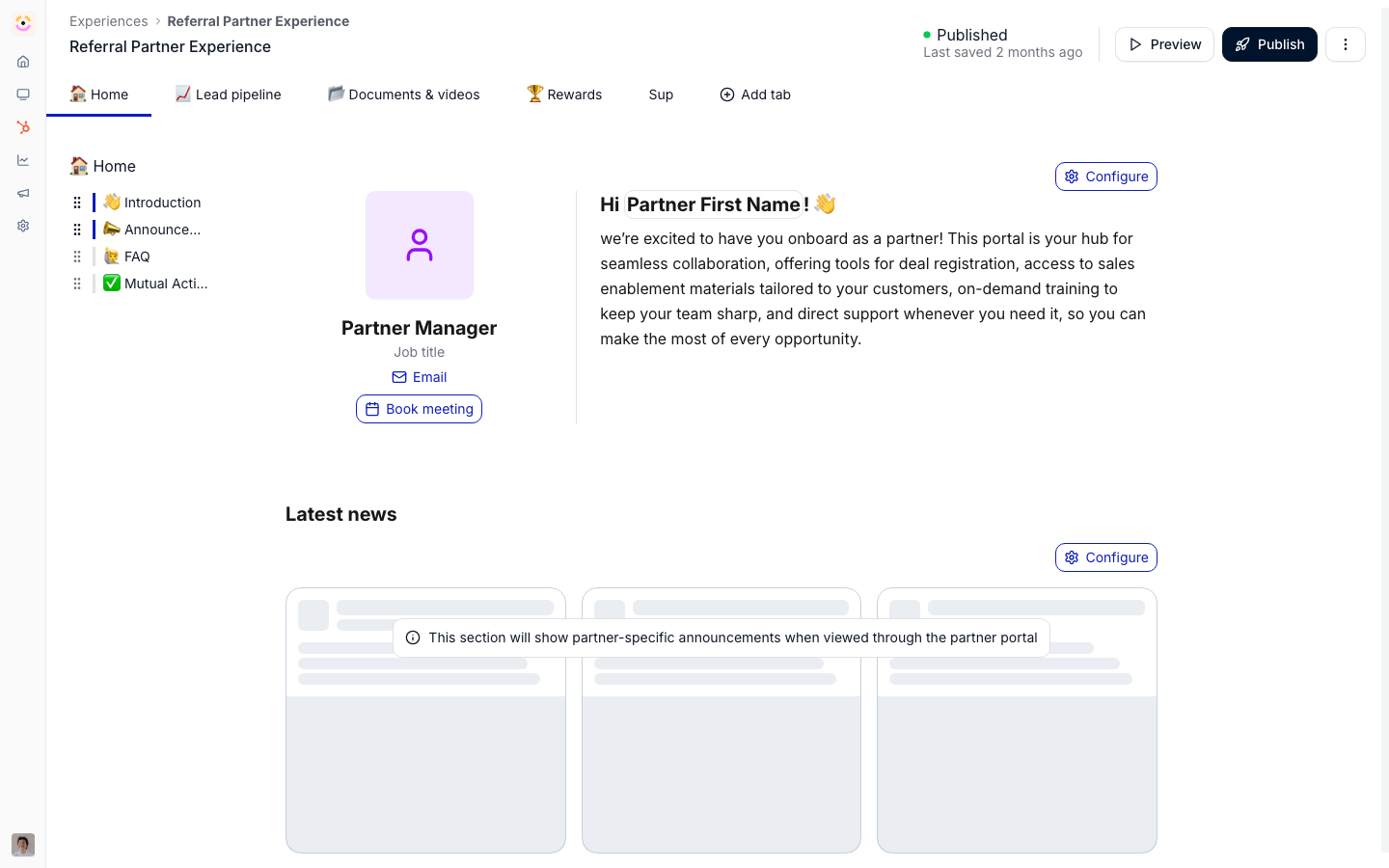
Before you start
How it works
An experience is built from stages and sections. Stages are the tabs partners see across the top of the portal, and sections are the content blocks within a stage. You add sections from a picker that includes rich text, documents, CRM views, forms, and other blocks, and arrange them visually. The experience is the master layout; when you assign it to a partner, they get a partner portal based on it. You can save a section as a synced section to reuse it across experiences, keeping shared content in one place. When you change an experience, you publish it to push the update to the partner portals linked to it, and you can preview the experience to see exactly what partners will see first.Designing experiences partners actually use
A published portal only drives the program if partners return and act. A few principles help:- Lead with the next action. Put the most important action, like registering a deal or finishing onboarding, at the top of the home tab with a clear call to action.
- Keep each tab focused. Show only what a partner needs and tailor tabs by segment rather than crowding one page.
- Make it personal. Add a partner profile section and tier status so the portal reflects the individual partner.
- Keep it fresh. Use announcements so there is a reason to come back.
Settings & configuration
Experiences are built in the experience builder at Experiences; reusable sections live under synced sections.Stages (tabs)
Stages are the portal’s tabs, and they are the portal’s whole navigation. Add, at the end of the tab bar, opens one dialog with a Type picker:
A group is always top level and holds tabs and URL tabs, never another group. Add to a group from its
dropdown or its … menu, or move an existing tab in with Move to group or by dragging it onto
the group. While a partner is on a tab inside a group, the group reads Group / Tab. Partners never
see a group with nothing visible in it. A URL tab’s link is checked before it can be added or saved; a
bare domain gets
https://, and a path starting with / stays inside your portal.
Drag an item along the bar to reorder it; its … menu carries the rest.
At least one tab must stay visible to everyone with portal access, so Introw blocks hiding, restricting or
moving the last one. Hiding and restricting are different tools: hiding takes a tab from everyone,
restricting takes it from everyone outside the chosen segments. See
Design the portal’s tabs and navigation.
Sections and blocks
Sections hold the content within a stage. Add them from the section picker and drag to reorder. The picker opens on Overview, which shows a few suggested blocks and then the group grid; search from there reaches every block in every group.
Which CRM blocks appear depends on your CRM: order pipelines are HubSpot only. Reach for smart sections
first, because
a portal built from them stays current with no editing. See
Every section you can add to a portal for
what each block shows a partner.
Section appearance
Every section has its own appearance menu, next to the section’s other actions.
Text inside a section that has its own color switches between light and dark by itself, so a light section on a dark portal keeps dark text and a dark section keeps white text. Links in it no longer get a dark hover pill on a dark section.
Dynamic variables
Type{ anywhere you write content and Introw inserts a dynamic variable: a placeholder that
resolves to that partner’s own data when the page renders. One experience therefore reads as if it
were written for each partner, with no per-partner copy.
The { menu offers:
CRM-sourced entries carry your CRM’s logo in the menu and Introw-sourced entries carry Introw’s, so you
can see where a value comes from before you insert it. Values resolve per partner at render time and
follow the CRM record, so updating the field in HubSpot or Salesforce updates every page it appears on.
Variables work in the same way in the experience builder, in announcements, in form content
and the post-submission screen, and in course content - one syntax across every surface where
you write.
Two related surfaces do the same job without a variable: the Partner profile section renders a
chosen set of partner-record properties as a block (with per-property label overrides and optional
inline editing by the partner), and the Tiers block renders the partner’s tier and the ladder above
it.
Variables resolve values, not links. A variable placed inside link text renders that partner’s value;
a link’s target URL is static.
Layout blocks
Beyond plain sections, the builder ships layout primitives:- Columns - two, three, or up to five columns per row, with draggable dividers to set the widths. A column takes any block, so a goals tile and a tasks tile sit side by side, or an image sits next to text.
- Collapsible content - a group of collapsible items. Items drag to reorder inside the group, and each item holds any block, an embedded form included.
- Tables, headings, lists, dividers, images, and call-to-action buttons.
Linking to a tab
A portal URL carries the open tab in astage query parameter, so a link of the form
https://your-portal-domain/?stage={tabId} opens the portal on that tab. Use it when an external tool -
a marketing email, an intranet page - has to land partners on a specific tab. A tab inside a group links
the same way; a link to a group opens its first tab, and a link to a URL tab opens the default tab. A link with no stage opens the first tab in the order of the tab bar, never a tab nested in a group. The link works when a partner has a single portal too: Introw carries stage (and the language) through to that portal instead of dropping it. Inside an experience, a
call-to-action button does the same with Go to tab, and can also open a form or an asset directly.
The call-to-action button
A Call to action button does one of four things: Go to tab, open a link, open a form, or play an asset. On Go to tab, Select section lists the sections of the tab you picked, so the button can land a partner on the training block rather than at the top of a long page; leave it on Top of the tab for the old behavior. Changing the tab clears the section, because a section belongs to the tab it lives on. The rest of the block is how it looks: the Label, the style (a solid button, an outlined one, or a plain link), the width, the alignment, and a Button color. The color is the portal’s button color until you set one, and setting one repaints only this button, with the label’s own color worked out from it so it stays readable on a dark shade. That is what lets one page carry a primary action and a quieter secondary one without touching your branding.Images inside sections
Person photos and the partner logo run through the same square avatar treatment as the company
logo, so anything wide loses its sides. Inline images keep their ratio, which is why the two
sizes above match the slots the editor and AI generation produce.
Synced sections
A synced section is a saved, reusable section. Maintain it once and insert it into any experience; updates to the synced section flow to where it is used. Synced sections are documented in full under Synced sections.Assigning and publishing
Assign an experience to a partner so they get a partner portal based on it. Publish pushes changes from the experience to the linked partner portals. Edits save themselves; publishing is separate. The header carries a state pill: green Published when everything is pushed, orange Draft when there are edits newer than the last publish, with Last saved under it. Draft does not mean “never live” - a portal a hundred partners use reads Draft the moment you change a heading. Publishing re-syncs every partner already on the experience. The publish dialog preselects them and does not let you deselect them, so the selection only decides who is added. For each tab it overwrites the content, name, type, link, group, layout, background colour, segment restrictions, hidden flag and position in every linked partner’s portal. Two consequences: a tab removed from the experience is removed from every partner’s portal along with its documents, and anything edited directly on one partner’s portal is overwritten on the next publish. Publishing also creates portals for selected partners who have none, applies the journeys and goals attached to its tabs, and generates affiliate links for any campaign block. Two ways out of the dialog. Publish without email applies everything silently, which is what an edit to a live portal wants. Writing a Personal message and choosing Publish and notify emails the selected partners, which is a launch rather than a save. The portal-limit check counts only the partners being added, so an edit to a live experience is never blocked. Preview is per partner and shows the published state. The Preview button lists the partners on this experience that already have a portal and opens the one you pick, rendered with their own data. A brand-new experience with nobody on it shows No Partners Found. Because it renders their portal, it reflects your last publish rather than the draft on screen. See Draft, published and preview.Automate it with a workflow
A workflow can move a partner between experiences. Update partner properties with the partner’s Experience does not patch a field: it publishes that experience to the partner, creating their portal if they have none and applying its content, journeys, and goals. A partner already in another experience is moved to this one, so it is a genuine move rather than an addition. Because it can create a portal, that row is subject to your plan’s portal limit, and it has no write mode for the same reason: partners who already have a portal still move, and partners without one are skipped until you free up or add portals. The usual trigger is a classification change your CRM owns, so the portal follows the CRM without a second data-entry step. See React to a CRM change on a partner.How-to guides
Troubleshooting
A partner cannot be invited
A partner cannot be invited
They do not have an experience assigned yet.
A change did not reach partners
A change did not reach partners
The experience was edited but not published.
A tab is missing for some partners
A tab is missing for some partners
It is hidden in the shared view or restricted to segments they are not in, or it sits in a group that is.
A tab group does not show in the portal
A tab group does not show in the portal
Partners only see a group when at least one tab inside it is visible to them. Add a tab to it, or check the restrictions on the tabs inside.
Add URL stays greyed out
Add URL stays greyed out
The link is not one Introw can open, such as a domain with a space in it or with no dot. Enter a full link, like https://example.com.