

What you’ll achieve
Introw Course Enrollments and Certificates on the HubSpot records you choose (companies, contacts, deals, or custom objects), kept current from Introw, so training and certification status is visible right where your team works.What each app object carries
Because they are real objects, HubSpot treats them like any other: filter on them, build list views and reports on certification coverage, and enroll workflows on them. Introw owns the records, so nobody creates or edits them by hand in HubSpot; status, progress, and expiry are calculated and stay accurate on their own.
Before you start
1
Install or reconnect the Introw app in HubSpot
The Introw app must be installed in HubSpot. Installations created before January 1, 2026 must be reconnected once, so HubSpot grants the extra scopes these cards need. New installations already include them. See Connect HubSpot.
2
Have HubSpot permission to customize records
Adding or replacing cards on a record layout requires permission to edit HubSpot record views.
3
Enroll partners and issue certificates in Introw
The cards show real data once partners are enrolled and certificates issued. See Manually enroll partners and Create a certificate.
Steps
1
Confirm the Introw connection in Introw
Go to Integrations and confirm HubSpot is connected. If your app was installed before January 1, 2026, reconnect it here so the course and certificate cards have the scopes they need. This is the only step inside Introw; the rest happens in HubSpot.
2
Open record customization in HubSpot
In HubSpot, go to Settings, open Objects, and select the object you want to show progress on (for example Companies). Open Record customization and select the view you want to edit.
3
Add the Introw course cards
In the layout editor, select Add card, choose the Introw Course Enrollments and/or Introw Certificates cards, place them in the middle panel or right sidebar, and save. Repeat for each object and view where you want the cards, such as companies, contacts, and deals.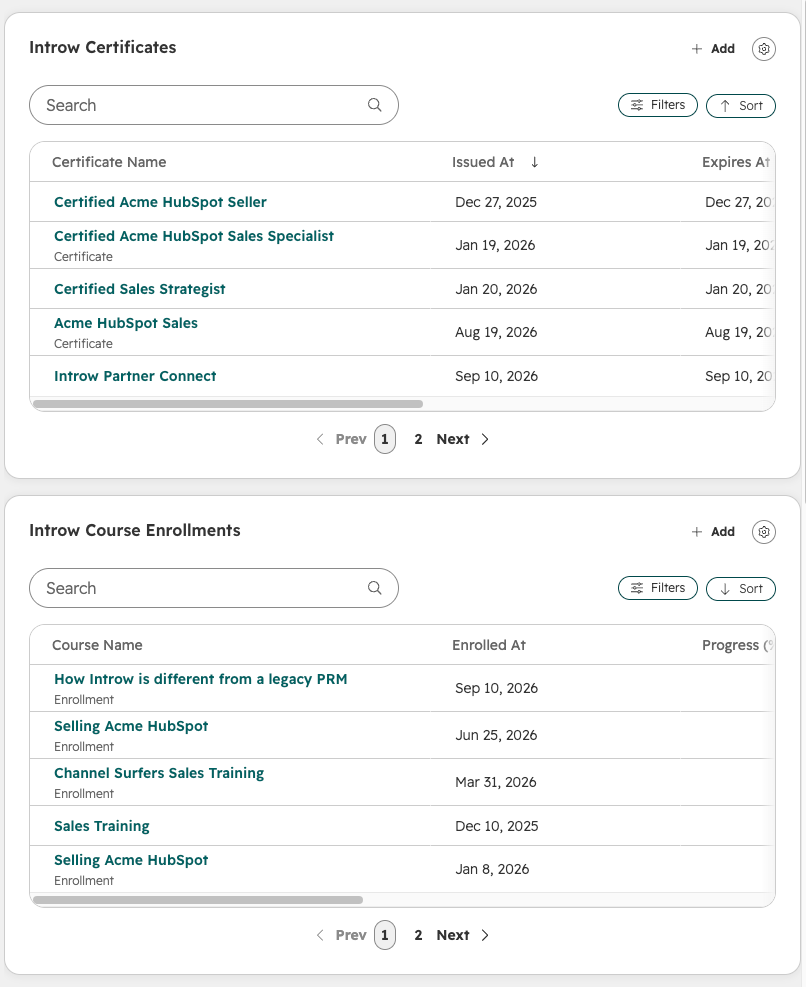
4
Use them beyond the record page
Because these are app objects rather than a display widget, the data is also available everywhere HubSpot uses objects. Build a list view of contacts holding an expired certificate, report on certification coverage per partner account, or enroll a workflow when an enrollment reaches completed.
Verify it worked
Open a HubSpot record for a partner who has enrollments or certificates in Introw. The Introw Course Enrollments card lists their courses and completion status, and the Introw Certificates card shows earned certificates, both matching what you see in Introw. At the company level you see aggregate learning activity; at the contact level you see per-person detail. Open one of the records itself and you get a full HubSpot record page with every property on it. Newly issued certificates and fresh course progress take up to 15 minutes to appear, since both objects are synced on a rolling schedule rather than per event.Related
Show course progress in Salesforce
The same visibility on Salesforce Account and Contact records.
Manually enroll partners
Get partners into courses so the cards have data.
Connect HubSpot
Install or reconnect the Introw app.
Embed Introw in HubSpot
The app cards that put partner collaboration on the record.
Report engagement with app events
Partner activity on the HubSpot timeline, counted in your reports.