

What you’ll achieve
Partner engagement as numbers on the dashboard your team already reviews: visits per partner, submissions per form, views per asset, sourced from the same system as your direct reporting.The app events you can report on
Six events, each written twice: once against the partner’s contact and once against their company, so you can work at either grain.
Those carried values are the event’s properties, and they are what HubSpot lets you filter and group on.
Each card also shows a detail block - every submitted field on Form submitted, the before and after values on Object update and Deal closed won.
Read that on the timeline, but treat it as display data: HubSpot does not expose it to filters, lists, or reports.
Five of the six are partner-initiated by design.
Your own team working a record in HubSpot writes no event, because that activity is already in HubSpot.
Form submitted is the exception: it fires for any submission, including one your team files on a partner’s behalf, and lands on the submitter’s contact plus the partner’s company.
Repeat activity is grouped rather than counted per click: one portal visit per partner contact per portal in a four-hour window, one event for a view and a download of the same asset inside 30 minutes, one event for several field changes on the same record inside 30 minutes.
Previewing a portal as a partner writes nothing at all, so your own testing stays out of both the timeline and the numbers.
Two consequences for your numbers.
Counts are actions, not clicks, because of the grouping above - Portal visit answers “how many times did this partner come back”, not “how many pages did they open”.
And because five of the six are partner-initiated, an engagement report is genuinely partner activity, never your own team’s work on the record.
Before you start
1
Connect HubSpot with current scopes
Go to Integrations and confirm HubSpot shows as Connected.
If the tile shows Update available, or the header shows Install update, run it and re-authorize so the app holds the scopes it needs to write timeline events.
See Connect HubSpot as your source of truth.
2
Check your HubSpot subscription
Event enrollment triggers and the custom report builder both need a Professional or Enterprise subscription, on any hub.
Below those tiers the events still land on the timeline for people to read; they just cannot drive a workflow or a custom report.
3
Expect nothing to switch on in Introw
App events are governed by the HubSpot app being installed, not by an Introw setting.
There is no toggle and nothing to configure per event: let a partner act once, and the first events appear.
Steps
1
Confirm the activity lands on the timeline
In HubSpot, open a partner company or contact and read the record timeline.
The Introw events appear there as activity, each card carrying its detail block: the submitted fields, the asset name, the before and after values.
If a card is missing, the event had nothing to attach to - see when an event does not appear.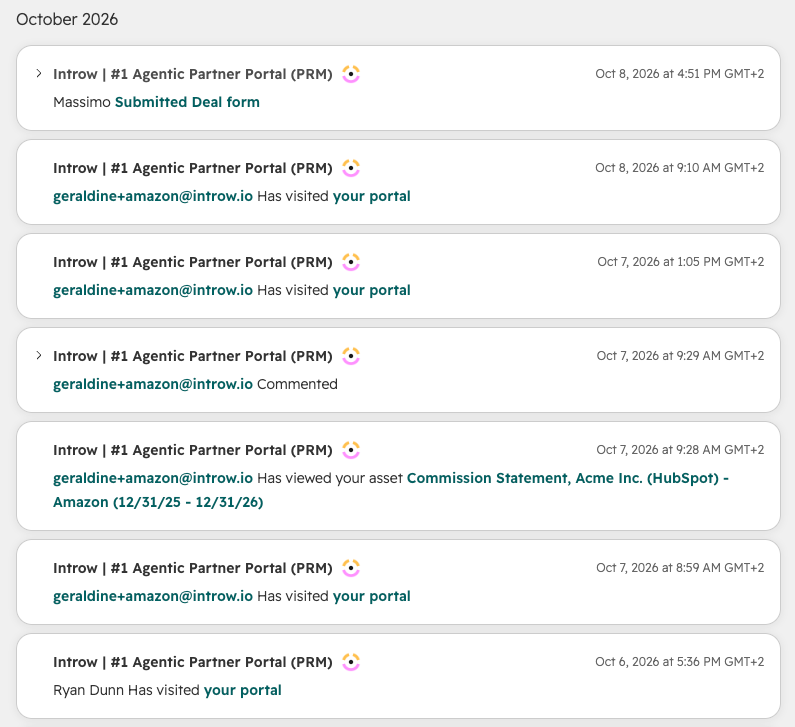
2
Build the reports
In HubSpot, go to Reports > Reports > Create custom report and pick Create report on your own.
Add App Events as a data source: it sits under Other, next to the Introw app objects for certificates and course enrollments.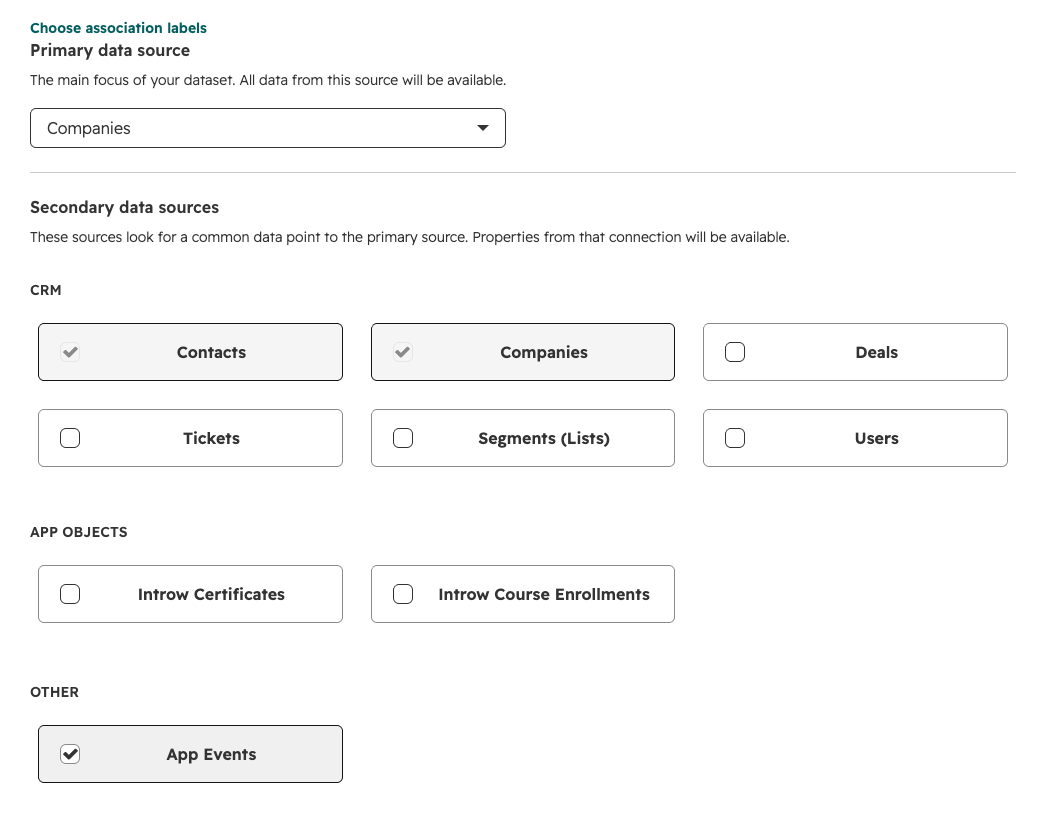 Then report on the events the way you report on any other activity.
Three that earn their place:
Then report on the events the way you report on any other activity.
Three that earn their place: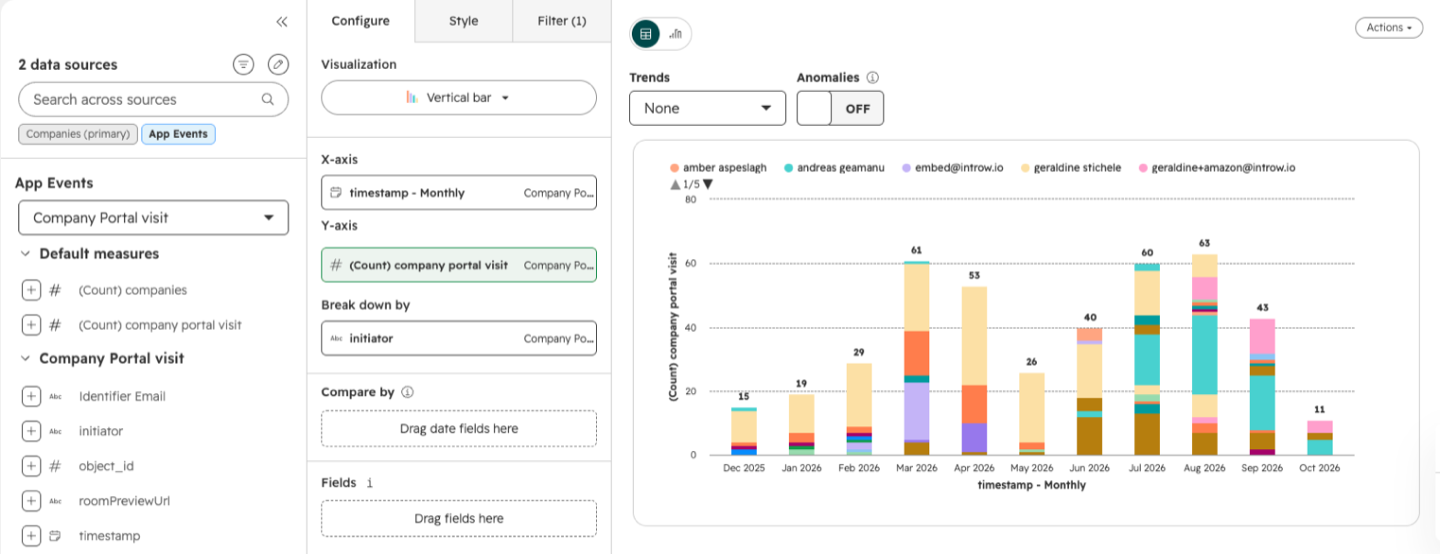
- Portal visits per partner over time - the accounts going quiet, before the renewal call.
- Form submissions by form - registration volume as a number rather than a feeling.
- Asset views by asset - the content partners actually open.
3
Put partner activity next to direct activity
Add those reports to the dashboard your team already reviews.
That is the point of pushing the events into HubSpot rather than keeping them in Introw: partner engagement and Deal closed won sit in the same view as direct pipeline, from one system, with no export step.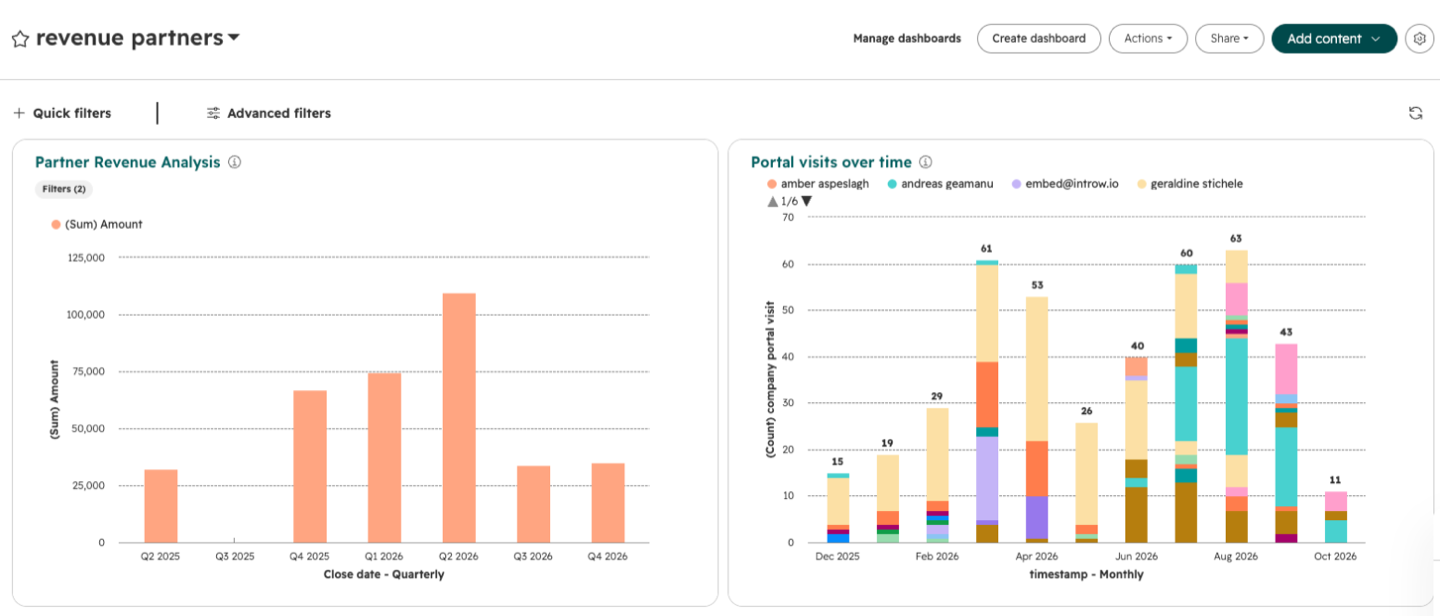
4
Segment and score on the same events
The events also drive dynamic lists (partner contacts with no portal visit in 90 days) and lead scoring, so engagement raises or lowers a score without anyone maintaining it.
The same events are available in datasets and customer journey analytics, and they show in HubSpot’s custom events dashboard next to your own custom events.
5
Report on the rest of the program in Introw
HubSpot sees the activity, not the program.
Tier progress, goal attainment, commissions, and course completion live in partner analytics, and the metrics you want on the CRM record - last activity, tier, partnership manager - are pushed there as partner properties instead.
When an event does not appear
- The contact is not in HubSpot. Introw matches the event to the contact by the email that acted, and to the company by the partner’s linked HubSpot company, falling back to the partner’s domain.
- The app is out of date. If the Integrations tile shows Update available, re-authorize: the app needs current scopes to write timeline events.
- The activity was yours, not the partner’s. Five of the six events only fire for partner-initiated activity.
- It was a preview. Previewing a portal as a partner writes nothing.
- You are on Salesforce. App events are a HubSpot surface; partner engagement reporting there stays in partner analytics.
Verify it worked
Have a partner open their portal and submit a form. The linked HubSpot contact and company show both events on the timeline within seconds, and a custom report on Form submitted counts the submission the next time it runs.Related
Trigger HubSpot workflows from partner engagement
The same events, automated: enroll a workflow the moment a partner acts.
Partner analytics
Program reporting inside Introw: tiers, goals, commissions, engagement.
Show course progress in HubSpot
The app objects that track certifications inside HubSpot.
Embed Introw in HubSpot
The app cards that put partner collaboration on the record itself.
Read a partner's analytics
Engagement per partner, inside Introw.
Implementation reference
Full configuration options.