

Every step between a partner’s intent and the data landing in your CRM costs you submissions. Build the form once, then let partners submit through whichever entry point fits how they work: a link, an embed, email, Slack, Teams, an AI assistant, a bulk CSV, or a call from their own systems. Every channel feeds the same form and the same CRM automation, so the submission always lands attributed and clean.You build one form, with its CRM automation, attribution, and duplicate checks, and then expose it through as many channels as you like. This guide covers each one. Pick the channels where your partners already are; you don’t need all of them. Deal registration, lead sharing, and MDF have their own channel guides that reuse these same routes for those specific motions.
What you’ll achieve
The same form reachable through every channel your partners use, so participation no longer depends on a portal login. Each submission, wherever it started, runs through the form’s automation and lands attributed to the right partner in your CRM.Before you start
1
Confirm batch upload is on your plan
Batch upload is a plan feature. If the option is missing from the share dialog, it is not on your plan yet - check what yours includes at introw.io/pricing.
2
Build the form
A published form with its CRM automation, attribution, and duplicate checks should already exist, and every channel below feeds it. Build it in Build and publish a form and map it in Connect a form to your CRM.
Choose a channel
The lowest-friction way to submit is a link the partner opens and fills in anywhere. A partner-specific link attributes every submission to that partner automatically, so credit is never in question; a general link is open to anyone and arrives unattributed. Prefer the partner link whenever you send the form to a known partner.
1
Open the form's share dialog
In Forms, open your form and choose Share form.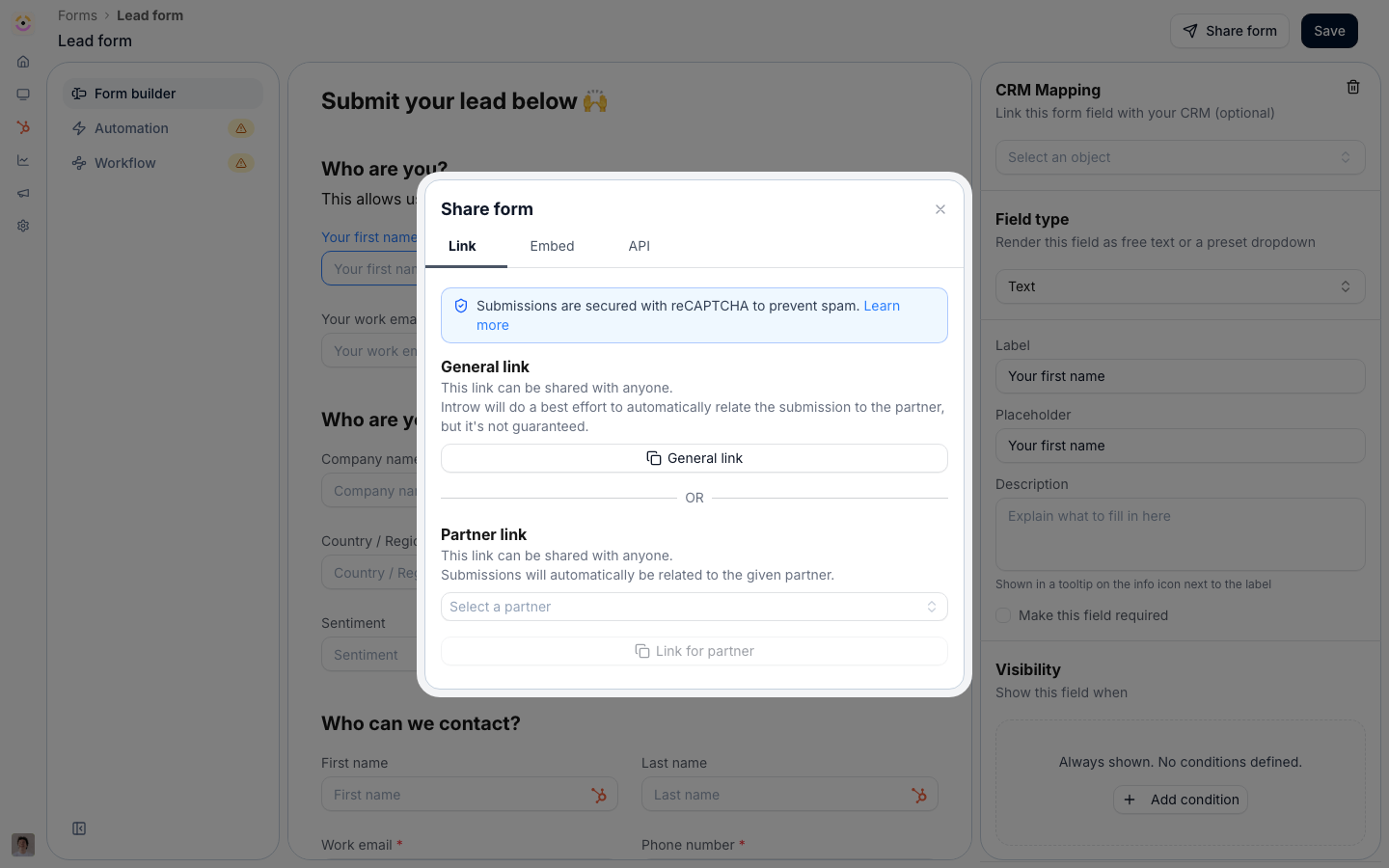
2
Copy the right link
On the Link area, copy the General link to share with anyone, or the Partner link to attribute every submission to a specific partner.
3
Send it to partners
Drop the link into an email, a portal message, or a Slack channel - anywhere your partners already are.
Embed on your site
Embed on your site
Some partners and prospects arrive on your own pages. Embedding the form there captures submissions in context, with your branding. Where the page is partner-specific, use an attributed embed so each submission credits the right partner. Embedding requires a custom domain; without one, share the link instead.
1
Open the Embed tab
In the Share form dialog, switch to the Embed tab and copy the generated snippet. The embedded form resizes to fit as it grows or shrinks, including the confirmation after submit, so your page never shows a scrollbar inside the form or a gap below it. A snippet copied before this resizing arrived is a plain frame with a fixed height; copy it again to get the resizing one.
2
Paste it on your page
Add the snippet to the page where you want partners to submit, such as a partner landing page or a website footer.
Your portal login page
Your portal login page
Everyone who reaches your partner portal without an account is already at the door, so put the form on the login page itself. This is how a partner application form recruits: a visitor applies without leaving the portal, and nobody has to hand them a link first.For the whole setup, see Set up a partner application form.
1
Pick the form in Portal settings
Go to Portal settings and open the Become a partner tab, beside Login, Verification and No Access. Select the form, then set Prompt text, the question above the link, and Link text, the link itself.
2
Know who sees it
The link shows under the sign-in box, and only to a visitor with no portal access yet, so existing partners never see it. It opens the form in a dialog on the login page, prefilled with the email address they just typed.
Submit by email
Submit by email
A partner often has the details mid email thread. Letting them forward that email captures the submission, with the AI agent reading it and filling in the form so it still lands attributed and CRM-ready. The AI agent must be enabled for your program.
Submit from Slack
Submit from Slack
If your partners live in Slack, bringing the Introw agent into the channel lets them submit in the same place they already talk to your team: they give the agent the details in a message and it submits the form for them. Connect your workspace first, see Connect Slack.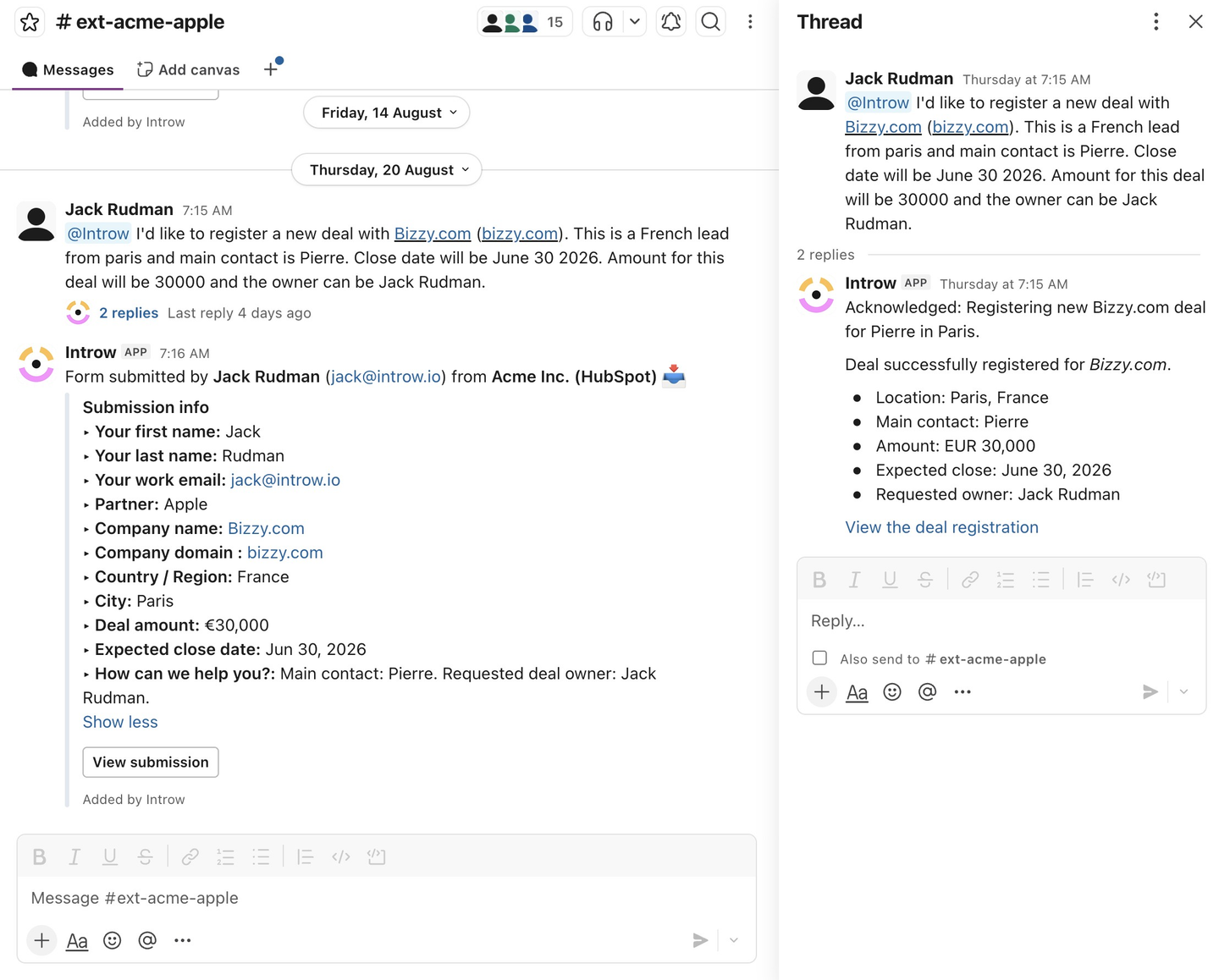
Submit from Microsoft Teams
Submit from Microsoft Teams
Same as Slack, for Teams-first partners. Connect your tenant first, see Connect Microsoft Teams.
Submit with an AI assistant (MCP)
Submit with an AI assistant (MCP)
When a partner already works in an AI assistant, the lowest-friction path is to just ask it. An assistant connected to Introw over MCP fills in the form and submits it, attributed to the partner, without switching tools. See Connect an MCP client and, for partners running their own assistant, Partner Connect.
Bulk upload a CSV
Bulk upload a CSV
When a partner has a whole list rather than a single record, a batch upload field takes up to 1000 rows from one CSV. Partners download a template that already lists your allowed values, and a preview validates every row before submission. See Bulk upload multiple records.
Submit over the API
Submit over the API
Sometimes no human should be filling in a form at all: a large partner’s own portal already holds the deal, an internal tool has the lead, a script is backfilling history, or an agent has just gathered the details. The API submits the same form directly, attributed to the partner you name, and runs the same automation and approval flow. Get the form id and field ids from the API tab of the Share form dialog. See Submit a form via the API.
Verify it worked
Use whichever channel you set up to submit a test entry, then confirm it appears in Submissions under Form submissions, attributed to the right partner, with the matching record synced to your CRM.Related
Bulk upload multiple records
Submit a whole list at once from a validated CSV.
Connect a form to your CRM
Set up the automation, attribution, and checks every channel feeds.
Submit a form via the API
Let your own systems or an agent submit the form directly.
Ways to refer a deal
The same channels, applied to the referral motion.
Connect an MCP client
Let assistants submit through Introw’s MCP server.