

Where it lives
Email Domain sits under Settings, at Portal settings.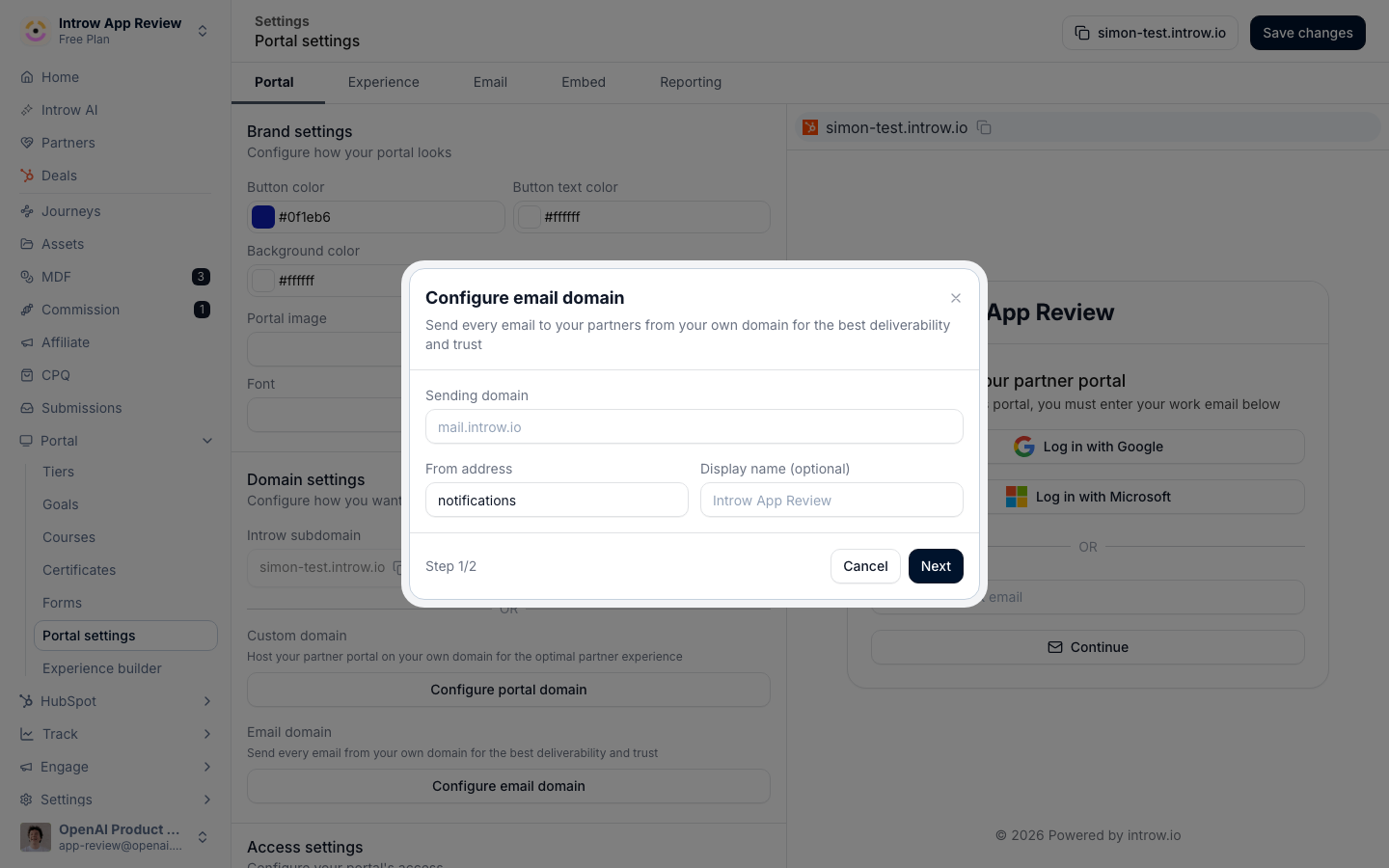
Before you start
Adding DNS records may need your IT team or whoever manages the domain, so loop them in early.
How it works
You choose a sender, a display name and a local part, on a domain you control, such as Acme Partners <[email protected]>. Introw generates the DNS records that authenticate the domain, and you add them at your DNS provider. Once those records verify, Introw sends every partner notification from your address instead of the default Introw sender. The authentication is DKIM (a TXT record that signs your mail) and a return-path (a CNAME that routes bounces and aligns the domain). Mailbox providers trust authenticated mail, which is what keeps it out of spam. There is no separate SPF record to add; the verified return-path handles alignment. Two behaviors matter in practice:- Verification is the switch. Until a domain is verified, notifications keep sending from the default Introw address, so partners are never blocked while DNS propagates. The moment verification completes, sends move to your address.
- Nothing else changes. Verifying a domain only changes the From address. Every existing notification, channel, segment, and reply-by-email setting stays exactly as configured, so there is nothing to migrate or reconfigure.
Email authentication and SPF
Three standards decide whether mailbox providers trust your mail: SPF, DKIM, and DMARC. Introw sets all three up through the two DNS records above, which is why you never add an SPF record yourself. This is by design, not a gap - here is how each one is handled.- SPF is checked against the return-path, not the From address. Mailbox providers validate SPF against the return-path domain (the address that collects bounces), not the address partners see. The return-path CNAME you add points at Introw’s sending infrastructure, which already publishes the SPF record that authorizes the servers your mail is sent from. So SPF passes automatically, with no record for you to maintain.
- The return-path aligns SPF with your domain for DMARC. Because the return-path lives on your own sending domain (a subdomain of, for example, mail.yourcompany.com), it shares an organizational domain with the From address. That shared domain is exactly what DMARC’s SPF alignment check looks for, so DMARC-aligned SPF passes as well.
- DKIM is aligned too, as a second layer. The DKIM record signs your mail on your own domain. DMARC only requires SPF or DKIM to align, so notifications still pass DMARC in the forwarding cases where SPF can break.
You never add an SPF record for Introw, and there are two places people are tempted to add one - neither works:
- On the return-path subdomain - you can’t. A DNS host that holds a CNAME cannot also hold a TXT record, and the return-path is already a CNAME. That CNAME is what carries SPF, so no TXT belongs there.
- On your root domain - it has no effect. SPF is checked against the return-path, not your root domain, so an
includefor Introw there does nothing for this mail - and it still counts against SPF’s ten-lookup limit, which can break SPF for the rest of your mail.
Settings & configuration
Email domain is configured from Portal settings, next to the portal custom domain.Sender
Sender display name is the friendly name partners see in their inbox, such as Acme Partners. Set it to the name partners recognize. Sender address is the local part and domain the mail sends from, such as [email protected]. The local part is the bit before the @ (for example, partners or notifications); the domain is the one you will authenticate. You can update the display name and sender address later without re-verifying the domain.DNS records
Introw generates the records to add at your DNS provider:- DKIM record - a TXT record that signs your outbound mail so mailbox providers can confirm it is really from you.
- Return-path record - a CNAME that routes bounce handling and aligns the sending domain.
Verification
Once the records resolve, verify the domain in Introw. When both the DKIM and return-path records check out, the domain is marked verified and partner notifications start sending from your address.Removing the domain
Remove the email domain to stop sending from it; notifications fall back to the default Introw sender.How-to guides
Troubleshooting
Verification keeps failing
Verification keeps failing
The DNS records have not propagated yet or were entered incorrectly. Confirm the DKIM and return-path records match exactly, then verify again.
Emails still come from the Introw address
Emails still come from the Introw address
The domain is not verified yet, so sends use the default sender until verification completes.
Replies are not going where expected
Replies are not going where expected
Replies route per notification; where none is set, they fall back to the default Introw address. See Configure partner notifications by email.
A DMARC report shows SPF as failing or unaligned
A DMARC report shows SPF as failing or unaligned
Your domain’s DMARC policy is likely set to strict SPF alignment. The return-path is on a subdomain, so it aligns under relaxed alignment (the DMARC default) but not strict. Aligned DKIM keeps DMARC passing either way. See the FAQ below.
Frequently asked questions
Do I need to add an SPF record for Introw?
Do I need to add an SPF record for Introw?
No. SPF is validated against the return-path domain, and the return-path record you add already resolves to Introw’s SPF-authorized infrastructure. The DKIM and return-path records are the complete setup.
A DMARC report shows SPF failing or misaligned. Is something broken?
A DMARC report shows SPF failing or misaligned. Is something broken?
Usually not. If your DMARC policy uses strict SPF alignment (
aspf=s), it flags the return-path as misaligned because it sits on a subdomain rather than the exact From domain. This does not affect delivery: aligned DKIM keeps DMARC passing. For SPF to align as well, use relaxed alignment (aspf=r), which is the DMARC default.Can I add Introw to our existing SPF record instead of the return-path record?
Can I add Introw to our existing SPF record instead of the return-path record?
No. An SPF include on your root domain applies to a domain that is not used as the return-path, so it has no effect on mail sent through Introw, and it consumes one of SPF’s ten allowed DNS lookups. Add the return-path CNAME exactly as shown instead.
Will this change SPF for our normal company email (Google Workspace, Microsoft 365)?
Will this change SPF for our normal company email (Google Workspace, Microsoft 365)?
No. Your mailbox provider sends from your root domain and still needs its own SPF record - keep it exactly as it is. Introw only adds a DKIM TXT record and a return-path CNAME on a dedicated sending subdomain, so it never touches the SPF record your mailbox relies on.
What DMARC policy should we use?
What DMARC policy should we use?
Any policy works, including
p=reject, as long as SPF alignment is relaxed (aspf=r, the default). Because Introw sets up aligned DKIM, partner notifications pass DMARC even under an enforcing policy.