

Where it lives
Announcements sits under Engage, at Announcements.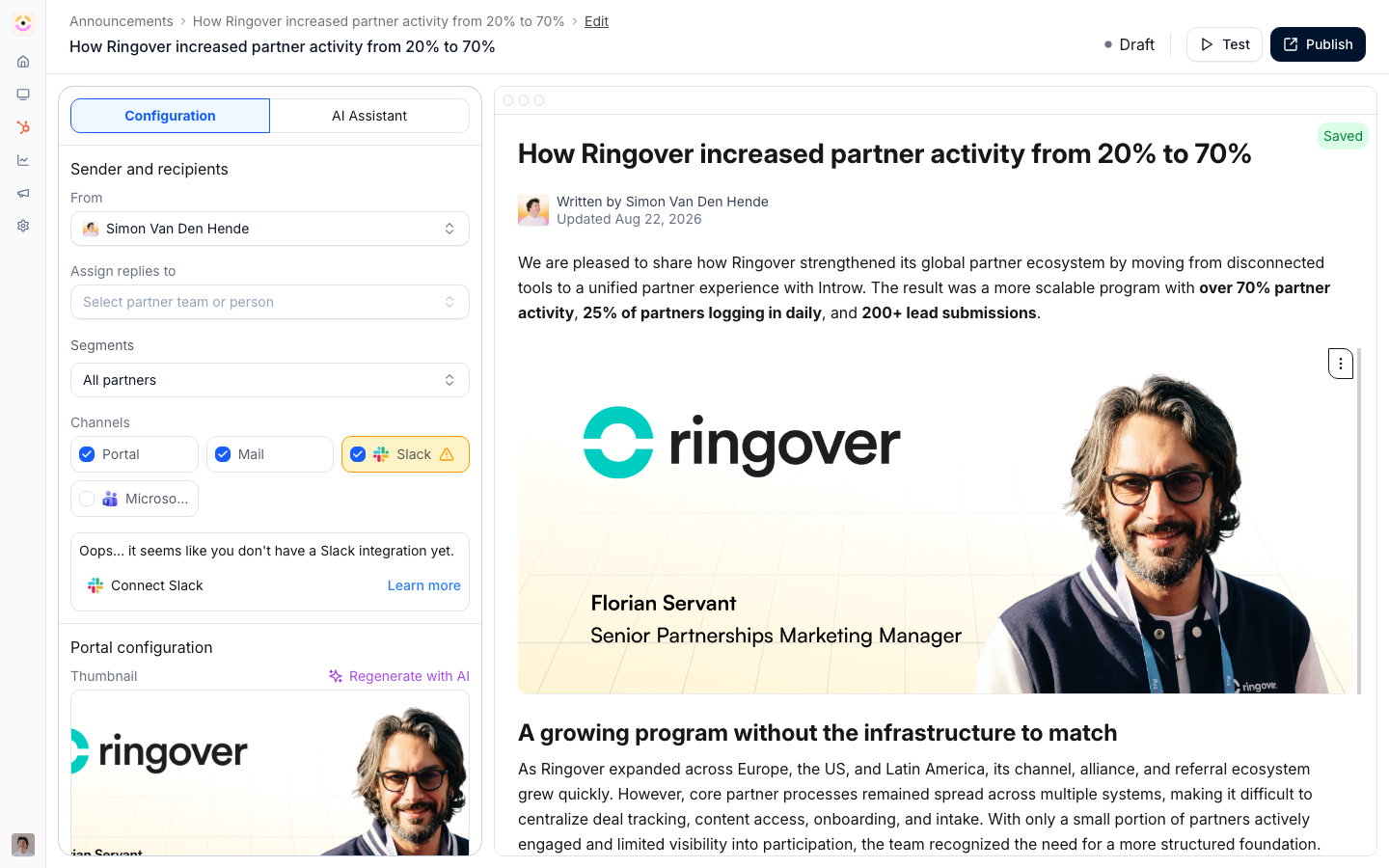
Before you start
How it works
An announcement is a message you compose, target to partner segments, and deliver across channels. You write it in a rich editor, or generate a draft with AI and refine it, choose which partner segments should receive it, and pick the delivery channels: the portal feed, email, Slack, and Microsoft Teams. A single publish fans the announcement out across every channel you enable at once - into the portal, every targeted contact’s inbox, and each targeted partner’s connected shared Slack and Teams channels. After publishing, Introw tracks delivery and engagement so you can see who saw it and nudge the rest. Introw can also suggest announcements for you: each week it reads your company’s LinkedIn page, picks the posts most relevant to partners, and drafts an announcement for each - rewritten for a partner audience. The drafts land in your Announcements list with an AI Generated badge for you to review, edit, and publish or discard; nothing is sent until you publish it. See Publish AI-suggested announcements from LinkedIn.Settings & configuration
Announcements are managed at Announcements.Composing
Write the announcement in the editor, adding formatting, links, and media. You can generate a draft with AI from a preset, Webinar, Product update, or Blog post, using a source URL or prompt, then edit it to fit your voice. You also set From, the team member the announcement comes from, Assign replies to, the user replies go to, and an optional Thumbnail under Portal configuration (shown once Portal is a selected channel). The email goes out from your own verified sending domain once you have set one up, and from the shared Introw address until then. A published announcement’s page shows that same sender on its From line, so what you read there is what partners see in their inbox. See Email domain. The thumbnail is the card artwork in the portal feed, in every view mode (grid, list, table). It is cropped to 16:9 on upload, so a landscape image around 1200×675 is a safe size, and Generate with AI produces one at that size from the announcement’s own title and body plus your brand colors (text-free by design, so nothing renders garbled). It is not rendered inside the announcement body or in the email version, so keep essential visuals in the content. AI-drafted announcements built from a source URL reuse that page’s image as the thumbnail at whatever ratio it has; the card still shows it in a 16:9 frame, filling and trimming the overflow, so replace it by hand if the crop cuts something important.What the editor holds
The announcement editor carries the same writing blocks as the rest of Introw: headings, bullet and numbered lists, tables, dividers, images, call-to-action buttons, and video embeds (YouTube, Loom, Vimeo, Vidyard, or any other provider through Embed other). Animated GIFs upload like any other image, up to 2 megapixels per frame (a frame of about 1414×1414). A larger animation, such as a screen recording made on a Retina display, is refused at upload with the frame size and the limit, so resize it or upload a still image instead. It also carries dynamic variables. Type{ and insert any property of your partner object from the
CRM, the Introw tier, partner champion or partner manager, a partner team role, or the reading contact’s
own first name, last name, email, or company. One announcement then reads per partner - see
Dynamic variables for the full list.
An existing announcement duplicates from its row in the list, which is the quickest way to run a
recurring format without rebuilding it.
Categories
An announcement can carry Categories: short labels such as Product, Events or Partner program. You set them in the editor, under the segments it targets. The picker offers every category already in use, and typing a new one creates it. Pick from the list where you can, because a different capitalisation makes a second category. A category is at most 25 characters, and one announcement holds at most 25 of them. Categories do two things. The announcements list gets a Categories column, and Add filter offers Categories with Equals, Is any of, Is none of and the known and not-known checks, so you can pull up every product update you have sent. And an announcements section in the portal can be limited to the categories it should show, so partners read a feed per topic instead of one list everything lands in. See The announcements section in the portal.Recipients
Target the announcement to specific partner segments so the right partners receive it. This keeps updates relevant rather than blasting every partner with everything. A published announcement’s page shows its reach on the To line: how many partners and how many people the targeting resolves to. Check it before you nudge, to catch a segment that is narrower or wider than you intended. Reach counts the people the email actually goes to, not everyone the targeting touches. A contact who has turned announcements off, or whose segment or organization default suppresses them, is left out of the count as well as out of the send. A person who is a contact at several partners gets one email and is counted once. The partner count still includes a partner with no one to email, because that partner still gets the announcement in their portal.Channels
Choose which channels the announcement is delivered on. Enable any combination - publishing fans it out across all of them at the same time:- Portal feed - posts to the portal of every targeted partner. Always available.
- Email - emails every contact at the targeted partners, reaching them off-portal.
- Slack - posts into each targeted partner’s connected shared Slack channel(s), when Slack is connected.
- Microsoft Teams - posts into each targeted partner’s connected Teams channel(s), when Teams is connected.
The announcements section in the portal
The Announcements section you drop into an experience has its own Configure panel, so the same announcements can read differently on two tabs:- Layout - List, Cards or Posts.
- Categories - Filter by category is off by default, so the section shows every announcement the partner may see. Turning it on ticks every category in use today plus Without a category for the ones nobody tagged, so the section changes nothing until you untick what it should leave out. A category someone creates later is not added to a filtered section on its own: tick it here when it should show. Tick nothing and the section shows nothing, which the builder warns you about.
- Configure visibility - Limit visibility caps how many announcements the section lists.
- Author and date - Show author and Show timestamp, both on by default. Turn them off where the update comes from the program rather than from a person; opening the announcement follows the same setting.
Sending a test
Test in the editor header opens Send a test announcement. Send test email to starts with your own address, and each extra address becomes a pill when you press Enter or type a semicolon, so you can paste a list such as[email protected]; [email protected]. Under Preview the test email as,
pick a partner and one of their contacts to fill the variables with that contact’s details. A test
goes only to the addresses you entered, is sent by email only, and does not count as the
announcement being published. A test always arrives: it ignores unsubscribes and email opt-outs, including those of the contact you preview as, and it carries no unsubscribe link.
Publishing and nudges
Publish to send the announcement. After it is out, you can send a nudge to remind partners who have not engaged yet.Engagement
Review delivery and engagement to see who was sent the announcement, who opened it, and who clicked, so you can follow up where it matters. Engagement is recorded per contact and per channel, so a portal-only announcement is measured the same way an emailed one is - you see which contacts opened it in the portal and which clicked through, not just email statistics.How-to guides
Troubleshooting
An announcement did not reach Slack or Teams
An announcement did not reach Slack or Teams
The integration is not connected.
The wrong partners received it
The wrong partners received it
The targeted segment was broader than intended.
Engagement looks low
Engagement looks low
Try a nudge and confirm you used multiple channels.
FAQ
Do we still need our marketing automation tool for partners?
Do we still need our marketing automation tool for partners?
For partner-program communication, no. Announcements broadcast to the segments you target across portal, email, Slack and Teams; notifications send the event-driven messages on their own; and a workflow can send a written email to a segment, a team role, or the contact a trigger was about, with delays and conditions between steps, which is what a partner onboarding sequence needs. Keep your marketing platform for what it is built for: campaigns to audiences that are not partner records, landing pages, and lead capture. The line to hold is that partner communication should run off partner data, and that data lives here and in your CRM.
Can we test an announcement before partners get it?
Can we test an announcement before partners get it?
Yes. Select Test in the editor to email the announcement to one or more addresses of your own, previewed as a real partner contact so the variables fill in. A test never reaches partners. A delivered announcement cannot be unsent, so check the reach on the announcement’s page before you nudge.
Can we send to one partner, or one person?
Can we send to one partner, or one person?
Yes, through targeting rather than a separate feature. A static segment can hold a single partner, and a workflow email can address the partner champion, a specific team role, or the contact its trigger was about. For a one-to-one exchange about a record, a comment on the record reaches the people on it and their reply lands back on the record.
Can partners reply, and where does the reply go?
Can partners reply, and where does the reply go?
They can reply straight from their inbox. The reply is tracked back to the record or thread it came from and shared with everyone on it, so a broadcast can turn into a conversation without the partner logging in. Set Assign replies to so the right person owns follow-up.