

Where it lives
Payouts sit under Commission, at Payouts. Each row is one batch for a pay period; the tabs filter batches into All, Upcoming, Paid and Declined, and the metric cards above them show Forecasted, Expected, Upcoming payouts, In review, Total paid and Declined commission.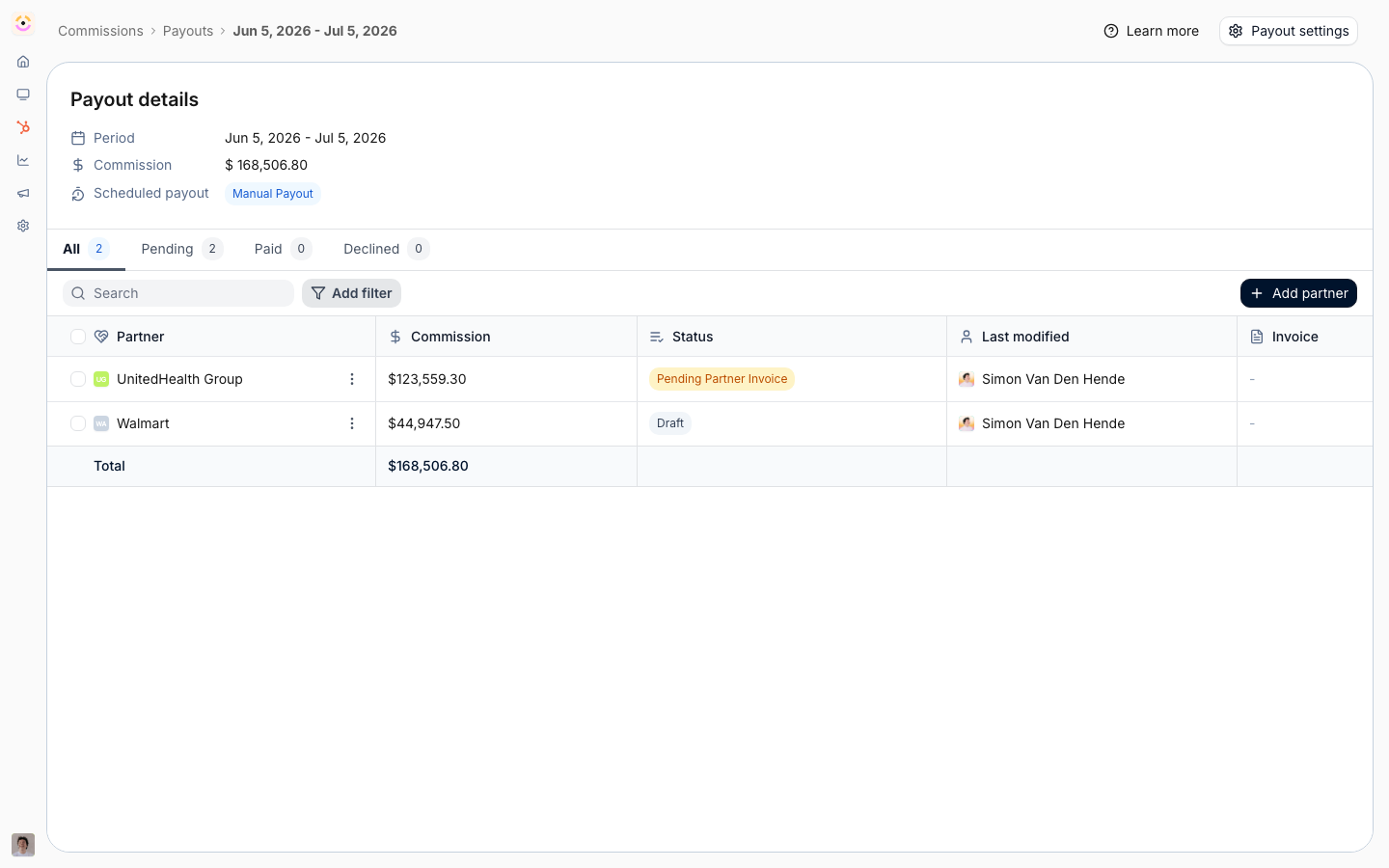
Before you start
How it works
A payout batch holds one payout per partner, and each partner’s payout holds their earned commission lines for the period. A line is earned, shown as Expected, once its record meets the plan’s conditions; it needs no separate approval to be batched. You review at the payout instead: open a partner’s payout, decline lines with a reason, postpone lines to the next cycle, or hold the whole payout. Batches are created for you when your Payout schedule is every month, every quarter or every fiscal quarter, covering the period that just closed and applying your minimum payout amount. On a manual schedule you choose Create payout, pick the period, and Introw attaches each partner’s eligible lines, including any backlog from earlier periods. Along the way you can Request partner invoice, which generates the statement and emails the partner with it attached, record PO numbers, write a Statement note that prints on the statement PDF, and mark payouts paid. Partners upload their invoice and set a PO from the portal, or reply to the statement email with the invoice attached. How a payout gets paid depends on your payout method. With Introw Pay, Pay now on the batch issues one invoice to your company and Introw Pay pays every ready partner and advances their payouts to Paid on its own. With manual invoicing, your team pays outside Introw and chooses Mark as paid, or your finance system does the same through the API.The stages a payout moves through
Worth knowing in full, because a payout that will not budge is almost always sitting in one of the later ones. A payout is visible to the partner as soon as it leaves Draft, including in Pending approval, Approved and Blocked; only Draft stays on your side.
Comments your team leaves on a payout while it is in Draft stay internal. Once the payout has left Draft, a comment is visible to the partner unless you mark it internal.
Uploading an invoice on a Draft or Pending Partner Invoice payout moves it to Pending payment automatically. A statement is generated the first time a payout reaches any paying stage, and regenerated whenever the lines, the PO number or the statement note change.
What the commission statement shows
The statement is the document the partner invoices you against, so it opens with who to bill. Your logo sits top left, under it the title and the period the payout covers, and beside it an Invoice to block carrying your commission billing info: your company, its address and its VAT number, or the registration number when you have no VAT one. The PO Number prints under it once you set one. A From block under the period names the partner: the legal name, address, country and one tax number from the business details they saved when they set up payouts, or the partner’s name alone when they saved none. A statement is regenerated once when the partner saves or edits one of these details, and the finance email is not printed. Then one row per commission line: the deal or the description on the left, the calculation in the middle, the commission on the right. A line that was earned on a deal value prints that calculation in full,EUR 4,200.00 x 10%, so the partner can check the number rather than take it. The rate is
read back out of the line’s own two figures, so a line prints what it actually paid whether it came
from a plan, a file import, a manual adjustment or the API. A fixed reward has no proportion to
show and prints its amount alone, and so does a line carrying no source revenue. Amount to be
invoiced closes the table, and your statement note prints under it.
Declined and postponed lines are left off, so the statement always adds up to what you are paying
this period.
Using your own statement instead
Upload your own on the statement’s menu, or Replace with your own once one exists, files your PDF as the payout’s statement. Introw then serves that file everywhere the generated one went, to the partner portal and the invoice request included, and stops regenerating it. Pick Use the generated statement to go back to the rendered one. Both need write access to payouts.The statement note
Free text you write per payout, printed below the commission table on the statement PDF under a Note label. Up to 2000 characters. Set it on the payout in Statement note, or through the API asmetadata on PATCH /api/v1/payouts/{id}. Partners read it on the statement; they cannot edit it.
A note that opens with its own heading, such as # Appendix, prints that heading in place of the
label. A payout without a note prints no label and no empty space.
Line breaks are kept, so remittance references, bank details or a contact address each sit on their
own line, and the note is read as Markdown: #, ## and ### headings, - bullets and 1.
numbered lists, *bold* or **bold**, and [label](https://example.com) links, which stay
clickable in the PDF.
A # heading prints at the size of the statement’s own title, and the two levels under it step down
towards body size.
There is no italic face on the statement, so one asterisk and two both print bold.
Anything that is not one of those prints exactly as you typed it.
What partners see in the Commissions section
Partners follow their payouts in the Commission section of your portal, which you add to an experience from the Smart sections in the section picker. The section opens on four totals, Forecasted, Expected, Upcoming payouts and Total paid, each of which lists the lines behind it when clicked, and a table with one row per payout. Clicking a payout opens its detail, with one row per commission item. You decide which columns both tables show and what they are called. In the experience builder, the section carries a Configure button above the table, visible to anyone who can edit experiences, and it opens a side panel with two lists:- Payouts table decides the columns partners see per payout: Amount, Owner, Period, Status, PO Number, Invoice link and Commission statement.
- Payout details decides the columns partners see per commission item when they open a payout: Commission item, Close date, Amount, Commission and Plan.
- for them, since both documents cover the whole partner. Lines with no deal behind
them, such as manual adjustments, stay visible to them. An AI assistant answering that contact reads
the same narrowed view.
When you pay with Introw Pay, add the Payout setup
section beside it, so partners can set up and check how they get paid in one place. See
Choose what partners see in the Commissions section.
Building a payout over the API
A payout can be assembled end to end without opening Introw:POST /api/v1/payouts opens one for a
partner and a period, POST /api/v1/commission-lines attaches each line to it, and
POST /api/v1/payouts/{id}/statement renders the statement PDF and returns a signed link to it.
A payout covers one partner, and the batch is the run around them, which is what the Payouts page
lists as a period. A payout created on its own opens a batch of its own, so a run that covers
several partners starts at POST /api/v1/payout-batches instead: it opens the period once and a
draft payout for every partner you name. Pass that batch id when you add a partner to a run that
already exists.
All four need the commissions:write scope. See
Feed your finance stack from Introw.
How-to guides
Troubleshooting
A partner is missing from a batch
A partner is missing from a batch
They had no earned lines for the period, or their balance was below the minimum payout amount and rolled forward.
A statement looks incomplete
A statement looks incomplete
Your commission billing info is not fully set.
A payout will not delete
A payout will not delete
Its stage prevents deletion. Decline or postpone it instead.
A payout is Blocked or Failed
A payout is Blocked or Failed
On Introw Pay, the partner’s bank rejected the payment or the invoice was only partially paid. See Introw Pay troubleshooting.