

Where it lives
Knowledge Base lives at Agent knowledge base.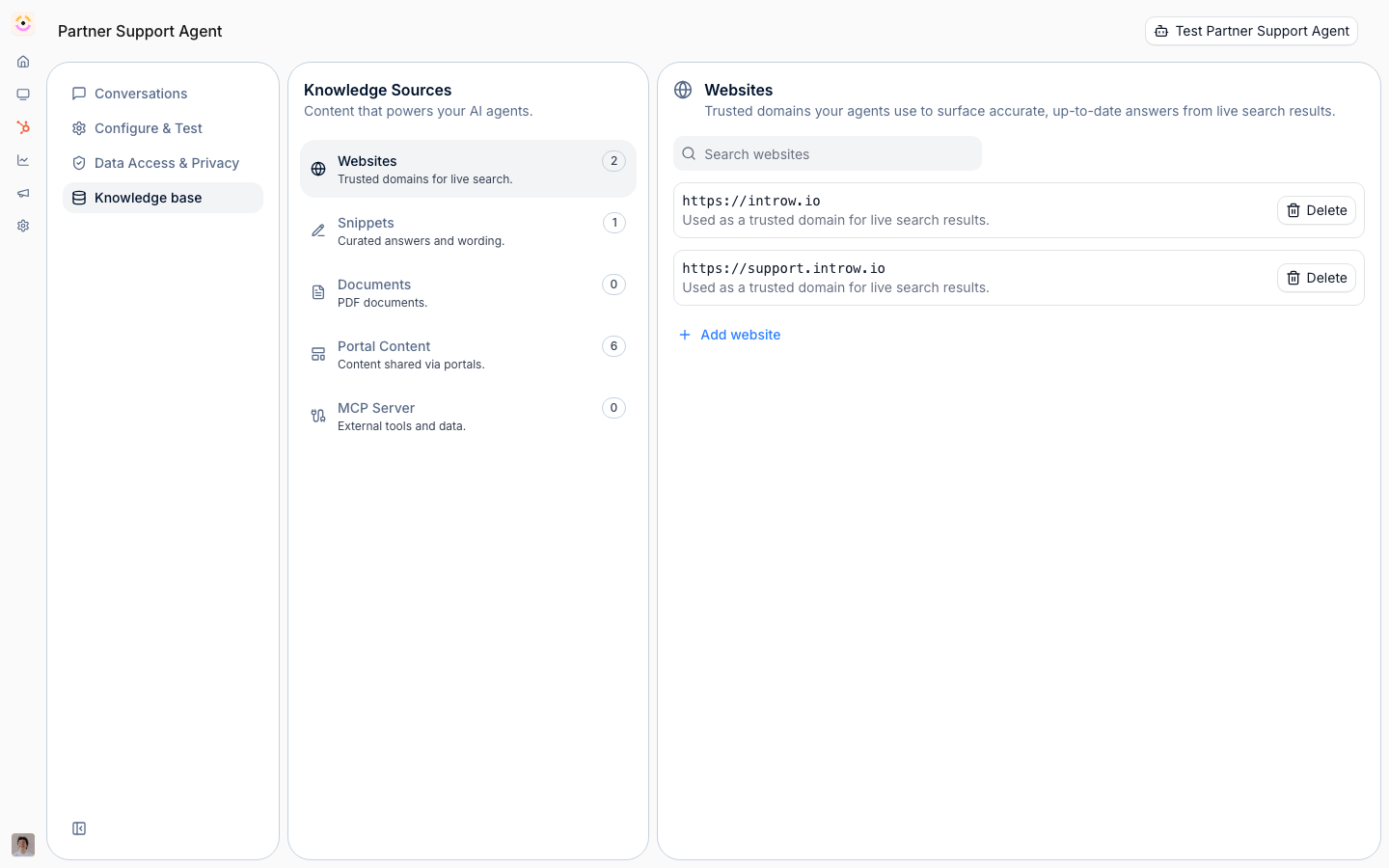
Before you start
How it works
The knowledge base lives on the agent’s Knowledge base tab. It has sections for Websites, Snippets, Documents, and an MCP Server connection, plus a read-only Portal Content summary of what the agent uses automatically. A website is stored as a trusted domain and searched live while the agent answers, so there is nothing to index and nothing to refresh; snippets are short question-and-answer pairs; documents are PDFs marked as agent knowledge. The agent retrieves the most relevant pieces when answering.How an answer is assembled
Every question runs the same path, and knowing it tells you which source to fix when an answer is wrong.- Snippets first. If the question closely matches a snippet’s question, the agent answers with that snippet’s response, translated into the language the partner wrote in, instead of composing its own answer.
- Then retrieval. Otherwise the agent searches your portal content, uploaded documents, and announcements, and at the same time runs a live search restricted to the domains on your Websites list. With no websites listed, no web results are used at all: the search never falls back to the open web.
- Then ranking. The candidates are reranked for relevance and only the top ones are passed into the answer, so a source competing with better-matching content may not be used even though it is in the knowledge base.
- Then the answer. The agent answers from what it used. Websites, portal assets and course sections it used appear as sources under its reply. Uploaded documents never do.
What partners see of your sources
The agent cites its sources, and a partner can open them. A website source links to the page, a portal asset links to the asset, and a course section names the section and its course. Uploaded documents are the exception: the agent answers from them without naming them, linking them or saying “according to the document”, and they never appear under Sources. They are still org-wide agent knowledge rather than partner-scoped content, so every partner can get answers from what they say. Only upload material you are willing to have a partner read in an answer, and keep internal-only wording out of it. A document’s name is hidden, but a name or title repeated inside its text can still come through.Portal content used automatically
Beyond what you upload, the agent automatically draws on each partner’s own portal content, announcements, tiers, commission, assets, CRM objects, and goals and KPIs, without you adding it as a source. This data is always scoped to what the requesting partner can access, so a partner can only ever get answers about their own program data and the agent never leaks one partner’s information to another. Segmentation counts: an asset, tab, or form hidden from that partner is hidden from the agent too, which is also why the agent can only offer a form that is actually in that partner’s experience. The Portal Content tab simply shows which of these sources are in play; it is read-only.Shared across agents
The sources you curate here are not limited to one agent. The same knowledge base grounds the partner support agent and Introw’s other agents (for example the agents behind deal coaching, channel conflict, and content generation), so content you add once is reused everywhere an agent needs it. Each agent still applies the per-partner scoping above, so broader reuse never widens what an individual partner can see.Settings & configuration
The knowledge base is managed at Agent knowledge base.Websites
Add a website URL and Introw stores its domain as a trusted source. The path is not kept: addinghttps://acme.com/partners/program allows the whole acme.com domain. The agent searches those
domains live at answer time, so new and edited pages are available immediately and there is no
index to rebuild.
Snippets
Write a snippet as the question a partner asks (up to 125 characters) and the answer you want given. On a close match, that response becomes the answer, so keep it complete on its own and keep one snippet per question. Snippets are also the fastest correction: add one the moment you see a bad answer, rather than waiting for the knowledge base to catch up.Documents
Upload a PDF as agent knowledge, for program material that is not on a website you connected. Skip what is already in the asset hub: the agent reads each partner’s own assets automatically, so re-uploading them here only duplicates them. Documents are available to every partner, who get answers from them without seeing the document named or linked, so treat their content as publishable. The agent reads the PDF’s text layer. PDFs saved by current tools are read in full; a scanned PDF with no text layer gives the agent nothing to read, so run it through OCR before you upload it.Portal content
The agent automatically uses portal-scoped data such as tiers, commissions, and assets; this section explains that and is read-only.MCP server
Connect an MCP server to give the agent live tool access. This requires the MCP connection module.How-to guides
Troubleshooting
A website's content is missing
A website's content is missing
The page is not publicly reachable, or its domain is not on the Websites list. Only the domain
is stored, so check the domain rather than the exact URL you added.
The agent ignores a document
The agent ignores a document
Confirm the PDF is marked as agent knowledge, that it has a text layer (a scanned PDF has nothing
for the agent to read), and that better-matching content is not outranking it. Asking about a phrase
that only appears in that document is the quickest way to tell these apart.
The agent answers from a document partners should not see
The agent answers from a document partners should not see
Uploaded documents are agent knowledge for the whole organisation. The agent does not name or link
them, but it does answer from them. Delete it, restrict the asset, or move the content into a snippet.
A snippet is not used
A snippet is not used
The partner phrased the question differently from the snippet’s question, or another snippet
covers the same question. Rewrite the question the way partners ask it, and keep one snippet per
question.
MCP cannot be connected
MCP cannot be connected
The MCP connection module is not enabled on your plan.