

Where it lives
This one lives on the partner’s side, at Integrations in their own Partner Connect account, not in your Introw.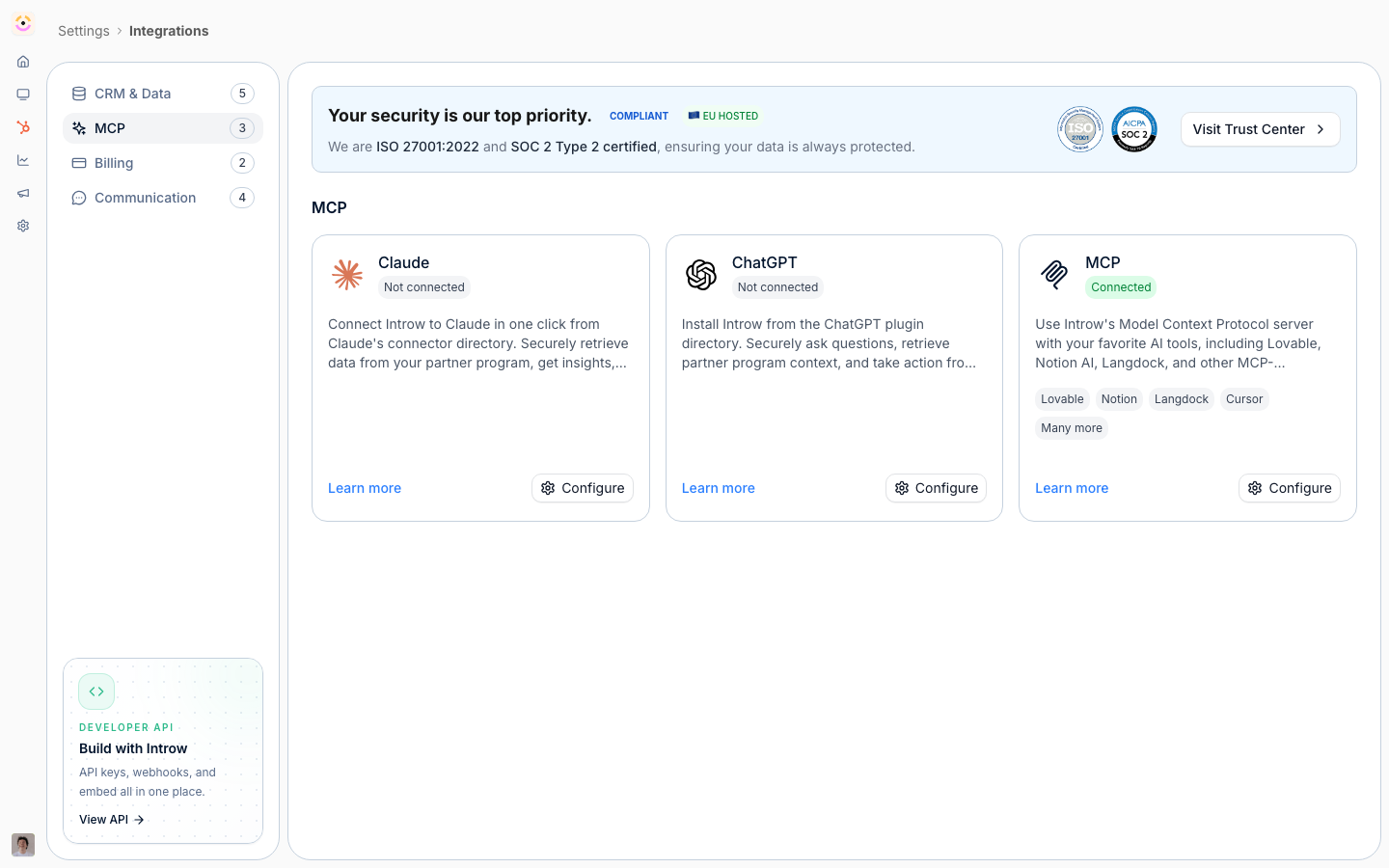
This is a partner-side screen, so it lives in the partner app at partners.introw.io, not in your own Introw at app.introw.io. The partner signs in to their own account there and connects the assistant from Settings, Integrations, MCP. See Get started as a partner for the whole front door.
Before you start
A partner account is free and takes a minute with Google, Microsoft, or an emailed code.
That is the whole list. The partner connector needs no vendor toggle and no module on your plan, and it is not restricted to admins on the partner side, so any of a partner’s users can connect. (The separate vendor-side MCP server, which your own team and agents use, is also included on every plan. Do not confuse the two: they expose different data.)
How it works
Partner AI is the partner-side experience of Introw’s MCP server. The partner connects their own MCP client - Claude, ChatGPT, Cursor, or another assistant - to Introw over OAuth, and from then on reaches the tools you expose (deal registration, coaching, enablement, support) from that assistant. Everything is scoped by the vendor-configured capability matrix and writes back to the CRM. The canonical MCP setup and tool reference live in the Developer domain; this page frames the partner-side path and links there.- Connect an assistant: Connect an MCP client, Connect Claude, Connect ChatGPT.
- Give partners their own assistant: Give partners their own AI assistant.
- What the assistant can answer and do: MCP and Partner Support.
Settings & configuration
The partner connects their assistant from Settings, Integrations, MCP in their own Introw account at partners.introw.io. What the assistant can see and do is governed by the vendor’s capability matrix and the partner’s permissions, and is not configured on the partner side. MCP connection lives on the partner’s Integrations screen and is where the partner authorizes their assistant over OAuth. Access is scoped to the partner’s permissions, so the assistant can only reach what the vendor exposes.Who connects, and with which account
The two questions partners ask most, answered:- Any of their users can connect, individually. Connecting is per person, not per partner organization, so ten reps at one partner each hold their own connection and each reaches only what their own portal access allows.
- The AI account does not matter. Authorization is an Introw OAuth sign-in, not an API key from the assistant, so a personal Claude or ChatGPT account grants no more than a company-managed one. Access derives from the Introw identity that signed in, and is revoked the moment that contact is deactivated.
- Every action is attributed. Tool calls are recorded against the partner user who authorized the connection and run through the same permission rules as the portal, so registrations and updates made from an assistant carry a full audit trail rather than landing as anonymous automation.
- What partners should decide internally: whichever assistant account they authorize, the responses land in that account’s history. That is a policy call for the partner, not something Introw enforces, and it is the one thing worth raising with a security-conscious partner.
Once connected, try
With the assistant connected, everything the vendor exposes is one sentence away:- Register or share a deal - “Register this deal with the vendor and attach my notes,” or “Share this lead with the vendor.”
- Check what you’ll earn - “What commission is pending for me?”
- Track your standing - “What do I still need to close to reach the next tier?” or “Which certifications am I missing?”
- Stay on top of work - “What partner tasks are open for me?”
- Pull enablement and get coached - “Find the vendor’s latest battle card,” or “Coach me on this deal.”
- Self-serve support - “How do I submit an MDF request?”
How-to guides
Troubleshooting
The assistant cannot connect
The assistant cannot connect
The OAuth authorization did not complete, or the client does not support remote MCP servers.
The assistant returns nothing for a partner
The assistant returns nothing for a partner
The partner contact is not an active contact on the experience, or the capability is not exposed to them.
One rep sees less than a colleague
One rep sees less than a colleague
Correct and expected: each connection is scoped to that person’s own portal access.