

Where it lives
Commission Plans sits under Commission, at Commission plans.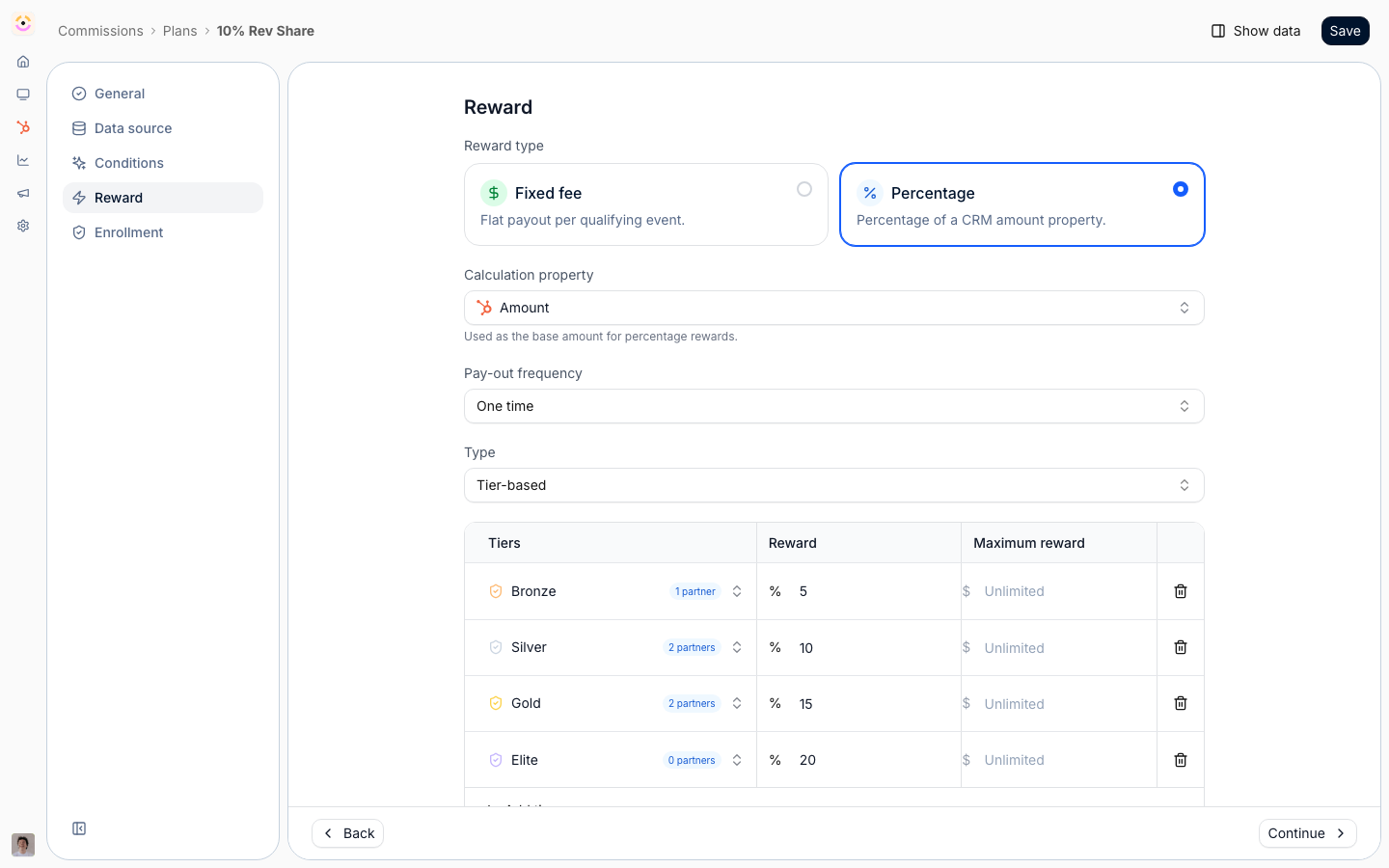
Before you start
Billing sources (Stripe, Chargebee) are connected separately, and the relevant module has to be on your plan.
How it works
Commission plans are built in a wizard with five steps: general details, data source, conditions, reward, and enrollment. The data source connects the plan to your CRM or a billing system, the conditions decide which records qualify, and the reward defines how much partners earn and how often. Once partners are enrolled, Introw calculates commission lines for qualifying records on a schedule. A plan can also read a file instead of a system. A File upload plan takes a CSV or Excel export, matches each row to a partner, and books the commission it earns, which is how revenue that never reaches your CRM still pays out on the same rules as everything else. See File upload plans. You can start from a template, such as a fixed fee, a revenue share, or a tiered commission, and adjust it. Plans can be duplicated, archived, and edited, and editing can optionally recompute pending lines.Settings & configuration
Plans are built at Commission plans; start a new one at/commission/plans/new.
General
Name the plan, describe it, and set its start and end dates.Data source
Choose where the plan reads from: your CRM, a billing system, or File upload. For a CRM source you pick the object type and the amount and date properties; for billing you connect the relevant integration; for a file you map the columns of a sample once and then import files against it. See File upload plans.Conditions
Set the conditions a record must meet to qualify, using property filters, so only the right deals or records generate commission.Reward
Choose a fixed fee or a percentage, set the frequency (one-time, monthly, quarterly, or yearly), and define the rate, tiers, and any maximum cap. You can target rates by partner, segment, or tier, and set installment amounts for recurring rewards. A fixed fee is always an amount in your company currency, whatever currency the deal is in: it is not converted, and a negative fixed amount still works as a one-time recoupment.Versions and duration
A plan is a chain of versions. Editing rates or conditions creates a new version, and every commission line records the version it was priced on - so changing a plan never re-prices lines that were already generated, and a deal keeps the terms that were in force when it was registered. A version’s end date is optional. Leave it empty and the plan runs open-ended; combine that with a recurring plan and its frequency and the plan keeps generating lines for the life of the customer rather than stopping on a fixed date.Enrollment
Enroll the partners the plan applies to, individually or via filters and segments.File upload plans
File upload reads commissionable rows out of a CSV or Excel file instead of a system. It is the plan type for revenue Introw cannot see: a distributor’s monthly sell-through report, a marketplace statement, a usage export from your own billing database. A file plan has three wizard steps rather than five. Conditions is gone, because the file is the filter: the rows you upload are the rows that earn. Enrollment is gone too, because a file plan’s partners are whoever its rows match. On Data source, upload a sample file (CSV or XLSX, up to 50 MB) and build the mapping the plan keeps:- Worksheet and the header row, for a workbook with more than one sheet.
- Partner - the column that names the partner, plus Select how to match: Introw partner ID, Partner external ID, Partner name, Partner domain, or a CRM record through its record ID or one of its properties. Introw proposes a match field from the sample and shows how many of the sampled rows resolve, and to which partners, before you save anything.
- Amount, and optionally Currency, a date, a Description that lands on the commission line, and a Unique row ID.
- Unique row ID is what makes a re-upload safe. With it, a row that was already imported is skipped, and a row whose figures changed under an ID you already used is flagged rather than silently overwritten. Without it, Introw falls back to exact row deduplication on the file name and row number.
Importing a file
Imports live on their own tab, at Imports, with All imports and Needs attention and a row per file: File, Plan, Status, Rows, On hold, Commission and Uploaded at, all filterable and sortable. Uploading runs in stages you can watch and leave: the file uploads, Introw reads it against the plan’s mapping, and every row is checked. Rows land as Ready, On hold, or Conflict, and each held row says why: no partner match, an ambiguous one, no rate that applies to that partner, a date outside the plan period, a currency that cannot be converted, or an amount the ledger cannot store. Assign a partner to a held row, or skip it, one at a time or over a selection. Finishing with rows still unresolved is allowed and the button says so, and skipped rows create nothing. Finish import books the lines in the background. They are ordinary commission lines from there: pending, visible on the partner, and carried into the next payout run. Each one keeps its provenance, the file, the worksheet, the row number and the row ID, so a partner asking “where does this number come from” is one click rather than an investigation. A negative amount is a credit and reverses, so a clawback file nets against what you already booked. An import that has not created lines yet can be discarded. A completed one stays for the audit trail and for the duplicate check on the next file, and its imported rows can still be skipped: skipping voids the unpaid commission lines they created and frees their row IDs, so a corrected file can be uploaded in their place. A row whose commission is already paid cannot be skipped. To undo a whole completed file, choose Revert in the import’s row menu or header. The Revert import dialog shows the partners, lines and commission it will void. A revert voids every line the file created, with the reason “Reverted by user”, skips every open row, frees the row IDs and sets the import to Reverted, which stays listed and cannot be discarded. It is refused when any line is already in a payout, when the import has not reached Import complete, or when your role limits you to your own partners. When a later file replaced a booked row, the line belongs to the file that replaced it, so reverting the earlier file leaves it booked.How-to guides
Troubleshooting
No commission lines are appearing
No commission lines are appearing
No enrolled partners have qualifying records yet, or the conditions exclude them.
A reward is smaller than expected
A reward is smaller than expected
A maximum cap or tier targeting is limiting it.