

What you’ll build
Confidence navigating the portal’s main areas on mobile.Before you start
1
Open the portal
Log in on your phone, or open the home-screen icon if you installed it.
Steps
Which tabs you see is set by the vendor on the experience assigned to you, so your portal may carry more or fewer than another partner’s. What is the same everywhere is the layout: the desktop columns reflow into one, and the tab bar becomes the menu.1
Use the menu
Open the navigation menu to move between the tabs the vendor published - a home tab, and
whichever of deals, content, courses, funds and commissions your program includes.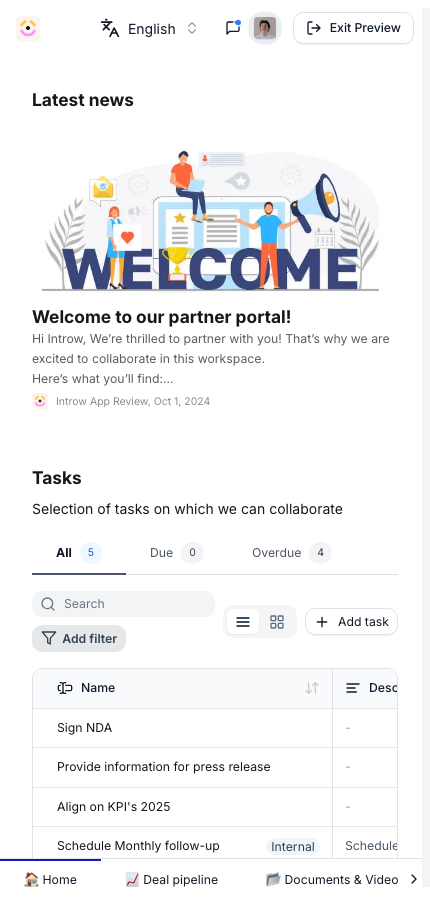
2
Work a deal
If your program shares a pipeline, the deals tab lists the deals you are on; opening one
gives you the same properties, comments and tasks as on desktop, stacked vertically.
3
Act on what is waiting
Tasks and announcements surface on the home tab, so the things needing you are reachable
without hunting through the menu.
Verify it worked
You can reach every tab the vendor published and complete an action - leaving a comment, closing a task, or submitting a form - without switching to a desktop.Related
Install on mobile
Add the portal to your home screen.
Experiences
How portal content is organized.