Partners are not always at their desk. The Introw portal works on mobile and installs to the home screen, so partners can register a deal or check earnings from their phone.

What it does

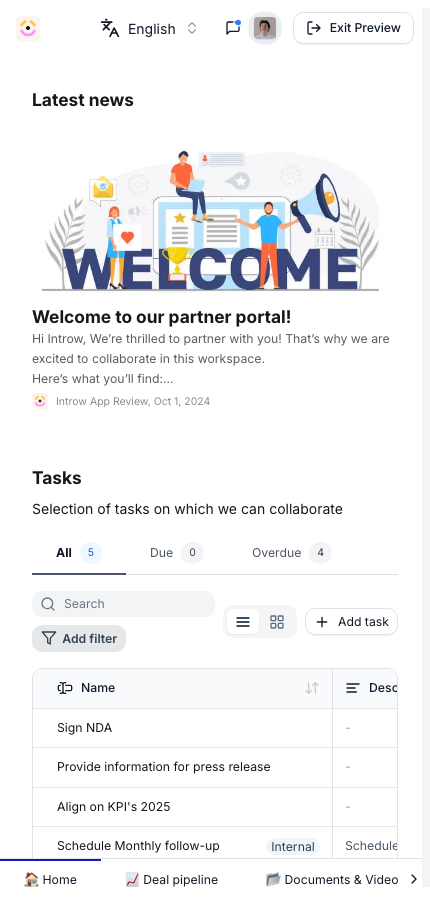
The partner portal is mobile-ready: the experiences, deals, content, and commissions partners see on desktop adapt to a phone screen. Partners can add the portal to their home screen so it opens like an app, with quick access and no app store download. That means a partner can register a deal at an event, check a commission on the road, or read an announcement between meetings. There is nothing extra to build; the same portal you configure works on mobile and installs to the home screen for partners who want it.
The problem it solves

  • Partners miss time-sensitive actions away from their desk → They register deals and respond from their phone.
  • A separate mobile app is a heavy ask → The portal installs to the home screen with no app store.
  • Engagement drops between desktop sessions → Partners check earnings and announcements on the go.
  • Field reps work on mobile first → The portal meets them on the device they already use.

From problem to solution

A partner no longer has to wait until they are back at a laptop to register a deal or check a payout. The portal they already use works on their phone and lives on their home screen, so the program stays in reach wherever they are. That keeps deals moving and partners engaged.

Use cases

Register deals on the go

Capture a deal at an event from a phone.

Check earnings anywhere

See commissions and payouts on mobile.

Stay engaged

Read announcements and content between meetings.

No app store

Install to the home screen directly.

Impact

  • Partner self-serve - partners act from their phone without help.
  • Work where you already are - the program reaches partners on the device they already use.

Who it’s for

Partner - Sales & Marketing

Registers deals and checks earnings on mobile.

Partner - Vendor/Alliance Manager

Stays on top of the relationship on the go.

Works with

Experiences

Experiences adapt to mobile.

Portal Access

Partners install after they get access.

Going deeper

How to

Setup, configuration, and all how-to guides.

API reference

Endpoints and code.