

Where it lives
AI Approvals sits under Portal, at Forms.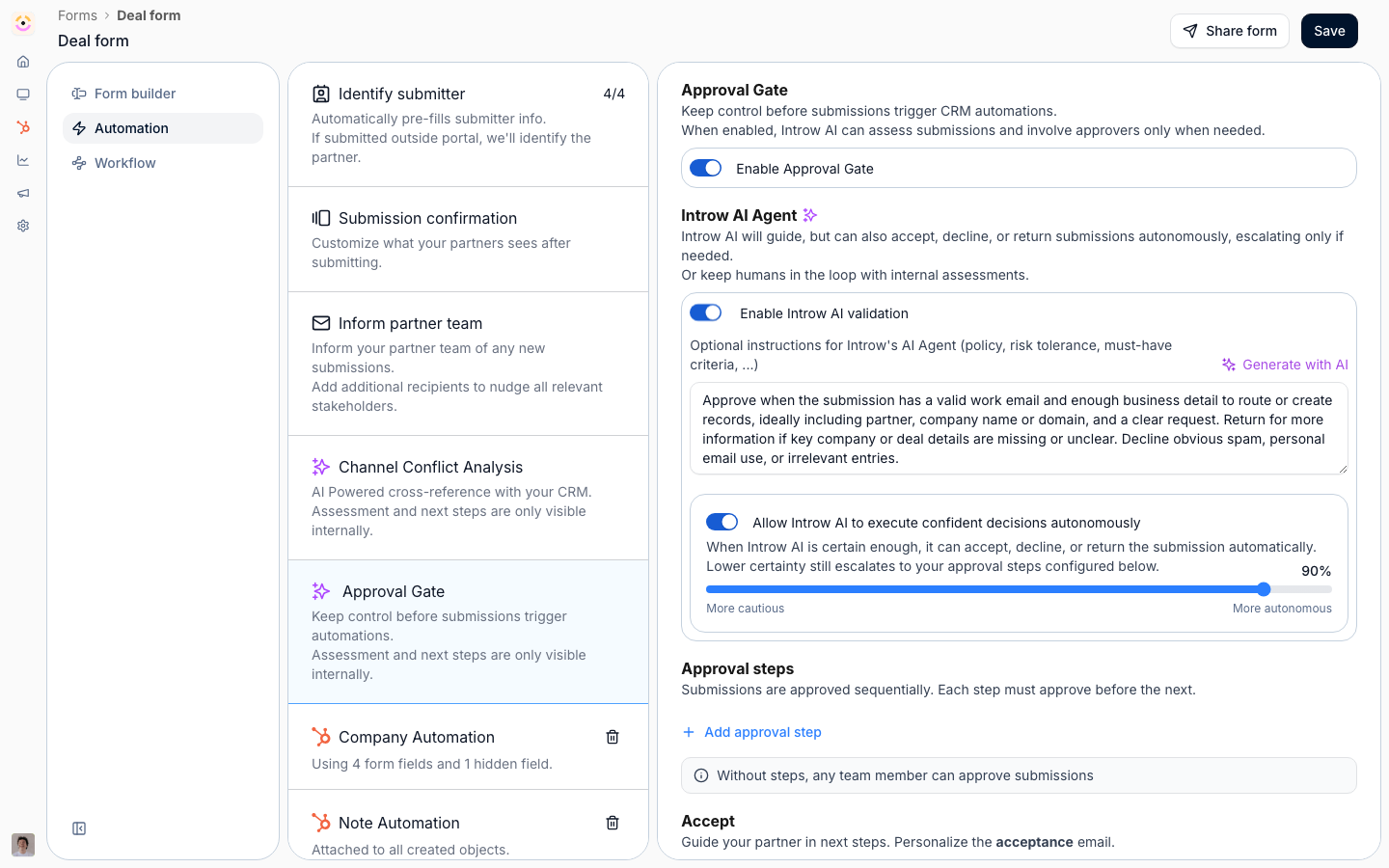
Before you start
How it works
AI Approvals is configured per form, on the Approval gate under Review. Picking AI Assisted or Autonomous AI (Agentic) puts the AI reviewer in that form’s approval workflow. You give it Guidance for Introw AI - the rules a submission has to meet, written in plain language - and Generate with AI drafts a first version from the form’s own fields, which you then edit. When a partner submits, the AI reads the submission and its attachments, checks it against your guidance, and produces a verdict with reasoning: accept, decline, or return for more information. On AI Assisted the verdict and reasoning show up for your human approvers, who make the call. On Autonomous AI one slider sets the confidence it has to clear (defaults to 90%) and the AI acts on its own at or above that bar, escalating anything below it to your acceptance steps. Because it runs on the form layer, the same reviewer covers deal registrations, MDF requests, claims, ROI, and invoices, and shared leads.How much of the review it owns
- Manual - every submission goes to your approvers, with no AI on it at all.
- AI Assisted - the AI assesses every submission and posts its verdict and reasoning; a human still accepts, declines, or returns.
- Autonomous AI (Agentic) - above the confidence you set, the AI accepts, declines, or returns on its own; below it, the submission escalates to a human. This is how a stack of routine, well-documented submissions clears without sitting in a queue.
Where it fits the approval flow
The AI reviews first, then your sequential human acceptance steps handle whatever escalates. Channel conflict screening runs alongside it as the conflict-specific check on deal registrations.Settings & configuration
Configured on the form editor’s Automation tab, on the Approval gate block.Review mode
Pick AI Assisted to keep the AI advisory while humans decide, or Autonomous AI (Agentic) to let it act on the cases it is sure about. The mode in force is shown beside Approval gate in the automation list.Guidance for Introw AI
Write the rules the AI checks each submission against - policy, risk tolerance, must-have criteria - or Generate with AI a draft from the form’s fields and edit it.Confidence
On Autonomous AI, set how confident the AI must be to act without a human (defaults to 90%). Lower it to automate more, raise it to escalate more; everything under the bar still goes to your approval steps.How-to guides
None yet.Troubleshooting
The AI isn't reviewing submissions
The AI isn't reviewing submissions
The gate is on Manual, or the form has no approval gate at all.
It escalates everything
It escalates everything
The confidence bar is too high for the guidance you wrote, or the guidance is ambiguous.
It auto-accepted something it shouldn't
It auto-accepted something it shouldn't
Tighten the guidance and raise the confidence bar; Autonomous AI follows the rules you gave it.