

Your own product
A partner-facing app or marketplace registers the deal as part of its own flow.
A partner's systems
A large partner’s PRM, portal, or CRM pushes registrations to you system to system.
Internal tooling and scripts
Backfill history, migrate from a legacy PRM, or submit from an internal ops tool.
Agents and automations
An agent that has already gathered the details files the submission itself.
Before you start
1
Have the form built in Introw
The API submits an existing form, it does not define one. Build it in Build and publish a form and map its automation in Connect a form to your CRM.
2
Know your credit allowance
Every plan includes API access with a monthly allowance of API credits. One submission spends one credit. If the allowance is spent, submissions return
402 until it resets on the first of the month.3
Create a scoped key
Create an API key with
forms:write to submit, and forms:read (or forms:write) to fetch a form’s schema. See Authentication and Create and manage API keys.Get the form id and field ids
Field ids are opaque, generated identifiers, never human-readable names. Read them straight off the form instead of guessing.Discover the schema programmatically
The Get a form schema endpoint is the recommended way to discover a form’s fields from code. It returns every submittable field with its id, label,isRequired flag, dataType (the value shape to send), and, for DROPDOWN, DROPDOWN_MULTI, and PARTNER_SELECT fields, the resolved options you can send as value. Call it before submitting instead of hard-coding ids.
forms:read scope (forms:write also works).
Discover the schema from the Introw UI
If you prefer to build the payload by hand:- In Introw, open Forms and open the form.
- Select Share form, then the API tab.
- Copy the generated cURL snippet. It is pre-filled with the form id and every field id for this form.
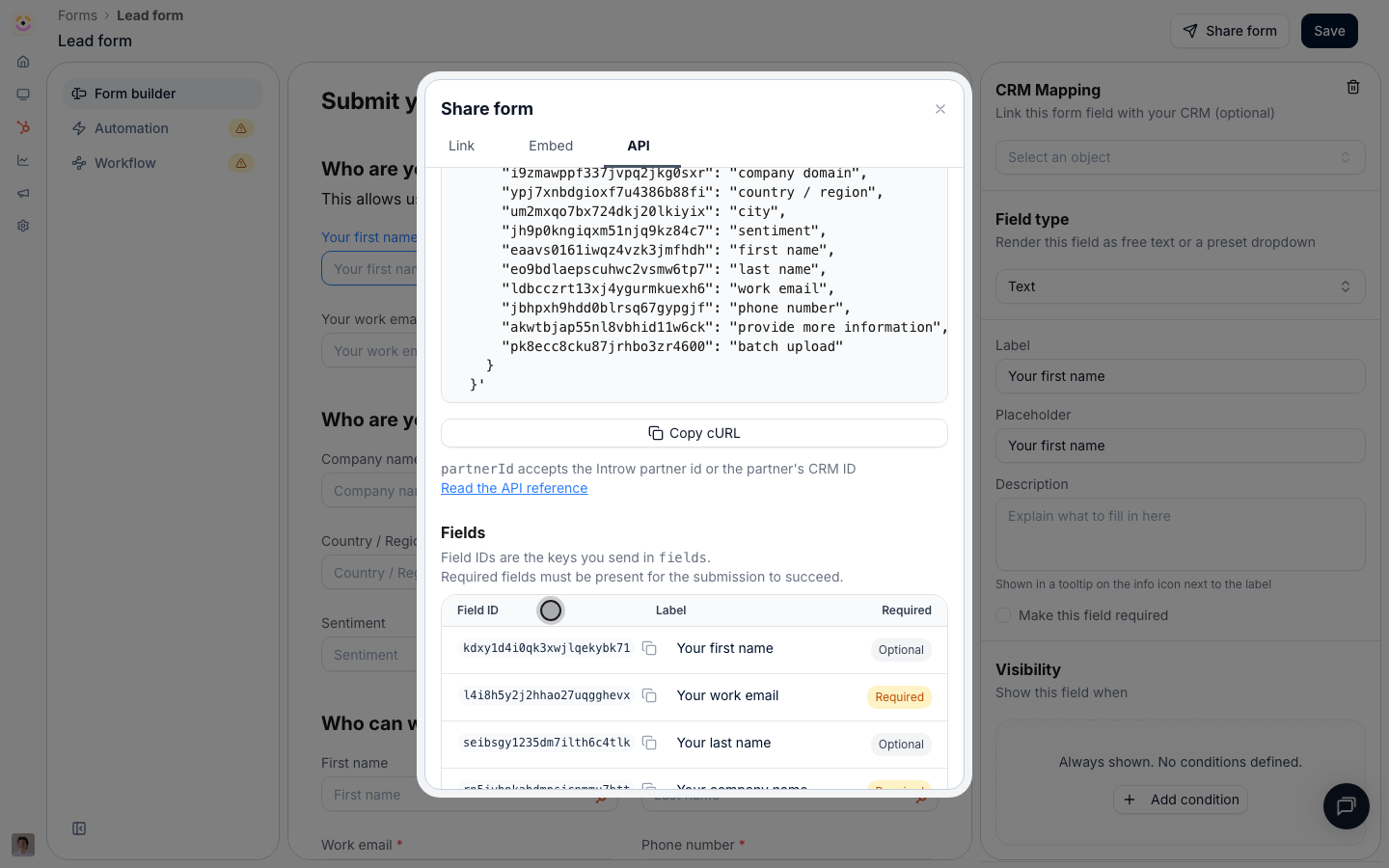
Share form > API: a runnable snippet carrying this form's id and field ids, with the Fields table below it.
Keys in
fields that do not match a field on the form are ignored, so an extra key never fails a
submission. A missing required field does, with 422. Unknown keys at the top level of the body
are rejected. When you change the form’s fields, re-fetch the schema (or re-open the API tab) and
re-check the ids.What to send per field
dataType is the single axis to branch on. It tells you the value shape, whatever widget the portal happens to draw.
Submit from your own stack
Attribution
Getting the submission credited to the right partner is the one thing worth being deliberate about.
Pass
partnerId whenever your system knows which partner it is acting for. It is the difference between attribution you can rely on and attribution you have to reconcile later.
To link records from the submitting partner’s own CRM, add partnerObjects:
What comes back
A successful call returns201 with the submission id and its review status.
status tells you whether a human still has to look at it:
Store the returned
id. It is what you pass as formSubmissionId to comment on the submission, and what shows up in the submissions inbox.
Errors
Rate limits and bulk runs
API keys are limited to 120 requests per minute, counted in a fixed one-minute window. Every response carriesx-ratelimit-limit-minute and x-ratelimit-remaining-minute, and going over returns 429 with RATE_LIMIT_EXCEEDED.
For a backfill or a migration, submit sequentially with a small delay, watch the remaining header, and retry a 429 after the current minute rolls over. Submissions are not deduplicated by the API, so make your own runs idempotent: keep the returned submission id per source record, and let the form’s own duplicate and conflict checks catch what slips through.
Authentication and security
Use a secret API key with theforms:write scope to submit, and forms:read (or forms:write) to fetch a form’s schema, see Authentication. Keys are per organisation, so the form must live in the organisation the key belongs to.
API reference
Get a form schema
GET /api/v1/forms/{formId}/schema
Submit a form
POST /api/v1/forms/{formId}/submissions
Related
Submit a form via the API
The step-by-step guide, from key to first submission, with a walkthrough of the API tab.
Ways to submit a form
Every other channel the same form is reachable through.
Comments
Comment on the submission you just created.
Authentication
Scopes, keys, and the
x-api-key header.