> ## Documentation Index
> Fetch the complete documentation index at: https://docs.introw.io/llms.txt
> Use this file to discover all available pages before exploring further.
# Form submissions
> Submit any Introw form headlessly from anywhere: your product, a partner's system, an internal tool, a script, or an agent, with the same automations.
A form is Introw's intake surface: deal registrations, shared leads, partner applications, MDF requests, claims, feedback. The [Submit a form](/api-reference/forms/submit-a-form) endpoint gives that surface a programmatic entry point, so a submission can originate anywhere: your own product, a partner's system, an internal tool, a backfill script, or an agent. No browser, no portal login, nobody filling in a form.
An API submission is not a side channel. It runs the same CRM automation, the same attribution, the same duplicate and conflict checks, and the same acceptance flow as a partner submitting in the portal. Nothing about the form is configured twice.
A partner-facing app or marketplace registers the deal as part of its own flow.
A large partner's PRM, portal, or CRM pushes registrations to you system to system.
Backfill history, migrate from a legacy PRM, or submit from an internal ops tool.
An agent that has already gathered the details files the submission itself.
## Before you start
The API submits an existing form, it does not define one. Build it in [Build and publish a form](/features/forms/form-builder/guides/build-and-publish-a-form) and map its automation in [Connect a form to your CRM](/features/forms/crm-automations/guides/connect-a-form-to-your-crm).
Every plan includes API access with a monthly allowance of [API credits](/general/api-credits). One submission spends one credit. If the allowance is spent, submissions return `402` until it resets on the first of the month.
Create an API key with `forms:write` to submit, and `forms:read` (or `forms:write`) to fetch a form's schema. See [Authentication](/general/authentication) and [Create and manage API keys](/features/developer/api/guides/create-and-manage-api-keys).
```bash theme={"theme":{"light":"github-light","dark":"github-dark"}}
curl -X POST "https://api.introw.io/api/v1/forms/$FORM_ID/submissions" \
-H "x-api-key: $INTROW_API_KEY" \
-H "Content-Type: application/json" \
-d '{
"email": "partner@example.com",
"partnerId": "ptn_01HVK6Y8Z8Q7J8J8J8J8J8J8J8",
"fields": {
"qkzv8h2m4t6r1yc9pd3sxf70": "Globex Corporation",
"b3n7wq1k5rt9x2ycp8ds4hf6": "45000"
}
}'
```
## Get the form id and field ids
Field ids are opaque, generated identifiers, never human-readable names. Read them straight off the form instead of guessing.
### Discover the schema programmatically
The [Get a form schema](/api-reference/forms/get-a-form-schema) endpoint is the recommended way to discover a form's fields from code. It returns every submittable field with its id, label, `isRequired` flag, `dataType` (the value shape to send), and, for `DROPDOWN`, `DROPDOWN_MULTI`, and `PARTNER_SELECT` fields, the resolved `options` you can send as `value`. Call it before submitting instead of hard-coding ids.
```bash theme={"theme":{"light":"github-light","dark":"github-dark"}}
curl "https://api.introw.io/api/v1/forms/$FORM_ID/schema" \
-H "x-api-key: $INTROW_API_KEY"
```
```json theme={"theme":{"light":"github-light","dark":"github-dark"}}
{
"data": {
"id": "frm_01HVK6Y8Z8Q7J8J8J8J8J8J8J8",
"name": "Register a deal",
"fields": [
{ "id": "qkzv8h2m4t6r1yc9pd3sxf70", "label": "Deal name", "isRequired": true, "dataType": "STRING" },
{
"id": "b2rk8wq5vn3ty7uc1md9zjx6",
"label": "Deal stage",
"isRequired": true,
"dataType": "DROPDOWN",
"options": [
{ "label": "Qualified to buy", "value": "qualifiedtobuy" },
{ "label": "Appointment scheduled", "value": "appointmentscheduled" }
]
}
]
}
}
```
The schema is resolved live, so re-fetch it whenever the form may have changed rather than caching it indefinitely. A new required field, an edited picklist, or a picklist synced from the CRM all change what a valid submission looks like. Requests need an API key with the `forms:read` scope (`forms:write` also works).
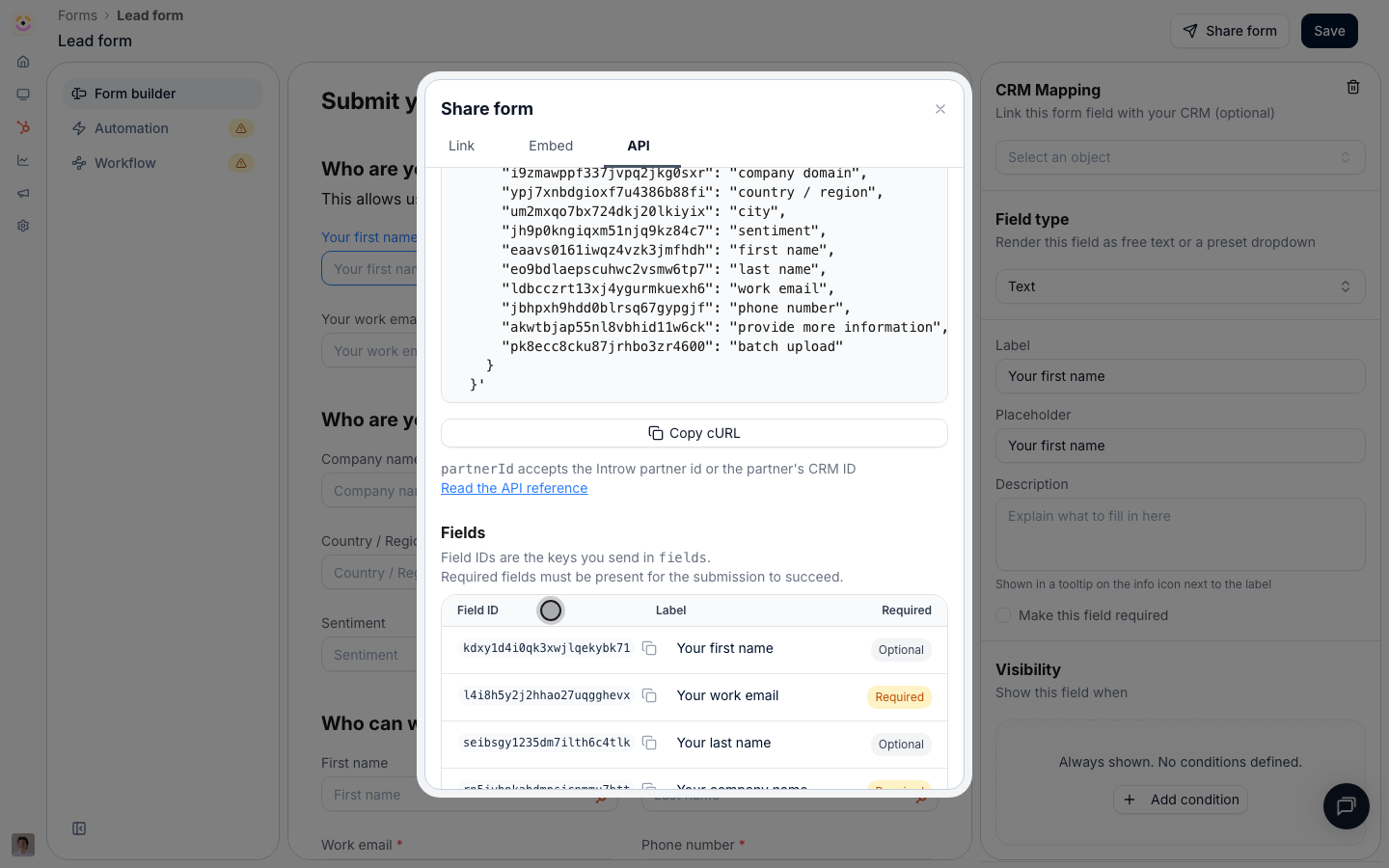
### Discover the schema from the Introw UI
If you prefer to build the payload by hand:
1. In Introw, open [Forms](https://app.introw.io/forms) and open the form.
2. Select **Share form**, then the **API** tab.
3. Copy the generated cURL snippet. It is pre-filled with the form id and every field id for this form.
The same tab lists a **Fields** table with each field's id, its label, and whether it is required.
 Keys in `fields` that do not match a field on the form are ignored, so an extra key never fails a
submission. A missing **required** field does, with `422`. Unknown keys at the top level of the body
are rejected. When you change the form's fields, re-fetch the schema (or re-open the **API** tab) and
re-check the ids.
## What to send per field
`dataType` is the single axis to branch on. It tells you the value shape, whatever widget the portal happens to draw.
| `dataType` | Send |
| ---------------- | --------------------------------------------------------------------------------------------------------------------- |
| `STRING` | Any string. |
| `EMAIL` | A valid email address. |
| `NUMBER` | A number, or a numeric string (thousand separators and currency symbols are tolerated). |
| `BOOLEAN` | `true` or `false`. |
| `DATE` | A `YYYY-MM-DD` date (other common formats are normalised). |
| `DATETIME` | An ISO 8601 timestamp. |
| `DROPDOWN` | Exactly one of the field's `options[].value`. |
| `DROPDOWN_MULTI` | One or more of the field's `options[].value`, joined with `;`. |
| `PARTNER_SELECT` | The id of one of the partners in `options[].value`. The field picks an Introw partner, not a CRM value. |
| `FILE_URL` | A publicly reachable URL of an already-uploaded file. Introw stores it as an asset on the submission. |
| `CRM_OBJECT_ID` | The CRM record id of an object of type `crmObjectType`. |
| `QUOTE_SELECTOR` | The id of an Introw quote. Quote selection is a portal flow, so prefer sending partners to the form itself for these. |
| `BATCH_UPLOAD` | Nothing. It is the portal's bulk-CSV control. Over the API, send one request per submission and omit the key. |
**Labels work too.** Sending `"Qualified to buy"` instead of `qualifiedtobuy` is resolved to the
option value case-insensitively, and a `PARTNER_SELECT` field accepts a partner name. A value that
matches no option is passed through as sent, which is what keeps unrestricted picklists and
not-yet-synced CRM properties working. Prefer `value` when you have it.
## Submit from your own stack
```bash cURL theme={"theme":{"light":"github-light","dark":"github-dark"}}
curl -X POST "https://api.introw.io/api/v1/forms/$FORM_ID/submissions" \
-H "x-api-key: $INTROW_API_KEY" \
-H "Content-Type: application/json" \
-d '{
"email": "jamie@partner.example",
"partnerId": "ptn_01HVK6Y8Z8Q7J8J8J8J8J8J8J8",
"fields": {
"qkzv8h2m4t6r1yc9pd3sxf70": "Globex Corporation",
"b3n7wq1k5rt9x2ycp8ds4hf6": "45000"
}
}'
```
```javascript Node.js theme={"theme":{"light":"github-light","dark":"github-dark"}}
const response = await fetch(`https://api.introw.io/api/v1/forms/${formId}/submissions`, {
method: "POST",
headers: {
"x-api-key": process.env.INTROW_API_KEY,
"Content-Type": "application/json",
},
body: JSON.stringify({
email: "jamie@partner.example",
partnerId: "ptn_01HVK6Y8Z8Q7J8J8J8J8J8J8J8",
fields: {
qkzv8h2m4t6r1yc9pd3sxf70: "Globex Corporation",
b3n7wq1k5rt9x2ycp8ds4hf6: "45000",
},
}),
});
if (!response.ok) throw new Error(`Introw returned ${response.status}`);
const { data } = await response.json();
console.log(data.id, data.status);
```
```python Python theme={"theme":{"light":"github-light","dark":"github-dark"}}
import os
import requests
response = requests.post(
f"https://api.introw.io/api/v1/forms/{form_id}/submissions",
headers={"x-api-key": os.environ["INTROW_API_KEY"]},
json={
"email": "jamie@partner.example",
"partnerId": "ptn_01HVK6Y8Z8Q7J8J8J8J8J8J8J8",
"fields": {
"qkzv8h2m4t6r1yc9pd3sxf70": "Globex Corporation",
"b3n7wq1k5rt9x2ycp8ds4hf6": "45000",
},
},
timeout=30,
)
response.raise_for_status()
print(response.json()["data"])
```
## Attribution
Getting the submission credited to the right partner is the one thing worth being deliberate about.
| You send | Introw does |
| ------------ | ---------------------------------------------------------------------------------------------------------------------------------------------------------------------------- |
| `partnerId` | Uses that partner. Accepts the Introw partner id **or** the partner's CRM external id, so you can pass whichever your system already stores. An unknown value returns `404`. |
| `email` only | Resolves the submitter from the email and applies the form's own identification automations to relate it to a partner. |
| Neither | The submission is accepted but unattributed, exactly as a general share link would be. |
Pass `partnerId` whenever your system knows which partner it is acting for. It is the difference between attribution you can rely on and attribution you have to reconcile later.
To link records from the submitting partner's own CRM, add `partnerObjects`:
```json theme={"theme":{"light":"github-light","dark":"github-dark"}}
{
"partnerObjects": [
{ "objectType": "deal", "objectId": "9840193344" },
{ "objectType": "contact", "objectId": "112233" }
]
}
```
## What comes back
A successful call returns `201` with the submission id and its review status.
```json theme={"theme":{"light":"github-light","dark":"github-dark"}}
{
"data": {
"id": "fsub_01HVK6Y8Z8Q7J8J8J8J8J8J8J8",
"formId": "frm_01HVK6Y8Z8Q7J8J8J8J8J8J8J8",
"status": "PENDING"
}
}
```
`status` tells you whether a human still has to look at it:
| Status | Meaning |
| --------------- | -------------------------------------------------------------------------------------------------------------------------- |
| `AUTO_ACCEPTED` | The form has no acceptance flow. The automation already ran and the CRM records exist. |
| `PENDING` | The form has an acceptance flow. The submission is waiting in [Submissions](https://app.introw.io/submissions) for review. |
| `ACCEPTED` | Reviewed and approved. |
| `RETURNED` | Sent back to the submitter for more information. |
| `DECLINED` | Rejected by a reviewer. |
| `ERROR` | The automation failed after the submission was accepted. |
Store the returned `id`. It is what you pass as `formSubmissionId` to [comment on the submission](/general/collaboration-overview), and what shows up in the submissions inbox.
## Errors
| HTTP | Code | What happened |
| ----- | ------------------------ | --------------------------------------------------------------------------------------------- |
| `401` | `UNAUTHORIZED` | The `x-api-key` header is missing, invalid, expired, or revoked. |
| `403` | `FORBIDDEN` | The key lacks `forms:write`, or the submitter is not allowed to process quotes for this form. |
| `404` | `FORM_NOT_FOUND` | No such form in this organisation, or the form has no automation configured. |
| `404` | `PARTNER_NOT_FOUND` | `partnerId` matched neither an Introw partner id nor a CRM external id. |
| `422` | `VALIDATION_ERROR` | A field value failed the form's own validation rules, or a required field was missing. |
| `422` | `MDF_FUND_EXPIRED` | The marketing fund linked to this form is no longer active. |
| `429` | `RATE_LIMIT_EXCEEDED` | Too many requests this minute. See below. |
| `500` | `FORM_SUBMISSION_FAILED` | The submission could not be processed. Safe to retry. |
## Rate limits and bulk runs
API keys are limited to **120 requests per minute**, counted in a fixed one-minute window. Every response carries `x-ratelimit-limit-minute` and `x-ratelimit-remaining-minute`, and going over returns `429` with `RATE_LIMIT_EXCEEDED`.
For a backfill or a migration, submit sequentially with a small delay, watch the remaining header, and retry a `429` after the current minute rolls over. Submissions are not deduplicated by the API, so make your own runs idempotent: keep the returned submission id per source record, and let the form's own duplicate and conflict checks catch what slips through.
## Authentication and security
Use a secret API key with the `forms:write` scope to submit, and `forms:read` (or `forms:write`) to fetch a form's schema, see [Authentication](/general/authentication). Keys are per organisation, so the form must live in the organisation the key belongs to.
API submissions authenticate with a secret key, so keep the call server-side. The reCAPTCHA that
protects the public share link and embed does not apply to the API path; your key is the control.
Never ship an Introw API key to a browser, a mobile app, or a partner.
## API reference
GET /api/v1/forms/\{formId}/schema
POST /api/v1/forms/\{formId}/submissions
## Related
The step-by-step guide, from key to first submission, with a walkthrough of the API tab.
Every other channel the same form is reachable through.
Comment on the submission you just created.
Scopes, keys, and the `x-api-key` header.
Keys in `fields` that do not match a field on the form are ignored, so an extra key never fails a
submission. A missing **required** field does, with `422`. Unknown keys at the top level of the body
are rejected. When you change the form's fields, re-fetch the schema (or re-open the **API** tab) and
re-check the ids.
## What to send per field
`dataType` is the single axis to branch on. It tells you the value shape, whatever widget the portal happens to draw.
| `dataType` | Send |
| ---------------- | --------------------------------------------------------------------------------------------------------------------- |
| `STRING` | Any string. |
| `EMAIL` | A valid email address. |
| `NUMBER` | A number, or a numeric string (thousand separators and currency symbols are tolerated). |
| `BOOLEAN` | `true` or `false`. |
| `DATE` | A `YYYY-MM-DD` date (other common formats are normalised). |
| `DATETIME` | An ISO 8601 timestamp. |
| `DROPDOWN` | Exactly one of the field's `options[].value`. |
| `DROPDOWN_MULTI` | One or more of the field's `options[].value`, joined with `;`. |
| `PARTNER_SELECT` | The id of one of the partners in `options[].value`. The field picks an Introw partner, not a CRM value. |
| `FILE_URL` | A publicly reachable URL of an already-uploaded file. Introw stores it as an asset on the submission. |
| `CRM_OBJECT_ID` | The CRM record id of an object of type `crmObjectType`. |
| `QUOTE_SELECTOR` | The id of an Introw quote. Quote selection is a portal flow, so prefer sending partners to the form itself for these. |
| `BATCH_UPLOAD` | Nothing. It is the portal's bulk-CSV control. Over the API, send one request per submission and omit the key. |
**Labels work too.** Sending `"Qualified to buy"` instead of `qualifiedtobuy` is resolved to the
option value case-insensitively, and a `PARTNER_SELECT` field accepts a partner name. A value that
matches no option is passed through as sent, which is what keeps unrestricted picklists and
not-yet-synced CRM properties working. Prefer `value` when you have it.
## Submit from your own stack
```bash cURL theme={"theme":{"light":"github-light","dark":"github-dark"}}
curl -X POST "https://api.introw.io/api/v1/forms/$FORM_ID/submissions" \
-H "x-api-key: $INTROW_API_KEY" \
-H "Content-Type: application/json" \
-d '{
"email": "jamie@partner.example",
"partnerId": "ptn_01HVK6Y8Z8Q7J8J8J8J8J8J8J8",
"fields": {
"qkzv8h2m4t6r1yc9pd3sxf70": "Globex Corporation",
"b3n7wq1k5rt9x2ycp8ds4hf6": "45000"
}
}'
```
```javascript Node.js theme={"theme":{"light":"github-light","dark":"github-dark"}}
const response = await fetch(`https://api.introw.io/api/v1/forms/${formId}/submissions`, {
method: "POST",
headers: {
"x-api-key": process.env.INTROW_API_KEY,
"Content-Type": "application/json",
},
body: JSON.stringify({
email: "jamie@partner.example",
partnerId: "ptn_01HVK6Y8Z8Q7J8J8J8J8J8J8J8",
fields: {
qkzv8h2m4t6r1yc9pd3sxf70: "Globex Corporation",
b3n7wq1k5rt9x2ycp8ds4hf6: "45000",
},
}),
});
if (!response.ok) throw new Error(`Introw returned ${response.status}`);
const { data } = await response.json();
console.log(data.id, data.status);
```
```python Python theme={"theme":{"light":"github-light","dark":"github-dark"}}
import os
import requests
response = requests.post(
f"https://api.introw.io/api/v1/forms/{form_id}/submissions",
headers={"x-api-key": os.environ["INTROW_API_KEY"]},
json={
"email": "jamie@partner.example",
"partnerId": "ptn_01HVK6Y8Z8Q7J8J8J8J8J8J8J8",
"fields": {
"qkzv8h2m4t6r1yc9pd3sxf70": "Globex Corporation",
"b3n7wq1k5rt9x2ycp8ds4hf6": "45000",
},
},
timeout=30,
)
response.raise_for_status()
print(response.json()["data"])
```
## Attribution
Getting the submission credited to the right partner is the one thing worth being deliberate about.
| You send | Introw does |
| ------------ | ---------------------------------------------------------------------------------------------------------------------------------------------------------------------------- |
| `partnerId` | Uses that partner. Accepts the Introw partner id **or** the partner's CRM external id, so you can pass whichever your system already stores. An unknown value returns `404`. |
| `email` only | Resolves the submitter from the email and applies the form's own identification automations to relate it to a partner. |
| Neither | The submission is accepted but unattributed, exactly as a general share link would be. |
Pass `partnerId` whenever your system knows which partner it is acting for. It is the difference between attribution you can rely on and attribution you have to reconcile later.
To link records from the submitting partner's own CRM, add `partnerObjects`:
```json theme={"theme":{"light":"github-light","dark":"github-dark"}}
{
"partnerObjects": [
{ "objectType": "deal", "objectId": "9840193344" },
{ "objectType": "contact", "objectId": "112233" }
]
}
```
## What comes back
A successful call returns `201` with the submission id and its review status.
```json theme={"theme":{"light":"github-light","dark":"github-dark"}}
{
"data": {
"id": "fsub_01HVK6Y8Z8Q7J8J8J8J8J8J8J8",
"formId": "frm_01HVK6Y8Z8Q7J8J8J8J8J8J8J8",
"status": "PENDING"
}
}
```
`status` tells you whether a human still has to look at it:
| Status | Meaning |
| --------------- | -------------------------------------------------------------------------------------------------------------------------- |
| `AUTO_ACCEPTED` | The form has no acceptance flow. The automation already ran and the CRM records exist. |
| `PENDING` | The form has an acceptance flow. The submission is waiting in [Submissions](https://app.introw.io/submissions) for review. |
| `ACCEPTED` | Reviewed and approved. |
| `RETURNED` | Sent back to the submitter for more information. |
| `DECLINED` | Rejected by a reviewer. |
| `ERROR` | The automation failed after the submission was accepted. |
Store the returned `id`. It is what you pass as `formSubmissionId` to [comment on the submission](/general/collaboration-overview), and what shows up in the submissions inbox.
## Errors
| HTTP | Code | What happened |
| ----- | ------------------------ | --------------------------------------------------------------------------------------------- |
| `401` | `UNAUTHORIZED` | The `x-api-key` header is missing, invalid, expired, or revoked. |
| `403` | `FORBIDDEN` | The key lacks `forms:write`, or the submitter is not allowed to process quotes for this form. |
| `404` | `FORM_NOT_FOUND` | No such form in this organisation, or the form has no automation configured. |
| `404` | `PARTNER_NOT_FOUND` | `partnerId` matched neither an Introw partner id nor a CRM external id. |
| `422` | `VALIDATION_ERROR` | A field value failed the form's own validation rules, or a required field was missing. |
| `422` | `MDF_FUND_EXPIRED` | The marketing fund linked to this form is no longer active. |
| `429` | `RATE_LIMIT_EXCEEDED` | Too many requests this minute. See below. |
| `500` | `FORM_SUBMISSION_FAILED` | The submission could not be processed. Safe to retry. |
## Rate limits and bulk runs
API keys are limited to **120 requests per minute**, counted in a fixed one-minute window. Every response carries `x-ratelimit-limit-minute` and `x-ratelimit-remaining-minute`, and going over returns `429` with `RATE_LIMIT_EXCEEDED`.
For a backfill or a migration, submit sequentially with a small delay, watch the remaining header, and retry a `429` after the current minute rolls over. Submissions are not deduplicated by the API, so make your own runs idempotent: keep the returned submission id per source record, and let the form's own duplicate and conflict checks catch what slips through.
## Authentication and security
Use a secret API key with the `forms:write` scope to submit, and `forms:read` (or `forms:write`) to fetch a form's schema, see [Authentication](/general/authentication). Keys are per organisation, so the form must live in the organisation the key belongs to.
API submissions authenticate with a secret key, so keep the call server-side. The reCAPTCHA that
protects the public share link and embed does not apply to the API path; your key is the control.
Never ship an Introw API key to a browser, a mobile app, or a partner.
## API reference
GET /api/v1/forms/\{formId}/schema
POST /api/v1/forms/\{formId}/submissions
## Related
The step-by-step guide, from key to first submission, with a walkthrough of the API tab.
Every other channel the same form is reachable through.
Comment on the submission you just created.
Scopes, keys, and the `x-api-key` header.