> ## Documentation Index
> Fetch the complete documentation index at: https://docs.introw.io/llms.txt
> Use this file to discover all available pages before exploring further.
# Campaign Registration & ROI
> Set up campaign registration on a marketing fund or as a CRM record, count the deals each campaign produces, and show partners their campaigns in the portal.
export const Rail = ({children}) =>
{children}
;
**Open in Introw:** [Marketing Funds](https://app.introw.io/marketing-funds)
## Where it lives
Campaign registration runs on a fund under **MDF**, at [Marketing Funds](https://app.introw.io/marketing-funds).
Partners register and follow their campaigns from the **Marketing Funds** section of their portal.
Campaigns kept as a plain CRM record run on a form under [Forms](https://app.introw.io/forms) and a CRM embed in the portal.
## Before you start
| You need | Why | Fix it |
| - | - | - |
| The MDF module on your plan | Funds are the campaign record | [introw.io/pricing](https://introw.io/pricing) |
| A connected CRM | Campaigns and their deals are CRM records | [Connect HubSpot](/features/integrations/crm/guides/connect-hubspot) |
| A campaign kit partners launch from | Registration follows the launch | [Enable partners with a campaign kit](/features/tcma/campaign-kits/guides/enable-partners-with-a-campaign-kit) |
| Write access to MDF and forms | To configure the fund and its forms | [Internal roles](/features/access/team-management/guides/create-an-internal-role) |
## How it works
There are two ways to keep a record of partner campaigns, and they suit different programs.
**On a marketing fund.**
The partner registers a campaign as a request on a fund, and you approve it on the request's acceptance steps.
The fund carries four steps: **Request Fund**, **Claims**, **ROI** and **Invoices**.
Claims, ROI and Invoices each have a switch at the top right of their tab.
Switch off Claims and Invoices when a campaign does not pay anything back, and the fund becomes a campaign register with approval and ROI.
Keep ROI on: it is where partners log the deals a campaign produces, and it holds real-time tracking.
On an approved request, the **ROI** section lists what was logged against the campaign.
The partner adds to it with **Add**, which opens the fund's ROI form already tied to that request.
Your team uses **Add ROI** to log on the partner's behalf, or **Request ROI** to ask the partner for it.
When the ROI form creates a deal, that deal counts toward the campaign, and your team sees the total as **ROI** against **Approved budget**, with the percentage.
A deal registered through any other form is not tied to the campaign.
**As a CRM record.**
A form's automation can create a record of any object type, including a Salesforce Campaign or a HubSpot custom object.
The partner fills in the form when the campaign goes out, and a CRM embed in the portal shows them their own campaign records.
They update the properties you mark editable.
A form cannot yet associate a later deal with one of these records, so use the fund route when deals must count toward a campaign.
```mermaid theme={"theme":{"light":"github-light","dark":"github-dark"}}
flowchart LR
portal["Partner portal"] --> request["Request on a fund"]
request --> approval["Acceptance steps"]
approval --> roiform["ROI form on the request"]
roiform --> crm["Deal in your CRM"]
crm --> tile["ROI against Approved budget"]
```
## Settings & configuration
### On the fund
**Request Fund tab.**
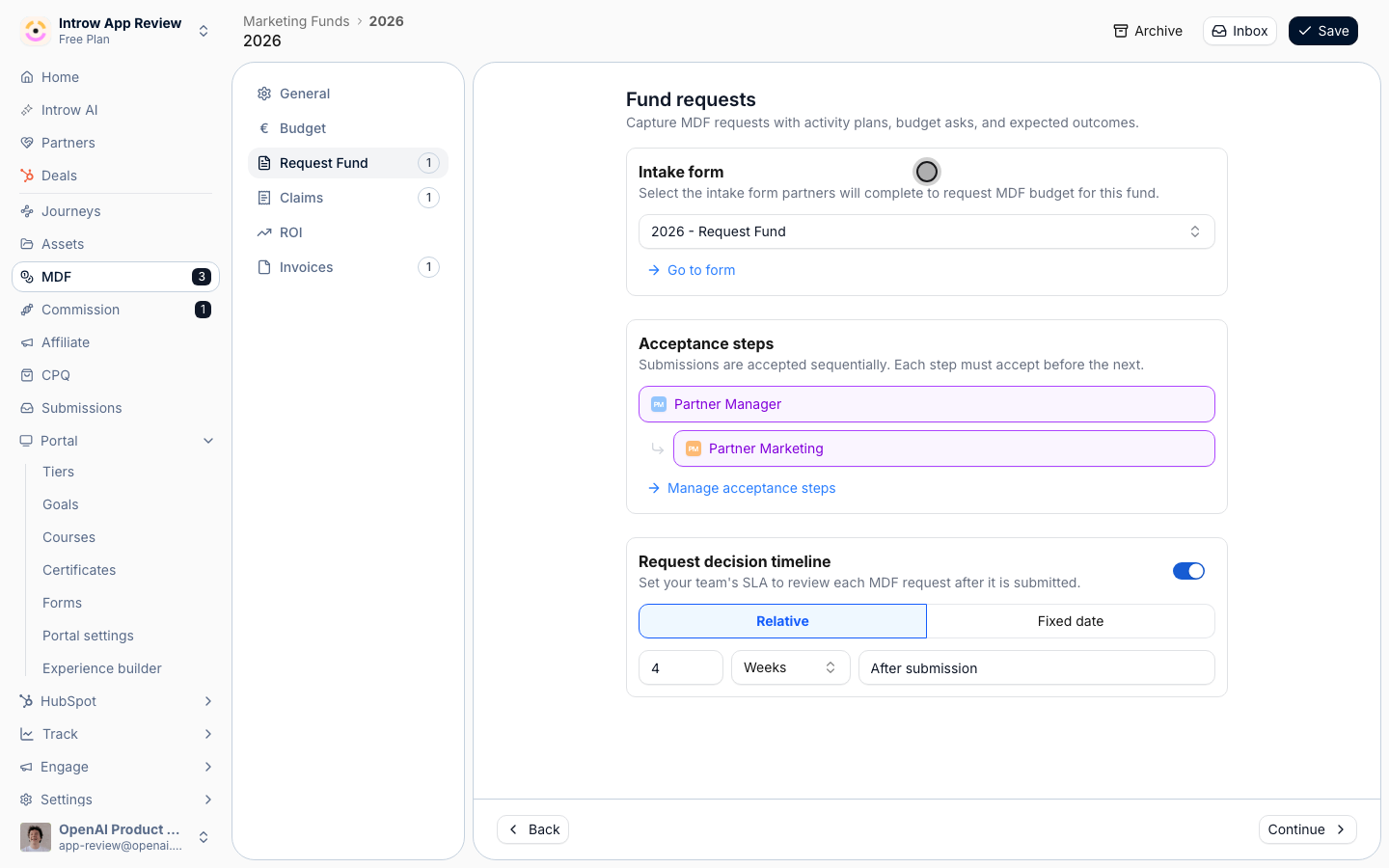
The **Intake form** is the registration form partners fill in.
Add the fields a campaign needs, such as campaign name, channel, start and end date, and expected audience, with **Go to form**.
**Acceptance steps** decide who approves a registration, and the **Request decision timeline** sets how fast your team decides.
**Claims and Invoices tabs.**
Switch the step off when partners are not paid back for the campaign.
Leave it on when the fund also reimburses spend.
See [Run the MDF lifecycle](/features/mdf/projects/guides/run-the-mdf-lifecycle).
**ROI tab.**
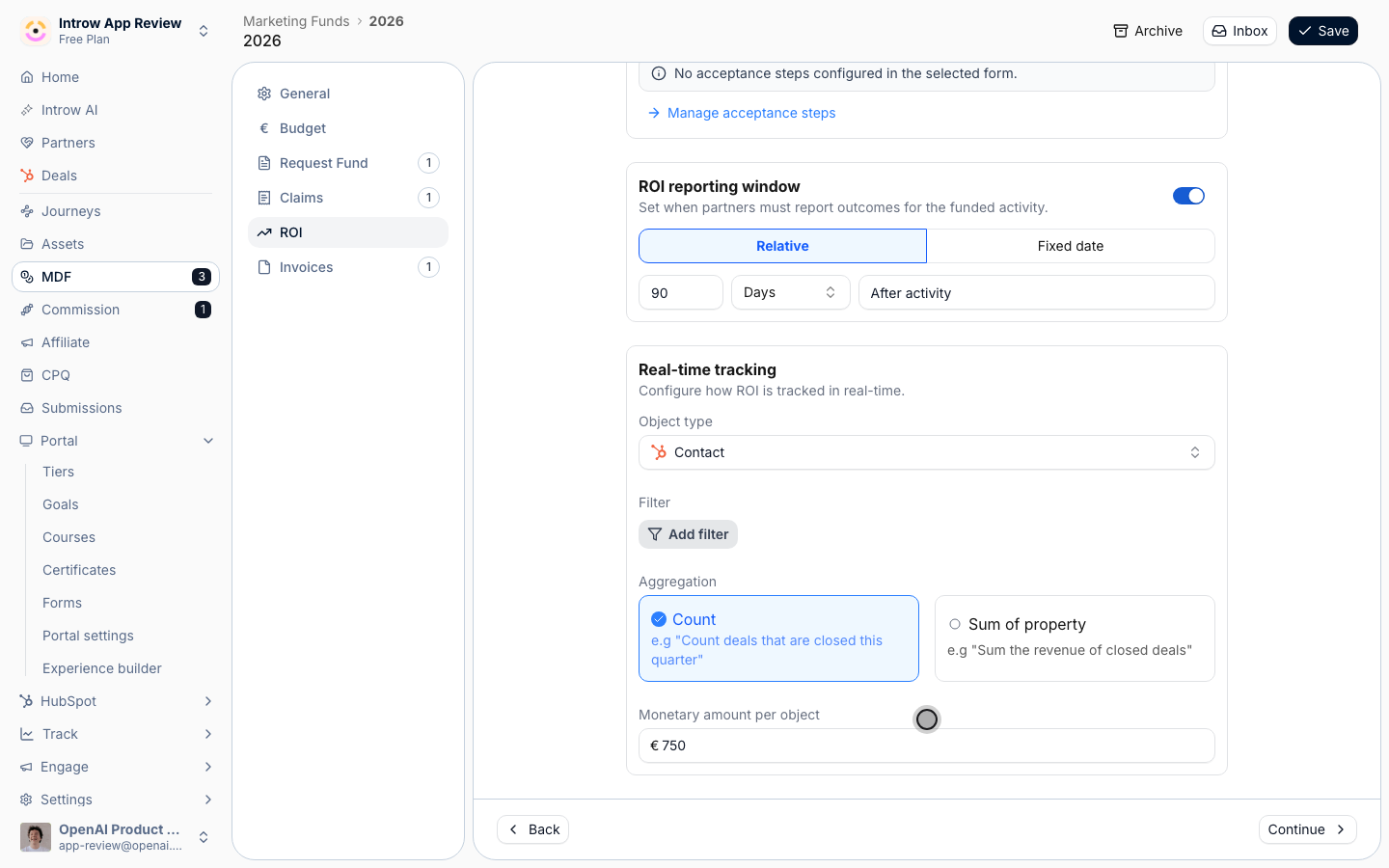
The **Intake form** here is what partners use to log results, and its automation decides what it creates.
For campaign ROI, make it create a **Deal**.
Under **Real-time tracking**, set **Object type** to the deal, then choose **Count** with a **Monetary amount per object**, or **Sum of property** with a **Field to sum** such as the deal amount.
**Filters** limit what counts, for example closed-won only.
The **ROI reporting window** sets how long after the campaign partners can log results.
### In the portal
Add the **Marketing Funds** section from the [Experience builder](https://app.introw.io/templates) and pick the fund.
Partners see **Allocated Budget**, **Pending Acceptance**, **Approved Spend** and **Available Budget**, their requests, and a button that opens the request form.
Rename the button to match the motion, for example "Fund a campaign" or "Register a campaign".
### For a campaign kept as a CRM record
Build the registration form under [Forms](https://app.introw.io/forms).
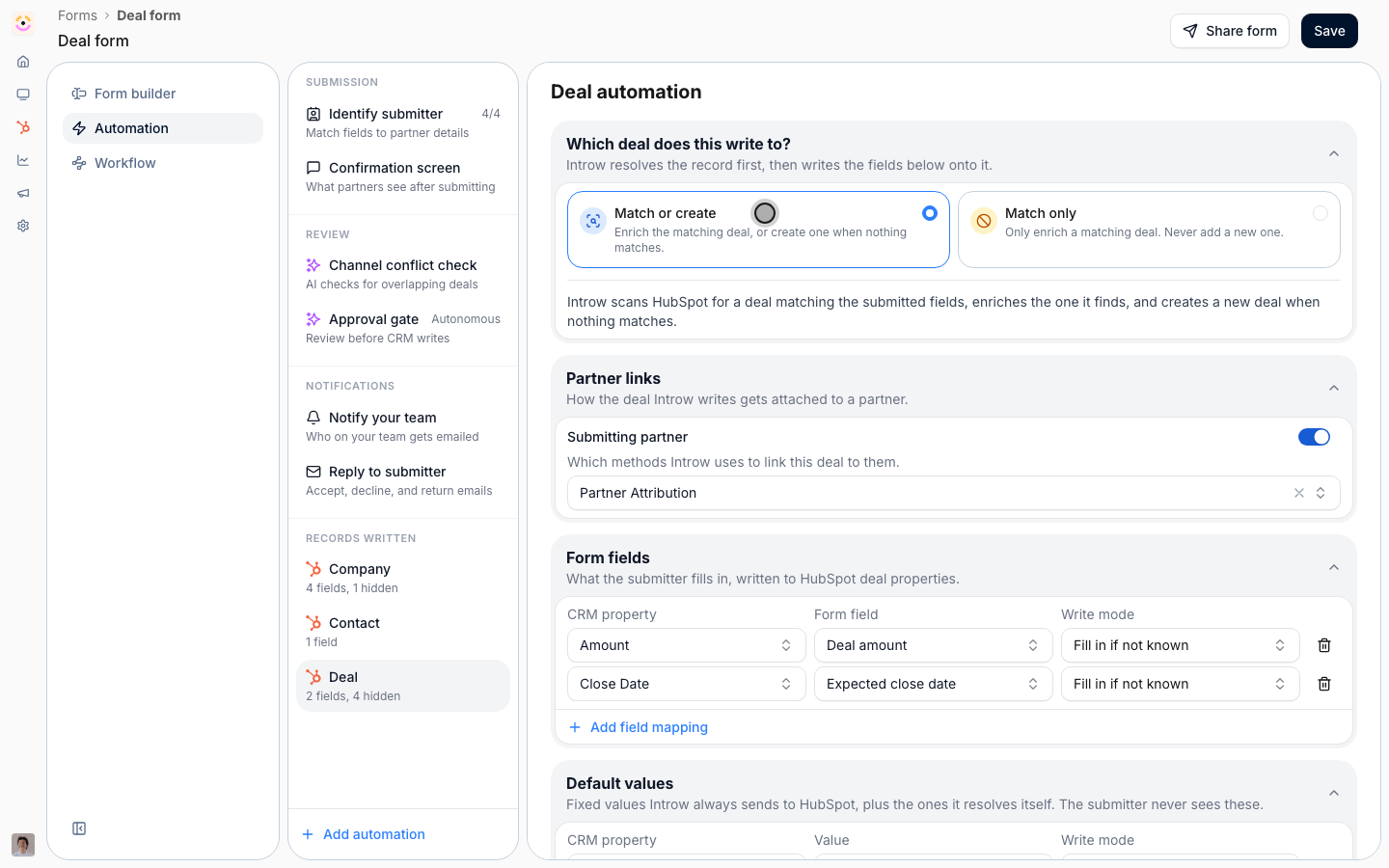
On the **Automation** tab, choose **Add automation** and pick the object, such as your Salesforce Campaign or HubSpot custom object.
Leave **Match or create** on, map the campaign fields, and keep **Submitting partner** on under **Partner links** so the record is linked to the partner.
Add the object to a portal CRM embed and mark the properties partners may change as editable.
Custom-object collaboration is a plan module: see [introw.io/pricing](https://introw.io/pricing).
### In reports
In the [report builder](https://app.introw.io/reports), group deals by **Introw MDF** to see deals per fund next to spend.
## How-to guides
* 
[**Log the deals a campaign produces**](/features/tcma/campaign-roi/guides/log-campaign-deals-as-roi)
Let partners log each deal a registered campaign creates, so it lands in your CRM, counts toward that campaign and shows as ROI against the approved budget.
* 
[**Register partner campaigns as a CRM record**](/features/tcma/campaign-roi/guides/register-campaigns-as-a-crm-record)
Let partners register each campaign as a record in your CRM, such as a Salesforce Campaign or a HubSpot custom object, and keep its status, dates and audience current from the portal.
* 
[**Register partner campaigns on a marketing fund**](/features/tcma/campaign-roi/guides/register-partner-campaigns-with-mdf)
Turn a marketing fund into the place partners register every campaign they launch from a kit, with your approval, their budget and the campaign's status in one record.
## Troubleshooting
Only deals created through the ROI form on a request count toward that campaign.
A deal a partner registers through your regular deal form is attributed to the partner, not to the campaign.
Check the ROI form's automation creates the object set under **Real-time tracking**, and that **Filters** include the deals you expect.
The ROI form has no automation, or it does not create the tracked object type. Open the form with **Go to form** and add one.
The ROI step is switched off, or the **ROI reporting window** has closed.
The property is not marked editable on the embed, or custom-object collaboration is not on your plan.
This documentation is built and hosted on [Mintlify](https://mintlify.com), a developer documentation platform.