> ## Documentation Index
> Fetch the complete documentation index at: https://docs.introw.io/llms.txt
> Use this file to discover all available pages before exploring further.
# Campaign Registration & ROI
> Partners register the campaigns they launch from a kit, keep them up to date themselves, and log the deals each one produces, so you see what is live and what it returned.
export const Headless = ({children, intro = true}) => {
const [copied, setCopied] = useState(null);
const copy = event => {
const row = event.target.closest("li");
if (!row) return;
const text = row.textContent.trim();
try {
navigator.clipboard?.writeText(text);
} catch {}
setCopied(text);
setTimeout(() => setCopied(null), 1600);
};
return <>
{intro ?
Introw is headless by design: run everything here in plain language from Claude, ChatGPT,
Slack, Teams, or your own CRM through Introw's MCP server, with every
action written straight back to your CRM source of truth. The portal is one surface, never the only one.
:
The agentic motion - lifecycle deep dives and a Claude Code skill library that run your partner program from
Claude, ChatGPT, Slack, and your CRM.
}
;
};
export const Tour = ({children}) => {
const [active, setActive] = useState(0);
const wrappers = (Array.isArray(children) ? children : [children]).filter(c => c && c.props);
const frames = wrappers.length === 1 && Array.isArray(wrappers[0].props.children) ? wrappers[0].props.children.filter(c => c && c.props) : [];
if (frames.length < 2) {
return
;
> Partners register every campaign they launch from a kit, keep it current themselves, and log the deals it produces. You see which campaigns are live, what they cost and what they returned, in your CRM.
## The problem it solves
| Without Introw | With Introw |
| - | - |
| You cannot see which campaigns are live | Partners register each one |
| Campaign details go stale in a spreadsheet | Partners update their own record |
| Deals never trace back to a campaign | Each deal lands on the campaign |
| You cannot show finance what a fund returned | ROI counts itself, against the budget |
## Impact
Partners run campaigns in their own tools, which is why they run more of them. Registration is the one step that keeps you in the loop, and it takes them a form, not a report.
for your business
* **In your CRM**
Every registered campaign is a record in your CRM, with its owner, dates, status and budget, next to the deals it produced
* **Trustworthy**
ROI counts the deals each campaign created, so the number you show finance comes from your CRM, not from a partner's slide
for your partners
* **Self-serve**
They register a campaign in one form and see its status in the portal, without emailing you
* **Enabled**
They see their budget, what is approved and what is left before they commit to a campaign
* **Efficient**
A deal they log on the campaign lands in your CRM with them attached, so they enter it once
[A day in the life of a co-sell partner](/days-in-the-life/co-sell-partner)
* **Partner Marketing** - every live campaign, in one list
* **Partner Operations** - campaign records in the CRM, not a spreadsheet
* **Finance** - what each fund returned
* **Partner marketers** - register once, update it themselves
## See it work
* 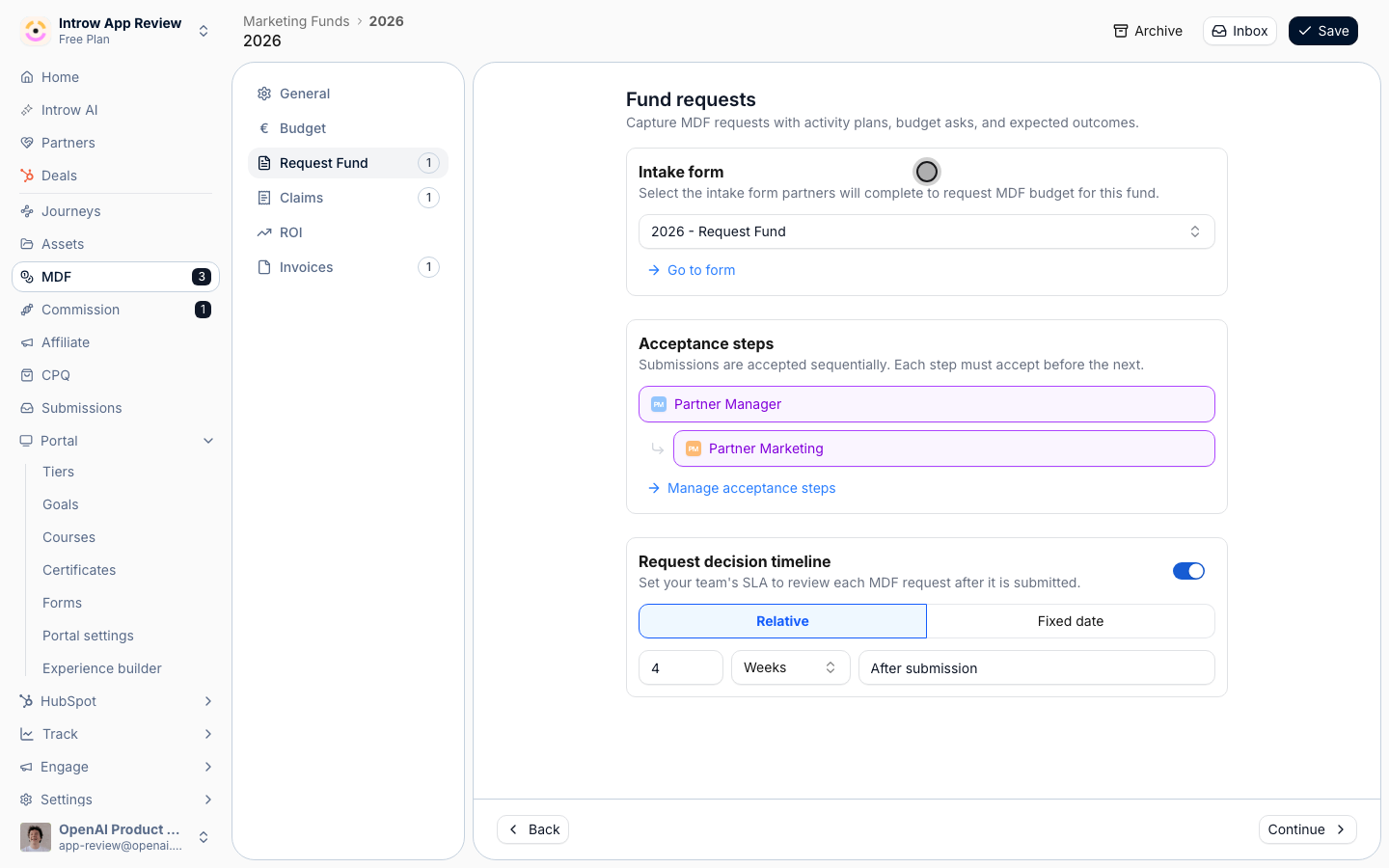
**Shape the registration**
One fund, one form partners fill in when a campaign goes out.
* 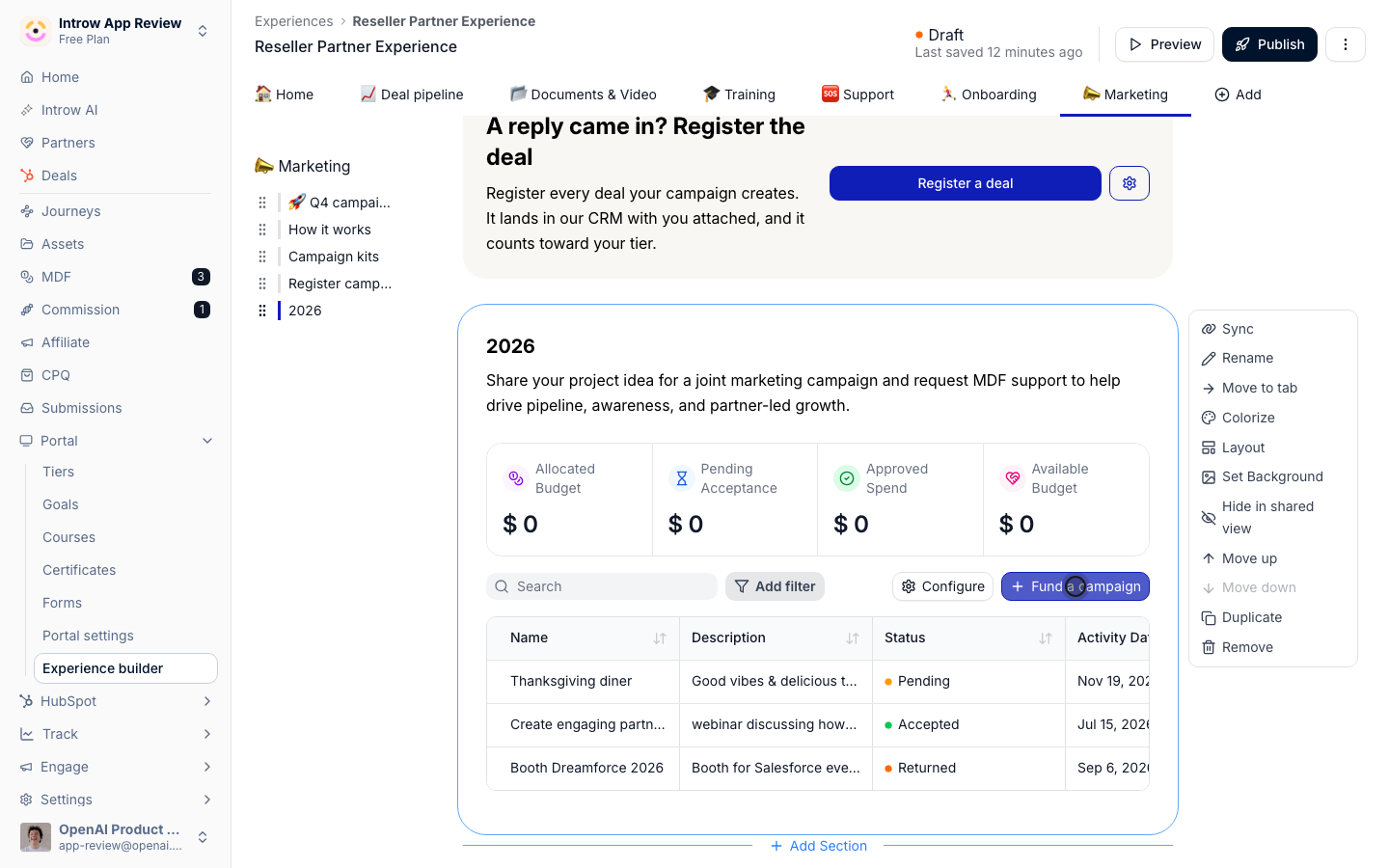
**Put it under the kit**
Partners register or fund a campaign from the same tab as the kit.
* 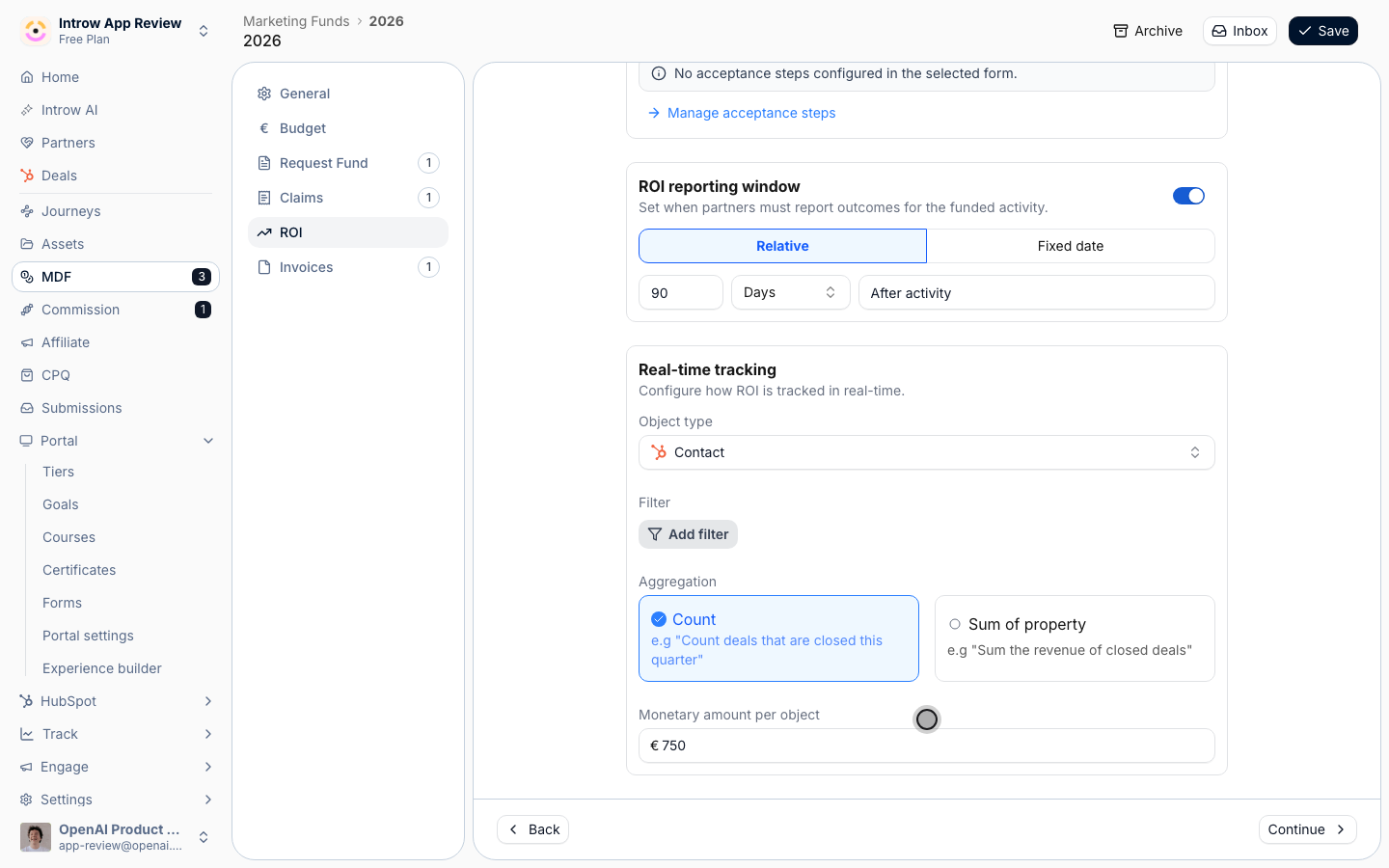
**Count what it produces**
Every object logged as ROI counts toward the campaign, at a value you set.
* 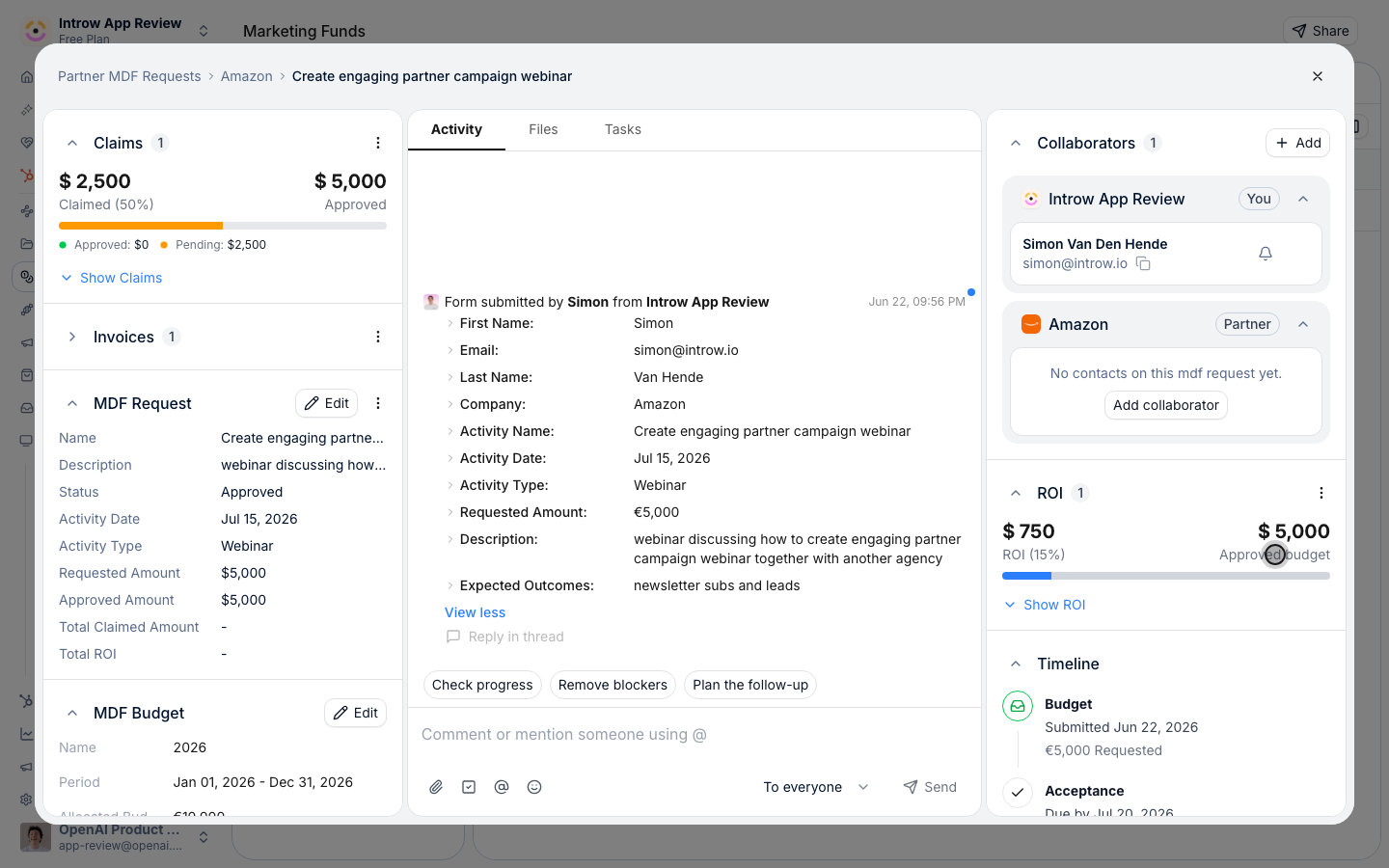
**ROI against budget**
Each registered campaign shows what it returned against what it cost.
## How it works
A partner registers a campaign at the moment it goes out.
The registration is a request on a marketing fund: the partner names the campaign, its dates, its channel and the budget they need, and you approve it like any other request.
A fund does not have to pay anything back.
Switch off its Claims and Invoices steps and it becomes a place partners register campaigns, with the budget at zero or used only as an approval limit.
Once a campaign is approved, the partner follows it from the portal.
They see it next to their budget with its status, and log the deals it produces through the campaign's ROI form.
Each deal they log is created in your CRM and counted toward that campaign, so the campaign's ROI rises as deals come in.
Introw shows the return against the approved budget, and reports can group deals by fund.
Some programs want a campaign record without any fund at all.
For those, a registration form can create a record of any type in your CRM, such as a Salesforce Campaign or a HubSpot custom object.
The portal shows partners their own records, and they update the fields you open up, such as status, end date or audience size.
Linking a later deal registration to one of those records is not something a form does today, so programs that need campaign ROI on deals use the fund route.
Clicks and signups from a partner's campaign are tracked separately, through affiliate links, and give you the top of the funnel the registered deals do not.
```mermaid theme={"theme":{"light":"github-light","dark":"github-dark"}}
flowchart LR
kit["Partner launches from a kit"] --> register["Registers the campaign"]
register --> approve["You approve it"]
approve --> manage["Partner keeps it current"]
manage --> deals["Logs the deals it creates"]
deals --> roi["ROI against the budget"]
```
## Run it from your AI assistant
* Which partner campaigns are approved and running this quarter?
* Show me the marketing fund requests for Apple and their status.
* Register a webinar campaign for us on the 2026 fund, running November 3 to December 12.
## Going deeper
Setup, configuration, and all how-to guides.
Endpoints and code.
**Works with**
Partners register the campaign they launch from a kit.
Real-time ROI counts the deals a registered campaign produces.
A fund is where partners register and fund their campaigns.
Clicks and conversions add the top of the funnel to the deals logged here.
A registration form writes the campaign record into your CRM.
This documentation is built and hosted on [Mintlify](https://mintlify.com), a developer documentation platform.