> ## Documentation Index
> Fetch the complete documentation index at: https://docs.introw.io/llms.txt
> Use this file to discover all available pages before exploring further.
# Campaign Attribution
> Set up tracked partner links for a through-channel campaign, credit conversions in your CRM, and report on which campaign kits partners use.
export const Rail = ({children}) =>
{children}
;
## Where it lives
Campaign Attribution is built from two surfaces you already have.
Click and conversion tracking lives at [Affiliate campaigns](https://app.introw.io/campaigns).
Kit usage lives on each asset in [Assets](https://app.introw.io/assets/library) and in [Reports](https://app.introw.io/reports).
## Before you start
| You need | Why | Fix it |
| - | - | - |
| A campaign kit in the portal | Partners need something to launch | [Enable partners with a campaign kit](/features/tcma/campaign-kits/guides/enable-partners-with-a-campaign-kit) |
| The campaigns module on your plan | Affiliate links live in a campaign | **Request access** |
| A conversion form | It writes each conversion to your CRM | [Connect a form to your CRM](/features/forms/crm-automations/guides/connect-a-form-to-your-crm) |
| Edit access to your destination site | The tracking snippet goes on it | [Set up conversion tracking](/features/affiliate/conversion-tracking/guides/set-up-affiliate-conversion-tracking) |
| Reports write access | To build the kit usage report | [Internal roles](/features/access/team-management/guides/create-an-internal-role) |
## How it works
A through-channel campaign leaves your tools the moment a partner sends it.
Attribution brings it back in two ways.
**Tracked links measure what the campaign drove.**
One affiliate campaign per through-channel campaign gives every partner a single signed link to your destination page.
Partners put that link in each call to action of the kit.
Clicks are recorded against the partner, with any UTM parameters on the URL.
A conversion inside the attribution window is credited by the campaign's attribution model.
It is then submitted on the campaign's conversion form, so the form's CRM automations write it to your CRM with the partner attached.
**Asset engagement measures what partners used.**
Every view and download of a kit asset is recorded against the partner contact and the partner.
Categories let you roll those up per campaign, because a report on the Assets data source can group by category.
## Settings & configuration
### Affiliate campaign
All of these live on the campaign at [Affiliate campaigns](https://app.introw.io/campaigns).
**Conversion form** sits on the **General** tab.
It is the form Introw submits for every conversion, with the partner attributed.
Pick a form whose CRM automations create the record you want, for example a contact or a lead.
**Destination URL** sits on the **General** tab.
Every partner link redirects here.
Point it at the landing page the kit promotes, not your home page, so the click lands on the offer.
**Attribution window (days)** sits on the **General** tab.
It sets how long a click keeps counting, from 1 to 365 days.
Match it to how long your campaign runs plus a typical buying delay, for example 60 days for a six-week campaign.
**Attribution model** sits on the **General** tab, as **Last click** or **First click**.
Last click credits the most recent partner a visitor clicked through.
First click credits the partner who introduced the visitor.
**Reward type** sits on the **Commission** tab once **Commissions** is on.
**Fixed amount per conversion** pays a flat amount per credited conversion.
**Commission plan** follows a plan you link.
**Generate links** sits on the **Links** tab.
It creates one signed link per selected partner and skips partners who already have one.
The table shows each partner's **Clicks**, **Conversions**, and the **Accepted**, **Declined**, **Failed** and **Pending** counts.
**Track conversions** sits on the **Install** tab, below **Add the tracking snippet**.
Choose **Client-side**, **Server-to-Server** or **HubSpot forms**, depending on where the signup happens.
### Kit usage
**Categories** sit in the asset details panel in [Assets](https://app.introw.io/assets/library).
Give every asset in a kit the same category, named after the campaign.
That category is what the usage report groups on.
**Engagement** is a tab in the asset details panel.
It shows views over time and a **People** and **Partners** breakdown with **Last viewed** and **Total views**.
A folder shows its **Total views** across everything inside it.
**Assets** is a data source in [Reports](https://app.introw.io/reports).
It groups by **Asset**, **Partner contact**, **File type**, **Category** and **Downloaded**.
It filters by **Asset**, **Partner contact**, **Source**, **Partner**, **File type**, **Categories**, **Interaction** and **Date**.
## How-to guides
* 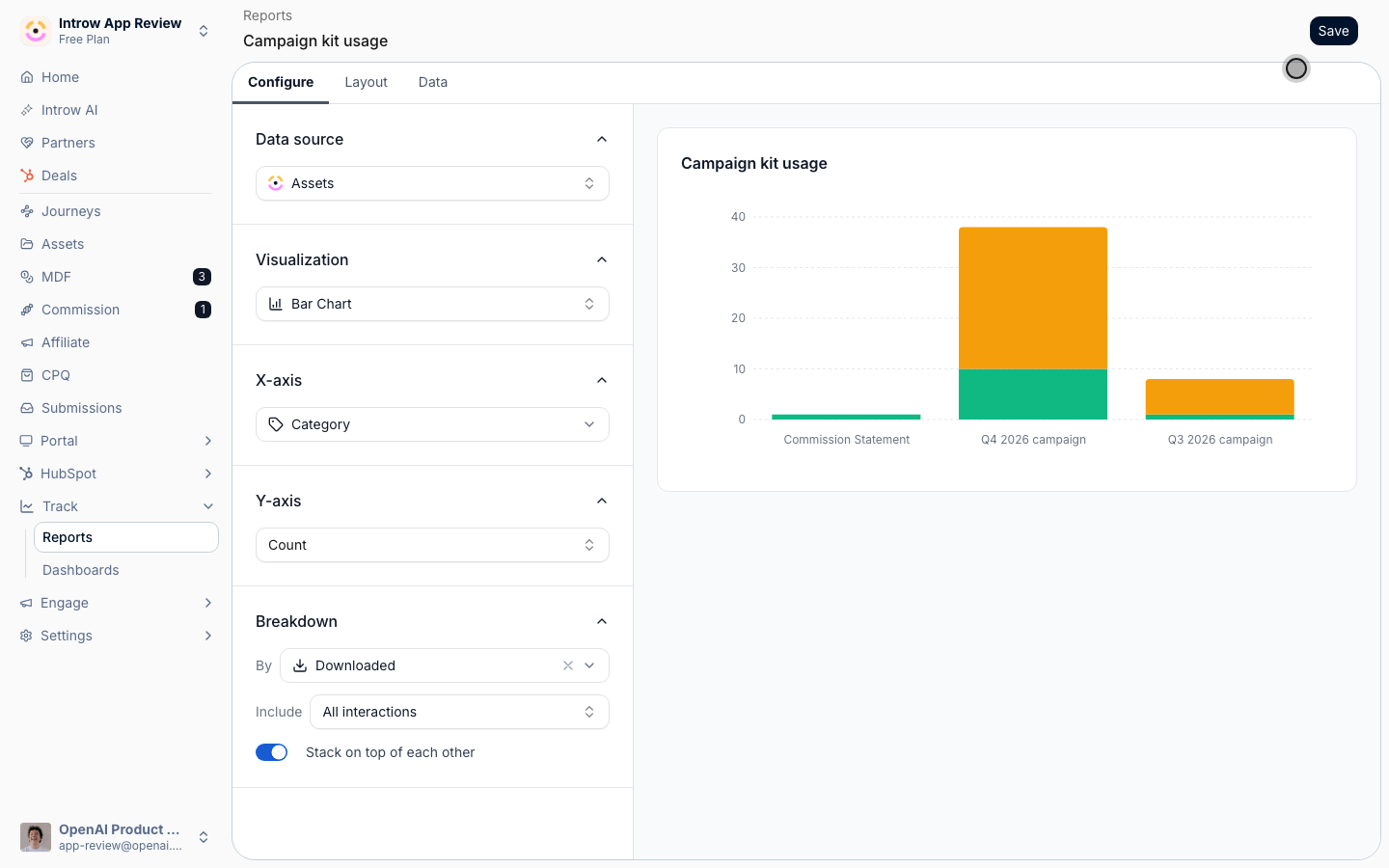
[**Report on campaign kit usage**](/features/tcma/attribution/guides/report-on-campaign-kit-usage)
Tag every asset in a campaign kit with one category, then build an Assets report that shows which kits partners view and download, and which partners use them.
* 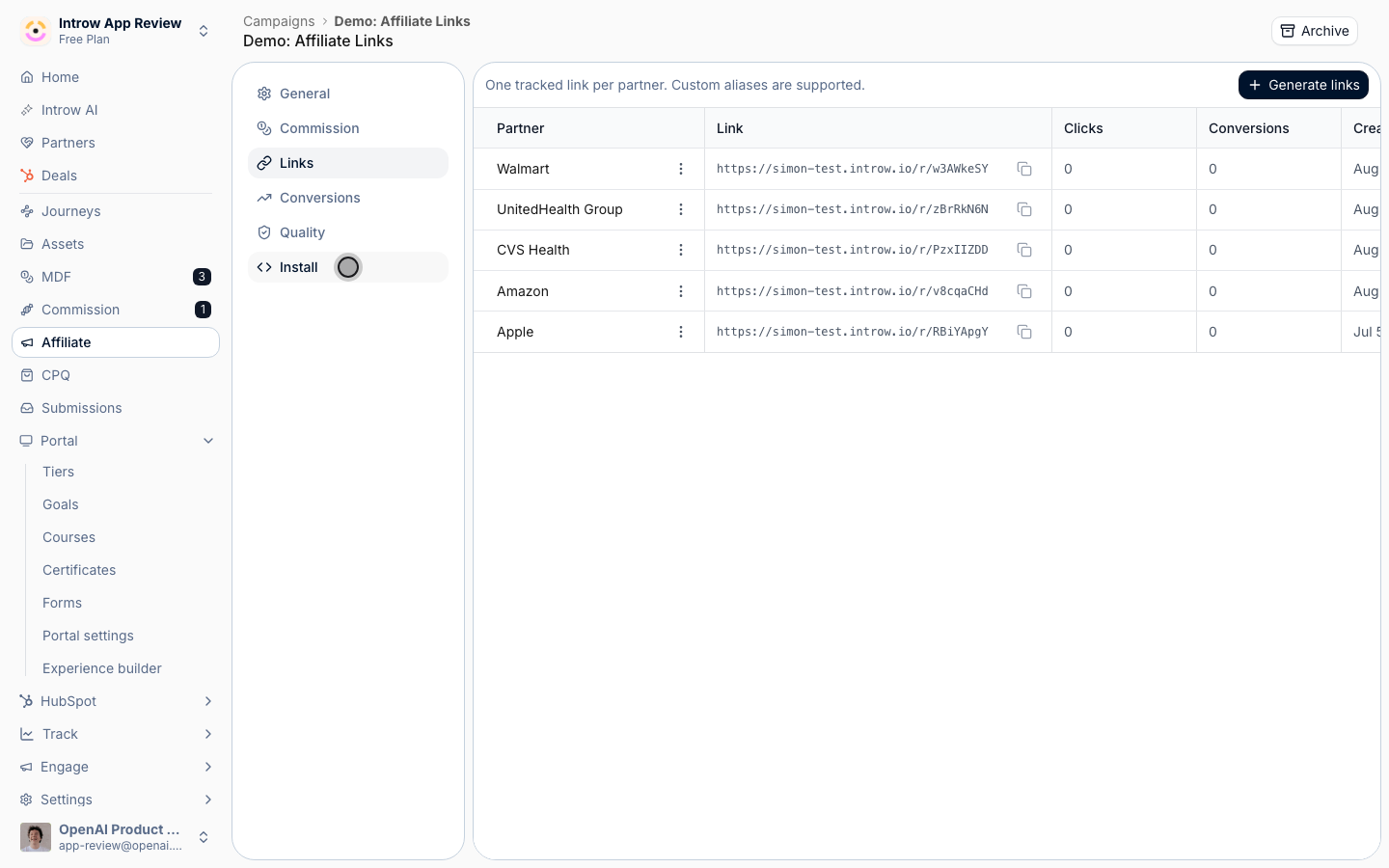
[**Track partner campaign attribution**](/features/tcma/attribution/guides/track-partner-campaign-attribution)
Give every partner a tracked link for your through-channel campaign, credit their clicks and signups, and land each conversion in your CRM with the partner attached.
## Limits
Asset reports group by country or region only through a CRM company property on the partner, such as **Company Country/Region**.
A partner with that property empty lands in **Unknown**, so fill it in your CRM before you compare regions.
Affiliate links have no tool on Introw's MCP servers today.
Partners copy their link from the campaign section in their portal.
Attribution only counts traffic that comes through the partner's link.
A partner who sends the campaign without it generates demand you cannot credit.
## Troubleshooting
Check the **Install** tab: the snippet must show **Installed** on your destination URL, and a conversion method must be set up.
Check the attribution model on the **General** tab, and whether the visitor clicked two partners' links inside the window.
Open the campaign's conversion form and check its CRM automation.
Confirm every asset in the kit carries the campaign's category, and that the report's date range covers the campaign.
This documentation is built and hosted on [Mintlify](https://mintlify.com), a developer documentation platform.