> ## Documentation Index
> Fetch the complete documentation index at: https://docs.introw.io/llms.txt
> Use this file to discover all available pages before exploring further.
# Track partner campaign attribution
> Give every partner a tracked link for your through-channel campaign, credit their clicks and signups, and land each conversion in your CRM with the partner attached.
A through-channel campaign runs in your partners' tools, so you only see what it drove if the partner's identity travels with every click.
This guide sets that up with an affiliate campaign: one tracked link per partner, conversions credited by rules you choose, and every conversion written to your CRM with the partner attached.
At the end, the kit you published tells partners which link to use, and the campaign reports its own results.
## What you'll achieve
Every partner running the campaign has one signed link to your landing page.
Clicks and signups are credited to the right partner inside a window you set.
Each signup lands in your CRM as a record with the partner on it.
Partners see their own link, clicks and conversions in their portal.
## Before you start
Partners need the kit before they need the link.
See [Enable partners with a campaign kit](/features/tcma/campaign-kits/guides/enable-partners-with-a-campaign-kit).
Choose the page the campaign promotes, for example a demo request or signup page.
You need edit access to it, or to its tag manager, to install tracking.
The conversion form is what writes each signup to your CRM.
If you do not have one, build a form with the fields you want on the record and connect it to your CRM first.
See [Connect a form to your CRM](/features/forms/crm-automations/guides/connect-a-form-to-your-crm).
Affiliate campaigns need the campaigns module on your plan.
If **Affiliate campaigns** is locked, ask your admin.
## Watch it
## Steps
### Create one campaign per through-channel campaign
Go to [Affiliate campaigns](https://app.introw.io/campaigns) and select **New campaign**.
In **New affiliate campaign**, set:
* **Name** - name it after the through-channel campaign, for example "Q4 2026 HubSpot campaign".
One affiliate campaign per through-channel campaign keeps results separate per campaign.
* **Conversion form** - the form Introw submits for every conversion, with the partner attributed.
Its CRM automation decides which record lands in your CRM.
* **Destination URL** - the landing page the kit promotes.
Every partner link redirects here.
Select **Create campaign**.
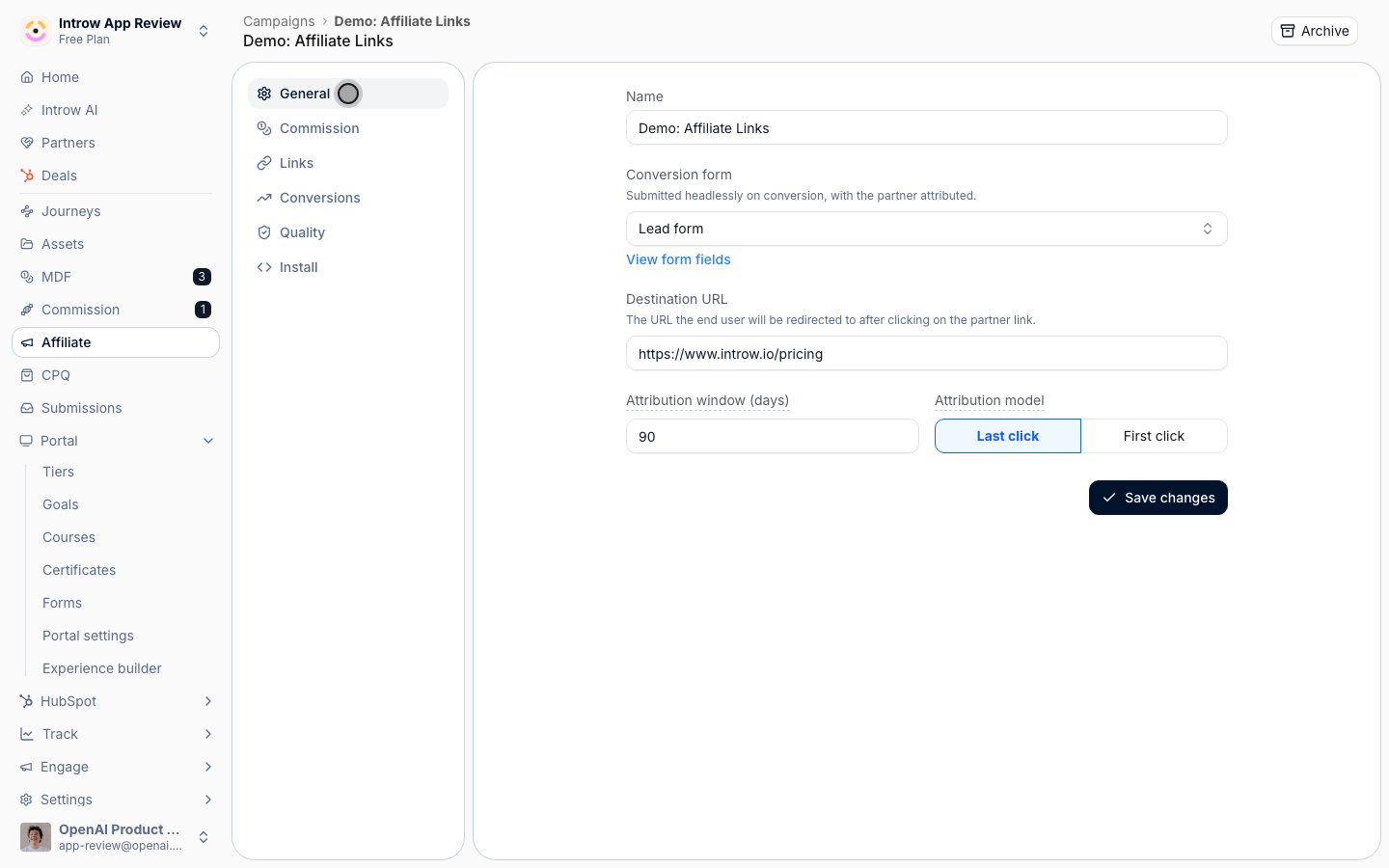
On the **General** tab, set:
* **Attribution window (days)** - how long a click keeps counting, from 1 to 365 days.
For a six-week campaign, 60 days covers the campaign plus a short buying delay.
* **Attribution model** - **Last click** credits the most recent partner a visitor clicked through.
**First click** credits the partner who introduced the visitor.
Last click is the common choice when several partners promote the same offer.
Select **Save changes**.
 On the **Commission** tab, turn on **Commissions** if the campaign pays partners per conversion.
Under **Reward type**, pick:
* **Fixed amount per conversion** - a flat amount for each credited conversion, entered in **Commission per conversion**.
This is the simple choice for a campaign bounty.
* **Commission plan** - rewards follow a commission plan you select.
Use it for revenue-based rewards.
Leave **Commissions** off to track the campaign without paying per conversion.
Select **Save changes**.
### Give partners their links
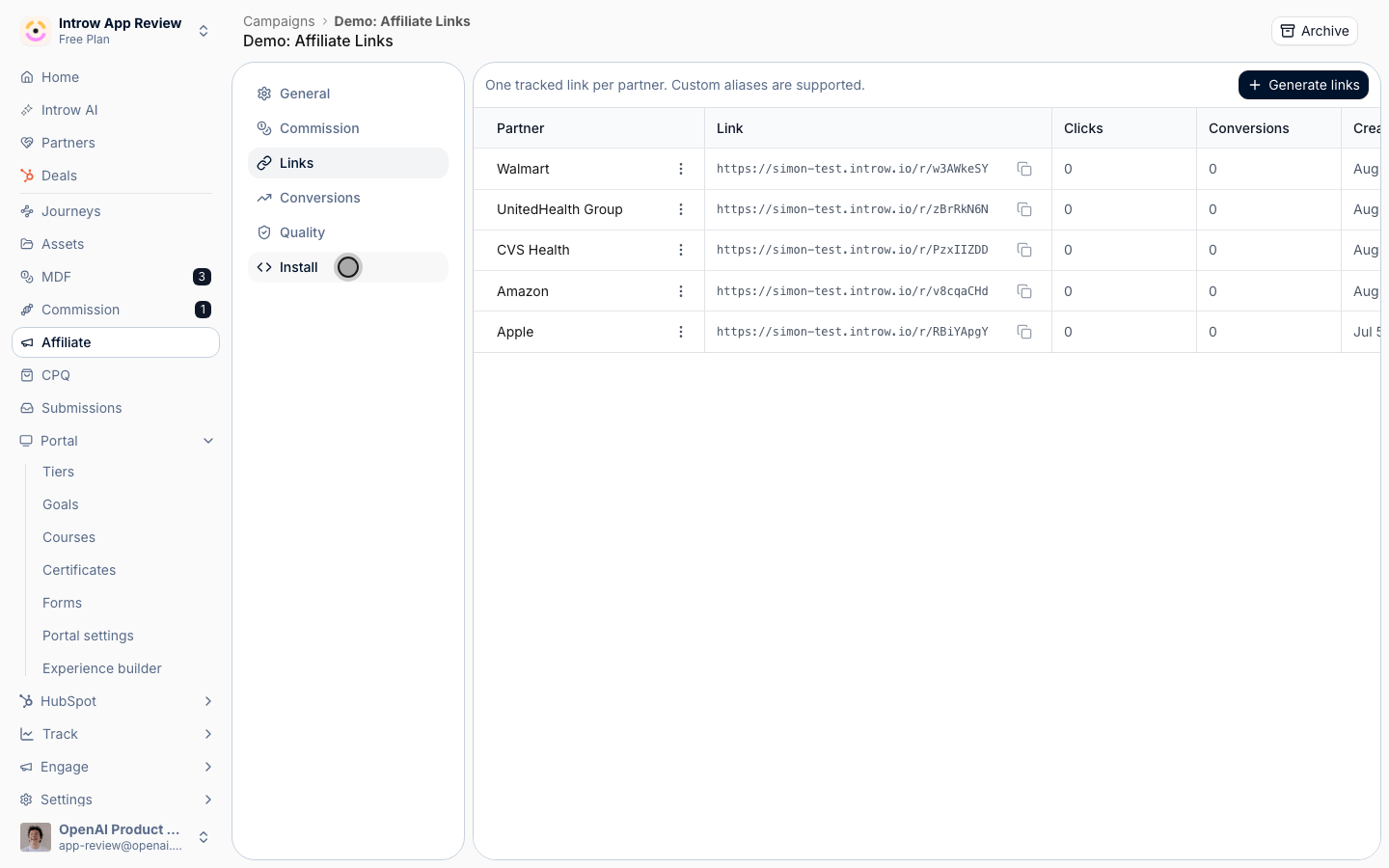
Open the **Links** tab, select **Generate links**, and pick the partners who received the kit in **Generate affiliate links**.
Each partner gets one signed link.
Partners who already have one are skipped, so you can run it again as more partners join.
On the **Commission** tab, turn on **Commissions** if the campaign pays partners per conversion.
Under **Reward type**, pick:
* **Fixed amount per conversion** - a flat amount for each credited conversion, entered in **Commission per conversion**.
This is the simple choice for a campaign bounty.
* **Commission plan** - rewards follow a commission plan you select.
Use it for revenue-based rewards.
Leave **Commissions** off to track the campaign without paying per conversion.
Select **Save changes**.
### Give partners their links
Open the **Links** tab, select **Generate links**, and pick the partners who received the kit in **Generate affiliate links**.
Each partner gets one signed link.
Partners who already have one are skipped, so you can run it again as more partners join.
 In **Experience builder**, add an **Affiliate Campaigns** section next to the campaign kit and select this campaign.
Each partner sees their own link, clicks and conversions there.
Publishing an experience that carries the section also creates a link for every partner in that publish who does not have one yet.
The kit should say it plainly: replace every link placeholder in the emails, posts and one-pager with your personal link.
A partner who sends the campaign without it drives demand you cannot credit.
### Turn on tracking
Open the **Install** tab, copy the snippet under **Add the tracking snippet**, and paste it into the `` of every page on the landing site.
One snippet covers every campaign in your organization.
Select **Re-check** after you deploy, and wait for the status to show **Installed**.
In **Experience builder**, add an **Affiliate Campaigns** section next to the campaign kit and select this campaign.
Each partner sees their own link, clicks and conversions there.
Publishing an experience that carries the section also creates a link for every partner in that publish who does not have one yet.
The kit should say it plainly: replace every link placeholder in the emails, posts and one-pager with your personal link.
A partner who sends the campaign without it drives demand you cannot credit.
### Turn on tracking
Open the **Install** tab, copy the snippet under **Add the tracking snippet**, and paste it into the `` of every page on the landing site.
One snippet covers every campaign in your organization.
Select **Re-check** after you deploy, and wait for the status to show **Installed**.
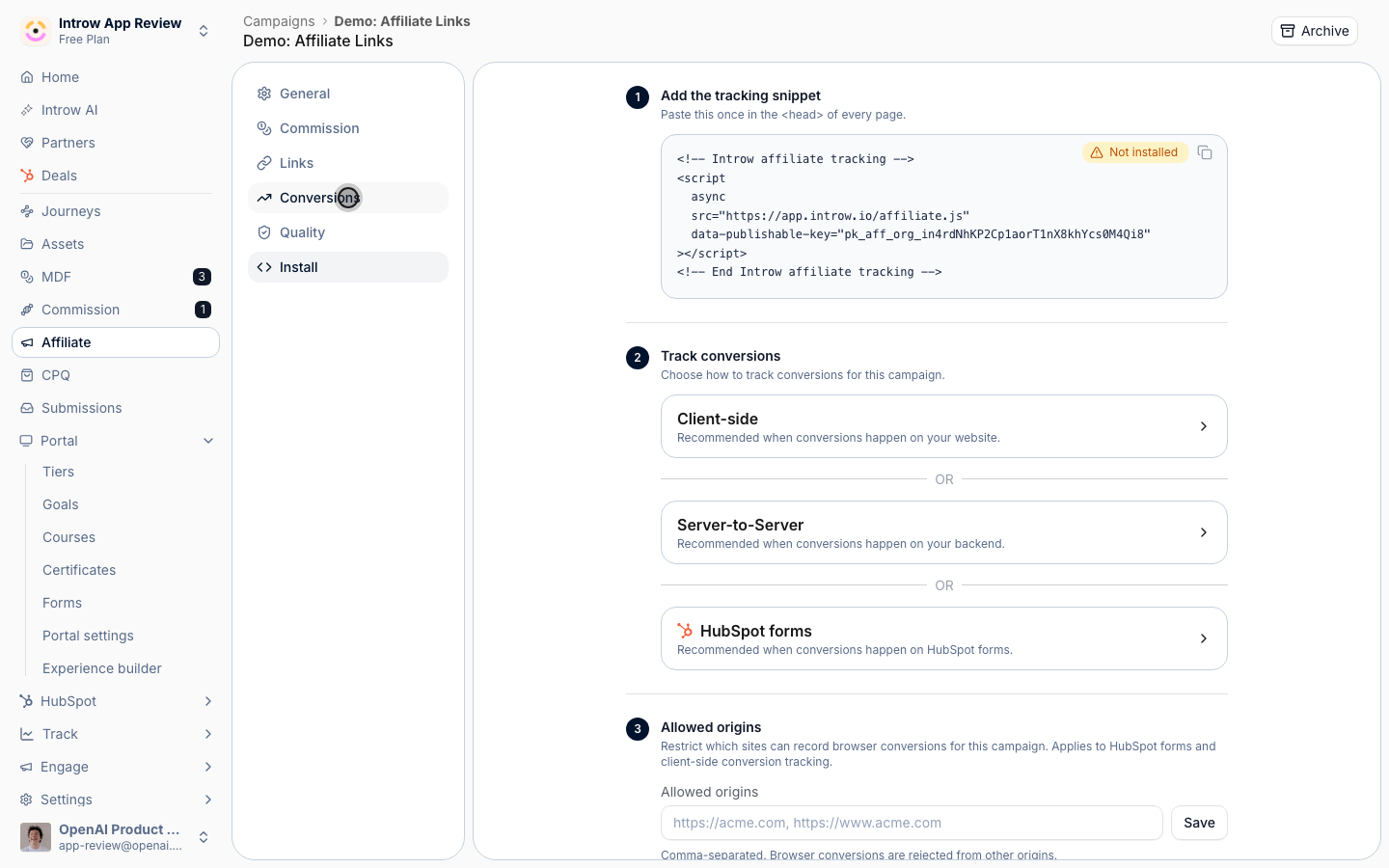 Under **Track conversions**, pick where the signup happens:
* **Client-side** - the signup happens on your website, and the page calls the tracking function.
* **Server-to-Server** - the signup happens on your backend, which posts the conversion with an API key.
* **HubSpot forms** - the signup is a HubSpot form, which is tracked automatically once the snippet is installed.
See [Set up affiliate conversion tracking](/features/affiliate/conversion-tracking/guides/set-up-affiliate-conversion-tracking) for each method.
Under **Allowed origins**, list your own sites so nobody else can record conversions for the campaign.
Select **Save**.
## Verify it worked
Open a partner's link in a private browser window and complete the signup on the landing page.
On the campaign's **Links** tab, the partner's **Clicks** and **Conversions** go up by one.
On the **Conversions** tab, the conversion shows with the partner, its status and any commission.
In your CRM, the record created by the conversion form carries the partner.
## Read the results
The **Conversions** tab shows **Clicks**, **Conversions**, **Conversion rate** and **Commission** for the whole campaign.
The **Links** tab shows the same per partner, so you see which partners actually ran the campaign.
Deals that come later from those signups are tracked on the campaign record.
See [Campaign Registration & ROI](/features/tcma/campaign-roi).
## What your partners experience
Partners copy their link from the campaign section in their portal and paste it into the emails and posts from the kit.
They send the campaign from their own tool.
Every click and signup they drive shows up in the same section, credited to them, with what they earned.
## Related
See which kits and assets partners open.
Every affiliate campaign setting in depth.
Block self-referrals and fake signups.
Full campaign attribution configuration options.
This documentation is built and hosted on [Mintlify](https://mintlify.com), a developer documentation platform.
Under **Track conversions**, pick where the signup happens:
* **Client-side** - the signup happens on your website, and the page calls the tracking function.
* **Server-to-Server** - the signup happens on your backend, which posts the conversion with an API key.
* **HubSpot forms** - the signup is a HubSpot form, which is tracked automatically once the snippet is installed.
See [Set up affiliate conversion tracking](/features/affiliate/conversion-tracking/guides/set-up-affiliate-conversion-tracking) for each method.
Under **Allowed origins**, list your own sites so nobody else can record conversions for the campaign.
Select **Save**.
## Verify it worked
Open a partner's link in a private browser window and complete the signup on the landing page.
On the campaign's **Links** tab, the partner's **Clicks** and **Conversions** go up by one.
On the **Conversions** tab, the conversion shows with the partner, its status and any commission.
In your CRM, the record created by the conversion form carries the partner.
## Read the results
The **Conversions** tab shows **Clicks**, **Conversions**, **Conversion rate** and **Commission** for the whole campaign.
The **Links** tab shows the same per partner, so you see which partners actually ran the campaign.
Deals that come later from those signups are tracked on the campaign record.
See [Campaign Registration & ROI](/features/tcma/campaign-roi).
## What your partners experience
Partners copy their link from the campaign section in their portal and paste it into the emails and posts from the kit.
They send the campaign from their own tool.
Every click and signup they drive shows up in the same section, credited to them, with what they earned.
## Related
See which kits and assets partners open.
Every affiliate campaign setting in depth.
Block self-referrals and fake signups.
Full campaign attribution configuration options.
This documentation is built and hosted on [Mintlify](https://mintlify.com), a developer documentation platform.