> ## Documentation Index
> Fetch the complete documentation index at: https://docs.introw.io/llms.txt
> Use this file to discover all available pages before exploring further.
# Campaign Attribution
> See which partner campaigns drove clicks, signups and deals, and which campaign kits partners actually open, with every conversion credited to the partner in your CRM.
export const Headless = ({children, intro = true}) => {
const [copied, setCopied] = useState(null);
const copy = event => {
const row = event.target.closest("li");
if (!row) return;
const text = row.textContent.trim();
try {
navigator.clipboard?.writeText(text);
} catch {}
setCopied(text);
setTimeout(() => setCopied(null), 1600);
};
return <>
{intro ?
Introw is headless by design: run everything here in plain language from Claude, ChatGPT,
Slack, Teams, or your own CRM through Introw's MCP server, with every
action written straight back to your CRM source of truth. The portal is one surface, never the only one.
:
The agentic motion - lifecycle deep dives and a Claude Code skill library that run your partner program from
Claude, ChatGPT, Slack, and your CRM.
}
;
};
export const Tour = ({children}) => {
const [active, setActive] = useState(0);
const wrappers = (Array.isArray(children) ? children : [children]).filter(c => c && c.props);
const frames = wrappers.length === 1 && Array.isArray(wrappers[0].props.children) ? wrappers[0].props.children.filter(c => c && c.props) : [];
if (frames.length < 2) {
return
;
> Partners run your campaign from their own tools.
> Campaign Attribution tells you what it produced: the clicks and signups each partner drove, and which kits they actually used.
## The problem it solves
A campaign that runs outside your tools usually runs outside your numbers too.
| Without Introw | With Introw |
| - | - |
| Partner campaigns are a black box | Every click ties back to a partner |
| Signups arrive with no partner on them | The partner is on the CRM record |
| You guess which kit worked | You see which kits partners open |
| Partners argue about credit | One signed link per partner |
## Impact
Partners keep running campaigns when the credit for them is automatic and visible.
That is the difference between a channel that sends you demand and one that sends you excuses.
for your business
* **In your CRM**
Each conversion lands as a form submission with the partner attached, next to every other lead source in your CRM
* **Trustworthy**
Signed links, a window you set and one attribution model per campaign decide credit, so nobody settles it by hand at quarter end
* **No new tool**
Partners paste their link into the email or post they already send, and the tracking travels with it
for your partners
* **Self-serve**
They find their own link and their own clicks, signups and earnings in the portal, without asking you
* **Enabled**
The kit already tells them where the link goes, so every call to action is tracked from the first send
* **Efficient**
One link per campaign works across email, LinkedIn and their website
[A day in the life of your partners](/days-in-the-life)
* **Partner Marketing** - proof of which campaigns and kits worked
* **Partner Operations** - credit decided by rules, not by hand
* **RevOps** - partner signups on the CRM record
* **Head of Partnerships** - partner demand you can report upward
* **Partner marketers** - their own link and their own numbers
## See it work
* 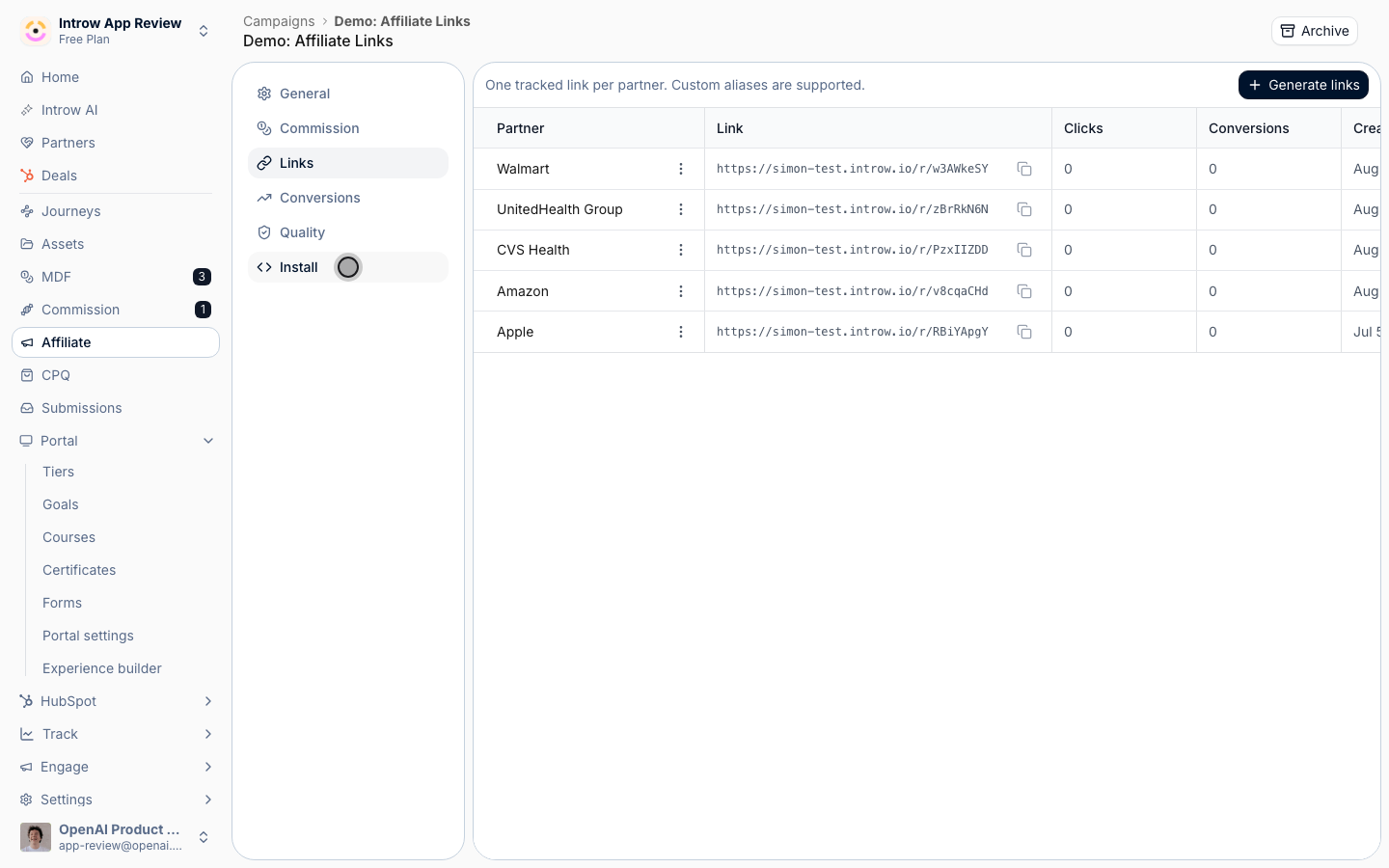
**One link per partner**
Every click from a partner's campaign is tagged to that partner.
* 
**Clicks and sales**
Sales come back per partner, written to your CRM through the form.
* 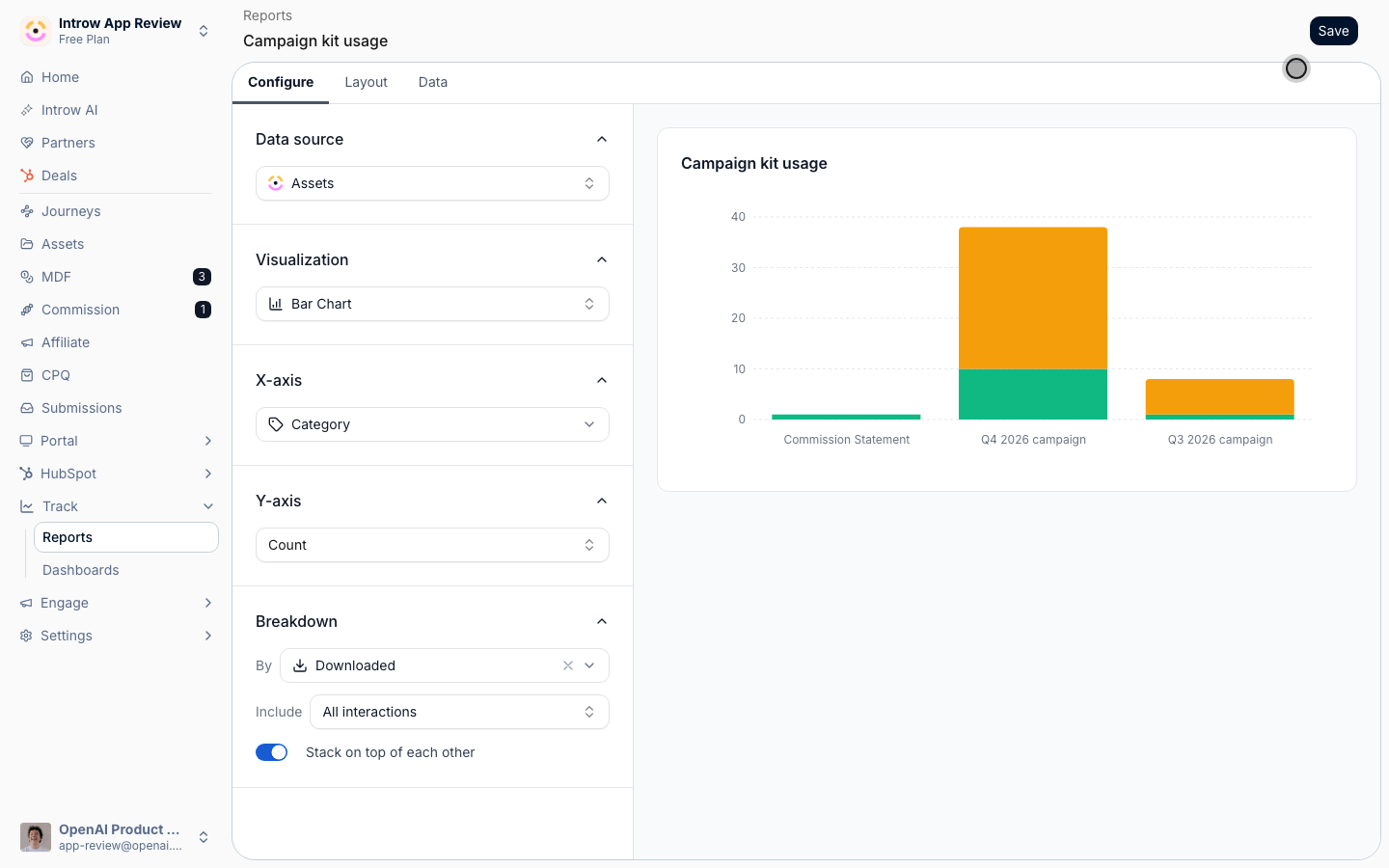
**Usage per campaign**
Views and downloads per kit, from one category on every asset.
* 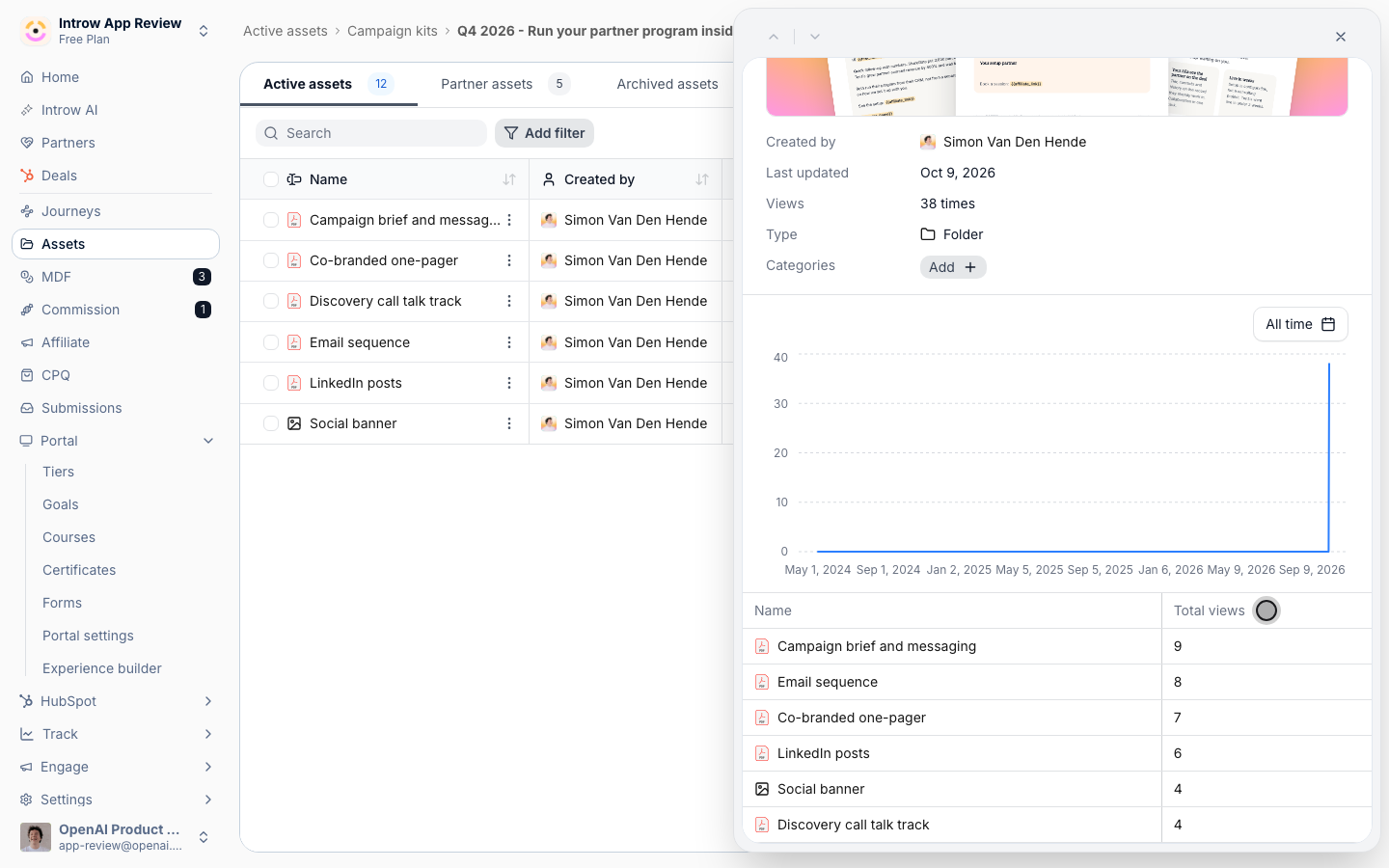
**Who opened the kit**
The kit folder adds up the views of every asset inside it.
## How it works
Campaign Attribution answers two questions about a through-channel campaign: what did it drive, and what did partners use to run it.
The first comes from affiliate links.
The second comes from asset engagement.
Every partner in an affiliate campaign gets one signed, tracked link that points at your destination page.
The partner puts that link in every call to action of the campaign they send from their own tool.
When a visitor clicks, Introw records the click against the partner, including any UTM parameters on the URL.
When that visitor converts within the attribution window you set, the conversion is credited by your attribution model, last click or first click.
Each conversion becomes a form submission on the campaign's conversion form, and that form's CRM automations write it into your CRM with the partner attached.
The campaign can pay the partner a fixed amount per conversion or follow a commission plan.
Kit usage comes from the content side.
Every view and download of a kit asset is recorded against the partner contact and the partner.
You read it per asset on its Engagement tab, or across the program in a report on the Assets data source.
Tag every asset in a kit with one category, for example the campaign name, and the report groups usage per campaign.
Asset reports group by asset, partner contact, file type, category and interaction, and by anything on the partner: tier, phase, partner manager, or a CRM company property such as country or region.
Deals the campaign creates further down the line are covered by [Campaign Registration & ROI](/features/tcma/campaign-roi), which links registered deals back to the campaign record.
```mermaid theme={"theme":{"light":"github-light","dark":"github-dark"}}
flowchart LR
kit["Campaign kit"] --> send["Partner sends from own tool"]
send --> click["Tracked link click"]
click --> conversion["Credited conversion"]
conversion --> crm["Form submission in CRM"]
kit --> usage["Kit views and downloads"]
usage --> report["Assets report by category"]
```
## Run it from your AI assistant
* Which partners viewed or downloaded the Q4 campaign kit this month?
* Show the partner activity for Apple in the last 30 days, including asset views.
* Which form submissions came in from partners this week?
## Going deeper
Setup, configuration, and all how-to guides.
Endpoints and code.
**Works with**
Attribution covers the clicks, ROI covers the deals the campaign produced.
Usage reports read the kits you publish.
Every partner launches with their own tracked link.
Signups on your site become credited conversions.
Report on kit usage by asset, category and partner.
This documentation is built and hosted on [Mintlify](https://mintlify.com), a developer documentation platform.