> ## Documentation Index
> Fetch the complete documentation index at: https://docs.introw.io/llms.txt
> Use this file to discover all available pages before exploring further.
# AI Campaign Remix
> Partners point their own AI assistant at your campaign kit, rewrite it with their own services and voice, and launch it from the tools they already use.
export const Headless = ({children, intro = true}) => {
const [copied, setCopied] = useState(null);
const copy = event => {
const row = event.target.closest("li");
if (!row) return;
const text = row.textContent.trim();
try {
navigator.clipboard?.writeText(text);
} catch {}
setCopied(text);
setTimeout(() => setCopied(null), 1600);
};
return <>
{intro ?
Introw is headless by design: run everything here in plain language from Claude, ChatGPT,
Slack, Teams, or your own CRM through Introw's MCP server, with every
action written straight back to your CRM source of truth. The portal is one surface, never the only one.
:
The agentic motion - lifecycle deep dives and a Claude Code skill library that run your partner program from
Claude, ChatGPT, Slack, and your CRM.
}
;
};
export const Tour = ({children}) => {
const [active, setActive] = useState(0);
const wrappers = (Array.isArray(children) ? children : [children]).filter(c => c && c.props);
const frames = wrappers.length === 1 && Array.isArray(wrappers[0].props.children) ? wrappers[0].props.children.filter(c => c && c.props) : [];
if (frames.length < 2) {
return
;
> Your campaign kit becomes something a partner's AI assistant can work with. The partner asks their own assistant for the kit, it reads the brief and the emails, rewrites them with the partner's services and voice, and the partner sends the result from their own tools.
## The problem it solves
Partners rarely run your campaign as you wrote it.
They need it in their own words, with their own offer, in their own tool.
| Without Introw | With Introw |
| - | - |
| Partners rewrite the kit by hand | Their assistant rewrites it in minutes |
| Your message gets lost in the rewrite | The brief travels with every rewrite |
| Small partners never get round to it | Every partner can launch the same week |
| You learn about a campaign afterwards | The assistant registers it as it launches |
## Impact
Partners who sell for several vendors launch the campaign that is easiest to make their own.
When their own assistant can do that in one conversation, yours is the one that goes out.
for your business
* **AI, not admin**
The partner's assistant reads the kit and adapts it, so you stop writing a custom version for every partner that asks for one
* **No new tool**
Partners work in Claude, ChatGPT or another assistant they already use, and send from HubSpot, Mailchimp or LinkedIn
* **Cost to run**
One kit serves every partner, because the rewrite happens on their side instead of in your agency queue
for your partners
* **Self-serve**
They ask for the kit, get a draft in their own voice and send it, without waiting on your marketing team
* **Enabled**
The brief, the proof points and the do and don't list reach the assistant, so the rewrite stays on message
* **Efficient**
One conversation takes them from kit to ready-to-send emails and a registered campaign
[A day in the life of a reseller](/days-in-the-life/reseller)
* **Partner Marketing** - one kit, adapted by every partner
* **Partner Operations** - campaigns registered as they launch
* **Partner marketers** - a ready draft in their own voice
## See it work
* 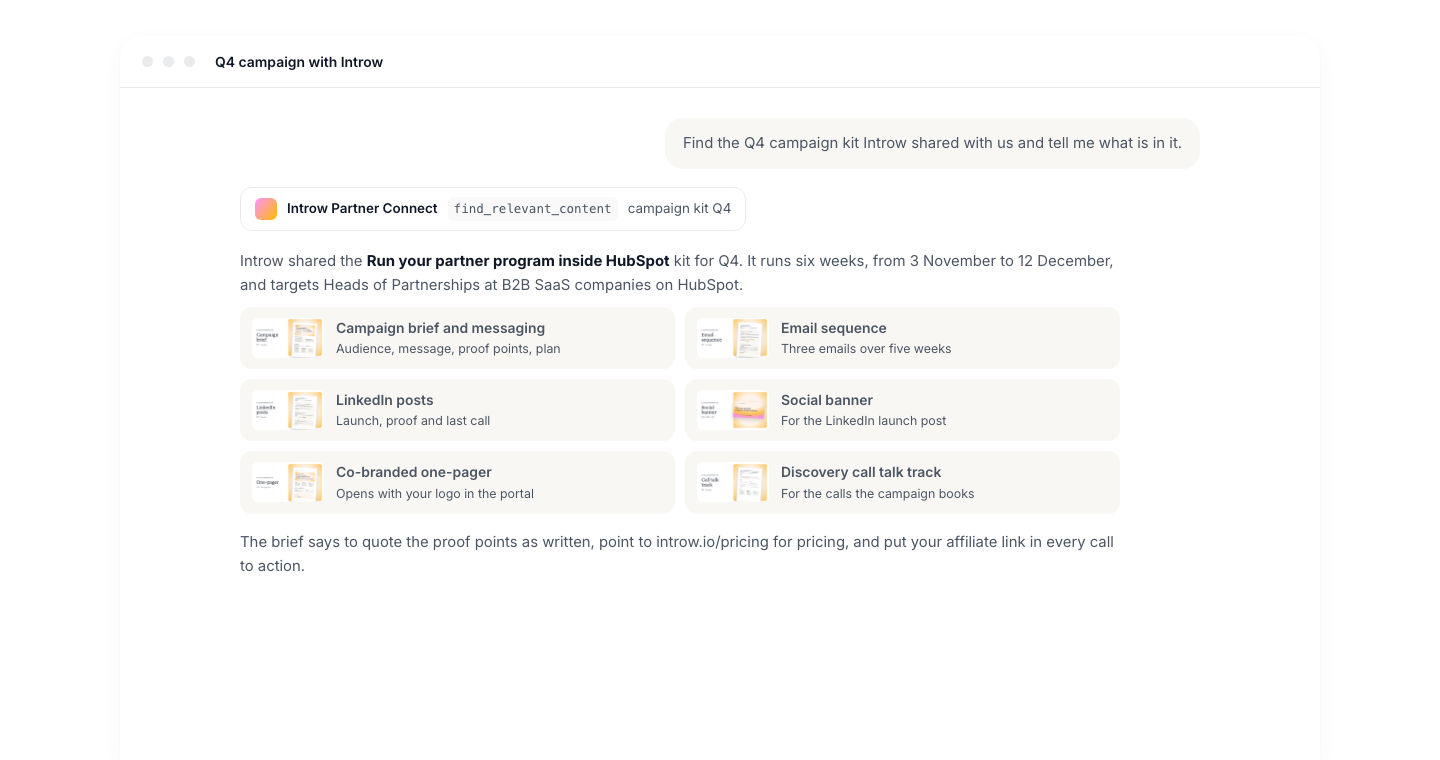
**Find the kit**
The partner asks their own assistant, and it finds your kit in their portal.
* 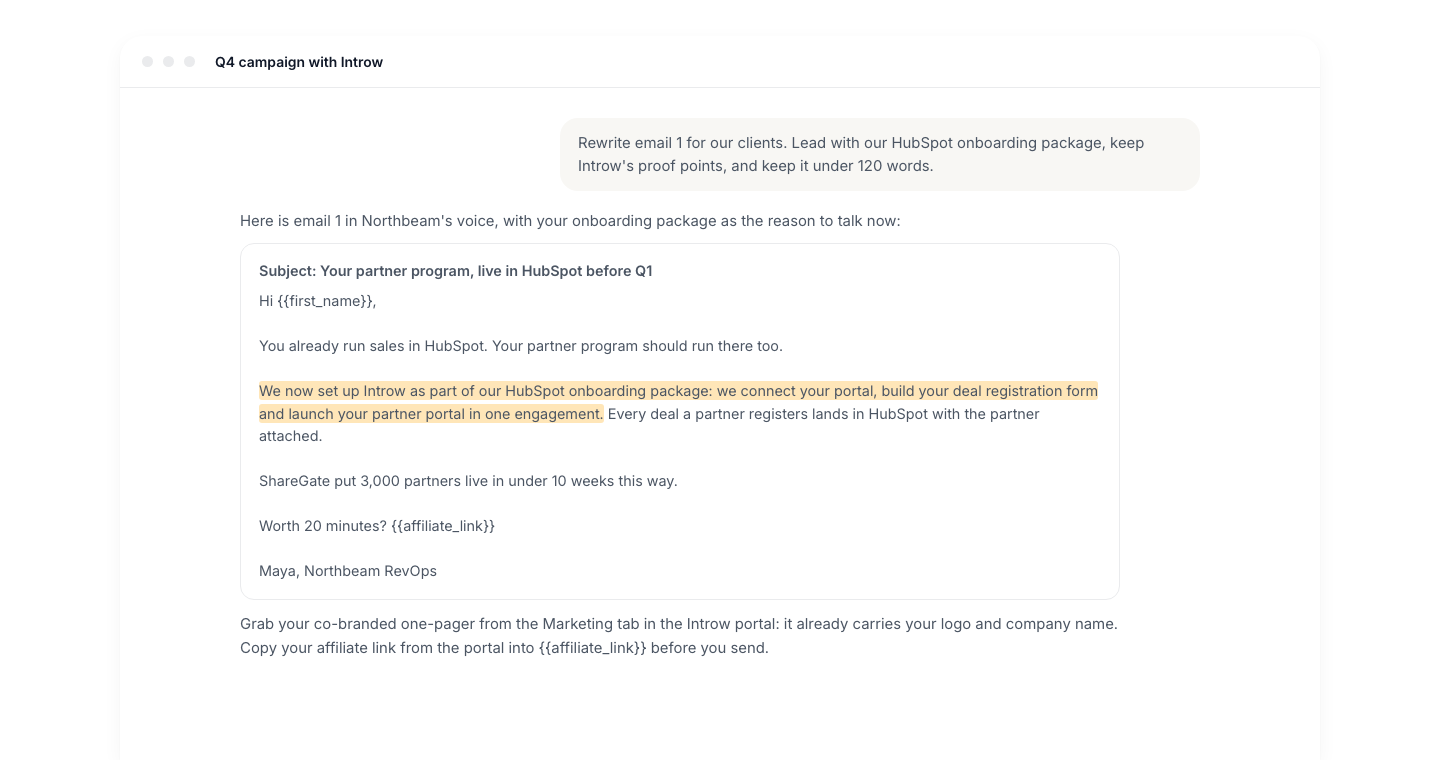
**Make it theirs**
It rewrites your emails around the partner's own offer and keeps your proof points.
* 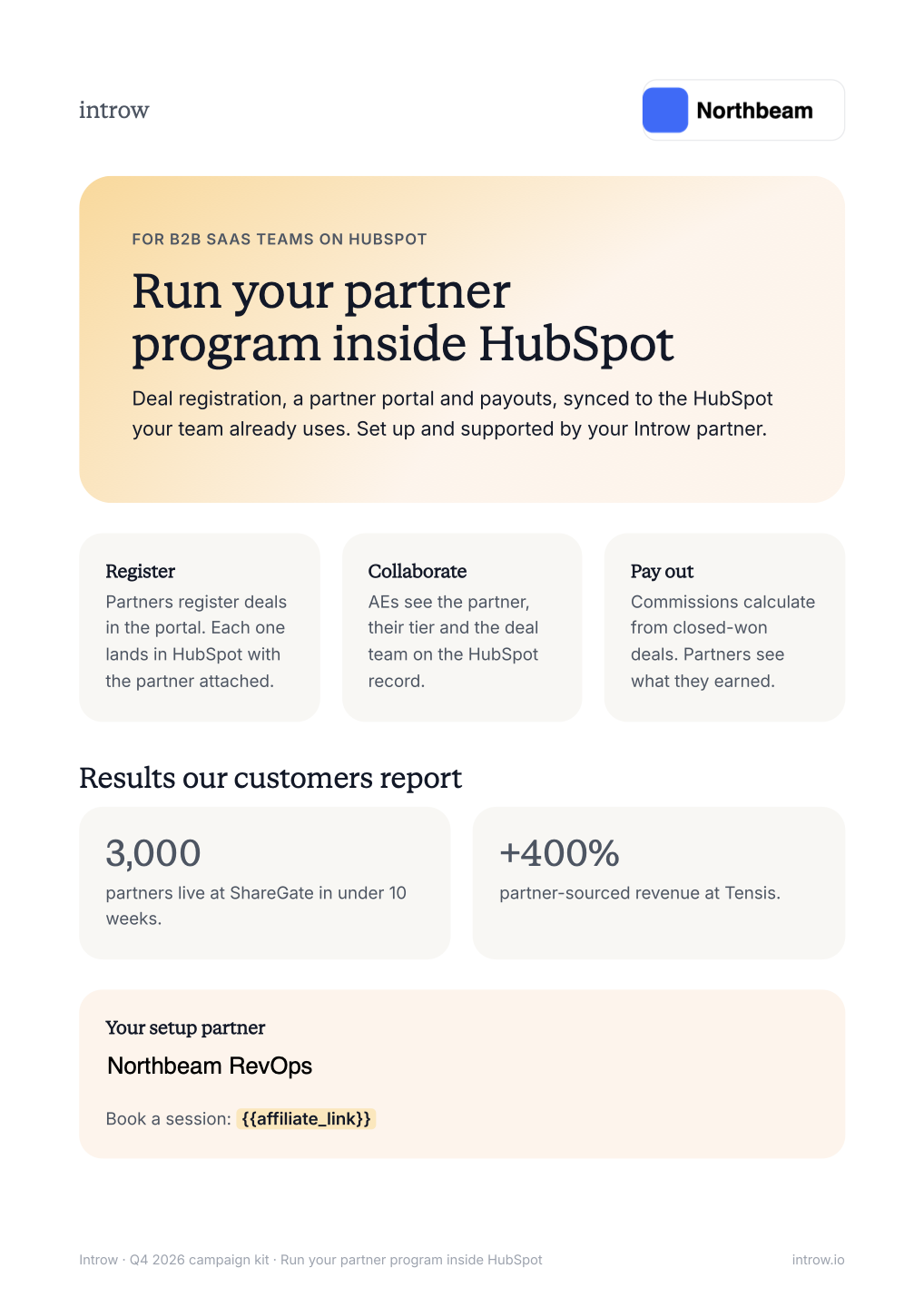
**Their logo, your one-pager**
The one-pager opens in the portal with the partner's name and logo on it.
* 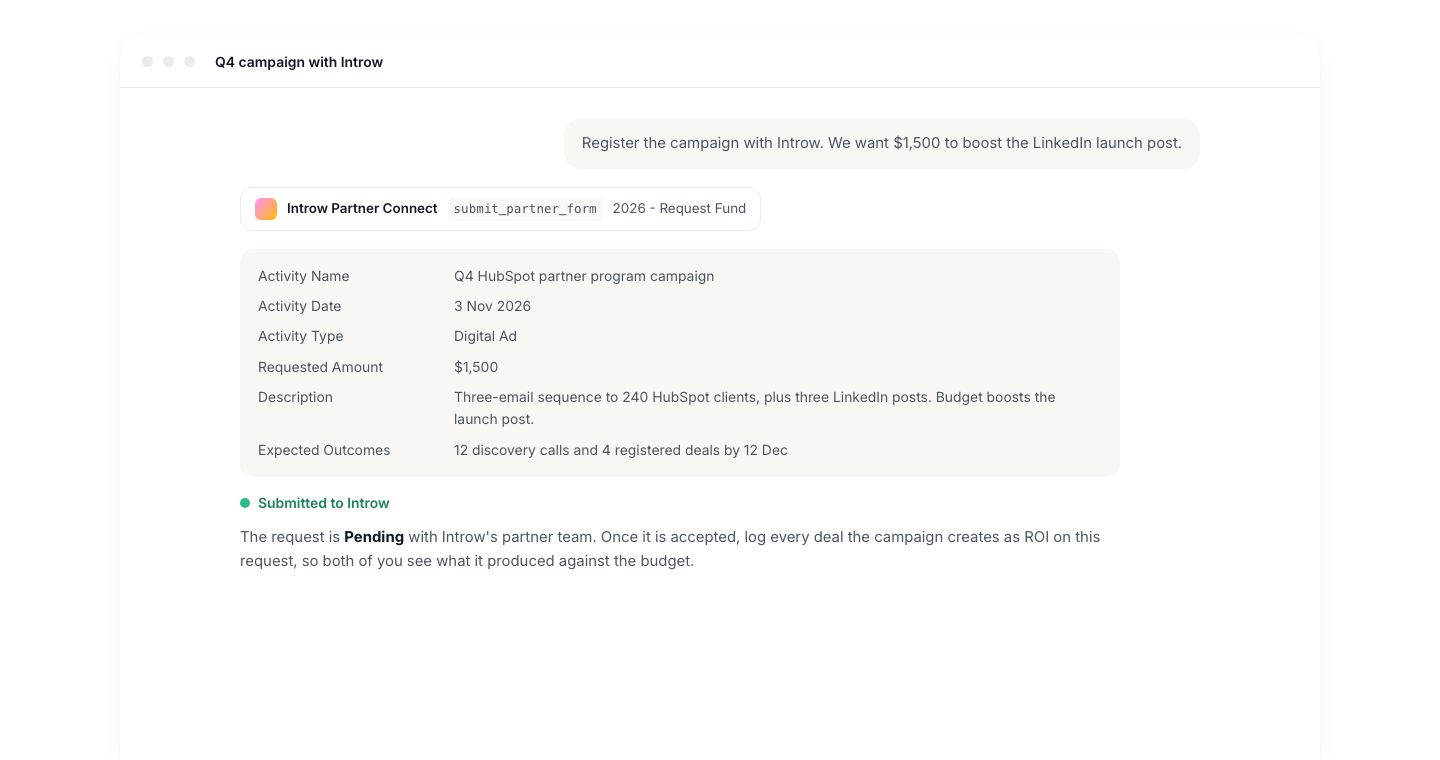
**Register the campaign**
The assistant submits your campaign form, so you see what is running.
## How it works
Your campaign kit lives as assets in the partner portal, usually a folder per campaign on an Asset Hub.
A partner connects their own AI assistant to Introw once, over the partner MCP connector, and from then on the assistant can search everything their portal shows them.
When the partner asks for the campaign, the assistant finds the brief, the email sequence and the social posts, reads their text and returns a link to each one.
The rewrite happens on the partner's side.
The partner tells the assistant what they sell, who their clients are and how they write, and the assistant turns your emails and posts into their version while keeping the message, the proof points and the rules in your brief.
The partner then sends the result from their own tools, for example as a HubSpot or Mailchimp email, or a LinkedIn post.
Two things stay in the portal by design.
Co-branded collateral is personalized when the partner opens it there, so the one-pager they download already carries their logo and company name.
Affiliate links are copied from the portal, because each one is unique to the partner.
The assistant closes the loop.
Through the same connection it can open the form your partners use to register or fund a campaign, such as an MDF request, and submit it with the partner's details.
You see the campaign as a record in Introw and in your CRM, and any deals the partner logs against it count toward its ROI.
```mermaid theme={"theme":{"light":"github-light","dark":"github-dark"}}
flowchart LR
kit["Campaign kit in the portal"] --> ask["Partner asks their assistant"]
ask --> read["Assistant reads the brief and emails"]
read --> remix["Rewritten with the partner's services"]
remix --> send["Sent from the partner's own tool"]
send --> register["Campaign registered through a form"]
```
## Run it from your AI assistant
* Find the Q4 campaign kit and summarize the brief, the audience and the proof points I can use.
* Rewrite email 1 of the campaign sequence for my clients, in my voice, and mention our HubSpot onboarding services.
* How much marketing fund budget do I have left, and what do I need to submit to fund this campaign?
* Register this campaign with the vendor through the campaign funding form.
## Going deeper
Setup, what the assistant can do, and all how-to guides.
Endpoints and code.
**Works with**
The kit is what the partner's assistant reads and rewrites.
Partners connect the assistant they already use, once, for every vendor.
The same assistant registers the campaign it just built.
The one-pager the assistant points to already carries the partner's logo.
This documentation is built and hosted on [Mintlify](https://mintlify.com), a developer documentation platform.