> ## Documentation Index
> Fetch the complete documentation index at: https://docs.introw.io/llms.txt
> Use this file to discover all available pages before exploring further.
# Register a deal from chat
> How the Introw agent turns a Slack, Teams, or WhatsApp message into a validated deal registration using your own form, including missing-field prompts.
A partner rep types one sentence in your shared channel and a registered, attributed deal lands in your CRM. The part worth understanding before you tell partners to work this way is what happens in between, because the agent does not shortcut your qualification.
## What you'll achieve
Confidence that a deal registered from chat is the same quality as one registered through your portal form: same fields, same required values, same dropdown options, same validation, and the same downstream automations and approval gates.
## Before you start
The agent works out which partner it is talking to from the channel it is in, so the shared channel has to be mapped to that partner on your side. Without the mapping there is no partner context and the agent cannot act. See [Configure Slack or Teams for partner activity](/features/integrations/chat/guides/configure-the-chat-integration).
The in-channel agent is the same agent. See [Partner Support](/features/ai/partner-support).
The agent submits your forms, it does not invent a schema. Whatever you have attached to your portal is what it can offer: deal registration, lead sharing, MDF requests, onboarding, and anything else you have configured.
## What the rep does
In the shared channel, the rep mentions the agent and says what they want, in their own words and their own language:
```
@Introw share this $20k deal with Acme for me
```
That is the whole interface. There is no command syntax and no form to open.
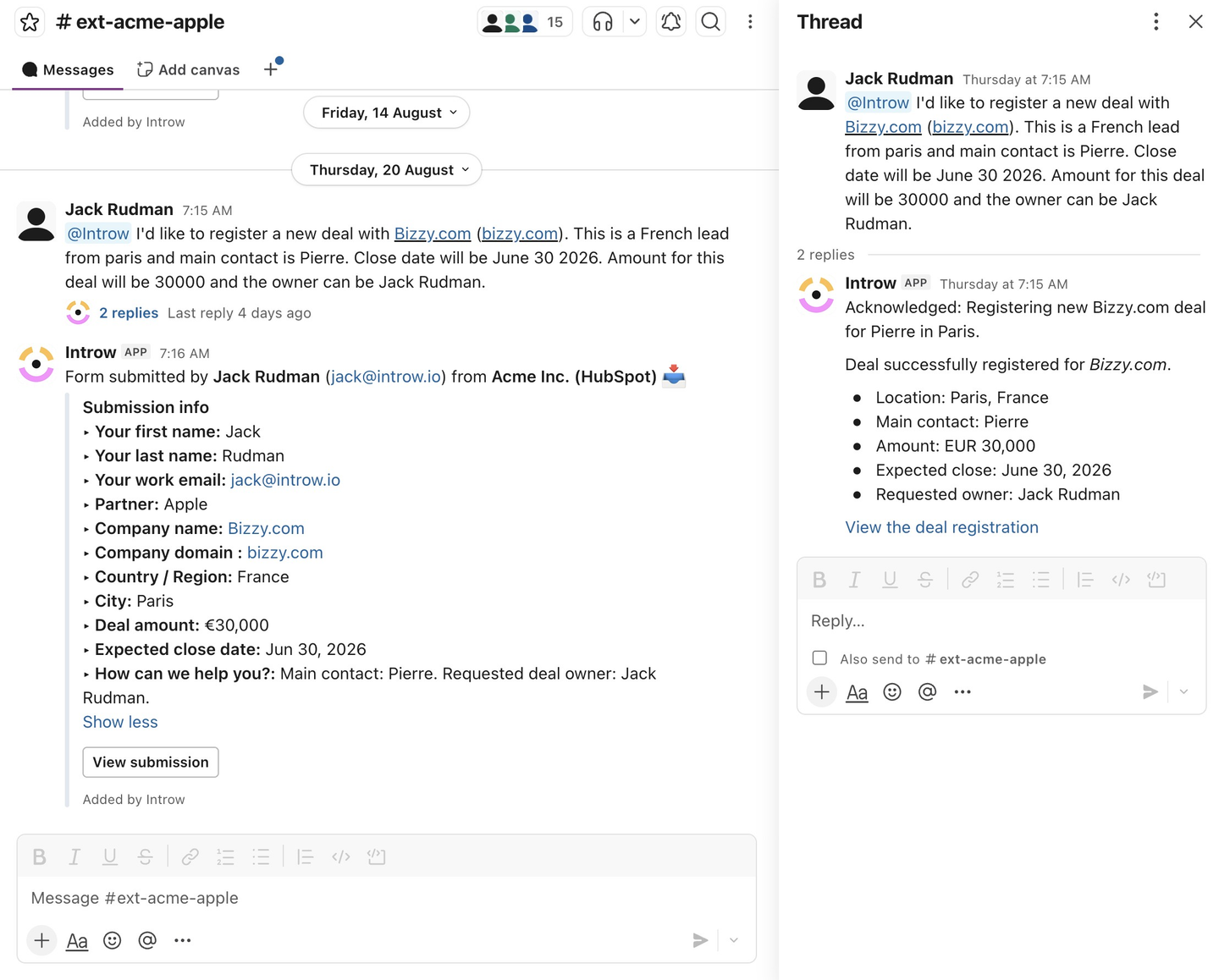 ## What the agent does with it
The agent matches the request against the forms you have attached to that partner's portal, whether they are reachable through a CTA, a shared pipeline, or anywhere else in the experience. If you have several plausible forms, it resolves which one the request means rather than defaulting to the first.
It pulls the actual field definitions: labels, types, which are required, and the permitted dropdown options. Your qualification questions are its checklist.
It maps the sentence onto those fields and normalizes the values: "\$20k" becomes 20000, "end of month" becomes a date, and a dropdown answer is matched to one of your real option labels. Partner fields are prefilled from the channel's partner context.
Anything required and still missing, or provided in a form that fails validation, comes back as a follow-up question in the same thread. The rep answers in chat. Nothing is guessed and nothing is left blank.
The data is validated against the same schema your portal form uses. Until it passes, the agent keeps asking. Once it passes, it submits.
From there it is an ordinary submission: your conflict checks, duplicate handling, approval gates, notifications, and CRM automations all run exactly as they do for a portal submission. Registering from chat changes the entry point, not the process.
The rep always has an escape hatch. Every exchange includes a button to open the real form and finish it manually, so a rep who would rather click than type never gets trapped in a conversation.
## What the agent cannot collect in chat
Four field types need the real form, and the agent will say so and hand over the link rather than attempt them:
| Field type | Why |
| ----------------- | --------------------------------------------- |
| File upload | A file cannot be passed in a chat answer |
| Batch upload | Same, and it is a bulk flow by design |
| CRM object picker | The rep needs to browse and select a record |
| Quote selector | The rep needs to pick from real quote records |
If a required field on your registration form is one of these, chat registration for that form will always end in a handoff to the form. Worth knowing before you tell a partner "just ask in Slack": if you want chat to complete end to end, keep those field types off the forms you expect partners to submit conversationally.
## The same thing on WhatsApp
WhatsApp behaves identically once it is set up, with one difference in how the agent knows who it is talking to: there is no channel to map, so the sender is matched on the phone number of their contact record in your CRM. A rep whose contact has no phone number, or a different one, will not be recognized. See [Set up WhatsApp](/features/integrations/chat/guides/set-up-whatsapp).
## Verify it worked
Ask the agent to register something from a mapped test channel, deliberately leaving out a required field. It should come back asking for exactly that field, by its label from your form, and refuse to submit until you answer. Then check the submission in Introw and confirm your normal approval and automation path ran.
## Troubleshooting
* **The agent does not respond** - the partner support agent is not enabled, or the channel is not mapped to a partner.
* **It offers the wrong form** - several similar forms are attached to that portal; make their names and purposes distinguishable.
* **It always ends with "open the form"** - a required field on that form is one of the four types above.
* **It says it cannot find a form** - nothing matching is attached to that partner's experience.
* **WhatsApp does not recognize a rep** - their CRM contact has no matching phone number.
## Related
Turn on the WhatsApp number partners text.
Every entry point partners can register through.
The agent that answers and acts in the channel.
Connect the workspace and map channels.
## What the agent does with it
The agent matches the request against the forms you have attached to that partner's portal, whether they are reachable through a CTA, a shared pipeline, or anywhere else in the experience. If you have several plausible forms, it resolves which one the request means rather than defaulting to the first.
It pulls the actual field definitions: labels, types, which are required, and the permitted dropdown options. Your qualification questions are its checklist.
It maps the sentence onto those fields and normalizes the values: "\$20k" becomes 20000, "end of month" becomes a date, and a dropdown answer is matched to one of your real option labels. Partner fields are prefilled from the channel's partner context.
Anything required and still missing, or provided in a form that fails validation, comes back as a follow-up question in the same thread. The rep answers in chat. Nothing is guessed and nothing is left blank.
The data is validated against the same schema your portal form uses. Until it passes, the agent keeps asking. Once it passes, it submits.
From there it is an ordinary submission: your conflict checks, duplicate handling, approval gates, notifications, and CRM automations all run exactly as they do for a portal submission. Registering from chat changes the entry point, not the process.
The rep always has an escape hatch. Every exchange includes a button to open the real form and finish it manually, so a rep who would rather click than type never gets trapped in a conversation.
## What the agent cannot collect in chat
Four field types need the real form, and the agent will say so and hand over the link rather than attempt them:
| Field type | Why |
| ----------------- | --------------------------------------------- |
| File upload | A file cannot be passed in a chat answer |
| Batch upload | Same, and it is a bulk flow by design |
| CRM object picker | The rep needs to browse and select a record |
| Quote selector | The rep needs to pick from real quote records |
If a required field on your registration form is one of these, chat registration for that form will always end in a handoff to the form. Worth knowing before you tell a partner "just ask in Slack": if you want chat to complete end to end, keep those field types off the forms you expect partners to submit conversationally.
## The same thing on WhatsApp
WhatsApp behaves identically once it is set up, with one difference in how the agent knows who it is talking to: there is no channel to map, so the sender is matched on the phone number of their contact record in your CRM. A rep whose contact has no phone number, or a different one, will not be recognized. See [Set up WhatsApp](/features/integrations/chat/guides/set-up-whatsapp).
## Verify it worked
Ask the agent to register something from a mapped test channel, deliberately leaving out a required field. It should come back asking for exactly that field, by its label from your form, and refuse to submit until you answer. Then check the submission in Introw and confirm your normal approval and automation path ran.
## Troubleshooting
* **The agent does not respond** - the partner support agent is not enabled, or the channel is not mapped to a partner.
* **It offers the wrong form** - several similar forms are attached to that portal; make their names and purposes distinguishable.
* **It always ends with "open the form"** - a required field on that form is one of the four types above.
* **It says it cannot find a form** - nothing matching is attached to that partner's experience.
* **WhatsApp does not recognize a rep** - their CRM contact has no matching phone number.
## Related
Turn on the WhatsApp number partners text.
Every entry point partners can register through.
The agent that answers and acts in the channel.
Connect the workspace and map channels.