> ## Documentation Index
> Fetch the complete documentation index at: https://docs.introw.io/llms.txt
> Use this file to discover all available pages before exploring further.
# Invoices
> Configure the MDF invoice form and reimbursement statement: line items from budget or claims, PO number and PDF, approval, and marking a project paid.
export const Rail = ({children}) =>
{children}
;
## Where it lives
Invoices sits under **MDF**, at [Marketing Funds](https://app.introw.io/marketing-funds).
 ## Before you start
| You need | Why | Fix it |
| -------------------------------- | ------------------------------------ | --------------------------------------------------------------------------------- |
| A fund with an approved project | You reimburse against one | [Set up a fund](/features/mdf/funds-allocation/guides/set-up-an-mdf-program) |
| Write access to MDF and forms | The invoice step is a form | [Internal roles](/features/access/team-management/guides/create-an-internal-role) |
| The invoice step on the timeline | Otherwise there is nothing to submit | [Set up a fund](/features/mdf/funds-allocation/guides/set-up-an-mdf-program) |
## How it works
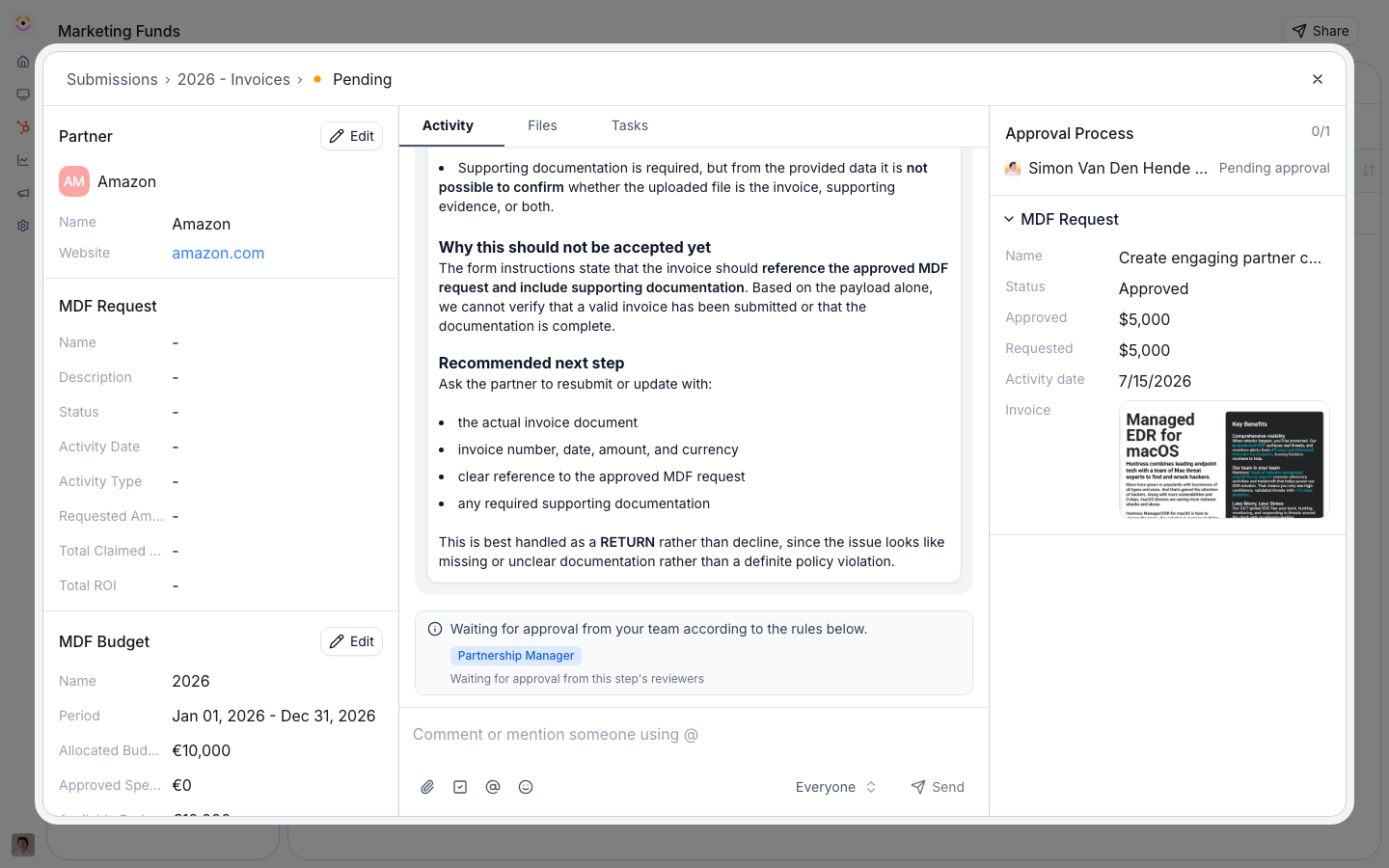
The fund binds an **invoice form** partners submit for reimbursement. From the approved amounts, Introw generates a **reimbursement statement**: line items sourced from either the **approved budget** or the **sum of approved claims**, a **PO number**, and a downloadable **PDF**, moving through its own stages (draft, pending approval, approved, paid). When a project is reimbursed, you **mark it paid**, which sets its CRM status to paid and logs the event.
## Settings & configuration
### The invoice form
Edit the invoice form no-code and map its fields to the CRM. Invoices can also be forwarded by email or requested from a partner.
### Reimbursement statements
Generate a statement for a project with line items from the **approved budget** or the **approved claims sum**, add a PO number, and export the PDF. The statement runs its own approval stages before it is marked paid.
### Reimbursement window
Set the invoice reimbursement deadline on the fund's timeline. The invoice step can be **turned off** if your program reimburses another way.
### Marking paid
When a project is reimbursed, mark it paid to update the CRM status and log the payment, closing the lifecycle.
## How-to guides
* 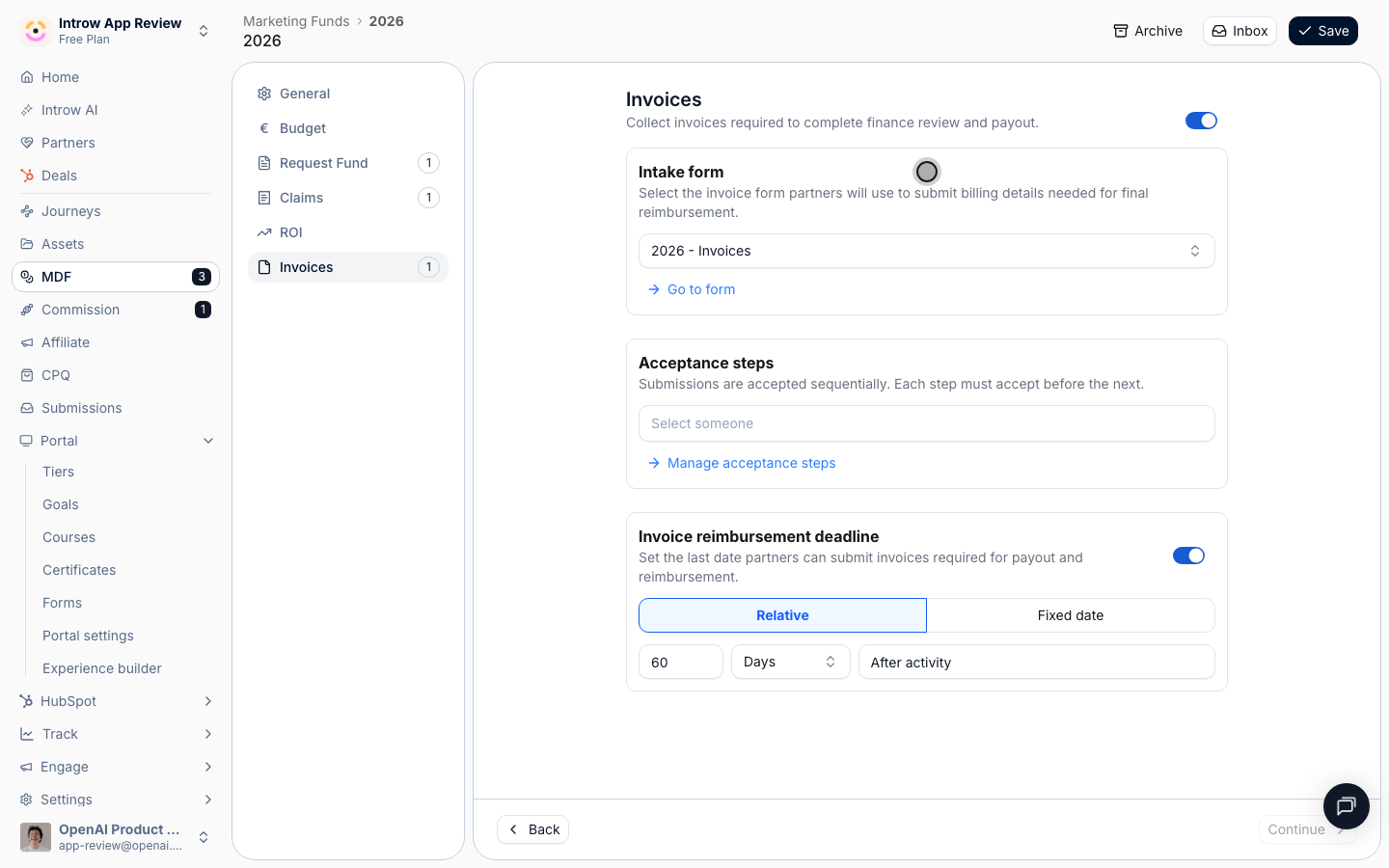
[**Configure the invoice step**](/features/mdf/invoices/guides/configure-the-invoice-form)
Configure the MDF invoice step: build the invoice form, set automations, approval gates, the reimbursement deadline, and how it feeds the payout statement.
* [**Submit an invoice**](/features/mdf/invoices/guides/submit-an-invoice)
How a partner submits an MDF invoice against an approved project - via the invoice form, email, or team request - within the reimbursement window.
## Troubleshooting
A project marks paid only once it is fully reviewed and reimbursed. The invoice step can be disabled, so confirm it is enabled if you reimburse through Introw. Statement line items come from approved budget or approved claims, so approve claims first if you reimburse against them.
Confirm whether it draws from approved budget or approved claims, and that claims are approved.
Confirm it is fully reviewed and reimbursed first.
## Before you start
| You need | Why | Fix it |
| -------------------------------- | ------------------------------------ | --------------------------------------------------------------------------------- |
| A fund with an approved project | You reimburse against one | [Set up a fund](/features/mdf/funds-allocation/guides/set-up-an-mdf-program) |
| Write access to MDF and forms | The invoice step is a form | [Internal roles](/features/access/team-management/guides/create-an-internal-role) |
| The invoice step on the timeline | Otherwise there is nothing to submit | [Set up a fund](/features/mdf/funds-allocation/guides/set-up-an-mdf-program) |
## How it works
The fund binds an **invoice form** partners submit for reimbursement. From the approved amounts, Introw generates a **reimbursement statement**: line items sourced from either the **approved budget** or the **sum of approved claims**, a **PO number**, and a downloadable **PDF**, moving through its own stages (draft, pending approval, approved, paid). When a project is reimbursed, you **mark it paid**, which sets its CRM status to paid and logs the event.
## Settings & configuration
### The invoice form
Edit the invoice form no-code and map its fields to the CRM. Invoices can also be forwarded by email or requested from a partner.
### Reimbursement statements
Generate a statement for a project with line items from the **approved budget** or the **approved claims sum**, add a PO number, and export the PDF. The statement runs its own approval stages before it is marked paid.
### Reimbursement window
Set the invoice reimbursement deadline on the fund's timeline. The invoice step can be **turned off** if your program reimburses another way.
### Marking paid
When a project is reimbursed, mark it paid to update the CRM status and log the payment, closing the lifecycle.
## How-to guides
* 
[**Configure the invoice step**](/features/mdf/invoices/guides/configure-the-invoice-form)
Configure the MDF invoice step: build the invoice form, set automations, approval gates, the reimbursement deadline, and how it feeds the payout statement.
* [**Submit an invoice**](/features/mdf/invoices/guides/submit-an-invoice)
How a partner submits an MDF invoice against an approved project - via the invoice form, email, or team request - within the reimbursement window.
## Troubleshooting
A project marks paid only once it is fully reviewed and reimbursed. The invoice step can be disabled, so confirm it is enabled if you reimburse through Introw. Statement line items come from approved budget or approved claims, so approve claims first if you reimburse against them.
Confirm whether it draws from approved budget or approved claims, and that claims are approved.
Confirm it is fully reviewed and reimbursed first.