> ## Documentation Index
> Fetch the complete documentation index at: https://docs.introw.io/llms.txt
> Use this file to discover all available pages before exploring further.
# Proof of Expense
> Configure MDF claims: build the claim form with proof-of-spend uploads, set CRM automations, approval gates, the claim window, and budget drawdown.
export const Rail = ({children}) =>
{children}
;
## Where it lives
Proof of Expense sits under **MDF**, at [Marketing Funds](https://app.introw.io/marketing-funds).
 ## Before you start
| You need | Why | Fix it |
| ------------------------------- | ------------------------------------ | --------------------------------------------------------------------------------- |
| A fund with an approved project | A claim is made against one | [Set up a fund](/features/mdf/funds-allocation/guides/set-up-an-mdf-program) |
| Write access to MDF and forms | The claim step is a form | [Internal roles](/features/access/team-management/guides/create-an-internal-role) |
| The claim step on the timeline | Otherwise there is nothing to submit | [Set up a fund](/features/mdf/funds-allocation/guides/set-up-an-mdf-program) |
## How it works
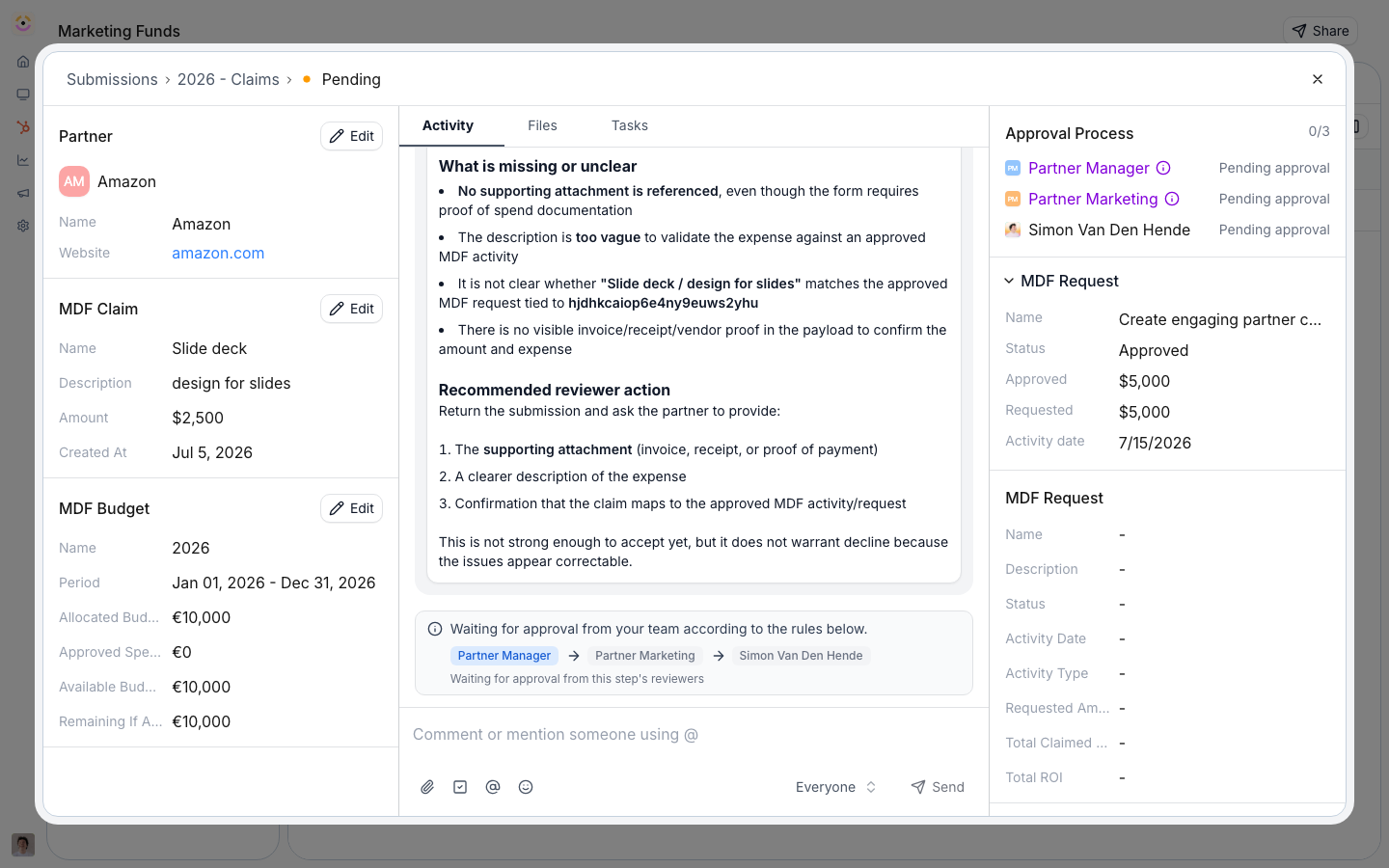
The fund binds a **claim form** where partners file proof of spend against an approved project. Each submission is a claim record with an amount, a date, and **document uploads** (receipts, invoices, creative). Approved claims draw down the project's approved amount, so available budget is always current, and the set of approved claims is the auditable statement of reimbursable spend - there is no separate statements screen.
## Settings & configuration
### The claim form and proof uploads
Edit the claim form no-code. Keep the amount and date fields, and the **upload** field partners use to attach receipts and invoices as proof of spend. Map each field to CRM properties on the form's automation; the claim links to its parent project automatically.
### Where claims are stored
Claims are an Introw `MDF_CLAIM` object by default.
You can back them with one of your own CRM objects instead, independently of what stores requests.
A CRM-backed claim object needs its own object linking and a field mapping for **Amount**, **Status**, and **Date**, or Introw counts every claim as 0 against the claimed total.
See [Store MDF requests and claims in your CRM](/features/mdf/funds-allocation/guides/store-mdf-requests-and-claims-in-your-crm).
### Approval
Claims run through the same approval as any submission: **agentic (AI) review** that auto-approves routine claims above a certainty threshold, plus **sequential human approval steps**. Only approved (and auto-approved) claims count against the budget.
### Claim window
Set the claim submission window on the fund's timeline (for example 30 days after the activity). The claim step can be **turned off** entirely if your program does not collect claims.
### Where partners claim
Claim links carry the project they belong to, so partners can submit from the portal, a link, or their own AI assistant, and the claim files against the right project.
## How-to guides
* 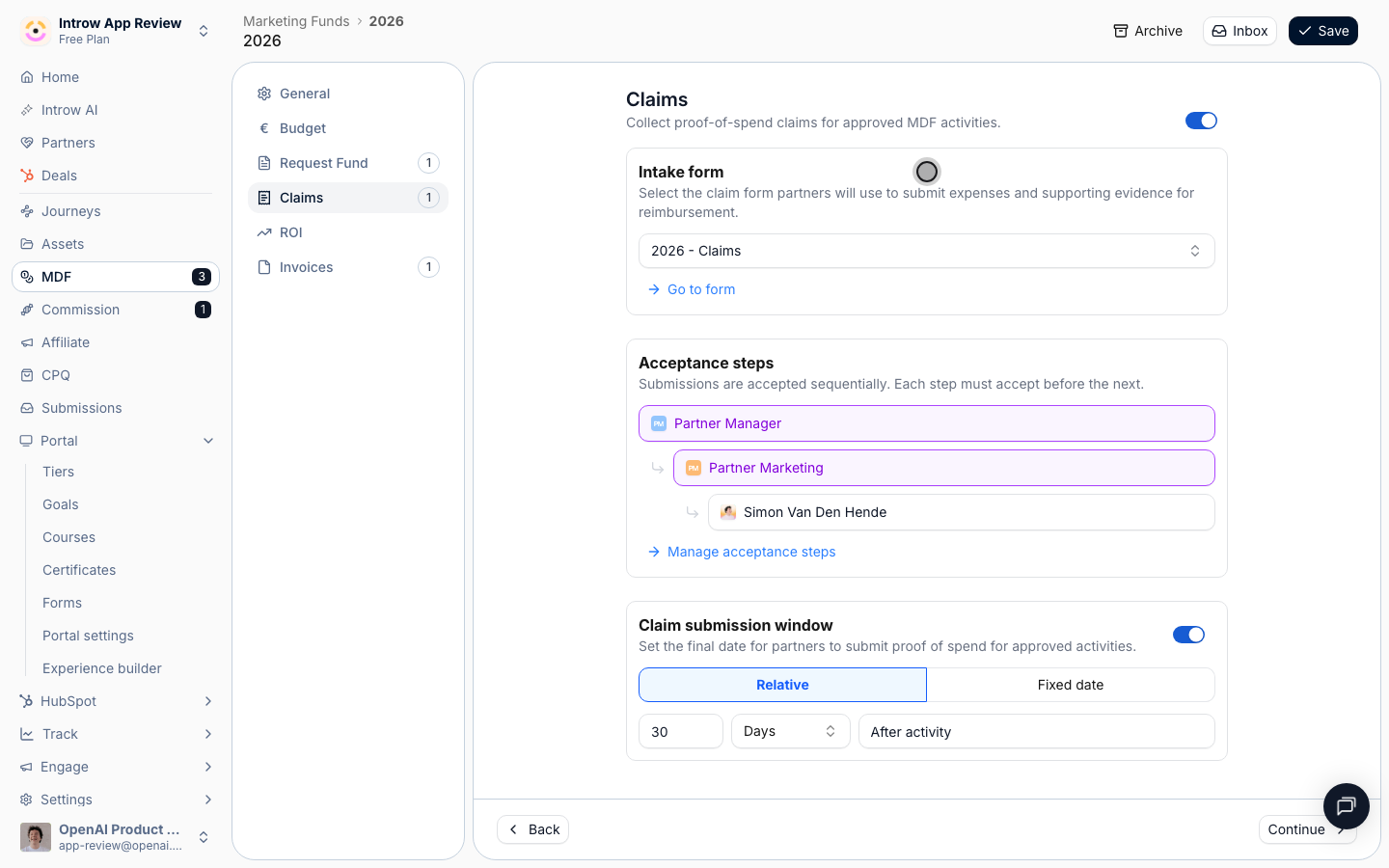
[**Configure the claim step**](/features/mdf/claims/guides/configure-the-claim-form)
Configure the MDF claim step: build the claim form with proof-of-spend upload, set CRM automations, approval gates, and the submission window.
* [**Submit a claim**](/features/mdf/claims/guides/submit-a-claim)
How partners file MDF proof of spend against an approved project - from the portal, a claim link, email, or an AI assistant - to draw down the budget.
## Troubleshooting
Only claims within the fund's period qualify, and only approved and auto-approved claims count against the budget. The claim window can be disabled, so confirm it is enabled if you collect proof of spend. Claim approval uses the standard form approval steps.
The claim window is disabled or has closed.
The claim is still pending; only approved claims count.
Confirm the upload field is present on the claim form.
Its **Amount** property is not mapped on the CRM mapping screen.
## Before you start
| You need | Why | Fix it |
| ------------------------------- | ------------------------------------ | --------------------------------------------------------------------------------- |
| A fund with an approved project | A claim is made against one | [Set up a fund](/features/mdf/funds-allocation/guides/set-up-an-mdf-program) |
| Write access to MDF and forms | The claim step is a form | [Internal roles](/features/access/team-management/guides/create-an-internal-role) |
| The claim step on the timeline | Otherwise there is nothing to submit | [Set up a fund](/features/mdf/funds-allocation/guides/set-up-an-mdf-program) |
## How it works
The fund binds a **claim form** where partners file proof of spend against an approved project. Each submission is a claim record with an amount, a date, and **document uploads** (receipts, invoices, creative). Approved claims draw down the project's approved amount, so available budget is always current, and the set of approved claims is the auditable statement of reimbursable spend - there is no separate statements screen.
## Settings & configuration
### The claim form and proof uploads
Edit the claim form no-code. Keep the amount and date fields, and the **upload** field partners use to attach receipts and invoices as proof of spend. Map each field to CRM properties on the form's automation; the claim links to its parent project automatically.
### Where claims are stored
Claims are an Introw `MDF_CLAIM` object by default.
You can back them with one of your own CRM objects instead, independently of what stores requests.
A CRM-backed claim object needs its own object linking and a field mapping for **Amount**, **Status**, and **Date**, or Introw counts every claim as 0 against the claimed total.
See [Store MDF requests and claims in your CRM](/features/mdf/funds-allocation/guides/store-mdf-requests-and-claims-in-your-crm).
### Approval
Claims run through the same approval as any submission: **agentic (AI) review** that auto-approves routine claims above a certainty threshold, plus **sequential human approval steps**. Only approved (and auto-approved) claims count against the budget.
### Claim window
Set the claim submission window on the fund's timeline (for example 30 days after the activity). The claim step can be **turned off** entirely if your program does not collect claims.
### Where partners claim
Claim links carry the project they belong to, so partners can submit from the portal, a link, or their own AI assistant, and the claim files against the right project.
## How-to guides
* 
[**Configure the claim step**](/features/mdf/claims/guides/configure-the-claim-form)
Configure the MDF claim step: build the claim form with proof-of-spend upload, set CRM automations, approval gates, and the submission window.
* [**Submit a claim**](/features/mdf/claims/guides/submit-a-claim)
How partners file MDF proof of spend against an approved project - from the portal, a claim link, email, or an AI assistant - to draw down the budget.
## Troubleshooting
Only claims within the fund's period qualify, and only approved and auto-approved claims count against the budget. The claim window can be disabled, so confirm it is enabled if you collect proof of spend. Claim approval uses the standard form approval steps.
The claim window is disabled or has closed.
The claim is still pending; only approved claims count.
Confirm the upload field is present on the claim form.
Its **Amount** property is not mapped on the CRM mapping screen.