> ## Documentation Index
> Fetch the complete documentation index at: https://docs.introw.io/llms.txt
> Use this file to discover all available pages before exploring further.
# Proof of Expense
> Partners submit MDF claims with receipts and invoices against an approved project - draws down the budget and builds an auditable, CRM-linked spend record.
export const Headless = ({children, intro = true}) => {
const [copied, setCopied] = useState(null);
const copy = event => {
const row = event.target.closest("li");
if (!row) return;
const text = row.textContent.trim();
try {
navigator.clipboard?.writeText(text);
} catch {}
setCopied(text);
setTimeout(() => setCopied(null), 1600);
};
return <>
{intro ?
Introw is headless by design: run everything here in plain language from Claude, ChatGPT,
Slack, Teams, or your own CRM through Introw's MCP server, with every
action written straight back to your CRM source of truth. The portal is one surface, never the only one.
:
The agentic motion - lifecycle deep dives and a Claude Code skill library that run your partner program from
Claude, ChatGPT, Slack, and your CRM.
}
;
};
export const Tour = ({children}) => {
const [active, setActive] = useState(0);
const wrappers = (Array.isArray(children) ? children : [children]).filter(c => c && c.props);
const frames = wrappers.length === 1 && Array.isArray(wrappers[0].props.children) ? wrappers[0].props.children.filter(c => c && c.props) : [];
if (frames.length < 2) {
return
;
> Once a partner runs the activity, they have to prove what they spent. Proof of expense is how they do it: claims with receipts and invoices attached, filed against the approved project, drawing down the budget, and reviewed the same way every other submission is - so reimbursement rests on evidence, not trust.
## The problem it solves
Reimbursing on receipts scattered across inboxes is slow and risky:
| Without Introw | With Introw |
| --------------------------- | ------------------------------------ |
| Receipts arrive by email | Proof goes on a claim form |
| Spend is hard to match up | Approved claims draw down the budget |
| Every claim needs a look | AI clears the easy ones |
| The paper trail is a folder | The claim is the record |
## Impact
Nothing sours a co-marketing relationship faster than a partner carrying your spend for a quarter. A stated deadline and a fast clear is why they front the money for you next time.
for your business
* **In your CRM**
The approved claim is the auditable record, linked to the activity it paid for and the partner who ran it
* **AI, not admin**
AI clears the routine claims against the rules you set, so your team reviews the exceptions and not the pile
* **Cost to run**
Approved claims draw down the fund automatically, so the remaining budget is never a manual calculation
for your partners
* **Self-serve**
They submit their own evidence the moment the activity finishes, without waiting to be asked
* **Enabled**
The window and the evidence requirements are stated before they spend a euro
* **Efficient**
A clean claim clears without a chase, so the reimbursement actually moves
[A day in the life of a co-sell partner](/days-in-the-life/co-sell-partner)
* **Partner Operations** - claims on a deadline, not a chase list
* **Finance** - proof behind every euro out
* **Partner Marketing & Enablement** - claims reviewed against the proof attached
* **Partners** - send it once, get paid
## See it work
* 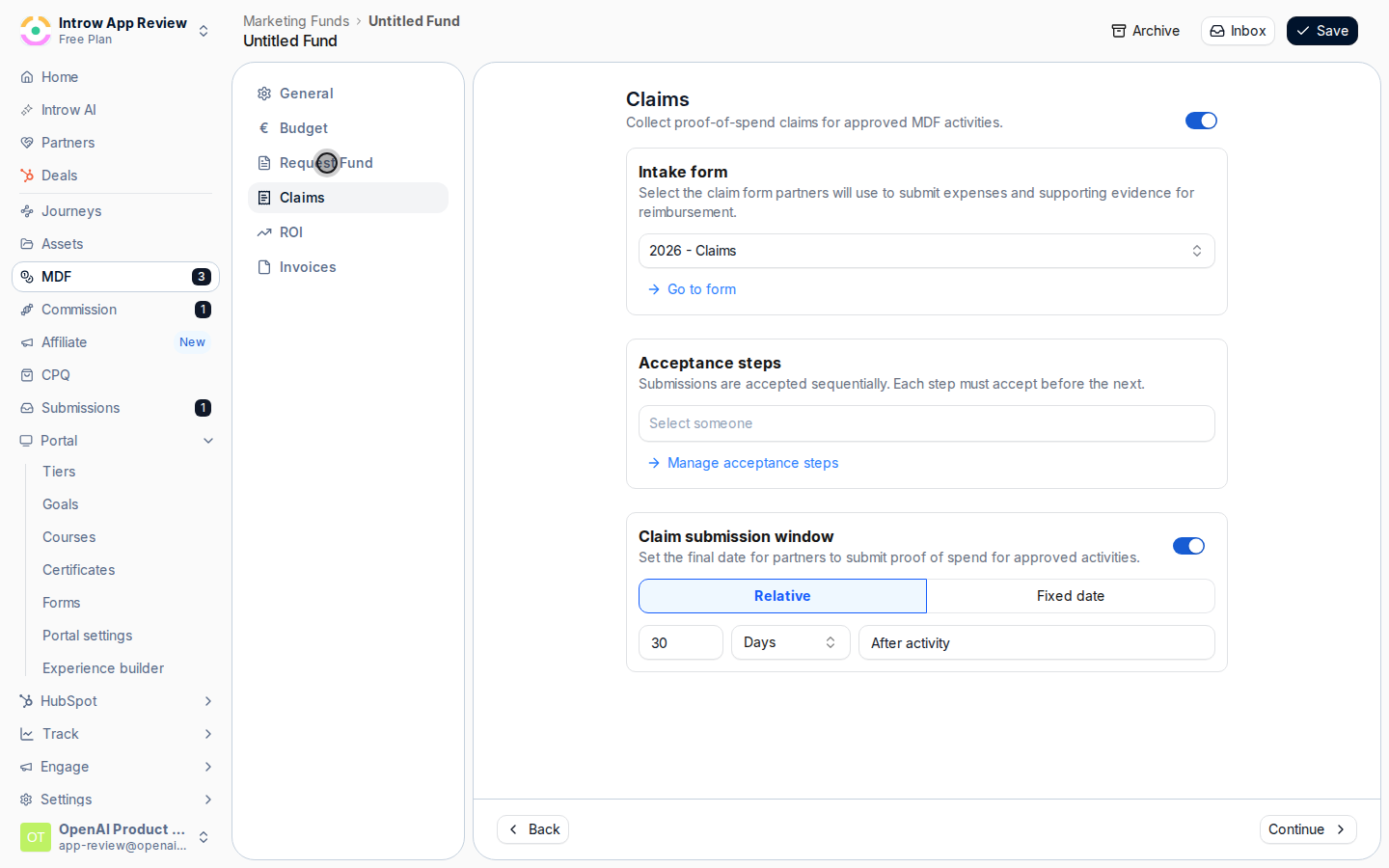
**The step**
The Claims step: a form, approvers, and a deadline.
* 
**The form**
What partners send you, and what they attach.
* 
**Approve**
Approvers in order, so nothing clears on one opinion.
* 
**The deadline**
A claim window both sides see, instead of a reminder email.
## How it works
A partner submits a **claim** against an approved project through the fund's claim form, attaching **proof of spend** - receipts, invoices, creative - as document uploads. Each claim is a CRM-linked record with an amount and date, and the sum of approved claims draws down the project's approved budget so you always know what is left.
Claims run through the standard review flow: **agentic approval** can clear straightforward claims automatically above a certainty threshold, and anything that needs a human routes through your approval steps. There is no separate "statements" screen - the approved claims against a project **are** the auditable statement of reimbursable spend your finance team reimburses against. Partners can submit claims from the portal or off it, and the whole thing is worked in the project's collaborative workspace with a claim-window deadline.
```mermaid theme={"theme":{"light":"github-light","dark":"github-dark"}}
flowchart LR
claim["Claim with receipts"] --> drawdown["Draws down the approved amount"]
drawdown --> review["Agentic or human approval"]
review --> statement["Auditable statement of spend"]
```
## Run it from your AI assistant
* Submit an MDF claim for Acme's webinar: \$3.2k with the invoice attached.
* Show all MDF claims pending approval this month.
* How much of Acme's approved budget is left after claims?
## Going deeper
Configure the claim form, proof uploads, approval, and claim window.
Integration surface and code.
**Works with**
Claims file against an approved proposal.
Approved claims roll into a reimbursement statement.
Claims are reviewed like any submission.