> ## Documentation Index
> Fetch the complete documentation index at: https://docs.introw.io/llms.txt
> Use this file to discover all available pages before exploring further.
# Sharing & submitting
> Set up how partners reach and submit your forms with share links, embeds, off-portal channels like email, Slack, and Teams, bulk CSV upload, and the API.
export const Rail = ({children}) =>
{children}
;
## Where it lives
Sharing & submitting sits under **Portal**, at [Forms](https://app.introw.io/forms).
 ## Before you start
| You need | Why | Fix it |
| ---------------------------- | ---------------------------------- | ---------------------------------------------------------------------------------------- |
| A published form, CRM-mapped | Submissions need somewhere to land | [Map it to your CRM](/features/forms/crm-automations/guides/connect-a-form-to-your-crm) |
| A custom domain, to embed | Only for embedding on your pages | [Custom domain](/features/portal/custom-domains/guides/connect-a-custom-domain) |
| The AI agent and a chat app | Only for chat and assistant sends | [Launch the agent](/features/ai/partner-support/guides/launch-the-partner-support-agent) |
| An API key, Forms - Write | Only for API submissions | [API keys](/features/developer/api/guides/create-and-manage-api-keys) |
Every plan includes API access with a monthly API credit allowance, so there is no add-on to enable.
## How it works
A form in Introw has one definition and one CRM automation, and many ways in. You build the form once, then decide how partners reach it: copy a link, embed it, place it in a portal experience, turn on off-portal channels, or expose a bulk upload for lists. Whichever route a partner takes, the submission runs through the same automation, so it is attributed and synced to your CRM identically every time.
Two ideas are worth holding onto. First, a **general link** is open to anyone, while a **partner-specific link** stamps every submission with that partner's attribution automatically. Second, the channels are not separate forms: they are entry points onto one form, so you configure the form and its automation once and switch channels on or off freely.
```mermaid theme={"theme":{"light":"github-light","dark":"github-dark"}}
flowchart LR
form["Form + CRM automation"] --> link["Share link / embed"]
form --> channel["Email / Slack / Teams / AI"]
form --> bulk["Bulk CSV upload"]
form --> api["API"]
link --> crm["Attributed CRM record"]
channel --> crm
bulk --> crm
api --> crm
```
## Settings & configuration
### Share form dialog
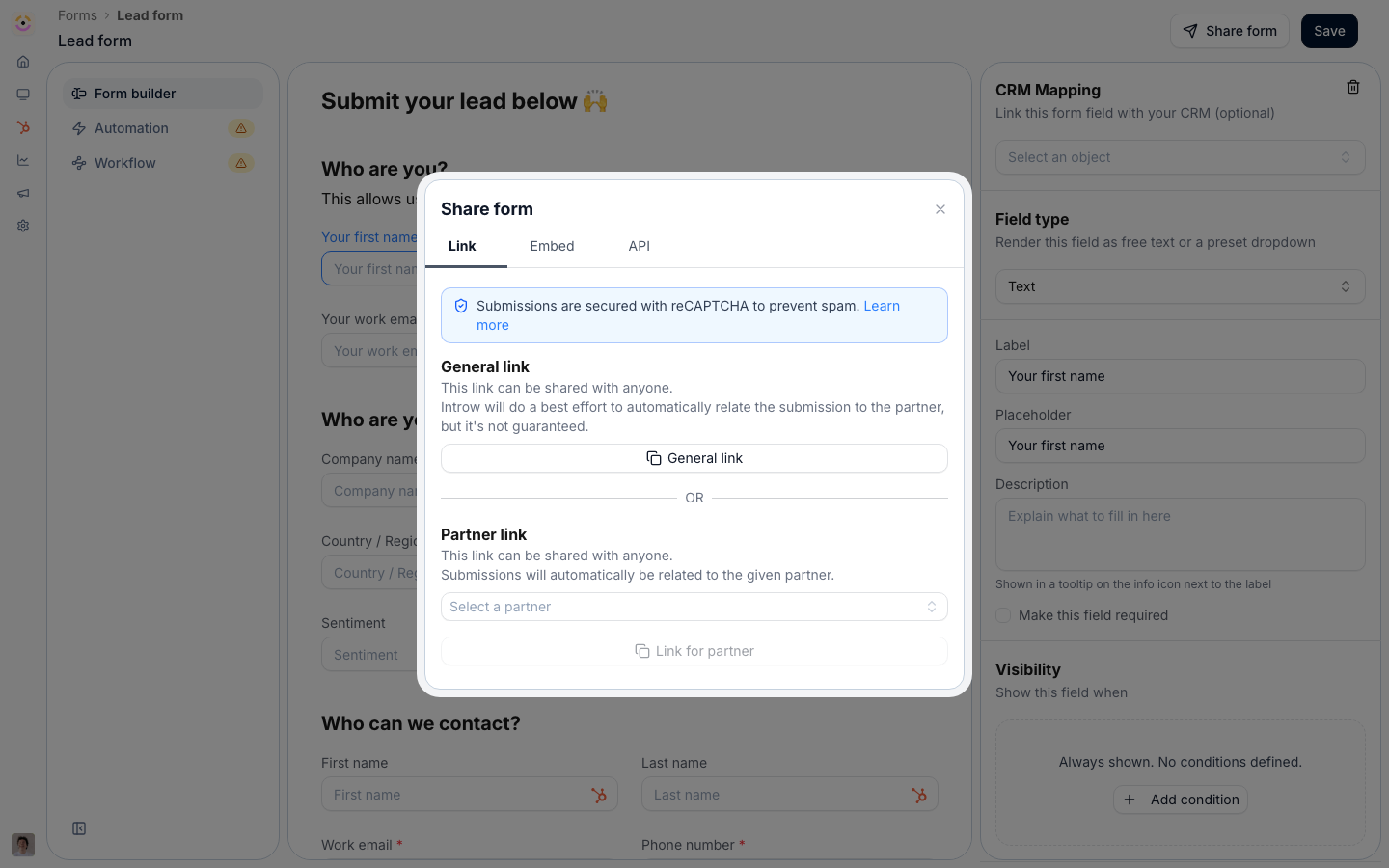
Open a form and choose **Share form** to get its entry points.
**General link** is the open link anyone can open and submit. Use it for broad, unattributed capture (a public sign-up, an event form).
**Partner link** is a partner-specific link that credits every submission to the chosen partner. Prefer it over the general link whenever you send a form to a known partner, so attribution is never in question.
**Embed** provides the code to drop the form onto your own site under your branding, on the **Embed** tab. Embedding requires a custom domain; until one is set, the tab points you to **Configure custom domain** and you should share the link instead.
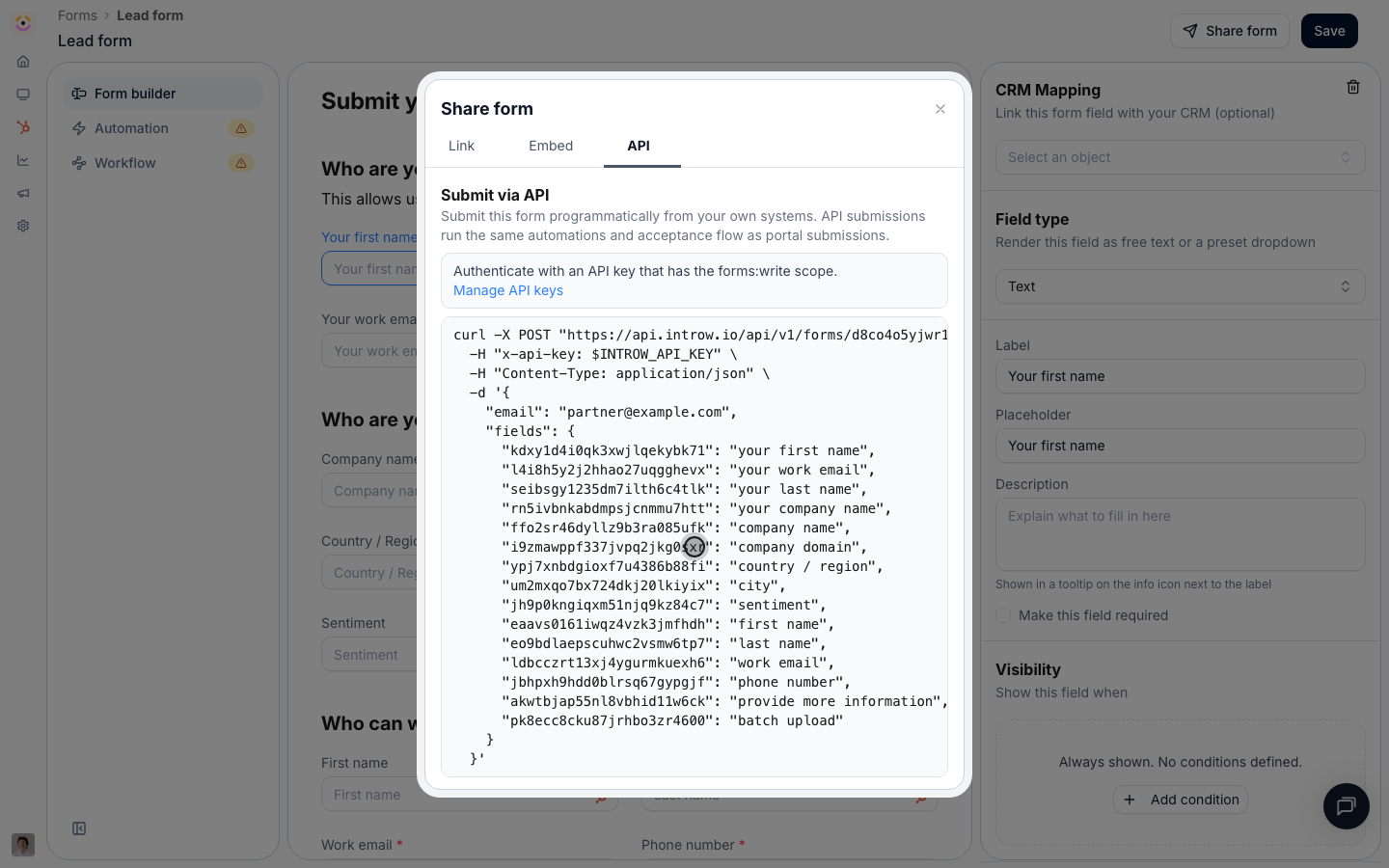
**API** turns the form into a request. The tab gives you a runnable cURL snippet already carrying this form's id and every field id, plus a **Fields** table listing each field's id, label, and whether it is required. Field ids are opaque generated strings, so never type them from labels: read them here, or fetch them from `GET /api/v1/forms/{formId}/schema`, which the note under the table links to. Pick a partner in the dialog before copying and the snippet comes back with that partner's `partnerId` pre-filled. API submissions run the same automations and acceptance flow as portal submissions, from any system, with no browser and no portal login. The tab is available on every plan; each submission spends one [API credit](/general/api-credits) from your monthly allowance. Full setup is in [Submit a form via the API](../guides/submit-a-form-via-the-api), and the complete contract is in [Form submissions](/general/forms-overview).
### Off-portal channels
Partners can also submit without opening the form at all. With the AI agent enabled and the matching integration connected, a partner can forward an email, message the agent in Slack or Microsoft Teams, or ask a connected AI assistant, and the agent fills in and submits the same form. These channels are covered end to end in [Ways to submit a form](../guides/ways-to-submit-a-form).
### Batch upload
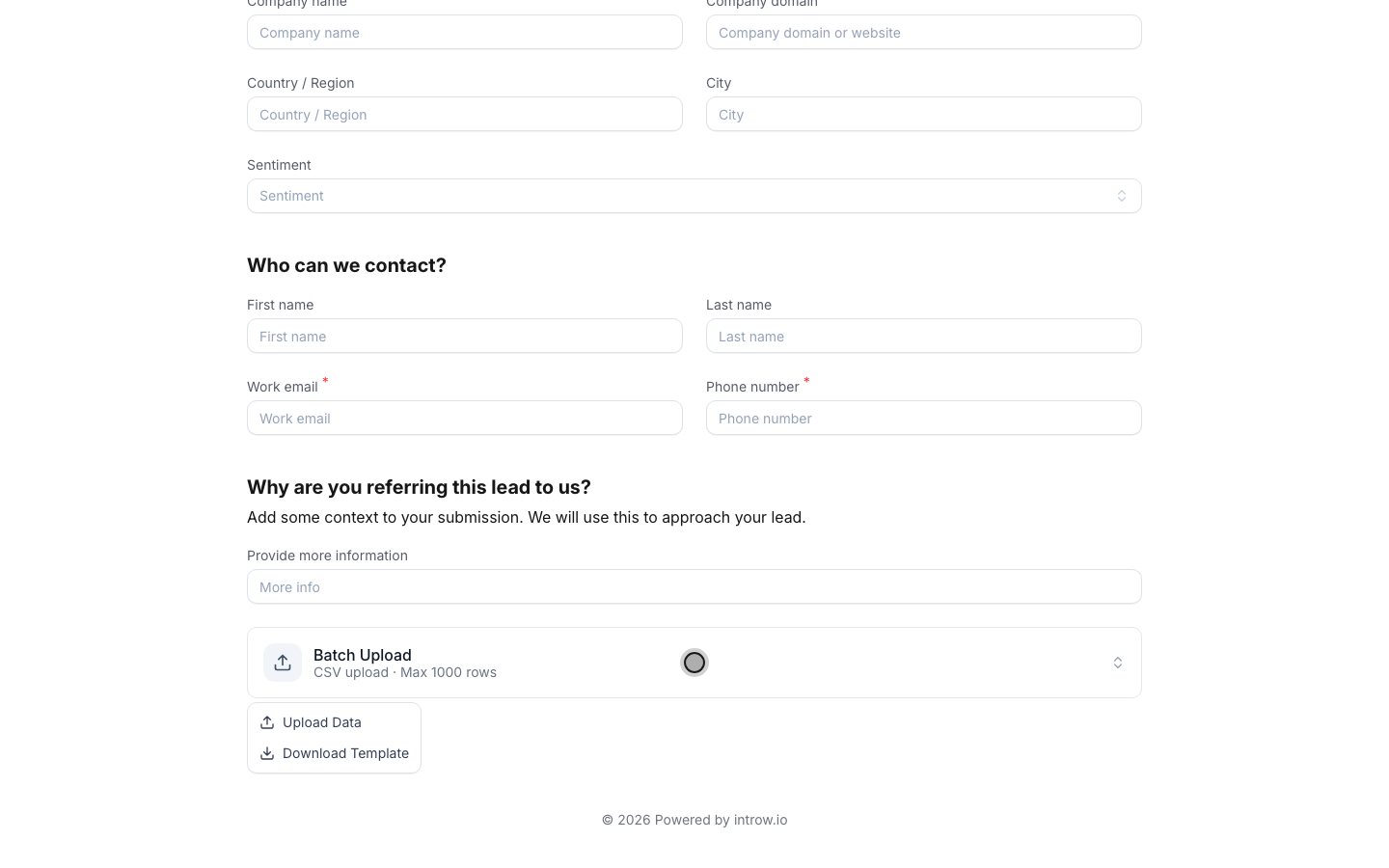
For lists rather than single records, add a **Batch Upload** field to the form. Its **Batch Upload Settings** control the four labels a partner sees (the upload **Label** and **Subtext**, the **Download Template** action, and the **Upload Data** action), and the field accepts a CSV of up to 1000 rows. The downloaded template is built from the form's fields, so it lists your allowed picklist values and marks required columns, and a preview validates every row before submission. Full setup is in [Bulk upload multiple records](../guides/bulk-upload-multiple-records).
## How-to guides
* 
[**Bulk upload multiple records**](/features/forms/sharing-submitting/guides/bulk-upload-multiple-records)
Let partners submit many records at once with a CSV bulk upload: a template, picklists and validation on every row, and a preview that blocks bad data.
* 
[**Submit a form via the API**](/features/forms/sharing-submitting/guides/submit-a-form-via-the-api)
Submit any Introw form from your own systems: fetch its schema for field ids and picklists, post with a scoped API key, and run the same automations.
* [**Ways to submit a form**](/features/forms/sharing-submitting/guides/ways-to-submit-a-form)
Every way a partner can submit an Introw form: share link, website embed, email, Slack, Teams, AI assistant, bulk CSV upload, or API from your own systems.
## Troubleshooting
A batch upload takes at most 1000 rows per file; larger lists must be split. A general link is open to anyone with the URL and its submissions are unattributed unless you use a partner-specific link. Embedding needs a custom domain. Off-portal (email, Slack, Teams, AI) submissions depend on the AI agent and the relevant integration being enabled. API submissions spend one [API credit](/general/api-credits) each from your monthly allowance and authenticate with a secret key rather than the reCAPTCHA that guards the link and embed, and adding or removing fields changes which field ids a valid payload carries, so re-fetch the schema after editing a form.
It likely came through the general link. Send the partner-specific link instead, or pass `partnerId` on the API call.
Configure a custom domain first, then re-open the **Embed** tab.
Confirm the AI agent is enabled and the Slack or Teams integration is connected for your program.
This month's API credit allowance is spent; it resets on the first of the month.
A required field was missing or a value failed the form's validation. Re-check the ids in the **Fields** table.
## Before you start
| You need | Why | Fix it |
| ---------------------------- | ---------------------------------- | ---------------------------------------------------------------------------------------- |
| A published form, CRM-mapped | Submissions need somewhere to land | [Map it to your CRM](/features/forms/crm-automations/guides/connect-a-form-to-your-crm) |
| A custom domain, to embed | Only for embedding on your pages | [Custom domain](/features/portal/custom-domains/guides/connect-a-custom-domain) |
| The AI agent and a chat app | Only for chat and assistant sends | [Launch the agent](/features/ai/partner-support/guides/launch-the-partner-support-agent) |
| An API key, Forms - Write | Only for API submissions | [API keys](/features/developer/api/guides/create-and-manage-api-keys) |
Every plan includes API access with a monthly API credit allowance, so there is no add-on to enable.
## How it works
A form in Introw has one definition and one CRM automation, and many ways in. You build the form once, then decide how partners reach it: copy a link, embed it, place it in a portal experience, turn on off-portal channels, or expose a bulk upload for lists. Whichever route a partner takes, the submission runs through the same automation, so it is attributed and synced to your CRM identically every time.
Two ideas are worth holding onto. First, a **general link** is open to anyone, while a **partner-specific link** stamps every submission with that partner's attribution automatically. Second, the channels are not separate forms: they are entry points onto one form, so you configure the form and its automation once and switch channels on or off freely.
```mermaid theme={"theme":{"light":"github-light","dark":"github-dark"}}
flowchart LR
form["Form + CRM automation"] --> link["Share link / embed"]
form --> channel["Email / Slack / Teams / AI"]
form --> bulk["Bulk CSV upload"]
form --> api["API"]
link --> crm["Attributed CRM record"]
channel --> crm
bulk --> crm
api --> crm
```
## Settings & configuration
### Share form dialog
Open a form and choose **Share form** to get its entry points.
**General link** is the open link anyone can open and submit. Use it for broad, unattributed capture (a public sign-up, an event form).
**Partner link** is a partner-specific link that credits every submission to the chosen partner. Prefer it over the general link whenever you send a form to a known partner, so attribution is never in question.
**Embed** provides the code to drop the form onto your own site under your branding, on the **Embed** tab. Embedding requires a custom domain; until one is set, the tab points you to **Configure custom domain** and you should share the link instead.
**API** turns the form into a request. The tab gives you a runnable cURL snippet already carrying this form's id and every field id, plus a **Fields** table listing each field's id, label, and whether it is required. Field ids are opaque generated strings, so never type them from labels: read them here, or fetch them from `GET /api/v1/forms/{formId}/schema`, which the note under the table links to. Pick a partner in the dialog before copying and the snippet comes back with that partner's `partnerId` pre-filled. API submissions run the same automations and acceptance flow as portal submissions, from any system, with no browser and no portal login. The tab is available on every plan; each submission spends one [API credit](/general/api-credits) from your monthly allowance. Full setup is in [Submit a form via the API](../guides/submit-a-form-via-the-api), and the complete contract is in [Form submissions](/general/forms-overview).
### Off-portal channels
Partners can also submit without opening the form at all. With the AI agent enabled and the matching integration connected, a partner can forward an email, message the agent in Slack or Microsoft Teams, or ask a connected AI assistant, and the agent fills in and submits the same form. These channels are covered end to end in [Ways to submit a form](../guides/ways-to-submit-a-form).
### Batch upload
For lists rather than single records, add a **Batch Upload** field to the form. Its **Batch Upload Settings** control the four labels a partner sees (the upload **Label** and **Subtext**, the **Download Template** action, and the **Upload Data** action), and the field accepts a CSV of up to 1000 rows. The downloaded template is built from the form's fields, so it lists your allowed picklist values and marks required columns, and a preview validates every row before submission. Full setup is in [Bulk upload multiple records](../guides/bulk-upload-multiple-records).
## How-to guides
* 
[**Bulk upload multiple records**](/features/forms/sharing-submitting/guides/bulk-upload-multiple-records)
Let partners submit many records at once with a CSV bulk upload: a template, picklists and validation on every row, and a preview that blocks bad data.
* 
[**Submit a form via the API**](/features/forms/sharing-submitting/guides/submit-a-form-via-the-api)
Submit any Introw form from your own systems: fetch its schema for field ids and picklists, post with a scoped API key, and run the same automations.
* [**Ways to submit a form**](/features/forms/sharing-submitting/guides/ways-to-submit-a-form)
Every way a partner can submit an Introw form: share link, website embed, email, Slack, Teams, AI assistant, bulk CSV upload, or API from your own systems.
## Troubleshooting
A batch upload takes at most 1000 rows per file; larger lists must be split. A general link is open to anyone with the URL and its submissions are unattributed unless you use a partner-specific link. Embedding needs a custom domain. Off-portal (email, Slack, Teams, AI) submissions depend on the AI agent and the relevant integration being enabled. API submissions spend one [API credit](/general/api-credits) each from your monthly allowance and authenticate with a secret key rather than the reCAPTCHA that guards the link and embed, and adding or removing fields changes which field ids a valid payload carries, so re-fetch the schema after editing a form.
It likely came through the general link. Send the partner-specific link instead, or pass `partnerId` on the API call.
Configure a custom domain first, then re-open the **Embed** tab.
Confirm the AI agent is enabled and the Slack or Teams integration is connected for your program.
This month's API credit allowance is spent; it resets on the first of the month.
A required field was missing or a value failed the form's validation. Re-check the ids in the **Fields** table.