> ## Documentation Index
> Fetch the complete documentation index at: https://docs.introw.io/llms.txt
> Use this file to discover all available pages before exploring further.
# Every notification Introw sends
> Full reference of automatic emails, chat messages, and nudges Introw sends across the partner lifecycle: triggers, recipients, and deal coaching.
## What you'll achieve
A clear picture of everything Introw sends automatically, grouped by area, so you can choose which notifications to turn on, which channels they use, and who receives them, and explain to partners exactly what to expect.
## Before you start
Every notification below is turned on, channelled, and scoped from **Notification settings**. This page is the catalog; [Control who gets notified](./control-who-gets-notified) covers targeting and [Channels](/features/engagement/channels) covers delivery.
## How to read this
Unless a row says email-only, a notification can be delivered by **email** and, where the workspace is connected, in **Slack** or **Teams**, and it also appears on the partner's portal timeline. Recipients depend on the segments and scopes you set. "Your team" means internal Introw users rather than partners.
 Whether a specific partner contact actually receives one of these is decided by a three-layer cascade: the organisation default, then any override segments the contact matches, then the contact's own opt-outs. Only the contact's own opt-outs are editable per contact, and only for events the layers above leave available. See [Control who gets notified](./control-who-gets-notified).
## Deal and pipeline
The heartbeat of a co-sell program: Introw watches your CRM and signals every meaningful change on a partner-attached deal.
| Notification | When it sends | Who it reaches |
| --------------- | ---------------------------------------------------------------- | ---------------------------------------- |
| New deal | A partner-attached deal is created in your CRM | The partner and their manager |
| Deal update | A tracked field on a shared deal changes | The partner and the deal's collaborators |
| Deal closed won | A shared deal is marked won | The partner and their manager |
| Sleeping deal | A deal sits in a stage longer than the inactivity window you set | The partner responsible for the deal |
| Shared record | You share a CRM deal, company, or contact with a partner | The partner it is shared with |
Deal notifications carry a **coached next step**. Instead of only telling a partner that a deal changed or went quiet, deal coaching adds what to do next, why it moves the customer forward, and how, including a ready-to-send message. See [Deal coaching](/features/ai/deal-coaching).
## Portal activity
| Notification | When it sends | Who it reaches |
| ------------ | -------------------------------------------------- | -------------------------------- |
| Announcement | You publish an announcement to an audience | The targeted partners |
| Comment | Someone comments on a shared record, task, or form | The collaborators on that thread |
| Mention | Someone mentions a person in a comment | The mentioned person |
## Submissions
Covers deal registrations, shared leads, MDF requests and claims, and any partner form.
| Notification | When it sends | Who it reaches |
| ------------------- | -------------------------------------------------------- | ---------------------------- |
| Form submitted | A partner submits a form | Your internal reviewers |
| Submission accepted | You approve a partner's submission | The partner who submitted it |
| Submission declined | You decline a submission | The partner who submitted it |
| Submission returned | You send a submission back for changes | The partner who submitted it |
| Submission error | Your CRM refuses the record a submission tried to create | Your internal reviewers |
**Submission error is internal, and it follows the form.** It goes to the recipients configured under **Inform partner team** on that form's **Automation** tab, never to the partner, and a form with no recipients there sends nothing. Configure recipients on every form that writes to your CRM, or a failed submission waits in the inbox unnoticed. What the error means and how to fix it: [Every CRM error Introw logs](/features/integrations/crm/guides/every-crm-error-introw-logs).
**Form submitted carries channel conflict.** When the submission overlaps a deal already in your CRM and the form runs [Channel Conflict Analysis](/features/ai/channel-conflict/technical), the notification leads with a **Channel conflict** section holding the AI's assessment and recommendation, and its button reads **Resolve conflict** rather than **View submission**. This is internal only: partner-facing channels get the ordinary message with neither.
## Tasks and onboarding
| Notification | When it sends | Who it reaches |
| ------------------------- | ----------------------------------------------- | ------------------------- |
| Task assigned | A task is assigned to a partner or teammate | The assignee |
| Onboarding tasks assigned | A journey assigns a batch of tasks to a partner | The partner |
| Task completed | A task is marked complete | The internal owner |
| Task reminder | A task is due soon or overdue | The assignee (email-only) |
## Learning and goals
| Notification | When it sends | Who it reaches |
| --------------------------- | --------------------------------------- | ------------------------ |
| Course enrollment | A partner is enrolled in a course | The partner |
| Course started or completed | A learner starts or finishes a course | Your team |
| Course reminder | A course is left incomplete | The learner (email-only) |
| Certificate awarded | A partner earns a certificate | The partner |
| Goal reminder | A partner's goal or KPI needs attention | The partner |
## Commissions and funds
| Notification | When it sends | Who it reaches |
| ---------------------- | ------------------------------------------------ | ----------------------------- |
| Payout ready | A commission payout is ready | The partner owner and manager |
| Invoice uploaded | A partner uploads an invoice for a payout | The internal owner |
| Commission line change | A commission line is added, updated, or declined | The partner |
| MDF invoice forwarded | An MDF invoice is forwarded on | The recipient |
## Activity and engagement signals
Mostly for your team, to show which partners are active.
| Notification | When it sends | Who it reaches |
| -------------------------- | ------------------------------------------------------------ | ---------------------- |
| Portal visit | A partner opens their portal | Your team |
| Website visit | A tracked website visit happens | Your team |
| Asset viewed | A partner opens a shared asset | Your team |
| AI conversation started | A partner starts an AI chat in the portal | Your team |
| Monthly engagement summary | Once a month | Your team (email-only) |
| Partner Connect nudge | A partner has not yet connected their CRM or attached a deal | The partner |
## Account and access
Transactional messages that keep people able to log in and work: portal and app invitations, email verification codes, and internal team invitations and join-request outcomes. These always send so people can get in.
## Turn these on and target them
On [Default settings](https://app.introw.io/settings/segments/default), give each event above its recipients and set the rest to **Disabled**.
Override the default on the segment that audience is defined by. See [Control who gets notified](./control-who-gets-notified).
Which events reach a partner's Slack, Teams, or WhatsApp channel is set per platform on that chat integration. See [Channels](/features/engagement/channels).
## Verify it worked
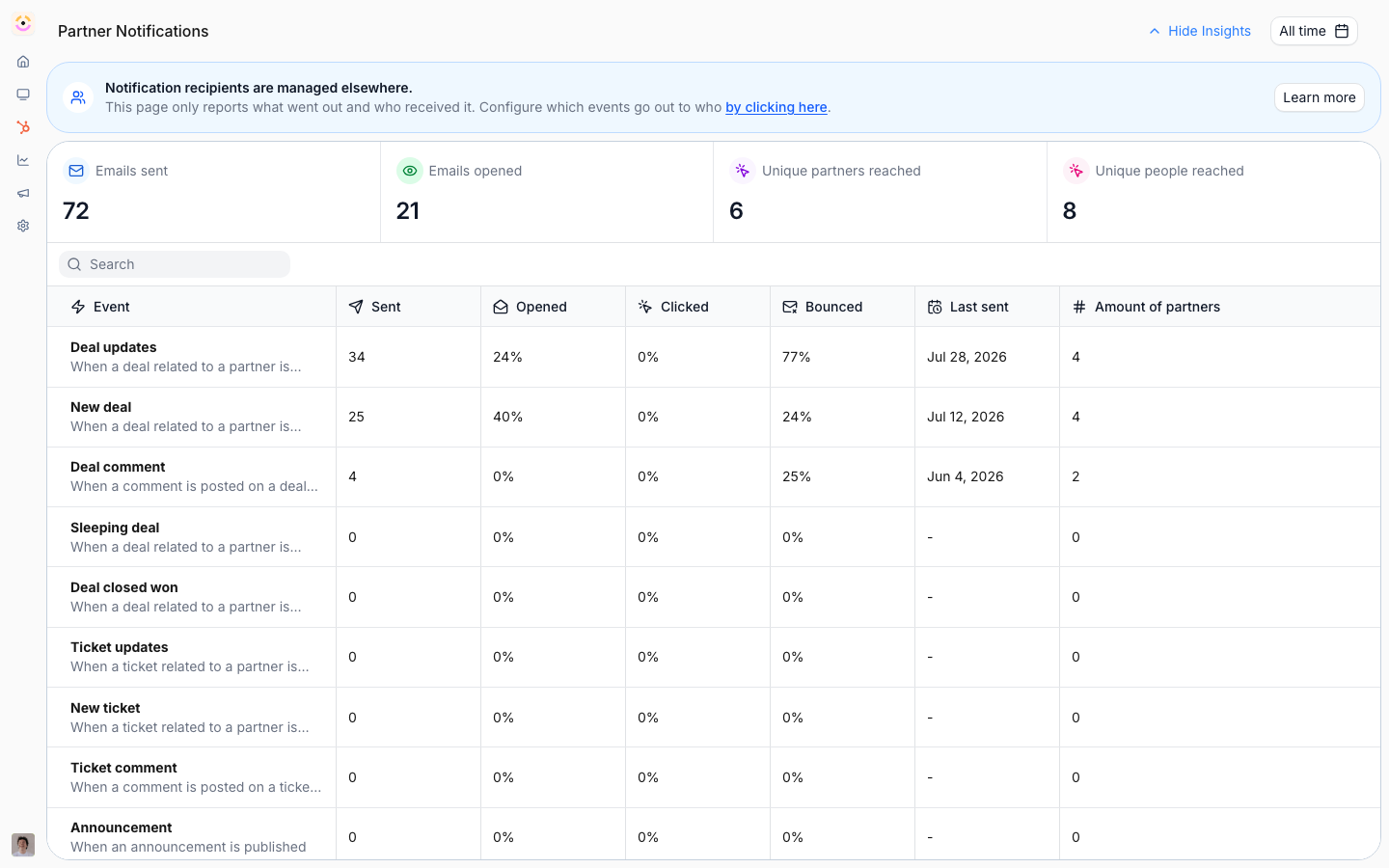
On **Notification settings**, each enabled notification shows a **Last sent** time after its next real event, and **Insights** shows what was sent and opened, so you can confirm the ones you turned on are firing.
## Related
Scope notifications to the right partners and teammates.
Set up the sleeping-deal reminder.
Deliver these by email, Slack, and Teams.
Add a coached next step to deal notifications.
Whether a specific partner contact actually receives one of these is decided by a three-layer cascade: the organisation default, then any override segments the contact matches, then the contact's own opt-outs. Only the contact's own opt-outs are editable per contact, and only for events the layers above leave available. See [Control who gets notified](./control-who-gets-notified).
## Deal and pipeline
The heartbeat of a co-sell program: Introw watches your CRM and signals every meaningful change on a partner-attached deal.
| Notification | When it sends | Who it reaches |
| --------------- | ---------------------------------------------------------------- | ---------------------------------------- |
| New deal | A partner-attached deal is created in your CRM | The partner and their manager |
| Deal update | A tracked field on a shared deal changes | The partner and the deal's collaborators |
| Deal closed won | A shared deal is marked won | The partner and their manager |
| Sleeping deal | A deal sits in a stage longer than the inactivity window you set | The partner responsible for the deal |
| Shared record | You share a CRM deal, company, or contact with a partner | The partner it is shared with |
Deal notifications carry a **coached next step**. Instead of only telling a partner that a deal changed or went quiet, deal coaching adds what to do next, why it moves the customer forward, and how, including a ready-to-send message. See [Deal coaching](/features/ai/deal-coaching).
## Portal activity
| Notification | When it sends | Who it reaches |
| ------------ | -------------------------------------------------- | -------------------------------- |
| Announcement | You publish an announcement to an audience | The targeted partners |
| Comment | Someone comments on a shared record, task, or form | The collaborators on that thread |
| Mention | Someone mentions a person in a comment | The mentioned person |
## Submissions
Covers deal registrations, shared leads, MDF requests and claims, and any partner form.
| Notification | When it sends | Who it reaches |
| ------------------- | -------------------------------------------------------- | ---------------------------- |
| Form submitted | A partner submits a form | Your internal reviewers |
| Submission accepted | You approve a partner's submission | The partner who submitted it |
| Submission declined | You decline a submission | The partner who submitted it |
| Submission returned | You send a submission back for changes | The partner who submitted it |
| Submission error | Your CRM refuses the record a submission tried to create | Your internal reviewers |
**Submission error is internal, and it follows the form.** It goes to the recipients configured under **Inform partner team** on that form's **Automation** tab, never to the partner, and a form with no recipients there sends nothing. Configure recipients on every form that writes to your CRM, or a failed submission waits in the inbox unnoticed. What the error means and how to fix it: [Every CRM error Introw logs](/features/integrations/crm/guides/every-crm-error-introw-logs).
**Form submitted carries channel conflict.** When the submission overlaps a deal already in your CRM and the form runs [Channel Conflict Analysis](/features/ai/channel-conflict/technical), the notification leads with a **Channel conflict** section holding the AI's assessment and recommendation, and its button reads **Resolve conflict** rather than **View submission**. This is internal only: partner-facing channels get the ordinary message with neither.
## Tasks and onboarding
| Notification | When it sends | Who it reaches |
| ------------------------- | ----------------------------------------------- | ------------------------- |
| Task assigned | A task is assigned to a partner or teammate | The assignee |
| Onboarding tasks assigned | A journey assigns a batch of tasks to a partner | The partner |
| Task completed | A task is marked complete | The internal owner |
| Task reminder | A task is due soon or overdue | The assignee (email-only) |
## Learning and goals
| Notification | When it sends | Who it reaches |
| --------------------------- | --------------------------------------- | ------------------------ |
| Course enrollment | A partner is enrolled in a course | The partner |
| Course started or completed | A learner starts or finishes a course | Your team |
| Course reminder | A course is left incomplete | The learner (email-only) |
| Certificate awarded | A partner earns a certificate | The partner |
| Goal reminder | A partner's goal or KPI needs attention | The partner |
## Commissions and funds
| Notification | When it sends | Who it reaches |
| ---------------------- | ------------------------------------------------ | ----------------------------- |
| Payout ready | A commission payout is ready | The partner owner and manager |
| Invoice uploaded | A partner uploads an invoice for a payout | The internal owner |
| Commission line change | A commission line is added, updated, or declined | The partner |
| MDF invoice forwarded | An MDF invoice is forwarded on | The recipient |
## Activity and engagement signals
Mostly for your team, to show which partners are active.
| Notification | When it sends | Who it reaches |
| -------------------------- | ------------------------------------------------------------ | ---------------------- |
| Portal visit | A partner opens their portal | Your team |
| Website visit | A tracked website visit happens | Your team |
| Asset viewed | A partner opens a shared asset | Your team |
| AI conversation started | A partner starts an AI chat in the portal | Your team |
| Monthly engagement summary | Once a month | Your team (email-only) |
| Partner Connect nudge | A partner has not yet connected their CRM or attached a deal | The partner |
## Account and access
Transactional messages that keep people able to log in and work: portal and app invitations, email verification codes, and internal team invitations and join-request outcomes. These always send so people can get in.
## Turn these on and target them
On [Default settings](https://app.introw.io/settings/segments/default), give each event above its recipients and set the rest to **Disabled**.
Override the default on the segment that audience is defined by. See [Control who gets notified](./control-who-gets-notified).
Which events reach a partner's Slack, Teams, or WhatsApp channel is set per platform on that chat integration. See [Channels](/features/engagement/channels).
## Verify it worked
On **Notification settings**, each enabled notification shows a **Last sent** time after its next real event, and **Insights** shows what was sent and opened, so you can confirm the ones you turned on are firing.
## Related
Scope notifications to the right partners and teammates.
Set up the sleeping-deal reminder.
Deliver these by email, Slack, and Teams.
Add a coached next step to deal notifications.