> ## Documentation Index
> Fetch the complete documentation index at: https://docs.introw.io/llms.txt
> Use this file to discover all available pages before exploring further.
# Announcements
> Compose partner announcements, target segments, choose channels (portal, email, Slack, Teams), publish, and review engagement analytics in Introw.
export const Rail = ({children}) =>
{children}
;
## Where it lives
Announcements sits under **Engage**, at [Announcements](https://app.introw.io/announcements).
 ## Before you start
| You need | Why | Fix it |
| --------------------------------- | ----------------------------- | ---------------------------------------------------------------------------------------------------------------------------------------- |
| Access to announcements | To write and send one | [Internal roles](/features/access/team-management/guides/create-an-internal-role) |
| Segments, to target an audience | Otherwise it goes to everyone | [Create a segment](/features/partners/segments/guides/create-a-dynamic-segment) |
| Slack or Teams, for chat delivery | Only to deliver into chat | [Connect Slack](/features/integrations/chat/guides/connect-slack) or [Teams](/features/integrations/chat/guides/connect-microsoft-teams) |
## How it works
An announcement is a message you compose, target to partner segments, and deliver across
channels. You write it in a rich editor, or generate a draft with AI and refine it, choose
which partner segments should receive it, and pick the delivery channels: the portal feed,
email, Slack, and Microsoft Teams. A single publish fans the announcement out across every
channel you enable at once - into the portal, every targeted contact's inbox, and each targeted
partner's connected shared Slack and Teams channels. After publishing, Introw tracks delivery and
engagement so you can see who saw it and nudge the rest.
Introw can also **suggest announcements for you**: each week it reads your company's LinkedIn page,
picks the posts most relevant to partners, and drafts an announcement for each - rewritten for a
partner audience. The drafts land in your Announcements list with an **AI Generated** badge for you
to review, edit, and publish or discard; nothing is sent until you publish it. See [Publish
AI-suggested announcements from LinkedIn](../guides/publish-ai-suggested-announcements).
## Settings & configuration
Announcements are managed at [Announcements](https://app.introw.io/announcements).
### Composing
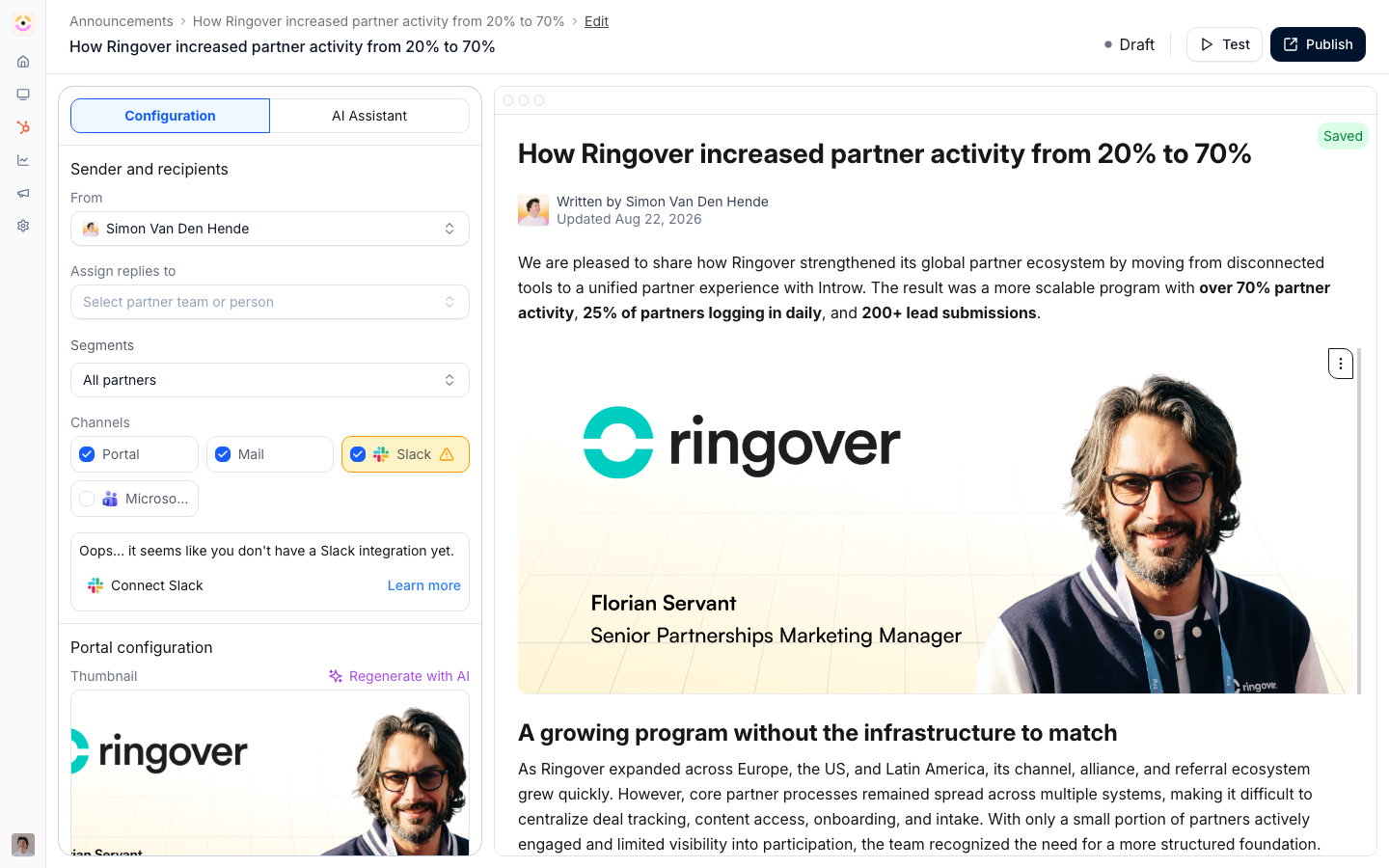
Write the announcement in the editor, adding formatting, links, and media. You can generate a
draft with AI from a preset, Webinar, Product update, or Blog post, using a source URL or
prompt, then edit it to fit your voice. You also set the author the announcement comes from,
the user replies are assigned to, and an optional **Thumbnail** under **Portal configuration**
(shown once **Portal** is a selected channel).
The thumbnail is the card artwork in the portal feed, in every view mode (grid, list, table).
It is cropped to **16:9** on upload, so a landscape image around 1200×675 is a safe size, and
**Generate with AI** produces one at that size from the announcement's own title and body plus
your brand colors (text-free by design, so nothing renders garbled). It is
not rendered inside the announcement body or in the email version, so keep essential visuals in
the content. AI-drafted announcements built from a source URL reuse that page's image as the
thumbnail at whatever ratio it has; the card still shows it in a 16:9 frame, filling and
trimming the overflow, so replace it by hand if the crop cuts something important.
### What the editor holds
The announcement editor carries the same writing blocks as the rest of Introw: headings, bullet and
numbered lists, **tables**, dividers, images, call-to-action buttons, and video embeds (YouTube, Loom,
Vimeo, Vidyard, or any other provider through **Embed other**).
It also carries **dynamic variables**. Type `{` and insert any property of your partner object from the
CRM, the Introw tier, partner champion or partner manager, a partner team role, or the reading contact's
own first name, last name, email, or company. One announcement then reads per partner - see
[Dynamic variables](/features/portal/experiences/technical#dynamic-variables) for the full list.
An existing announcement **duplicates** from its row in the list, which is the quickest way to run a
recurring format without rebuilding it.
### Recipients
Target the announcement to specific partner segments so the right partners receive it. This
keeps updates relevant rather than blasting every partner with everything.
Before you publish, the audience shows its **reach**: how many partners and which individual contacts
the current targeting resolves to, listed by name and email. Check it to catch a segment that is
narrower or wider than you intended.
### Channels
Choose which channels the announcement is delivered on. Enable any combination - publishing fans
it out across all of them at the same time:
* **Portal feed** - posts to the portal of every targeted partner. Always available.
* **Email** - emails every contact at the targeted partners, reaching them off-portal.
* **Slack** - posts into each targeted partner's connected shared Slack channel(s), when Slack is connected.
* **Microsoft Teams** - posts into each targeted partner's connected Teams channel(s), when Teams is connected.
Slack and Teams are independent toggles: enable both and a partner gets the announcement in both,
in every shared channel mapped to them. Across all your targeted partners, that one publish
distributes the update into every mapped shared channel in their ecosystem. Combining channels
improves the chance partners actually see it, and you can show the announcement as a pop-up the
next time targeted partners open the portal.
### Publishing and nudges
Publish to send the announcement. After it is out, you can send a nudge to remind partners who
have not engaged yet.
### Engagement
Review delivery and engagement to see who was sent the announcement, who opened it, and who
clicked, so you can follow up where it matters.
Engagement is recorded per contact and per channel, so a portal-only announcement is measured the same
way an emailed one is - you see which contacts opened it in the portal and which clicked through, not
just email statistics.
## How-to guides
* 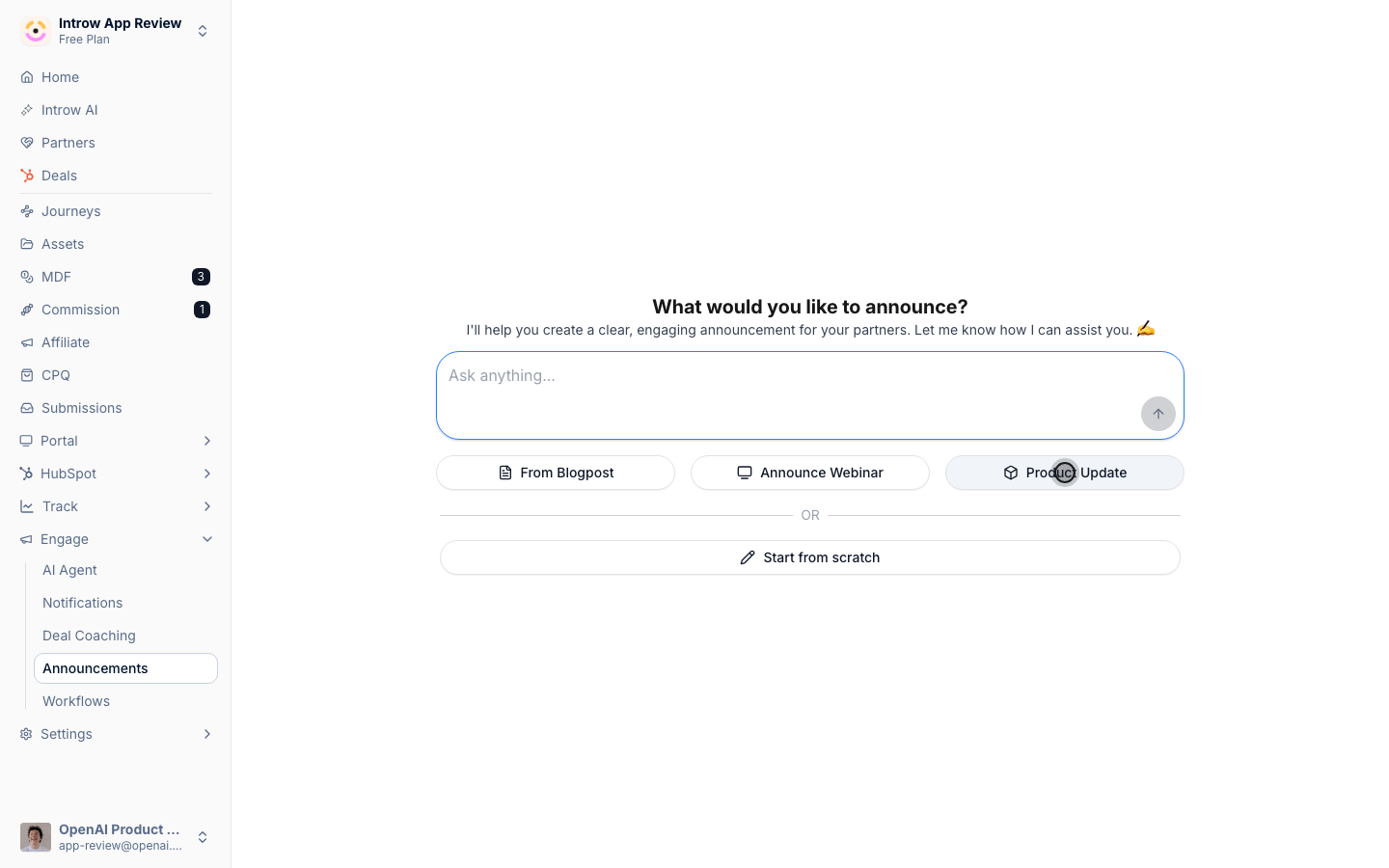
[**Generate an announcement with AI**](/features/engagement/announcements/guides/generate-an-announcement-with-ai)
Draft a partner announcement in seconds from a URL or text prompt using an AI preset, then refine the copy, target segments, and send it.
* [**Publish AI-suggested announcements from LinkedIn**](/features/engagement/announcements/guides/publish-ai-suggested-announcements)
Introw turns your company's partner-relevant LinkedIn posts into weekly announcement drafts rewritten for partners - review, edit, publish, or dismiss.
* 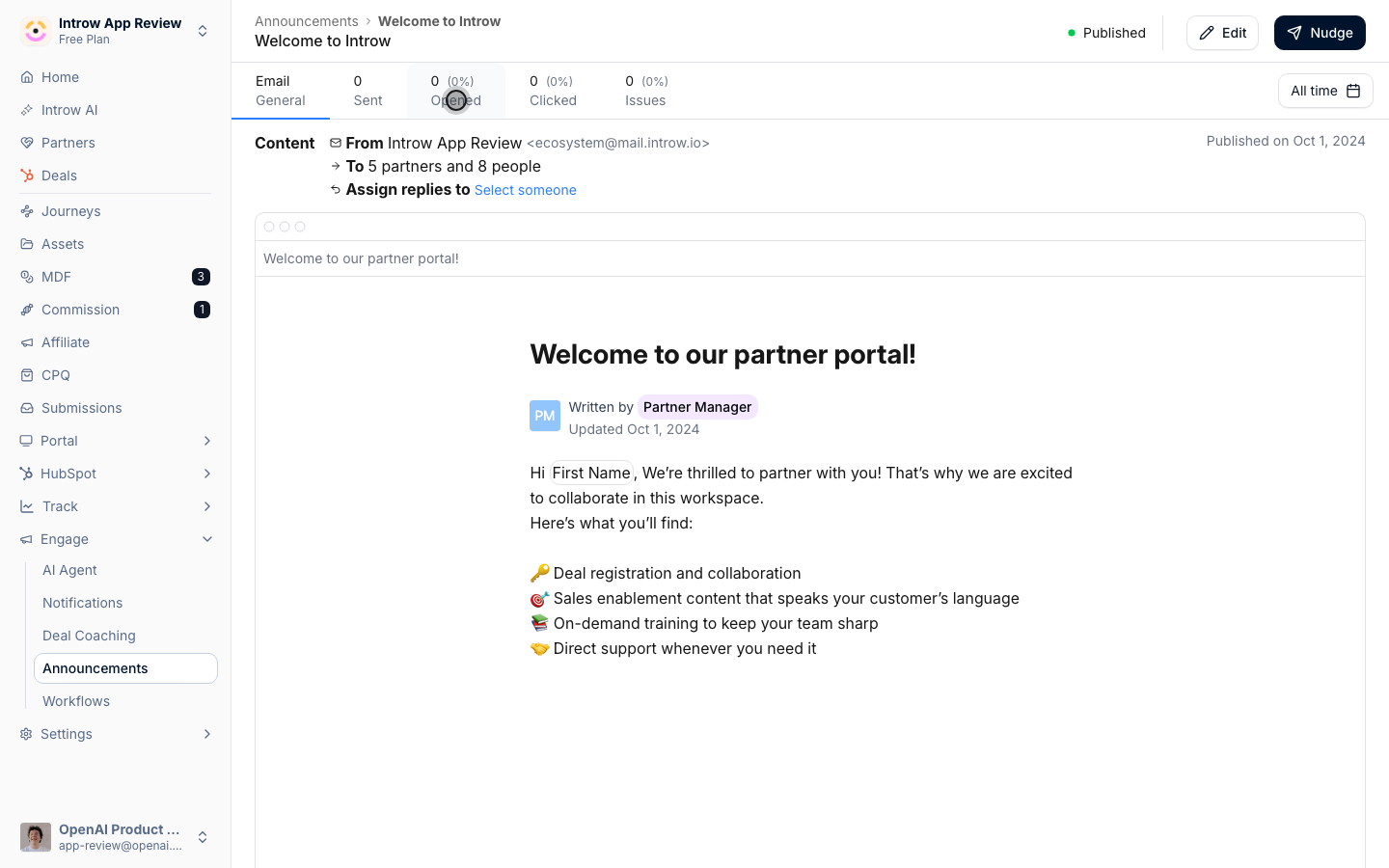
[**Review announcement engagement**](/features/engagement/announcements/guides/review-announcement-engagement)
Review announcement engagement in Introw: see who it was sent to, who opened, and who clicked, then follow up with partners who need a nudge.
* 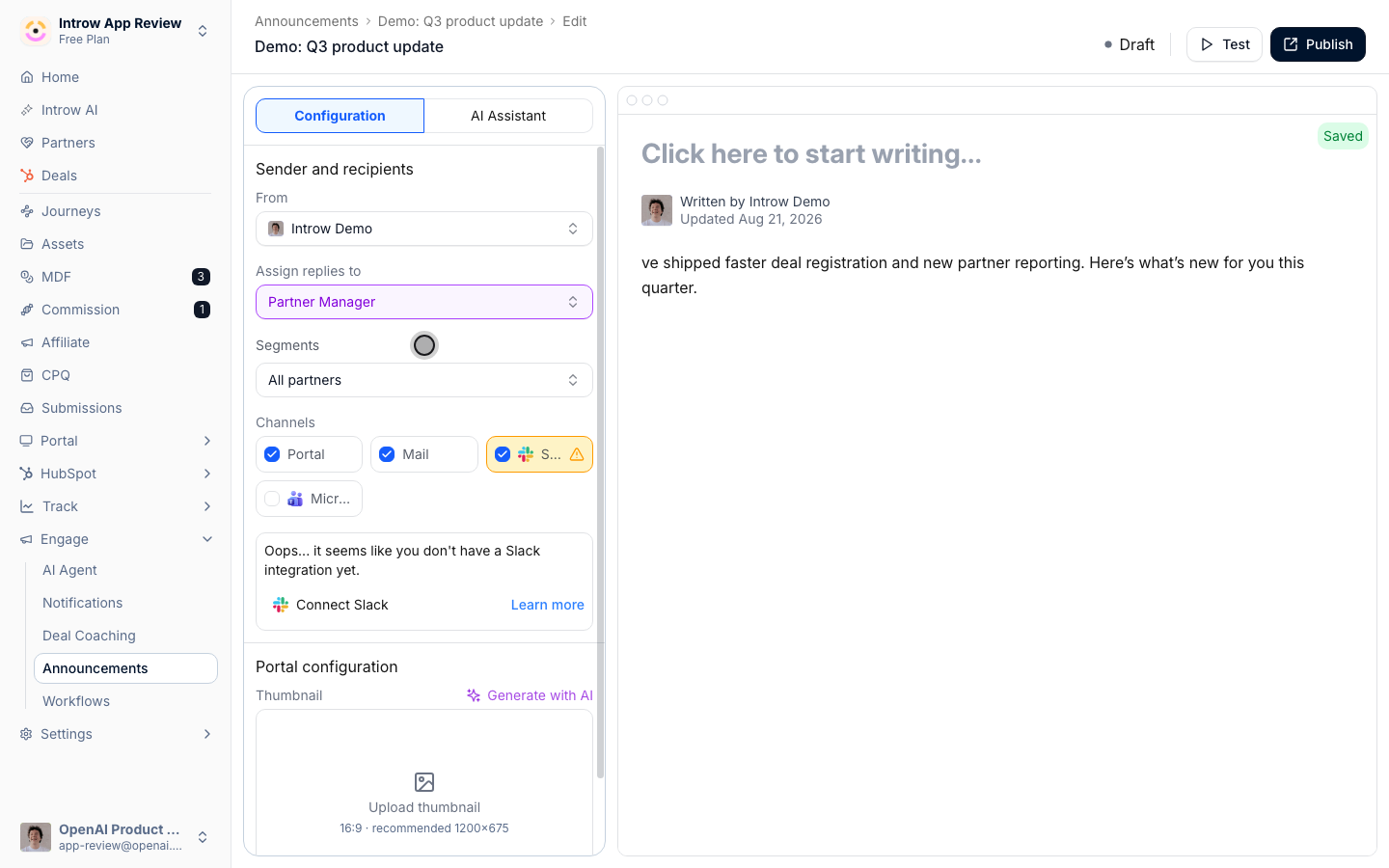
[**Send an announcement**](/features/engagement/announcements/guides/send-an-announcement)
Compose an announcement, set who it comes from and who handles replies, target the right segments, choose channels, and publish or nudge.
## Troubleshooting
Slack and Teams delivery requires those integrations to be connected first. Targeting depends on your segments being accurate, so review the audience before sending. Email and chat delivery reach partners off-portal, so proofread carefully since you cannot unsend a delivered announcement.
The integration is not connected.
The targeted segment was broader than intended.
Try a nudge and confirm you used multiple channels.
## FAQ
For partner-program communication, no. Announcements broadcast to the segments you target across portal, email, Slack and Teams; [notifications](/features/engagement/notifications) send the event-driven messages on their own; and a [workflow](/features/automation/workflows) can send a written email to a segment, a team role, or the contact a trigger was about, with delays and conditions between steps, which is what a partner onboarding sequence needs. Keep your marketing platform for what it is built for: campaigns to audiences that are not partner records, landing pages, and lead capture. The line to hold is that partner communication should run off partner data, and that data lives here and in your CRM.
There is no test send, and a delivered announcement cannot be unsent, so use the audience reach panel first to confirm exactly which contacts resolve. To see the real thing, keep one internal address as a test partner in a [static segment](/features/partners/segments/guides/create-a-static-segment) of its own and publish to that segment first.
Yes, through targeting rather than a separate feature. A static segment can hold a single partner, and a [workflow](/features/automation/workflows) email can address the partner champion, a specific team role, or the contact its trigger was about. For a one-to-one exchange about a record, a [comment on the record](/features/co-selling/shared-pipelines/guides/collaborate-on-a-shared-deal) reaches the people on it and their reply lands back on the record.
They can reply straight from their inbox. The reply is tracked back to the record or thread it came from and shared with everyone on it, so a broadcast can turn into a conversation without the partner logging in. Set **Assign replies to** so the right person owns follow-up.
## Before you start
| You need | Why | Fix it |
| --------------------------------- | ----------------------------- | ---------------------------------------------------------------------------------------------------------------------------------------- |
| Access to announcements | To write and send one | [Internal roles](/features/access/team-management/guides/create-an-internal-role) |
| Segments, to target an audience | Otherwise it goes to everyone | [Create a segment](/features/partners/segments/guides/create-a-dynamic-segment) |
| Slack or Teams, for chat delivery | Only to deliver into chat | [Connect Slack](/features/integrations/chat/guides/connect-slack) or [Teams](/features/integrations/chat/guides/connect-microsoft-teams) |
## How it works
An announcement is a message you compose, target to partner segments, and deliver across
channels. You write it in a rich editor, or generate a draft with AI and refine it, choose
which partner segments should receive it, and pick the delivery channels: the portal feed,
email, Slack, and Microsoft Teams. A single publish fans the announcement out across every
channel you enable at once - into the portal, every targeted contact's inbox, and each targeted
partner's connected shared Slack and Teams channels. After publishing, Introw tracks delivery and
engagement so you can see who saw it and nudge the rest.
Introw can also **suggest announcements for you**: each week it reads your company's LinkedIn page,
picks the posts most relevant to partners, and drafts an announcement for each - rewritten for a
partner audience. The drafts land in your Announcements list with an **AI Generated** badge for you
to review, edit, and publish or discard; nothing is sent until you publish it. See [Publish
AI-suggested announcements from LinkedIn](../guides/publish-ai-suggested-announcements).
## Settings & configuration
Announcements are managed at [Announcements](https://app.introw.io/announcements).
### Composing
Write the announcement in the editor, adding formatting, links, and media. You can generate a
draft with AI from a preset, Webinar, Product update, or Blog post, using a source URL or
prompt, then edit it to fit your voice. You also set the author the announcement comes from,
the user replies are assigned to, and an optional **Thumbnail** under **Portal configuration**
(shown once **Portal** is a selected channel).
The thumbnail is the card artwork in the portal feed, in every view mode (grid, list, table).
It is cropped to **16:9** on upload, so a landscape image around 1200×675 is a safe size, and
**Generate with AI** produces one at that size from the announcement's own title and body plus
your brand colors (text-free by design, so nothing renders garbled). It is
not rendered inside the announcement body or in the email version, so keep essential visuals in
the content. AI-drafted announcements built from a source URL reuse that page's image as the
thumbnail at whatever ratio it has; the card still shows it in a 16:9 frame, filling and
trimming the overflow, so replace it by hand if the crop cuts something important.
### What the editor holds
The announcement editor carries the same writing blocks as the rest of Introw: headings, bullet and
numbered lists, **tables**, dividers, images, call-to-action buttons, and video embeds (YouTube, Loom,
Vimeo, Vidyard, or any other provider through **Embed other**).
It also carries **dynamic variables**. Type `{` and insert any property of your partner object from the
CRM, the Introw tier, partner champion or partner manager, a partner team role, or the reading contact's
own first name, last name, email, or company. One announcement then reads per partner - see
[Dynamic variables](/features/portal/experiences/technical#dynamic-variables) for the full list.
An existing announcement **duplicates** from its row in the list, which is the quickest way to run a
recurring format without rebuilding it.
### Recipients
Target the announcement to specific partner segments so the right partners receive it. This
keeps updates relevant rather than blasting every partner with everything.
Before you publish, the audience shows its **reach**: how many partners and which individual contacts
the current targeting resolves to, listed by name and email. Check it to catch a segment that is
narrower or wider than you intended.
### Channels
Choose which channels the announcement is delivered on. Enable any combination - publishing fans
it out across all of them at the same time:
* **Portal feed** - posts to the portal of every targeted partner. Always available.
* **Email** - emails every contact at the targeted partners, reaching them off-portal.
* **Slack** - posts into each targeted partner's connected shared Slack channel(s), when Slack is connected.
* **Microsoft Teams** - posts into each targeted partner's connected Teams channel(s), when Teams is connected.
Slack and Teams are independent toggles: enable both and a partner gets the announcement in both,
in every shared channel mapped to them. Across all your targeted partners, that one publish
distributes the update into every mapped shared channel in their ecosystem. Combining channels
improves the chance partners actually see it, and you can show the announcement as a pop-up the
next time targeted partners open the portal.
### Publishing and nudges
Publish to send the announcement. After it is out, you can send a nudge to remind partners who
have not engaged yet.
### Engagement
Review delivery and engagement to see who was sent the announcement, who opened it, and who
clicked, so you can follow up where it matters.
Engagement is recorded per contact and per channel, so a portal-only announcement is measured the same
way an emailed one is - you see which contacts opened it in the portal and which clicked through, not
just email statistics.
## How-to guides
* 
[**Generate an announcement with AI**](/features/engagement/announcements/guides/generate-an-announcement-with-ai)
Draft a partner announcement in seconds from a URL or text prompt using an AI preset, then refine the copy, target segments, and send it.
* [**Publish AI-suggested announcements from LinkedIn**](/features/engagement/announcements/guides/publish-ai-suggested-announcements)
Introw turns your company's partner-relevant LinkedIn posts into weekly announcement drafts rewritten for partners - review, edit, publish, or dismiss.
* 
[**Review announcement engagement**](/features/engagement/announcements/guides/review-announcement-engagement)
Review announcement engagement in Introw: see who it was sent to, who opened, and who clicked, then follow up with partners who need a nudge.
* 
[**Send an announcement**](/features/engagement/announcements/guides/send-an-announcement)
Compose an announcement, set who it comes from and who handles replies, target the right segments, choose channels, and publish or nudge.
## Troubleshooting
Slack and Teams delivery requires those integrations to be connected first. Targeting depends on your segments being accurate, so review the audience before sending. Email and chat delivery reach partners off-portal, so proofread carefully since you cannot unsend a delivered announcement.
The integration is not connected.
The targeted segment was broader than intended.
Try a nudge and confirm you used multiple channels.
## FAQ
For partner-program communication, no. Announcements broadcast to the segments you target across portal, email, Slack and Teams; [notifications](/features/engagement/notifications) send the event-driven messages on their own; and a [workflow](/features/automation/workflows) can send a written email to a segment, a team role, or the contact a trigger was about, with delays and conditions between steps, which is what a partner onboarding sequence needs. Keep your marketing platform for what it is built for: campaigns to audiences that are not partner records, landing pages, and lead capture. The line to hold is that partner communication should run off partner data, and that data lives here and in your CRM.
There is no test send, and a delivered announcement cannot be unsent, so use the audience reach panel first to confirm exactly which contacts resolve. To see the real thing, keep one internal address as a test partner in a [static segment](/features/partners/segments/guides/create-a-static-segment) of its own and publish to that segment first.
Yes, through targeting rather than a separate feature. A static segment can hold a single partner, and a [workflow](/features/automation/workflows) email can address the partner champion, a specific team role, or the contact its trigger was about. For a one-to-one exchange about a record, a [comment on the record](/features/co-selling/shared-pipelines/guides/collaborate-on-a-shared-deal) reaches the people on it and their reply lands back on the record.
They can reply straight from their inbox. The reply is tracked back to the record or thread it came from and shared with everyone on it, so a broadcast can turn into a conversation without the partner logging in. Set **Assign replies to** so the right person owns follow-up.