> ## Documentation Index
> Fetch the complete documentation index at: https://docs.introw.io/llms.txt
> Use this file to discover all available pages before exploring further.
# Publish AI-suggested announcements from LinkedIn
> Introw turns your company's partner-relevant LinkedIn posts into weekly announcement drafts rewritten for partners - review, edit, publish, or dismiss.
> For keeping partners in the loop on your company news without watching your own LinkedIn feed or rewriting a single post.
Your company already announces its news on LinkedIn, but partners rarely see it, and rewriting each post for a partner audience is work nobody has time for. So Introw does it for you: every week it reads your company's LinkedIn page, keeps the posts that actually matter to partners, and drafts an announcement for each - already rewritten to speak to partners, not the public. You review the drafts, adjust anything, and publish the ones worth sending. This guide covers how the suggestions arrive and how you turn them into published announcements.
## What you'll achieve
Partner-ready announcement drafts, generated from your latest LinkedIn news and adapted for partners, reviewed and published across the portal, email, Slack, and Teams - or dismissed if they are not a fit.
## How the suggestions are made
You do not trigger this - it runs on its own for customers once your company's LinkedIn page is connected to Introw (set during onboarding; if you never see suggestions, ask your Introw contact to confirm your LinkedIn page is on file). Each week Introw:
* **Reads your recent LinkedIn posts** from your company page.
* **Keeps only the partner-relevant ones** - product updates and launches, new features, integrations, partner-program news, case studies, certifications and training, pricing changes, milestones, new partnerships, and events partners could join. It skips posts partners do not need, such as hiring, culture, personal notes, and reshares.
* **Groups posts about the same news** so one launch becomes one announcement, not three.
* **Drafts up to a few announcements** and rewrites each for a partner audience - written as your own announcement rather than "we posted on LinkedIn", carrying over the post's images.
* **Never repeats itself** - a post it has already drafted an announcement from is not suggested again.
The drafts are exactly that: nothing is sent until you publish it.
## Steps
When new drafts are generated, Introw emails everyone on your team with access to announcements, with a link straight to them. You do not have to check for them.
Go to [Announcements](https://app.introw.io/announcements). A banner shows how many announcements were generated from recent content, and each suggested draft carries an **AI Generated** badge while it is still a draft, so you can tell them apart from ones your team wrote.
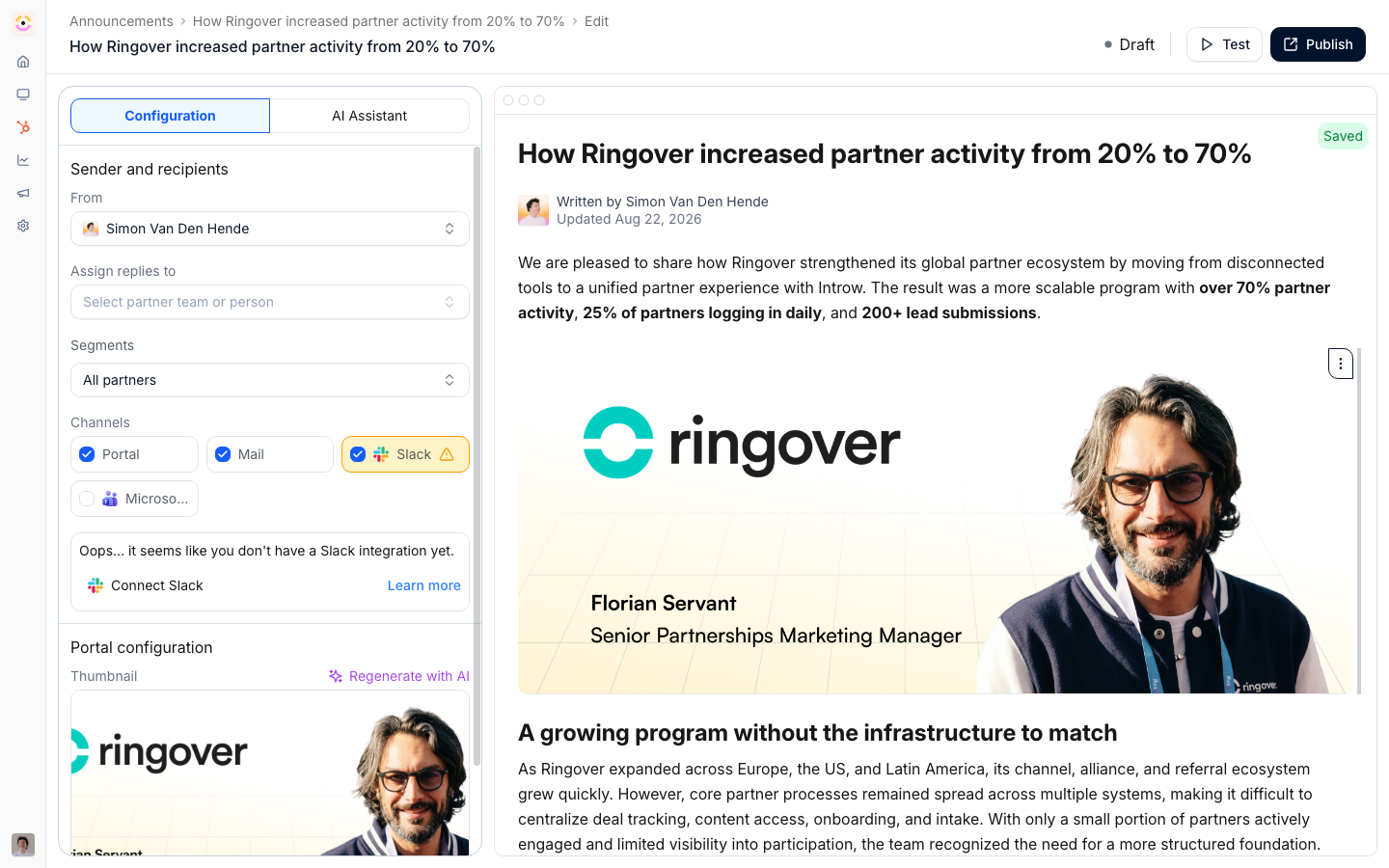 Open a draft. It is already written for partners, so read it through and adjust the wording, title, or images to fit your voice. Because it starts as a normal draft, everything on it is editable - it is a starting point, not a locked message.
Set who the announcement is for and how it goes out, exactly as with any announcement: pick the partner **segments** to target, and enable the delivery **channels** - portal feed, email, Slack, and Microsoft Teams. See [Send an announcement](./send-an-announcement) for the full targeting and channel options.
Publish the draft to fan it out across the channels you chose, the same as any announcement. If a suggestion is not a fit, delete the draft, or dismiss the banner to hide that batch. Only the drafts you publish ever reach partners.
## Verify it worked
A published suggestion appears in the portal feed and goes out on the channels you enabled, and the count of pending AI drafts on the Announcements banner drops. You can then track who opened and clicked it like any announcement (see [Review announcement engagement](./review-announcement-engagement)).
## Related
Draft an announcement on demand from a URL or prompt.
Target segments, choose channels, and publish.
See who opened and clicked, then nudge the rest.
Composing, channels, and publishing.
Open a draft. It is already written for partners, so read it through and adjust the wording, title, or images to fit your voice. Because it starts as a normal draft, everything on it is editable - it is a starting point, not a locked message.
Set who the announcement is for and how it goes out, exactly as with any announcement: pick the partner **segments** to target, and enable the delivery **channels** - portal feed, email, Slack, and Microsoft Teams. See [Send an announcement](./send-an-announcement) for the full targeting and channel options.
Publish the draft to fan it out across the channels you chose, the same as any announcement. If a suggestion is not a fit, delete the draft, or dismiss the banner to hide that batch. Only the drafts you publish ever reach partners.
## Verify it worked
A published suggestion appears in the portal feed and goes out on the channels you enabled, and the count of pending AI drafts on the Announcements banner drops. You can then track who opened and clicked it like any announcement (see [Review announcement engagement](./review-announcement-engagement)).
## Related
Draft an announcement on demand from a URL or prompt.
Target segments, choose channels, and publish.
See who opened and clicked, then nudge the rest.
Composing, channels, and publishing.