> ## Documentation Index
> Fetch the complete documentation index at: https://docs.introw.io/llms.txt
> Use this file to discover all available pages before exploring further.
# Link a registered deal to an existing lead
> Let partners pick an existing CRM lead when they register a deal, write the lead reference on the deal, and associate the two records in your CRM.
When a partner registers a deal that started as a lead, you want the deal and the lead connected in your CRM so nothing about the origin is lost. Introw supports this in three stages: a lead picker on the registration form, a form automation that records the chosen lead on the deal, and a CRM workflow that formally associates the two records. This guide walks the Introw setup and hands off to the CRM workflow that completes the link.
## What you'll achieve
A deal registration form on which partners can select the lead their deal relates to, so each new deal carries a reference to that lead and your CRM associates the deal and lead automatically, keeping attribution and history intact.
## Before you start
You need a form that registers deals. See [Build and publish a form](/features/forms/form-builder/guides/build-and-publish-a-form) and [Connect a form to your CRM](/features/forms/crm-field-mapping/guides/connect-a-form-to-your-crm).
In your CRM, have (or create) a property on the deal object to hold the linked lead's identifier, so the automation has somewhere to write it.
## Watch it
## Steps
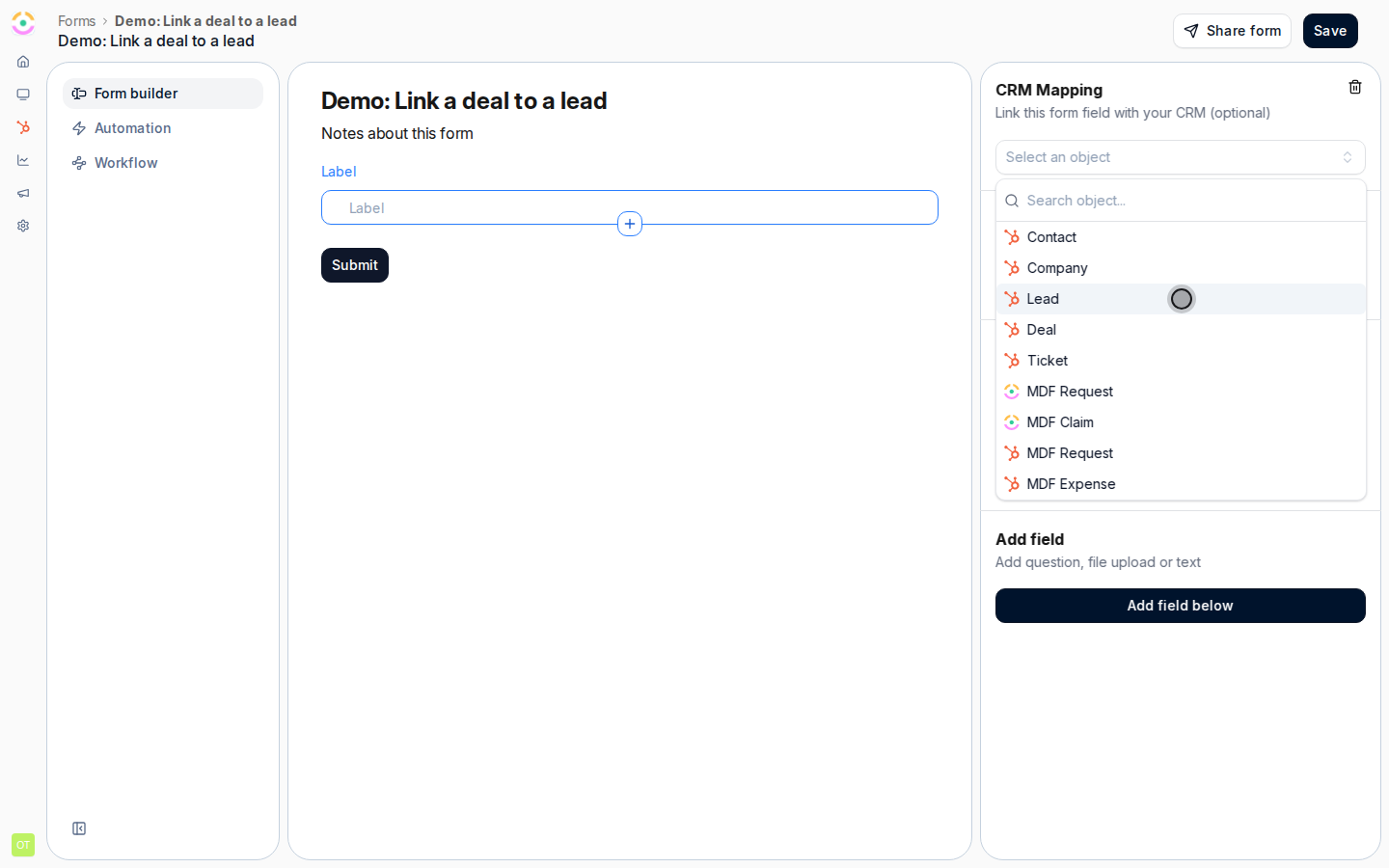
Go to [Forms](https://app.introw.io/forms) and open your deal registration form. Add a CRM embed list bound to the lead object, so partners can select the existing lead their deal relates to while registering. This is what captures which lead each deal should link to.
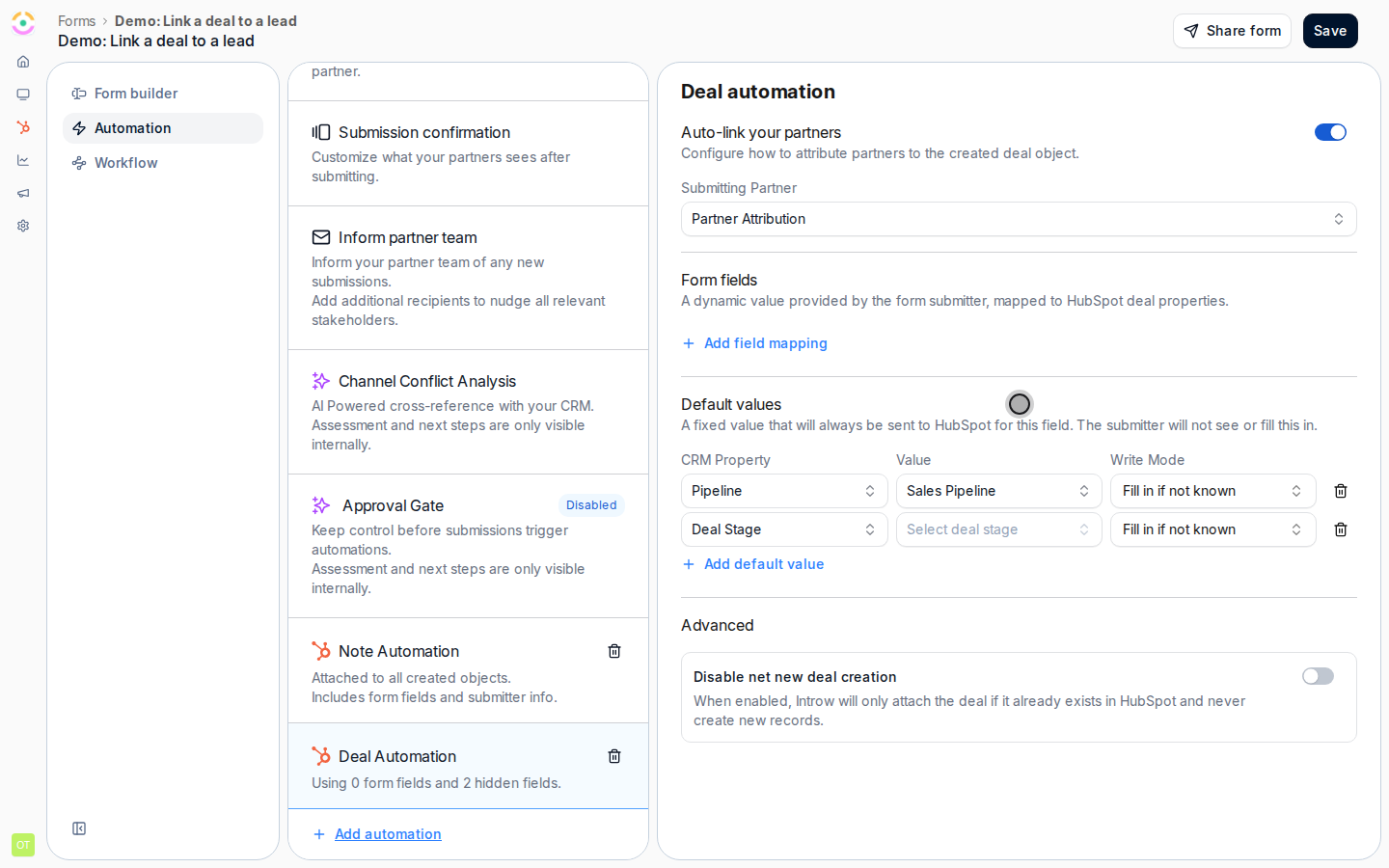
 On the form's **Automation** tab, configure the deal automation to write the selected lead's identifier into the deal property you prepared. Now every submitted deal carries a reference to its lead, which the CRM uses to make the association.
 Save and publish so partners get the lead picker and new registrations start recording the linked lead. Test with a submission and confirm the deal in your CRM shows the lead reference populated.
Finish the link in your CRM: create a workflow that triggers on new deals carrying the lead reference and associates the deal with that lead. In HubSpot, see [Use Introw workflow actions in HubSpot](/features/integrations/crm/guides/use-introw-workflow-actions-in-hubspot) for building the workflow. This step runs in your CRM, not in Introw.
## Verify it worked
Submit a test registration and pick a lead. The new deal appears in your CRM with the lead reference filled in, and once the workflow runs, the deal and lead are associated so you can navigate between them, with the deal's partner attribution intact.
## Related
The core deal registration flow this extends.
Map and attribute form submissions to CRM records.
Build the workflow that associates the deal and lead.
Save and publish so partners get the lead picker and new registrations start recording the linked lead. Test with a submission and confirm the deal in your CRM shows the lead reference populated.
Finish the link in your CRM: create a workflow that triggers on new deals carrying the lead reference and associates the deal with that lead. In HubSpot, see [Use Introw workflow actions in HubSpot](/features/integrations/crm/guides/use-introw-workflow-actions-in-hubspot) for building the workflow. This step runs in your CRM, not in Introw.
## Verify it worked
Submit a test registration and pick a lead. The new deal appears in your CRM with the lead reference filled in, and once the workflow runs, the deal and lead are associated so you can navigate between them, with the deal's partner attribution intact.
## Related
The core deal registration flow this extends.
Map and attribute form submissions to CRM records.
Build the workflow that associates the deal and lead.