> ## Documentation Index
> Fetch the complete documentation index at: https://docs.introw.io/llms.txt
> Use this file to discover all available pages before exploring further.
# Deal & Lead Registration
> Set up deal and lead registration for co-selling in Introw: build the form, map it to your CRM, add conflict checks and approvals, share it, and work the inbox.
export const Rail = ({children}) =>
{children}
;
## Where it lives
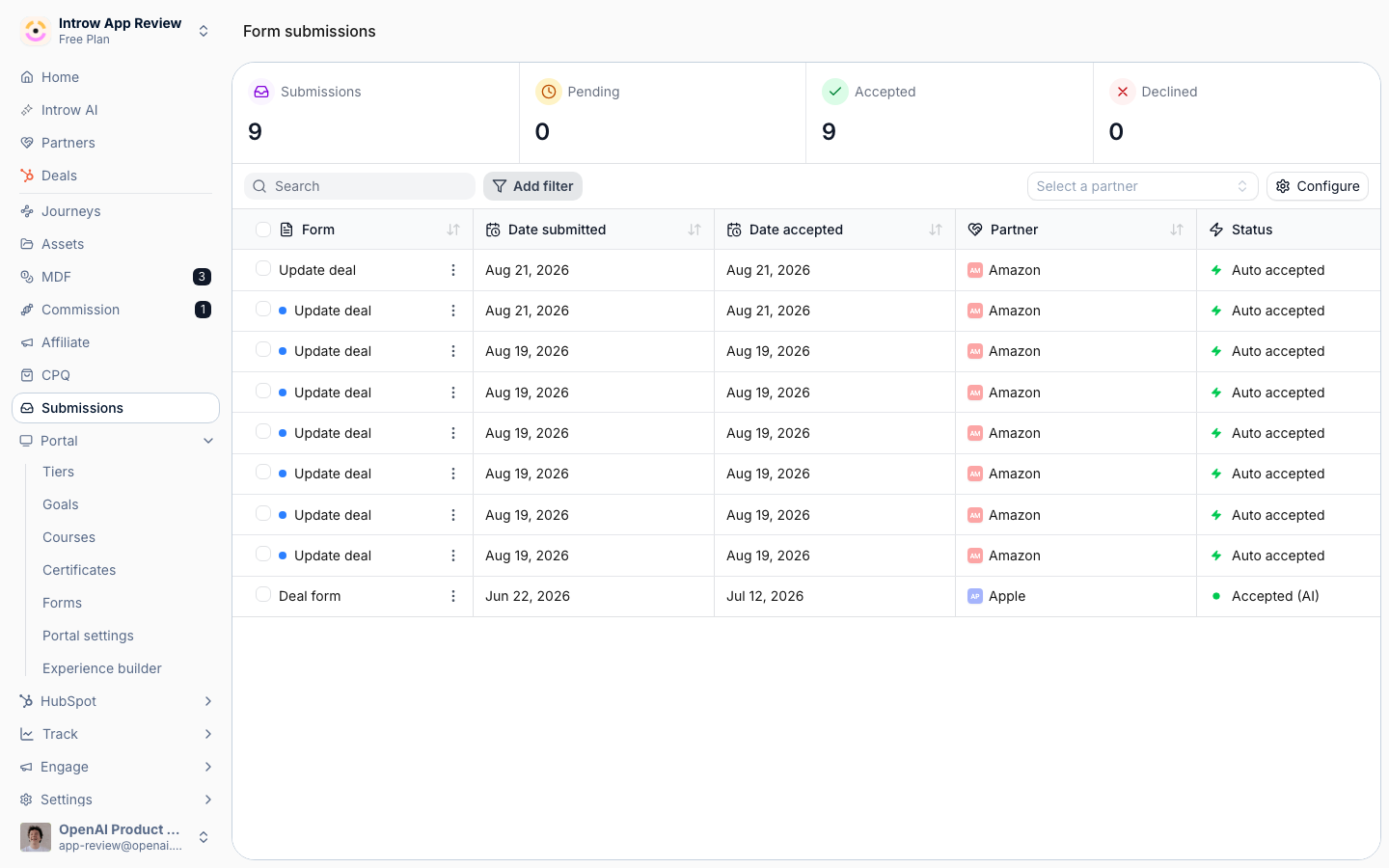
A registration is a form. You build and configure it under **Portal**, at [Forms](https://app.introw.io/forms), and every registration lands at [Submissions](https://app.introw.io/submissions).
 ## Before you start
| You need | Why | Fix it |
| -------------------------------- | ----------------------------------------------- | ------------------------------------------------------------------------------------------------- |
| A connected CRM with attribution | A registration credits the partner through it | [Configure attribution](/features/co-selling/shared-pipelines/guides/configure-deal-attribution) |
| Write access to Forms | Registration is form configuration | [Internal roles](/features/access/team-management/guides/create-an-internal-role) |
| A shared pipeline, optionally | So the registered deal opens as a shared record | [Set up a shared pipeline](/features/co-selling/shared-pipelines/guides/set-up-a-shared-pipeline) |
## How it works
A registration is an Introw form with a CRM automation behind it. A partner fills it in from
wherever they work: the portal, a share link, an embed on your site, an email, Slack or Teams, an
AI assistant, or the API. Introw identifies the submitter and their partner, checks the
registration against your existing pipeline for channel conflict, holds it at the approval gate
when you have one, and on accept writes the record to HubSpot or Salesforce attributed to the
partner. The record then shows up on that partner's shared pipeline, so the co-sell continues on
the same object.
Deals and leads run through the same mechanics; what differs is the object the automation
writes. A **deal registration** maps to a deal, usually with the company and contact behind it, so
credit is locked in before anyone works the opportunity. A **lead registration** maps to a lead or
contact, and your team qualifies it into a deal. When a lead later becomes a deal, a lead picker
on the deal form ties the two records together.
Because it is a form, nothing about registration is bespoke. The form builder, the CRM
automation, channel-conflict analysis, the approval gate, the sharing channels, and the
Submissions inbox are the same ones every other partner form uses. This page tells you which of
those settings matter for registration and sends you to the full reference for each.
```mermaid theme={"theme":{"light":"github-light","dark":"github-dark"}}
flowchart LR
channels["Portal, link, email, chat, AI, API"] --> form["Registration form"]
form --> checks["Identify partner, conflict check, approval"]
checks --> crm["Attributed deal or lead in your CRM"]
crm --> shared["Shared pipeline"]
```
## Settings & configuration
Everything registration-specific lives on the form: its fields on the **Form builder** tab and
its behavior on the **Automation** tab, both from [Forms](https://app.introw.io/forms). The
Automation tab lists the form's blocks in four groups, **Submission**, **Review**,
**Notifications**, and **Records written**, and opens each one in the panel beside the list. The
settings below are the ones that decide whether a registration lands clean, credited, and on the
right desk.
### Fields and CRM mapping
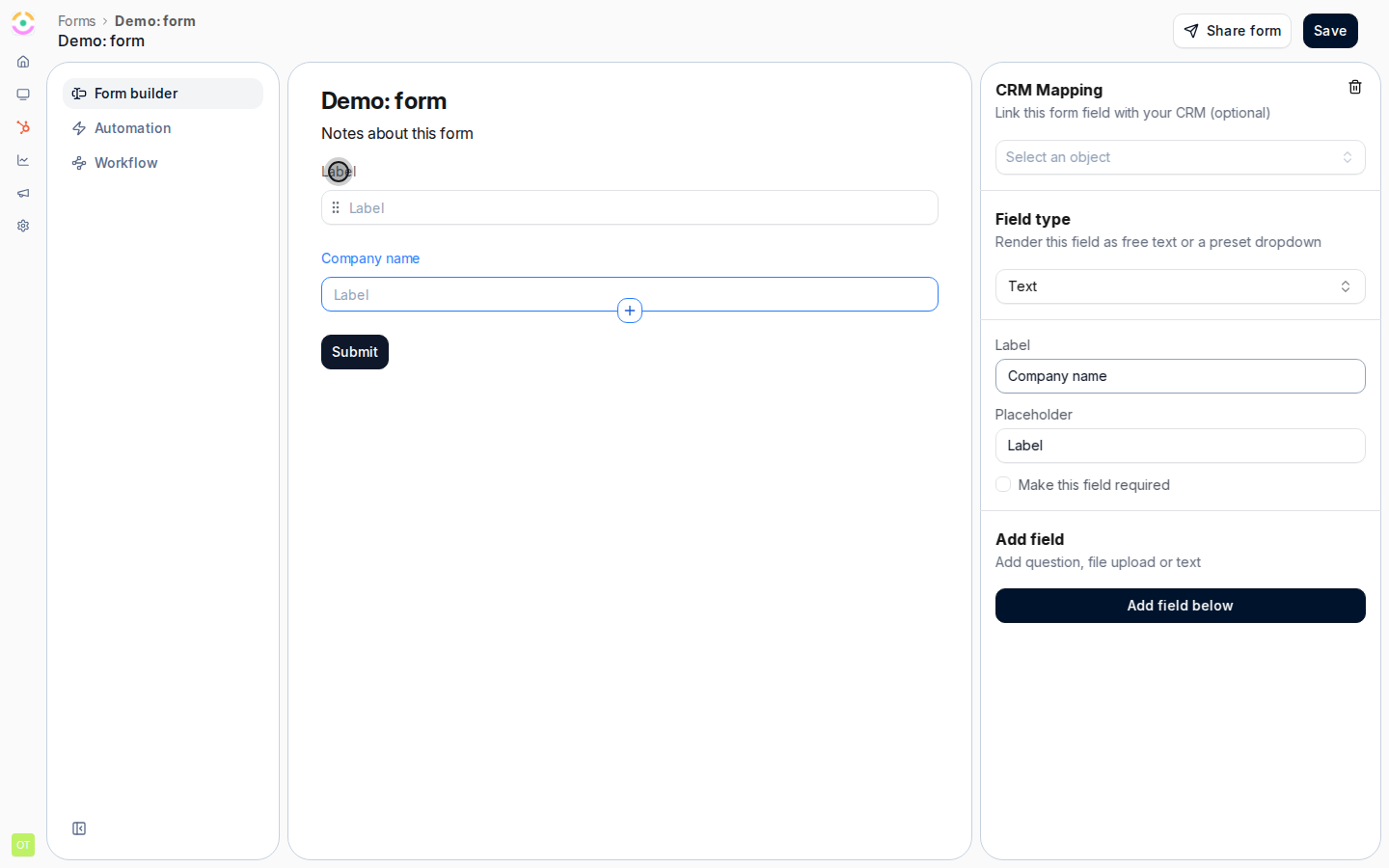
On the **Form builder** tab, add the fields a partner fills in and map each one to a CRM object
and property under **CRM Mapping**. A deal registration usually asks for the company name and
domain, a contact, the deal amount, the expected close date, and one free-text question about the
opportunity. Keep it short: partners register more when the form only asks what you cannot look
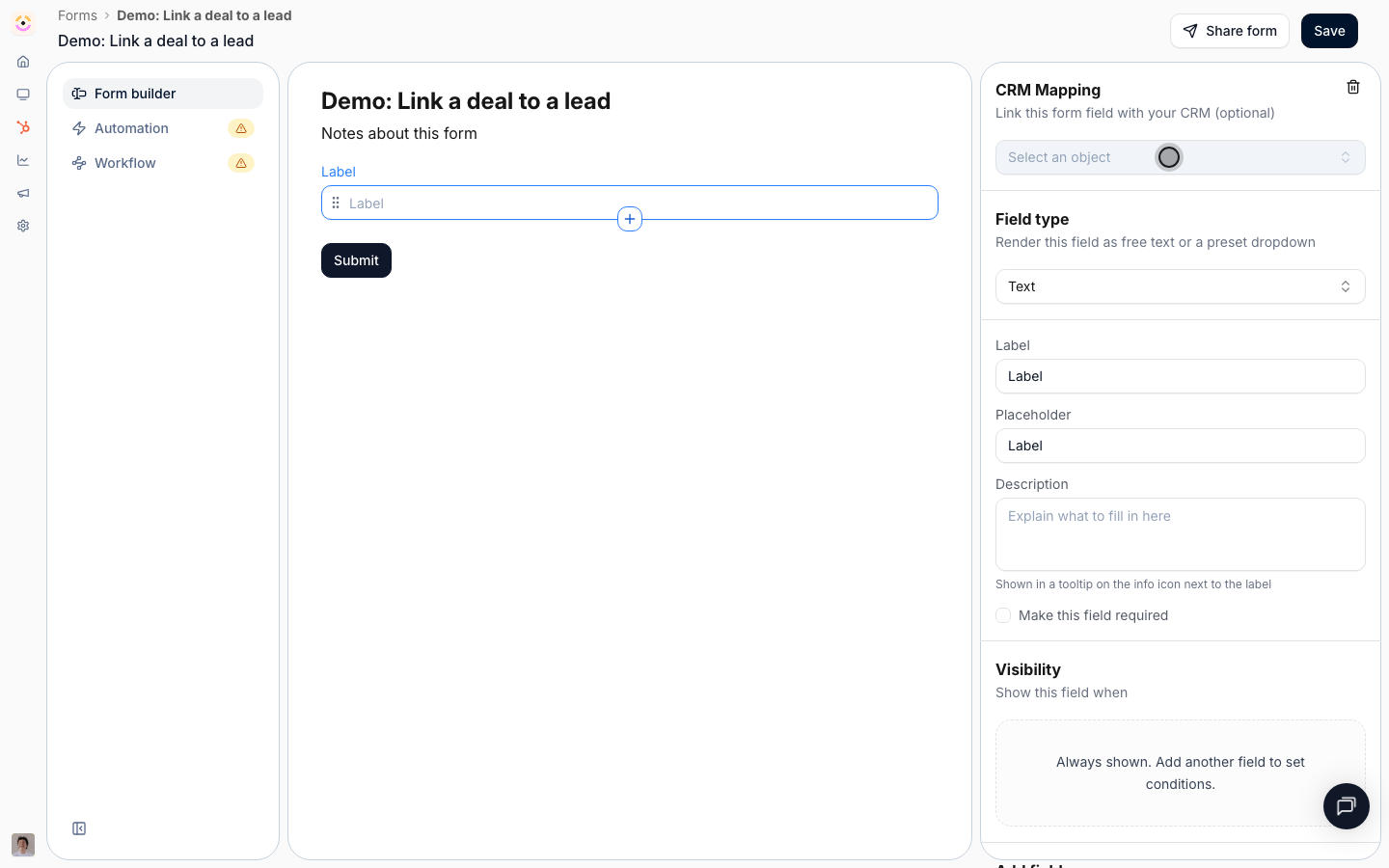
up yourself. Add a **CRM object** field when you want a partner to pick an existing lead, account,
or contact instead of retyping it, and use conditional fields to ask a question only when it
applies. Start from the **Deal registration** or **Lead capture** template rather than a blank
form.
Full reference: [Form Builder](/features/forms/form-builder/technical).
### The deal or lead record
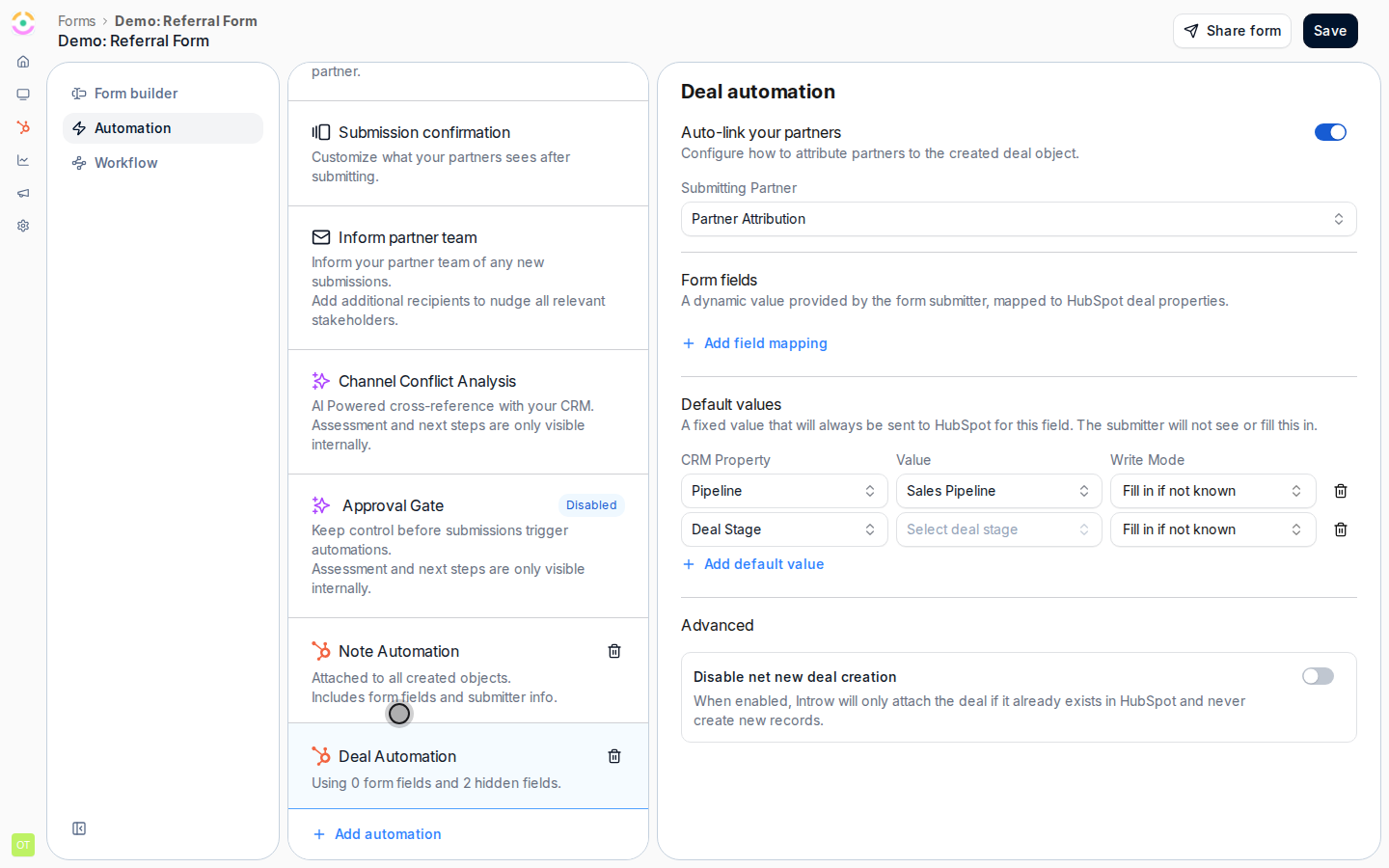
Under **Records written**, add the record a registration should write: a **Deal** for deal
registration, or a **Lead**, **Contact**, or **Company** for lead sharing. The panel asks four
questions in order.
**Which deal does this write to?** **Match or create** enriches the deal Introw finds in your CRM
and creates one only when nothing matches, so a registration never duplicates a deal you already
have. **Match only** never adds a record, for forms that should only ever update an existing deal.
A CRM object picker on the form outranks matching: the record the partner picks is the record
Introw writes to.
**Form fields** map what the partner submits to CRM properties. Each row carries a **Write mode**
that defaults to **Fill in if not known**, so partner data fills gaps and never overwrites what a
rep already set.
**Default values** are what the partner never sees: the pipeline, the stage, the deal owner (a
fixed person or the partner's own manager), and a deal-name convention built from text and
variables such as the company name via the partner. The panel also shows the values Introw
resolves itself at submission time, such as the partner attribution property, so you can see what
every registered deal is created with.
Full reference: [CRM Automations](/features/forms/crm-automations/technical).
### Attribution
**Partner links**, on the same panel, decides how the deal Introw writes gets attached to a
partner. **Submitting partner** links the record to the partner who submitted, using the
attribution methods you already configured on your CRM connection, with no per-form wiring. This
link is what puts the deal on that partner's shared pipeline and counts it toward their revenue
and commissions. **Identify submitter**, under **Submission**, matches the standard submitter
fields to partner details, so a registration that arrives off-portal, from a link, an email, or a
chat message, is still credited.
Full reference: [Configure deal attribution](/features/co-selling/shared-pipelines/guides/configure-deal-attribution).
### Channel conflict check
**Channel conflict check**, under **Review**, cross-references each registration against your
existing deals, contacts, and companies before anything is written. Turn on **Channel Conflict
Analysis**, scope it with filters, for example excluding Closed Lost deals, and add context about
how your team defines a conflict. The analysis proposes one of three outcomes: create a new
record, link the registration to the existing deal, or decline it. Conflict cases show the
overlapping records in the inbox so the reviewer decides with full context.
Full reference: [Channel Conflict Resolution](/features/ai/channel-conflict/technical).
### Approval gate
**Approval gate**, under **Review**, holds registrations for review before the CRM writes run.
Switch it on and pick how much of the review Introw AI owns. **Manual** sends every submission to
your approvers with no AI. **AI Assisted** has Introw AI pre-check each registration and
recommend, and your approvers decide. **Autonomous AI** lets Introw AI decide when it is confident
and escalate the rest to your approvers. The mode in force shows beside the block in the list.
Without a gate, a conflict-free registration is accepted the moment it arrives.
Full reference: [Approval gate](/features/forms/submissions-approvals/technical#approval-gate).
### Who gets told
**Notify your team**, under **Notifications**, sets who on your team is emailed about every new
registration; this is also where a **Submission error** email goes when your CRM refuses the
record, so leave nobody out. **Reply to submitter**, shown once the approval gate is on, holds the
accept, decline, and return emails the partner receives. **Confirmation screen**, under
**Submission**, is what the partner sees right after submitting: an end screen or a redirect to
your own URL.
### Sharing the form
**Share form** on the form gives you every entry point. A **General link** is open to anyone, a
**Partner link** stamps every submission with that partner's attribution, **Embed** places the
form on your own site, and the **API** tab turns it into a request from the partner's systems. In
a portal experience, add the form as a section. With the AI agent on and the integration
connected, partners also register by forwarding an email, messaging the agent in Slack or Teams,
or asking a connected AI assistant.
Full reference: [Sharing & submitting](/features/forms/sharing-submitting/technical).
### Working the inbox
[Submissions](https://app.introw.io/submissions) lists every registration with its status. Open
one to **Accept**, **Decline**, or **Return** it for more information, and reply to the partner
on the same thread. Use **Configure** to add the mapped CRM properties you triage by, such as deal
amount and stage, as columns. **Accepted** is final: accepting is what wrote the record and told
the partner yes, so correct the record in your CRM and return the submission if you need a
change.
Full reference: [Submissions & Approvals](/features/forms/submissions-approvals/technical).
## How-to guides
Registration owns no guides of its own. It is a form, so the guides live with Forms and with the
two registration motions. Follow them in this order.
### Start with the whole recipe
* [**Register and approve a reseller deal**](/features/deal-registration/registration/guides/register-and-approve-a-deal)
Build a reseller registration form that creates an attributed CRM deal, add channel conflict checks and approvals, and work the submissions inbox.
* 
[**Build and share a referral form**](/features/referrals/lead-sharing/guides/build-and-share-a-referral-form)
Build a referral form that captures attributed leads, credits the referring partner, and share it as a link, an embed, or an API call from their systems.
### Build the form
* 
[**Build and publish a form**](/features/forms/form-builder/guides/build-and-publish-a-form)
Create a no-code partner form in Introw: add and configure fields, set the confirmation screen, and publish it via link, embed, portal, or the API.
* [**Partner form templates & use cases**](/features/forms/form-builder/guides/partner-form-templates)
Partner form templates: deal registration, lead capture, support, MDF requests, partner applications, purchase orders, events, and feedback.
* [**Show fields conditionally**](/features/forms/form-builder/guides/show-fields-conditionally)
Build one form that adapts: fields that appear only when they are relevant, questions that become mandatory only when they apply, and whole sections that unfold from a single answer.
* 
[**Link a registered deal to an existing lead**](/features/deal-registration/registration/guides/link-a-deal-to-an-existing-lead)
Let partners pick an existing CRM lead when they register a deal, write the lead reference on the deal, and associate the two records in your CRM.
### Write it to your CRM
* 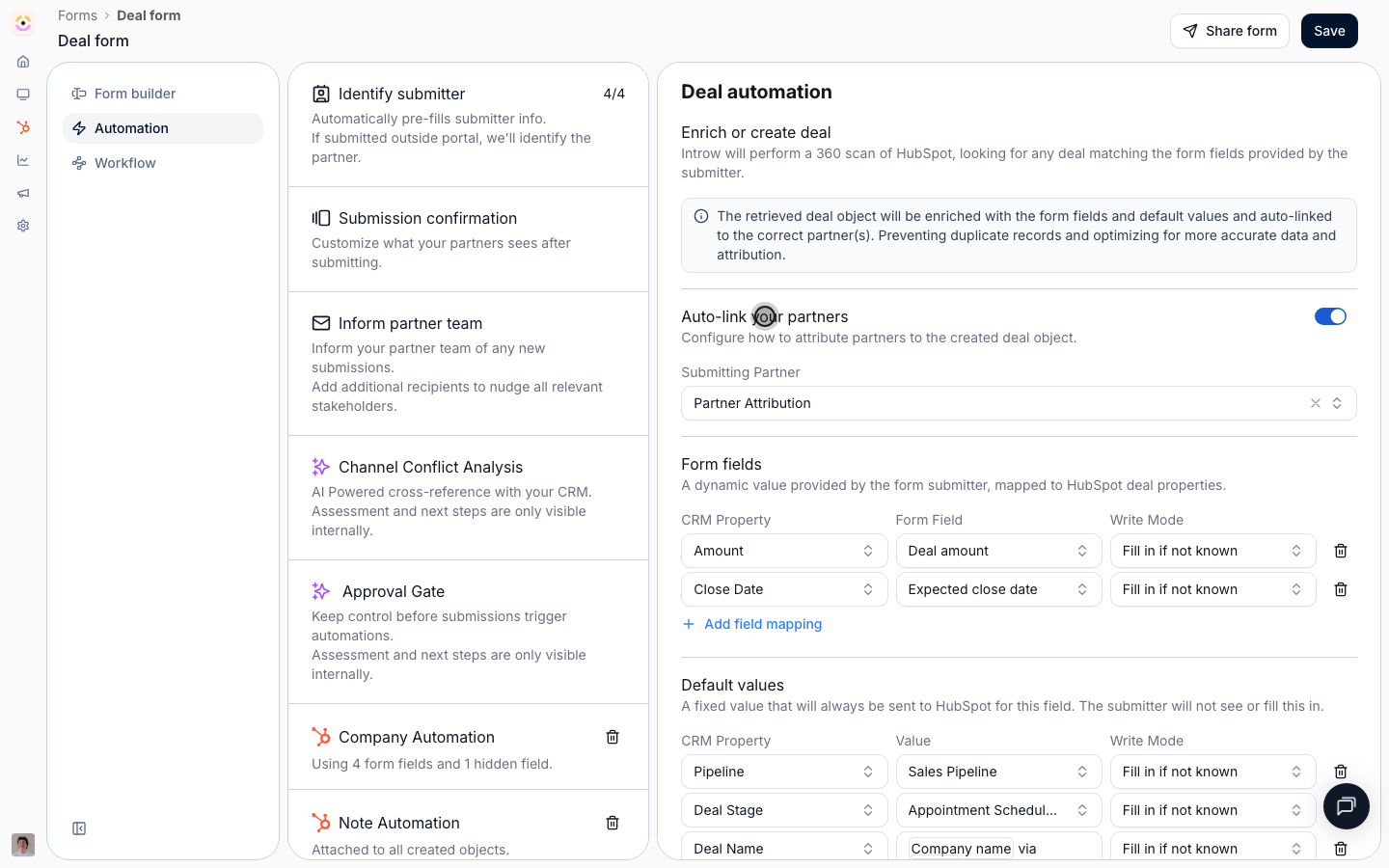
[**Connect a form to your CRM**](/features/forms/crm-automations/guides/connect-a-form-to-your-crm)
Map fields to CRM properties, control how submissions create or update records, attribute them to the partner, and prefill from known data.
* 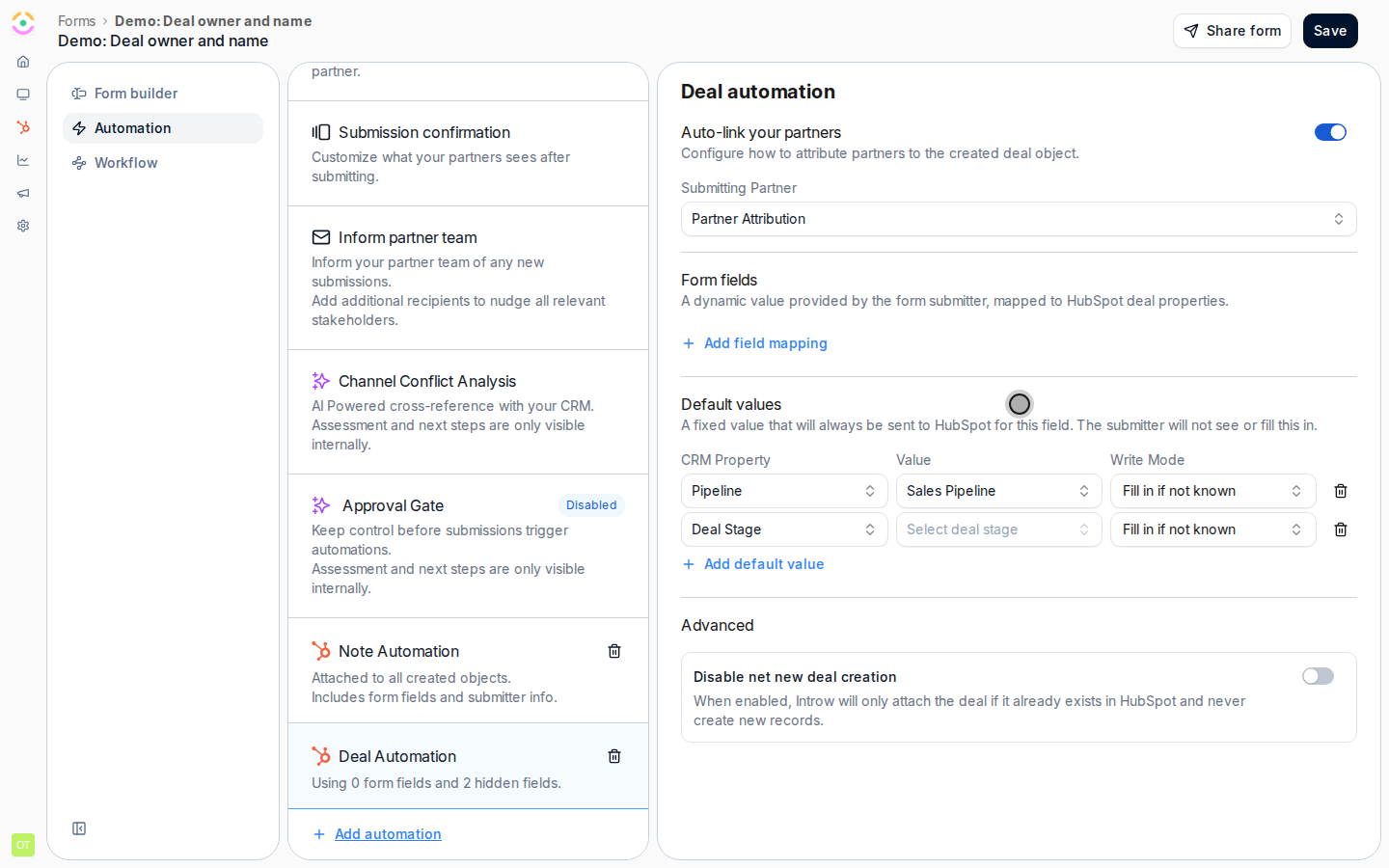
[**Configure the deal owner and name for partner deals**](/features/deal-registration/registration/guides/configure-partner-deal-owner-and-name)
Control who owns partner-registered deals in your CRM and how those deals are named, using default fields and naming rules on the deal automation.
* 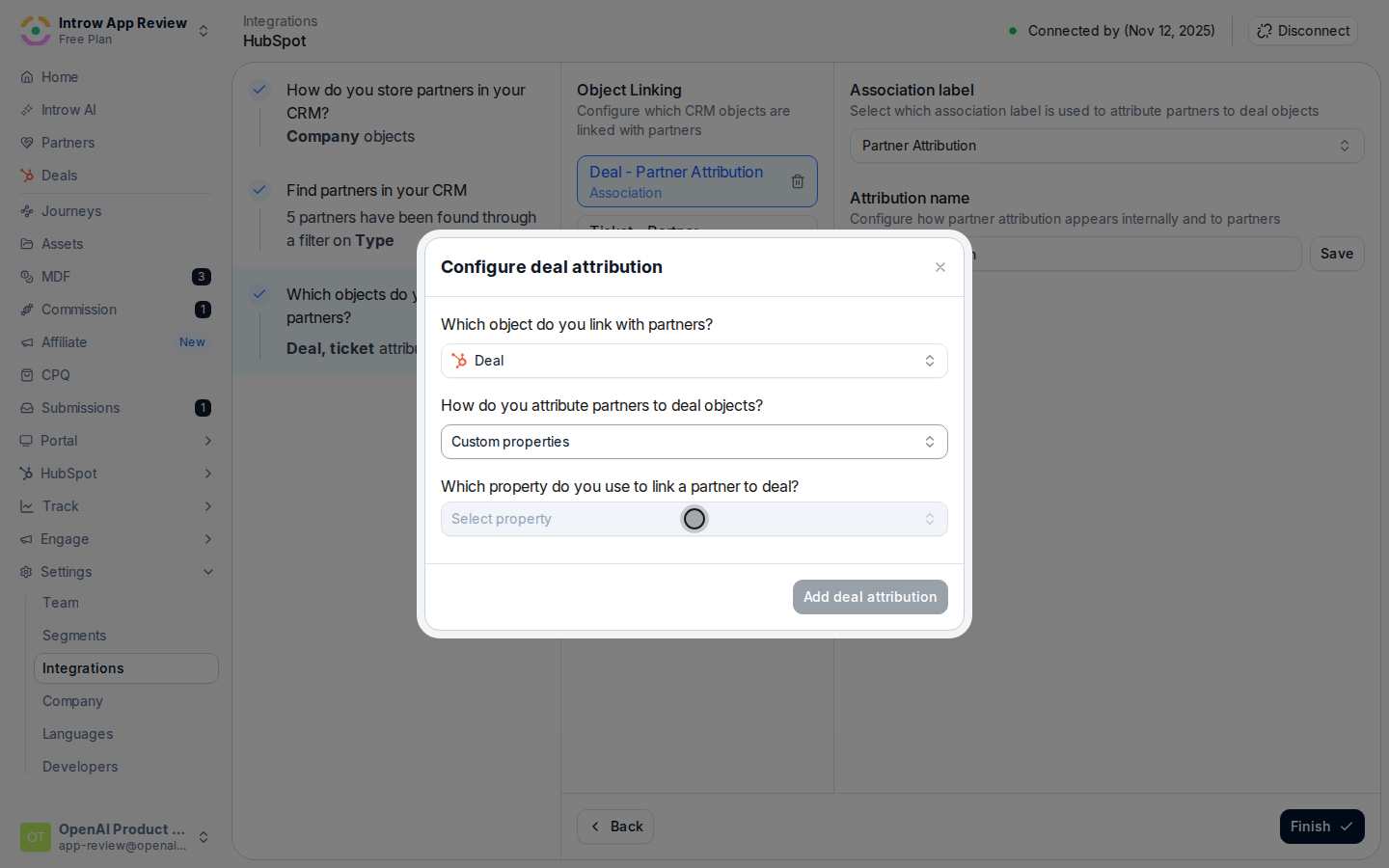
[**Configure deal attribution**](/features/co-selling/shared-pipelines/guides/configure-deal-attribution)
Link every deal to the partner who sourced or influenced it so shared pipelines, partner-attached revenue, reporting, and commissions stay accurate.
### Check it and approve it
* 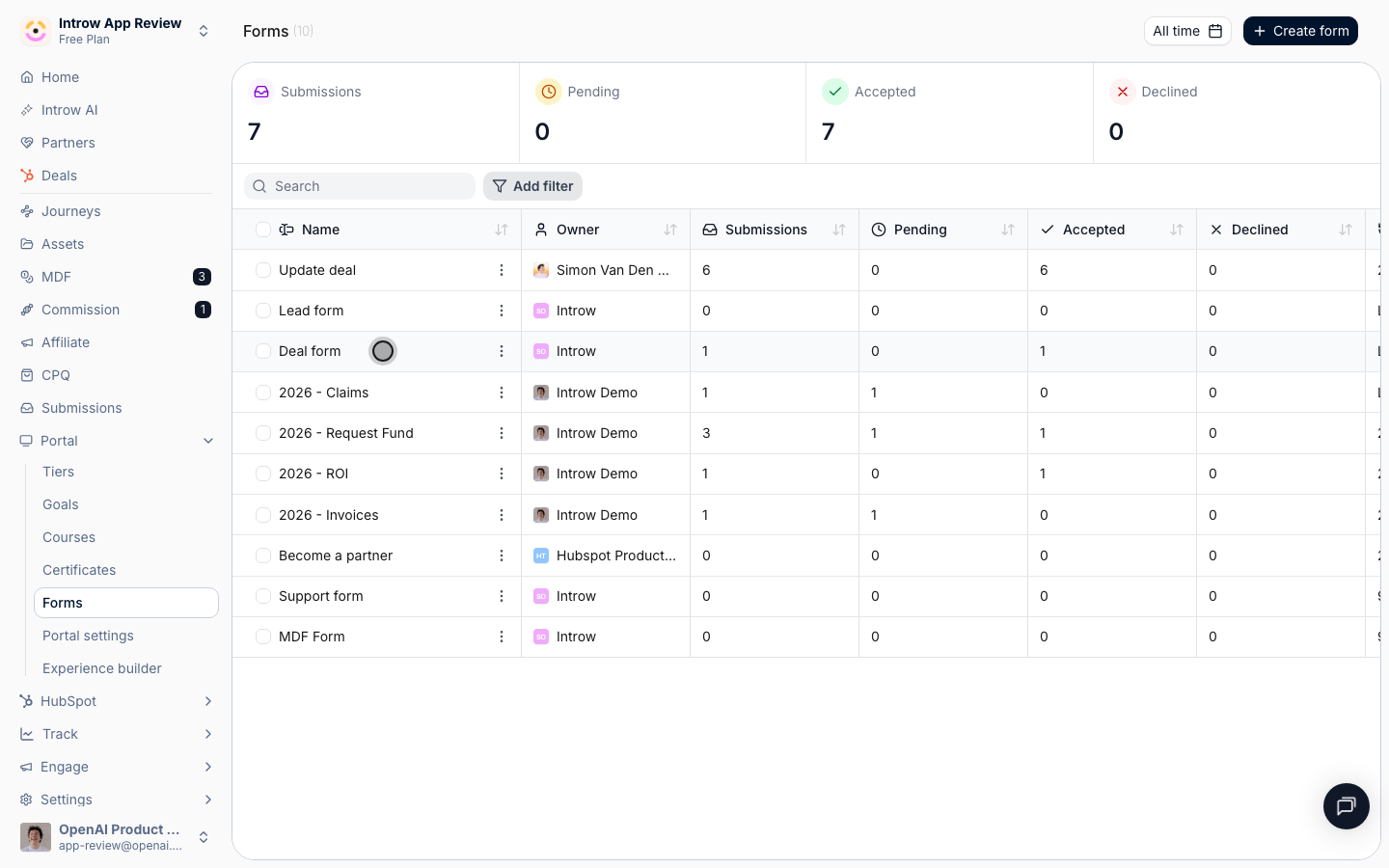
[**Catch and resolve channel conflict**](/features/ai/channel-conflict/guides/catch-and-resolve-channel-conflict)
Turn on AI channel-conflict screening for a deal form, then review and resolve any overlap from the Submissions inbox before it syncs to your CRM.
* [**Choose how submissions get approved**](/features/forms/submissions-approvals/guides/choose-an-approval-model)
Decide who signs off on partner form submissions, what accept, decline and return each do, and what the partner sees at every step.
* [**Run a submission approval workflow**](/features/forms/submissions-approvals/guides/run-a-submission-approval-workflow)
Set up a form submission approval workflow with steps and AI validation, notify the right reviewers, and process every submission to a clear outcome.
### Put it in front of partners
* [**Ways to submit a form**](/features/forms/sharing-submitting/guides/ways-to-submit-a-form)
Every way a partner can submit an Introw form: share link, website embed, email, Slack, Teams, AI assistant, bulk CSV upload, or API from your own systems.
* 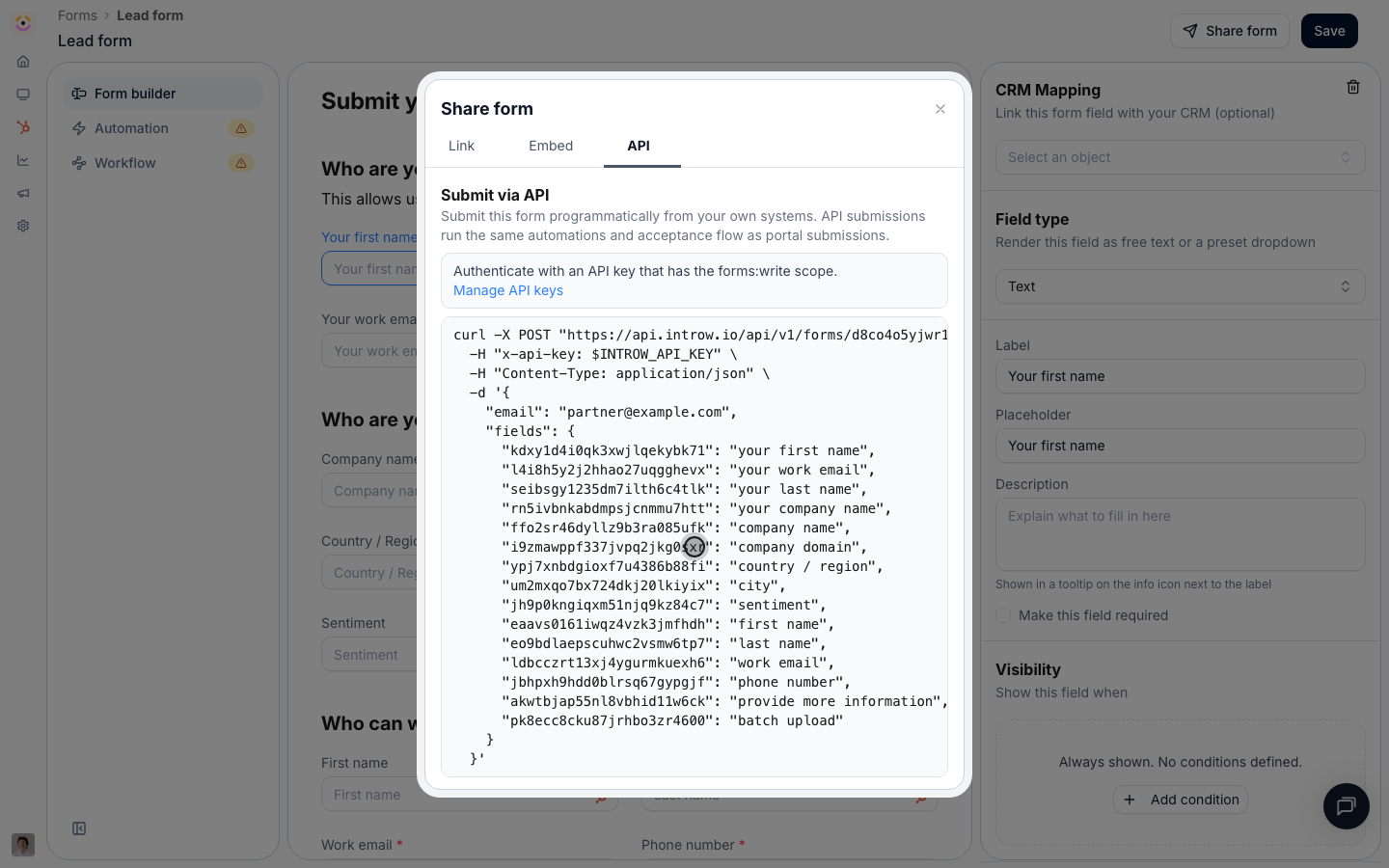
[**Submit a form via the API**](/features/forms/sharing-submitting/guides/submit-a-form-via-the-api)
Submit any Introw form from your own systems: fetch its schema for field ids and picklists, post with a scoped API key, and run the same automations.
* 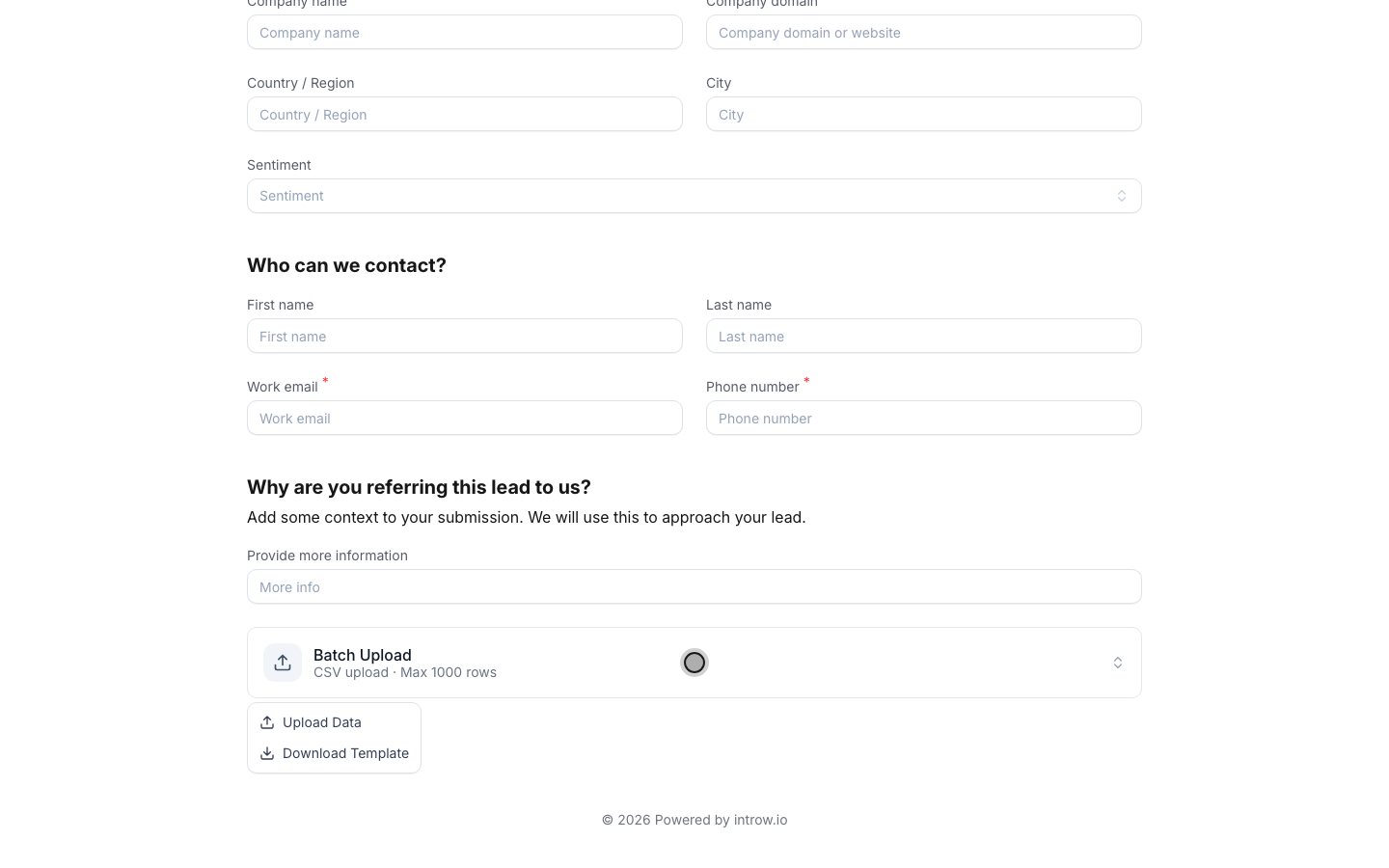
[**Bulk upload multiple records**](/features/forms/sharing-submitting/guides/bulk-upload-multiple-records)
Let partners submit many records at once with a CSV bulk upload: a template, picklists and validation on every row, and a preview that blocks bad data.
### Test it and work the inbox
* [**Test a form before partners see it**](/features/forms/form-builder/guides/test-a-form-before-partners-see-it)
Submit a form the way a partner will, confirm the CRM record and notifications it produces, walk every outcome, and clean up the test without leaving records behind.
* 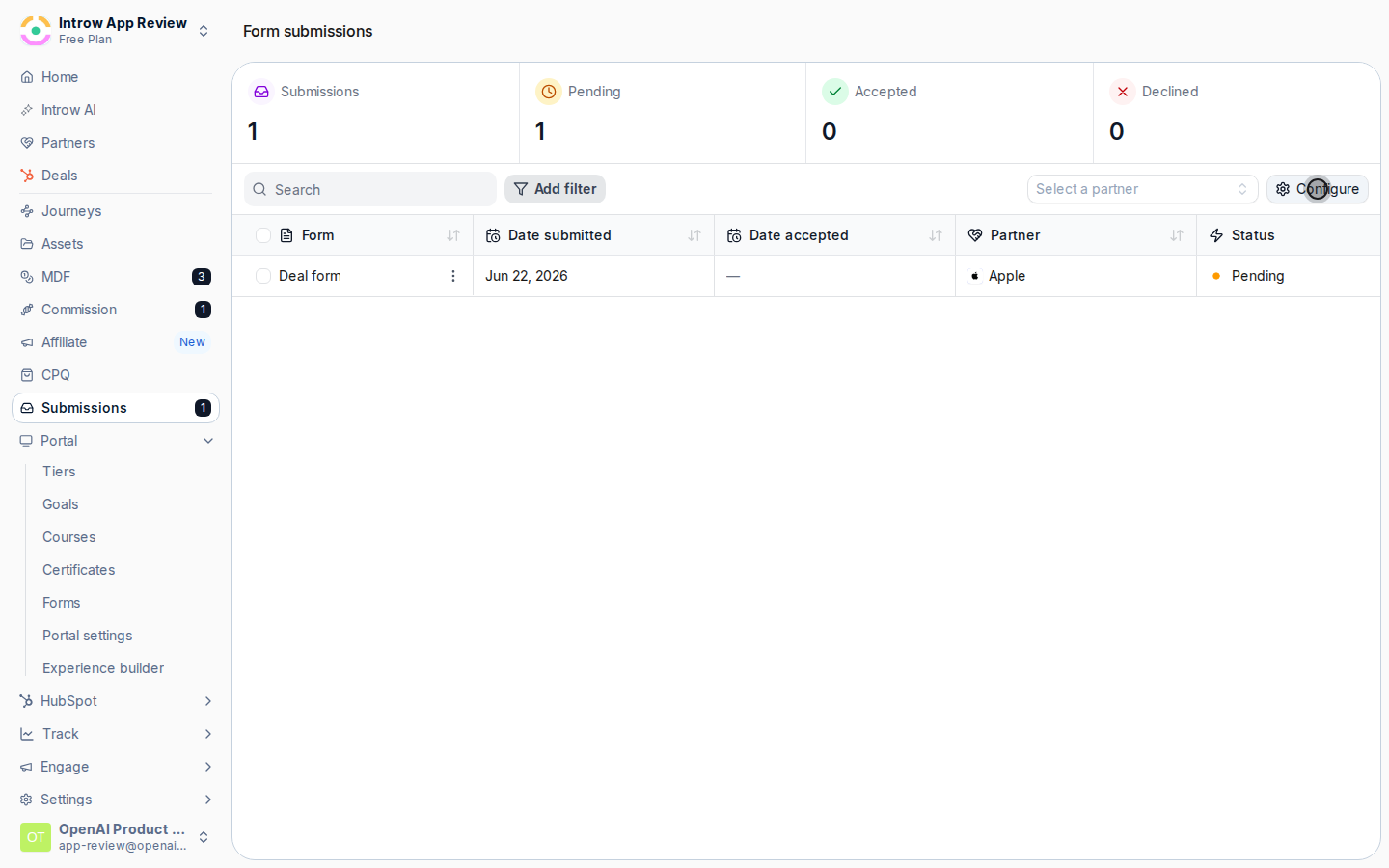
[**Customize the submissions inbox**](/features/forms/submissions-approvals/guides/customize-the-submissions-inbox)
Customize the submissions inbox in Introw: choose the columns you review form submissions by, including custom fields and mapped CRM properties.
## Troubleshooting
Registration needs partner attribution configured on your CRM connection, or the record cannot be linked to the partner and never reaches their shared pipeline. A registration only auto-accepts when it is conflict-free and no approval gate is on, and AI acts on its own only above the certainty threshold you set. A submission in **Error** reached Introw but your CRM refused the record: it is work, not a decision, so fix the field or the permission and retry.
An approval gate is on, or AI validation was not confident enough. Review them in Submissions, or adjust the approval steps and the threshold on the form's Automation tab.
Attribution is not configured on the CRM connection, or the Submitting partner link is off under Partner links on the deal record. Fix the attribution method first, then switch the link back on.
Matching found no existing record. Check the match keys and filters on the deal record, or switch it to Match only for a form that should only update deals.
Channel Conflict Analysis is off on the form, or its filters exclude the records that overlap.
It came in through the general link and the submitter's email matched no partner contact. Share a partner link instead, or add the contact to the partner first.
## Before you start
| You need | Why | Fix it |
| -------------------------------- | ----------------------------------------------- | ------------------------------------------------------------------------------------------------- |
| A connected CRM with attribution | A registration credits the partner through it | [Configure attribution](/features/co-selling/shared-pipelines/guides/configure-deal-attribution) |
| Write access to Forms | Registration is form configuration | [Internal roles](/features/access/team-management/guides/create-an-internal-role) |
| A shared pipeline, optionally | So the registered deal opens as a shared record | [Set up a shared pipeline](/features/co-selling/shared-pipelines/guides/set-up-a-shared-pipeline) |
## How it works
A registration is an Introw form with a CRM automation behind it. A partner fills it in from
wherever they work: the portal, a share link, an embed on your site, an email, Slack or Teams, an
AI assistant, or the API. Introw identifies the submitter and their partner, checks the
registration against your existing pipeline for channel conflict, holds it at the approval gate
when you have one, and on accept writes the record to HubSpot or Salesforce attributed to the
partner. The record then shows up on that partner's shared pipeline, so the co-sell continues on
the same object.
Deals and leads run through the same mechanics; what differs is the object the automation
writes. A **deal registration** maps to a deal, usually with the company and contact behind it, so
credit is locked in before anyone works the opportunity. A **lead registration** maps to a lead or
contact, and your team qualifies it into a deal. When a lead later becomes a deal, a lead picker
on the deal form ties the two records together.
Because it is a form, nothing about registration is bespoke. The form builder, the CRM
automation, channel-conflict analysis, the approval gate, the sharing channels, and the
Submissions inbox are the same ones every other partner form uses. This page tells you which of
those settings matter for registration and sends you to the full reference for each.
```mermaid theme={"theme":{"light":"github-light","dark":"github-dark"}}
flowchart LR
channels["Portal, link, email, chat, AI, API"] --> form["Registration form"]
form --> checks["Identify partner, conflict check, approval"]
checks --> crm["Attributed deal or lead in your CRM"]
crm --> shared["Shared pipeline"]
```
## Settings & configuration
Everything registration-specific lives on the form: its fields on the **Form builder** tab and
its behavior on the **Automation** tab, both from [Forms](https://app.introw.io/forms). The
Automation tab lists the form's blocks in four groups, **Submission**, **Review**,
**Notifications**, and **Records written**, and opens each one in the panel beside the list. The
settings below are the ones that decide whether a registration lands clean, credited, and on the
right desk.
### Fields and CRM mapping
On the **Form builder** tab, add the fields a partner fills in and map each one to a CRM object
and property under **CRM Mapping**. A deal registration usually asks for the company name and
domain, a contact, the deal amount, the expected close date, and one free-text question about the
opportunity. Keep it short: partners register more when the form only asks what you cannot look
up yourself. Add a **CRM object** field when you want a partner to pick an existing lead, account,
or contact instead of retyping it, and use conditional fields to ask a question only when it
applies. Start from the **Deal registration** or **Lead capture** template rather than a blank
form.
Full reference: [Form Builder](/features/forms/form-builder/technical).
### The deal or lead record
Under **Records written**, add the record a registration should write: a **Deal** for deal
registration, or a **Lead**, **Contact**, or **Company** for lead sharing. The panel asks four
questions in order.
**Which deal does this write to?** **Match or create** enriches the deal Introw finds in your CRM
and creates one only when nothing matches, so a registration never duplicates a deal you already
have. **Match only** never adds a record, for forms that should only ever update an existing deal.
A CRM object picker on the form outranks matching: the record the partner picks is the record
Introw writes to.
**Form fields** map what the partner submits to CRM properties. Each row carries a **Write mode**
that defaults to **Fill in if not known**, so partner data fills gaps and never overwrites what a
rep already set.
**Default values** are what the partner never sees: the pipeline, the stage, the deal owner (a
fixed person or the partner's own manager), and a deal-name convention built from text and
variables such as the company name via the partner. The panel also shows the values Introw
resolves itself at submission time, such as the partner attribution property, so you can see what
every registered deal is created with.
Full reference: [CRM Automations](/features/forms/crm-automations/technical).
### Attribution
**Partner links**, on the same panel, decides how the deal Introw writes gets attached to a
partner. **Submitting partner** links the record to the partner who submitted, using the
attribution methods you already configured on your CRM connection, with no per-form wiring. This
link is what puts the deal on that partner's shared pipeline and counts it toward their revenue
and commissions. **Identify submitter**, under **Submission**, matches the standard submitter
fields to partner details, so a registration that arrives off-portal, from a link, an email, or a
chat message, is still credited.
Full reference: [Configure deal attribution](/features/co-selling/shared-pipelines/guides/configure-deal-attribution).
### Channel conflict check
**Channel conflict check**, under **Review**, cross-references each registration against your
existing deals, contacts, and companies before anything is written. Turn on **Channel Conflict
Analysis**, scope it with filters, for example excluding Closed Lost deals, and add context about
how your team defines a conflict. The analysis proposes one of three outcomes: create a new
record, link the registration to the existing deal, or decline it. Conflict cases show the
overlapping records in the inbox so the reviewer decides with full context.
Full reference: [Channel Conflict Resolution](/features/ai/channel-conflict/technical).
### Approval gate
**Approval gate**, under **Review**, holds registrations for review before the CRM writes run.
Switch it on and pick how much of the review Introw AI owns. **Manual** sends every submission to
your approvers with no AI. **AI Assisted** has Introw AI pre-check each registration and
recommend, and your approvers decide. **Autonomous AI** lets Introw AI decide when it is confident
and escalate the rest to your approvers. The mode in force shows beside the block in the list.
Without a gate, a conflict-free registration is accepted the moment it arrives.
Full reference: [Approval gate](/features/forms/submissions-approvals/technical#approval-gate).
### Who gets told
**Notify your team**, under **Notifications**, sets who on your team is emailed about every new
registration; this is also where a **Submission error** email goes when your CRM refuses the
record, so leave nobody out. **Reply to submitter**, shown once the approval gate is on, holds the
accept, decline, and return emails the partner receives. **Confirmation screen**, under
**Submission**, is what the partner sees right after submitting: an end screen or a redirect to
your own URL.
### Sharing the form
**Share form** on the form gives you every entry point. A **General link** is open to anyone, a
**Partner link** stamps every submission with that partner's attribution, **Embed** places the
form on your own site, and the **API** tab turns it into a request from the partner's systems. In
a portal experience, add the form as a section. With the AI agent on and the integration
connected, partners also register by forwarding an email, messaging the agent in Slack or Teams,
or asking a connected AI assistant.
Full reference: [Sharing & submitting](/features/forms/sharing-submitting/technical).
### Working the inbox
[Submissions](https://app.introw.io/submissions) lists every registration with its status. Open
one to **Accept**, **Decline**, or **Return** it for more information, and reply to the partner
on the same thread. Use **Configure** to add the mapped CRM properties you triage by, such as deal
amount and stage, as columns. **Accepted** is final: accepting is what wrote the record and told
the partner yes, so correct the record in your CRM and return the submission if you need a
change.
Full reference: [Submissions & Approvals](/features/forms/submissions-approvals/technical).
## How-to guides
Registration owns no guides of its own. It is a form, so the guides live with Forms and with the
two registration motions. Follow them in this order.
### Start with the whole recipe
* [**Register and approve a reseller deal**](/features/deal-registration/registration/guides/register-and-approve-a-deal)
Build a reseller registration form that creates an attributed CRM deal, add channel conflict checks and approvals, and work the submissions inbox.
* 
[**Build and share a referral form**](/features/referrals/lead-sharing/guides/build-and-share-a-referral-form)
Build a referral form that captures attributed leads, credits the referring partner, and share it as a link, an embed, or an API call from their systems.
### Build the form
* 
[**Build and publish a form**](/features/forms/form-builder/guides/build-and-publish-a-form)
Create a no-code partner form in Introw: add and configure fields, set the confirmation screen, and publish it via link, embed, portal, or the API.
* [**Partner form templates & use cases**](/features/forms/form-builder/guides/partner-form-templates)
Partner form templates: deal registration, lead capture, support, MDF requests, partner applications, purchase orders, events, and feedback.
* [**Show fields conditionally**](/features/forms/form-builder/guides/show-fields-conditionally)
Build one form that adapts: fields that appear only when they are relevant, questions that become mandatory only when they apply, and whole sections that unfold from a single answer.
* 
[**Link a registered deal to an existing lead**](/features/deal-registration/registration/guides/link-a-deal-to-an-existing-lead)
Let partners pick an existing CRM lead when they register a deal, write the lead reference on the deal, and associate the two records in your CRM.
### Write it to your CRM
* 
[**Connect a form to your CRM**](/features/forms/crm-automations/guides/connect-a-form-to-your-crm)
Map fields to CRM properties, control how submissions create or update records, attribute them to the partner, and prefill from known data.
* 
[**Configure the deal owner and name for partner deals**](/features/deal-registration/registration/guides/configure-partner-deal-owner-and-name)
Control who owns partner-registered deals in your CRM and how those deals are named, using default fields and naming rules on the deal automation.
* 
[**Configure deal attribution**](/features/co-selling/shared-pipelines/guides/configure-deal-attribution)
Link every deal to the partner who sourced or influenced it so shared pipelines, partner-attached revenue, reporting, and commissions stay accurate.
### Check it and approve it
* 
[**Catch and resolve channel conflict**](/features/ai/channel-conflict/guides/catch-and-resolve-channel-conflict)
Turn on AI channel-conflict screening for a deal form, then review and resolve any overlap from the Submissions inbox before it syncs to your CRM.
* [**Choose how submissions get approved**](/features/forms/submissions-approvals/guides/choose-an-approval-model)
Decide who signs off on partner form submissions, what accept, decline and return each do, and what the partner sees at every step.
* [**Run a submission approval workflow**](/features/forms/submissions-approvals/guides/run-a-submission-approval-workflow)
Set up a form submission approval workflow with steps and AI validation, notify the right reviewers, and process every submission to a clear outcome.
### Put it in front of partners
* [**Ways to submit a form**](/features/forms/sharing-submitting/guides/ways-to-submit-a-form)
Every way a partner can submit an Introw form: share link, website embed, email, Slack, Teams, AI assistant, bulk CSV upload, or API from your own systems.
* 
[**Submit a form via the API**](/features/forms/sharing-submitting/guides/submit-a-form-via-the-api)
Submit any Introw form from your own systems: fetch its schema for field ids and picklists, post with a scoped API key, and run the same automations.
* 
[**Bulk upload multiple records**](/features/forms/sharing-submitting/guides/bulk-upload-multiple-records)
Let partners submit many records at once with a CSV bulk upload: a template, picklists and validation on every row, and a preview that blocks bad data.
### Test it and work the inbox
* [**Test a form before partners see it**](/features/forms/form-builder/guides/test-a-form-before-partners-see-it)
Submit a form the way a partner will, confirm the CRM record and notifications it produces, walk every outcome, and clean up the test without leaving records behind.
* 
[**Customize the submissions inbox**](/features/forms/submissions-approvals/guides/customize-the-submissions-inbox)
Customize the submissions inbox in Introw: choose the columns you review form submissions by, including custom fields and mapped CRM properties.
## Troubleshooting
Registration needs partner attribution configured on your CRM connection, or the record cannot be linked to the partner and never reaches their shared pipeline. A registration only auto-accepts when it is conflict-free and no approval gate is on, and AI acts on its own only above the certainty threshold you set. A submission in **Error** reached Introw but your CRM refused the record: it is work, not a decision, so fix the field or the permission and retry.
An approval gate is on, or AI validation was not confident enough. Review them in Submissions, or adjust the approval steps and the threshold on the form's Automation tab.
Attribution is not configured on the CRM connection, or the Submitting partner link is off under Partner links on the deal record. Fix the attribution method first, then switch the link back on.
Matching found no existing record. Check the match keys and filters on the deal record, or switch it to Match only for a form that should only update deals.
Channel Conflict Analysis is off on the form, or its filters exclude the records that overlap.
It came in through the general link and the submitter's email matched no partner contact. Share a partner link instead, or add the contact to the partner first.