> ## Documentation Index
> Fetch the complete documentation index at: https://docs.introw.io/llms.txt
> Use this file to discover all available pages before exploring further.
# Workflows
> Build a workflow in Introw: pick one of the twelve triggers, narrow it with segments, partner conditions and event conditions, add conditions and waits, choose the actions, rehearse it, and enable it.
export const Rail = ({children}) =>
{children}
;
## Where it lives
Workflows lives at [Workflows](https://app.introw.io/workflows).
 ## Before you start
| You need | Why | Fix it |
| ---------------------------------- | ------------------------------- | ----------------------------------------------------------------------------------- |
| Workflows switched on for your org | It is released per organisation | **Request access** |
| A role with Workflows access | Read shows it, write builds it | [Internal roles](/features/access/team-management/guides/create-an-internal-role) |
| Whatever the workflow reaches for | A picker cannot offer nothing | [Build a workflow](/features/automation/workflows/guides/build-your-first-workflow) |
| A connected CRM, for CRM triggers | Only for CRM-driven workflows | [Connect a CRM](/features/integrations/crm/guides/connect-hubspot) |
Not in your left-hand navigation under **Engage**? It is not enabled for your organisation yet.
## How it works
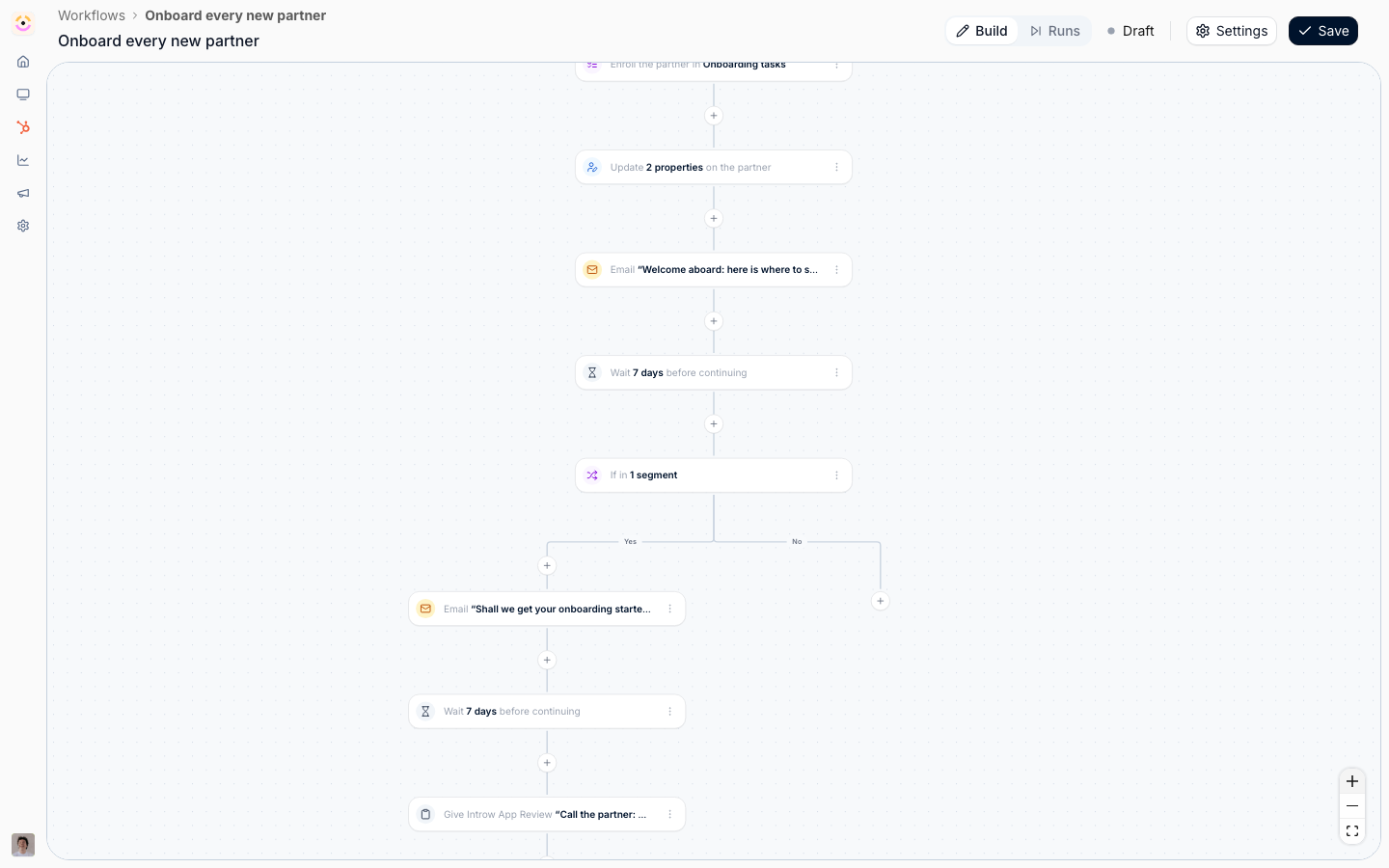
A workflow is one trigger followed by a chain of steps, drawn on a canvas. The trigger says what Introw watches for. Each step is either an **Action** (something done to the partner), a **Condition** (a Yes or No fork), or a **Delay** (a wait).
Every run is about exactly one partner. That is the single most useful thing to hold on to: whatever the trigger was, the run knows which partner it happened to, so every action targets that partner and every email goes to that partner's people. Some triggers also know which **contact**, which **task**, or which **course enrolment** they were about, and a few steps only become available on those.
Narrowing happens in three independent blocks, and mixing them up is the usual reason a workflow never fires:
* **Which partners, by segment.** You pick segments, and any one of them matching is enough. Reach for this when the audience is one you already maintain, or want to reuse.
* **Which partners, by their own fields.** A condition builder over the partner's Introw and CRM properties, for the one-off answer a segment would be overkill for. "The tier changed, and it is now Gold" is this block.
* **Which events.** Conditions on the fields the triggering event itself carries: which journey, which task, which course, which portal access state, when it happened.
The trigger's own narrowing is checked before a run exists, so partners and events outside it leave nothing behind. A condition step narrows a run that is already going, which is what lets one workflow handle both the partner who did the thing and the partner who did not.
```mermaid theme={"theme":{"light":"github-light","dark":"github-dark"}}
flowchart LR
event["Something happens to a partner"] --> trigger["Trigger, narrowed by segments and event conditions"]
trigger --> steps["Actions, conditions, and delays"]
steps --> writes["Partner, portal, CRM, and messages"]
steps --> runs["Painted back onto the canvas under Runs"]
```
### What workflows reach
Workflows do not add a parallel system. Every trigger is an event a feature you already
configure emits, and every action is something you can do by hand on the same feature, which
is the whole reason a workflow needs no code: the vocabulary is the product's own. This is the
map, and each feature's own reference carries the same detail from its side.
| Feature | Triggers it fires | Actions that write to it |
| ----------------------------------------------------------- | -------------------------------------------------- | ------------------------------------------ |
| [Tasks](/features/partners/tasks) | Task assigned, Task completed | Give a task |
| [Journeys](/features/partners/journeys) | Enrolled in journey, Journey completed | Enroll in a journey |
| [Segments](/features/partners/segments) | Segment membership | Add to a segment |
| [Partner management](/features/partners/partner-management) | Partner created, Partner updated | Update partner properties |
| [Tiers](/features/partners/tiers) | | Update partner properties, on Partner tier |
| [Portal experiences](/features/portal/experiences) | | Update partner properties, on Experience |
| [Portal access](/features/portal/portal-access) | Partner contact added, Partner contact updated | |
| [Courses](/features/courses/enrollments) | Course started, Course completed | |
| [Certificates](/features/courses/certificates) | Certificate issued | Issue a certificate |
| [Commission lines](/features/commissions/commission-lines) | | Give commission |
| [Notifications](/features/engagement/notifications) | | Send an email |
| [Chat integrations](/features/integrations/chat) | | Send a chat message |
| [CRM integrations](/features/integrations/crm) | Partner updated, on any partner-level CRM property | Log a CRM note, Update partner properties |
Two gaps in that table are deliberate rather than missing. There is no enroll-in-a-course action,
because course auto-enrollment is decided by segments, so **Add to a segment** is the route. And
nothing writes portal access, because access is granted through your access setup or by inviting the
contact, and a workflow email is not an invitation.
## Settings & configuration
### Creating and finding workflows
**New workflow** on [Workflows](https://app.introw.io/workflows) creates a draft called **Untitled workflow** and opens the canvas straight away. The list is the usual overview table, filterable and sortable on **Name**, **Status** (Active or Draft), **Trigger**, **Steps**, **Runs**, **Owner** (whoever saved it last), and **Last updated**, so you can answer "what do we have running, and who touched it" without opening anything. Select rows to delete several at once.
The canvas header carries the workflow's name (editable in place), a **Build** and **Runs** switch, the Active or Draft status with a tooltip explaining why it is still a draft, **Settings**, and **Save**. The canvas does not save as you type: **Save** commits it.
### Triggers
A workflow has exactly one trigger, picked from three groups. Every trigger also carries the two-part filter described under [Narrowing](#narrowing-which-partners-and-which-events).
#### Tasks & journeys
**Task assigned** runs when a partner acquires a [task](/features/partners/tasks), which means when the task is created. Reassigning an existing task between people does not run it, so a nudge chain does not restart every time a manager tidies up. It is the trigger to start a deadline chase from, and the only one that offers a wait anchored to the task's due date.
**Task completed** runs when a task is marked done.
**Enrolled in journey** runs once when a partner is put on a [journey](/features/partners/journeys). **Which journeys count** narrows it; pick none and any journey qualifies. Adding a task to a journey a partner is already on does not run it again.
**Journey completed** runs when every task of a journey is done. **Which journeys count** narrows it the same way.
#### Learning
**Course started** runs the first time a partner contact opens a [course](/features/courses/enrollments). Being enrolled without opening it does not run it. **Which courses count** narrows it.
**Course completed** runs when the last module is finished. Progress before that does not run it.
**Certificate issued** runs when a [certificate](/features/courses/certificates) is awarded to a partner contact. **Which certificates count** narrows it, and re-issuing the same certificate to the same contact does not run it again.
#### Partners
**Partner created** runs when a new [partner](/features/partners/partner-management) appears, whether added by hand or brought in by [CRM detection](/features/partners/partner-management/guides/detect-partners-from-your-crm).
**Partner updated** runs when a partner's field changes, in Introw or in your [CRM](/features/integrations/crm). **Which changes count** is a searchable list of **Partner tier**, **Partner phase**, **Partner categories**, **Partner owner**, and every partner-level CRM property on the company or your custom partner object. Pick none and any of them changing runs the workflow. Changes the workflow makes itself never re-trigger it.
**Partner contact added** runs when a contact appears on a partner's [portal](/features/portal/portal-access). **Which access states they arrive in** narrows it to **Invited, not signed in yet**, **Has portal access**, **Asked for access**, or **Access removed**.
**Partner contact updated** runs when an existing contact's portal access moves or one of their fields changes. It narrows on both the access state and **Which changes count**, which here lists **Portal access**, **Email address**, **First name**, **Last name**, **Job title**, **Language**, **Email deliverability**, and every CRM contact property. Portal visits and emails sent to the contact do not run it.
**Segment membership** runs when a partner enters or leaves a [segment](/features/partners/segments): **The partner enters the segment** or **The partner leaves the segment**, then **Which segments count**. This is the most useful trigger on the canvas, because a dynamic segment re-evaluates itself against live partner, contact, and CRM data on a schedule. "Has not traded in 30 days", "crossed a revenue threshold", "is certified" are all this one trigger pointed at a different segment. Segments the workflow itself adds partners to never re-trigger it.
### Narrowing: which partners, and which events
Both the trigger panel and every condition step carry the same three blocks, in the same order.
**Segments** answers which partners, reusably. On the trigger it reads **Only for partners in**, on a condition just **Partners in**, and on the trigger it is checked before the workflow starts, so partners outside the chosen segments leave no run behind. Any one of the selected segments matching is enough. Leave it empty for every partner.
**Partner properties** answers which partners, one-off. It reads **Only for partners matching** on the trigger and **Partner matches** on a condition, and it is a condition builder over the partner's own fields: **Partner tier**, **Partner phase**, **Partner categories**, **Partner owner**, each partner team role, and every partner-level CRM property on the company or your custom partner object. Every field carries Introw's mark or your CRM's, so an Introw **Tier** and a CRM property also called Tier are distinguishable.
Use it for the check that would otherwise need a segment per value. On the trigger it is read as the event arrives, so "the tier changed, **and** it is now Gold" is one trigger rather than a trigger plus a maintained segment. On a condition it is read **when that step runs**, so after a ten-day delay a tier condition sees the tier the partner has now. The two blocks are ANDed: a partner has to be in one of the segments *and* match the conditions.
Contact and deal fields are deliberately absent from this block. A run acts on a partner, so those would offer filters the runner cannot answer; contact conditions belong in a segment.
**Event conditions** answers which events, over the fields that trigger carries. The block is labelled for the trigger (**Only for tasks matching**, **Only for certificates matching**, **Only for segments matching**), and the fields on offer change with it:
* Task triggers offer **Journey**, **Task**, and the timestamps (**Due date** and **Assigned at** on an assignment, **Completed at** on a completion). Picking a journey scopes the **Task** list to that journey's tasks.
* Journey triggers offer **Journey** and **Enrolled at** or **Completed at**.
* Course triggers offer **Course** plus **Started at** and **Completed at**.
* **Certificate issued** offers **Certificate**, **Issued at**, and **Expires at**.
* **Partner contact added** offers **Portal access**; **Partner contact updated** adds **Changed fields** and **Updated at**.
* **Segment membership** offers **Segment**.
* **Partner created** and **Partner updated** offer nothing, so the block is not shown at all. Their event *is* the partner: which fields moved is already the trigger's **Which changes count** picker, and everything else worth asking is a question about the partner, which the partner-properties block answers directly.
Conditions use the usual builder: **is**, **is not**, **is any of**, **is none of**, **contains**, **is known**, **is not known**, and comparisons on numbers and dates. Date fields accept a fixed calendar date or a relative one (**Today**, **7 days ago**, **30 days from now**), which is what makes "due within the next week" a condition rather than a calculation. Rows in a group are ANDed and groups are ORed. Leave the block empty and every event of that kind qualifies.
Three fields answer about **right now** rather than about the moment the workflow started, and they are the ones that make a nudge chain honest: **Task status right now**, **Journey progress right now**, and **Course progress right now**. They are read from the current state when the condition is decided, so after a ten-day wait they tell you whether the partner has since done the thing. Every other field answers about the triggering event.
### Actions
Nine actions, in four groups on the picker.
#### Partner
**Update partner properties** writes values onto the partner, one row per property. Each row is a property, a value, and a **Write mode**: **Overwrite** always replaces what is there, **Fill in if not known** leaves an existing value alone. The write mode is the setting that decides whether an automation quietly undoes work a partner manager did by hand, so choose it deliberately. The properties on offer are **Partner tier** (from your [tier program](/features/partners/tiers)), **Partner phase**, **Partner categories**, **Partner owner**, the partner's **Experience** (from your [portal experiences](/features/portal/experiences)), and every writable CRM property on their company or custom partner object, each marked with Introw's logo or your CRM's so you can tell two same-named fields apart.
Setting the **Experience** is not an ordinary field write: it publishes that experience to the partner. Their portal is created if they have none, and its content, journeys, and goals are applied. A partner already in another experience is moved to this one. Because it can create a portal, it is subject to your plan's portal limit: partners who already have a portal still move, and partners without one are skipped until you free up or add portals. The **Experience** row has no write mode for that reason.
**Add to a segment** enrolls the partner in a **static** [segment](/features/partners/segments). Only static segments are offered: a dynamic segment's members are whoever matches its audience, so an enrollment there would be undone at the next evaluation. The partner keeps every segment they are already in, and adding a partner twice does nothing.
#### Tasks & journeys
**Give a task** creates one portal [task](/features/partners/tasks), for the partner or for your own team. It is the same task detail a journey's tasks have: **Task name**, a **Due date** expressed as days after assigned (assignment being this step running, so the date is right for every run rather than only the first), **Assignee**, **Visibility**, **Status**, an **Action** the partner must complete, a rich **Description**, and an attachment. On a trigger that names a contact, the assignee list also offers **The contact this is about**, resolved per run.
**Enroll in a journey** gives the partner the tasks of a [journey](/features/partners/journeys). It is the same operation as **Apply** on the partner page, so a partner already on that journey keeps their progress and only the steps they do not have yet are added.
#### Rewards
**Give commission** books a one-off [commission line](/features/commissions/commission-lines) for the partner: an **Amount**, a **Currency**, and a **Description**. Leave the currency on **Partner's currency** and it resolves per partner when the run happens, so one workflow stays correct across a program that bills in several. This is the "500 for the referral" case, not a plan: it lands as a manual line, created as pending, so it still goes through your normal approval and payout run. Plans that earn lines from CRM or billing data live under [Commission plans](/features/commissions/commission-plans).
**Issue a certificate** awards a [certificate](/features/courses/certificates) to **The contact this is about** (only on a trigger that names one), **The partner champion**, or **All contacts of the partner**. Recipients are notified exactly as they are for a certificate issued by hand.
#### Messages
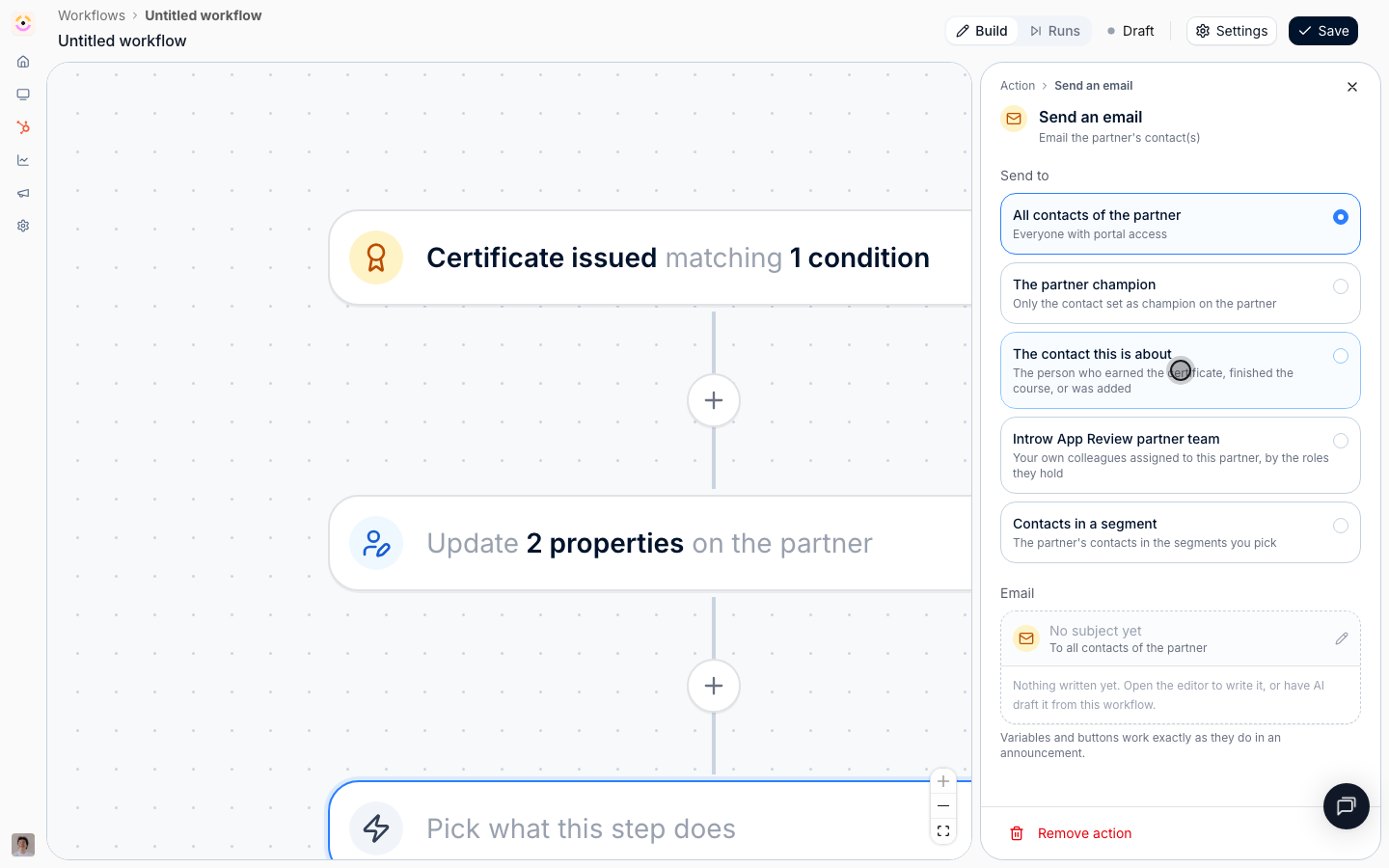
**Send an email** emails the partner's contacts, alongside the [notifications](/features/engagement/notifications) Introw already sends on its own. **Send to** offers **All contacts of the partner**, **The partner champion**, **Contacts in a segment** (which narrows this partner's contacts, not other partners), and two options that appear only on the triggers that can answer them: **The contact this is about** on a contact trigger, and **Whoever the task is assigned to** on a task trigger. The task assignee is read fresh when the email sends and can be one of your own team if the task is assigned internally. **Your partner team** is the one audience that is always internal: your own colleagues assigned to this partner, optionally narrowed by the partner team roles they hold, which is how a chain escalates to the partner manager. The body is written in the announcement editor, so variables and CTA buttons behave exactly as they do in an [announcement](/features/engagement/announcements), and it is stored with the step, so it cannot be edited or deleted from under a live workflow. The **Subject** is its own field and stays plain text.
**Send a chat message** posts a short plain-text nudge to Slack or Microsoft Teams. **The partner's channel** posts to the shared channel mapped on the partner's page, resolved at send time so remapping a partner moves every workflow with it; **One fixed channel** posts every run into the same place. Write `{{partner}}` for the partner's name. Only connected and active providers are offered, and with one connected there is no provider choice to make. See [Chat integrations](/features/integrations/chat).
**Log a CRM note** writes a note on the partner's own [CRM](/features/integrations/crm) record, their company or your custom partner object. There is no record picker, because that is the one record every run can name. `{{partner}}` works here too.
### Conditions
A **Condition** step splits the flow: everything matching takes the **Yes** path, everything else takes **No**, and exactly one path runs. It uses the same two-block filter as the trigger, labelled **Partners in** and the trigger's own event-condition label, so you can branch on the partner's segments, on the event's fields, or on both.
There is no merge node by design: each side runs to its own end. A condition is therefore always the last step of the chain it sits in, and both paths can hold further steps, including further conditions. Adding a condition in the middle of an existing chain moves the steps that followed it onto the **Yes** path.
### Delays
A **Delay** pauses the run and then carries on down the same path. The pause survives restarts and deploys.
**Wait** chooses what the pause is measured from:
* **After the previous step** is a plain wait: an amount and a unit of **Minutes**, **Hours**, or **Days**.
* **Around the task's due date**, offered only on **Task assigned**, waits until an offset from that task's due date.
* **Around the course's due date**, offered only on **Course started**, does the same for a course enrolment's due date.
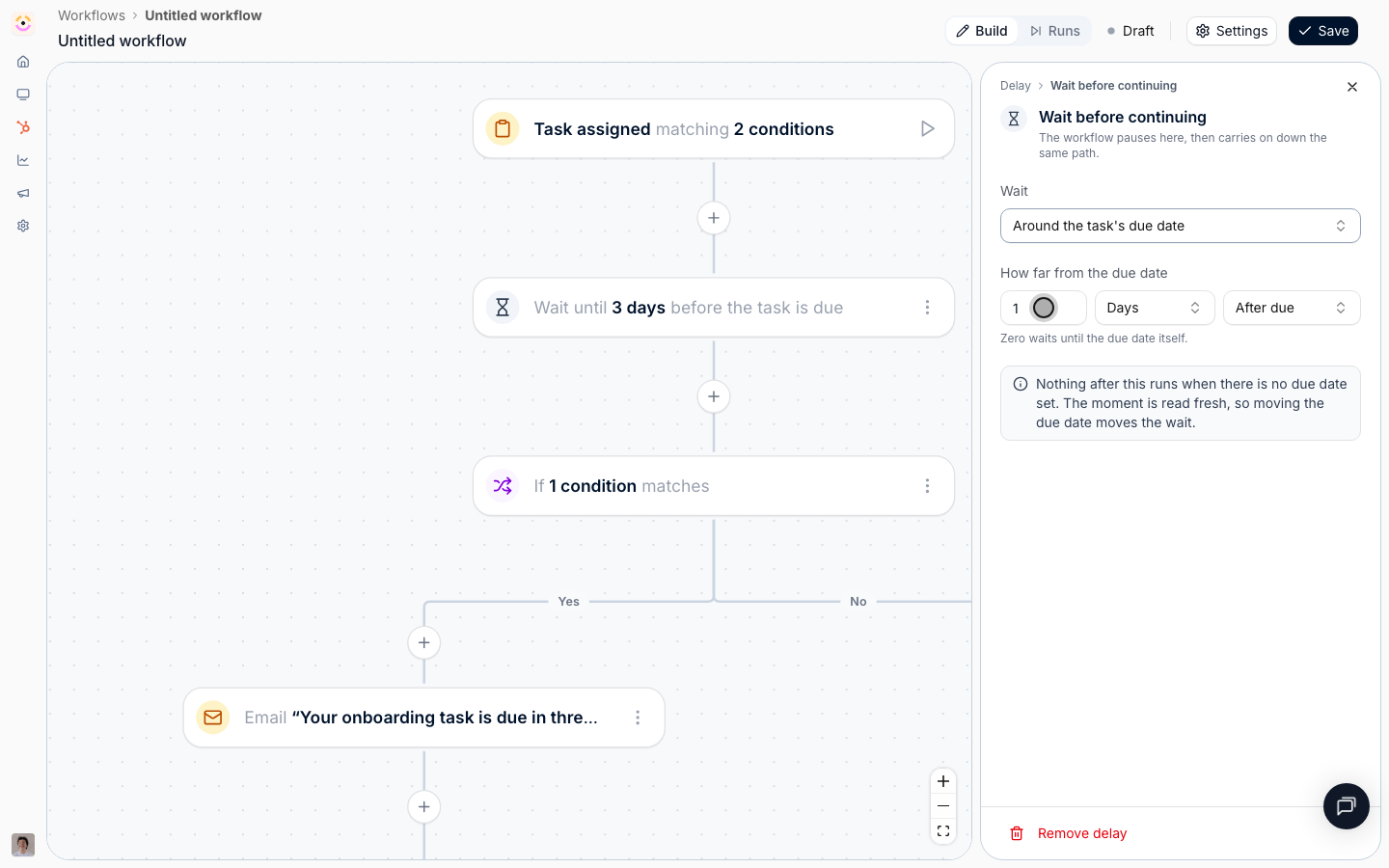
On an anchored wait the same two inputs stop meaning "how long to pause" and start meaning **How far from the due date**, and a third control appears: **Before due** or **After due**. Zero waits until the due date itself. This is the only way to express "three days before it is due", because that instant is not knowable when the workflow is written and moves when someone edits the date. The moment is read fresh each run, so moving a due date moves the wait.
Keep a plain delay, and the offset on an anchored one, at 180 days or less.
### Workflow settings
**Settings** in the canvas header holds the **Name**, the **Description** for whoever reads the workflow next, the **Enable** switch, and **Delete workflow**.
**Enabling is not retroactive.** Only partners who meet the trigger from the moment you switch it on enter the workflow. Nothing replays history.
**Enable** is unavailable while the canvas is unfinished, and the dialog lists exactly what is missing under **Not ready to enable yet**: a trigger, at least one action, an unset value on a step, or a pairing that cannot work, such as an email addressed to the contact the trigger is about on a trigger that does not name one. The same list is behind the **Draft** tooltip in the header.
**Generate with AI** writes the name and description from the canvas as it stands, even unsaved. There is a matching **Generate with AI** in the email editor that drafts a subject and body from where the step sits in the flow, greeting and sign-off added for you. Both leave the result in the form for you to edit before saving, and both need AI to be configured for your environment.
### Testing and run history
**Test workflow**, on the play button beside the trigger, rehearses the canvas as it stands against one partner you pick, and optionally one of their contacts. Every test is a dry run: delays resolve instantly, nothing is written and nothing is sent, conditions are evaluated against live data, and the trigger's own filter is not applied, because you chose the partner by hand. Nodes the run touched are badged **Simulated** on the canvas.
**Runs** in the header switches the canvas from building to reading. The panel lists every time the workflow fired, newest first, named by the partner it was about, with a **Test** marker on rehearsals and a status: **Completed**, **Failed**, **Running**, **Queued**, **Waiting**, **Needs approval**, or **Cancelled**. Picking a run paints it onto the canvas: each node reads **Ran**, **Failed**, **Running**, **Waited**, **Waiting**, **Not taken** (the fork went the other way), or **Not reached**, and a node that stopped the run short says why.
## How-to guides
* 
[**Build your first workflow**](/features/automation/workflows/guides/build-your-first-workflow)
Create a workflow that moves a partner up a tier the moment they earn a certification, from an empty canvas through a rehearsal to an enabled automation.
* 
[**Chase a task to its due date and escalate**](/features/automation/workflows/guides/chase-a-task-to-its-due-date)
Build a nudge chain that reminds a partner three days before a task is due, again two days after it slips, and hands it to the partner manager five days after.
* 
[**Onboard a new partner automatically**](/features/automation/workflows/guides/onboard-a-new-partner-automatically)
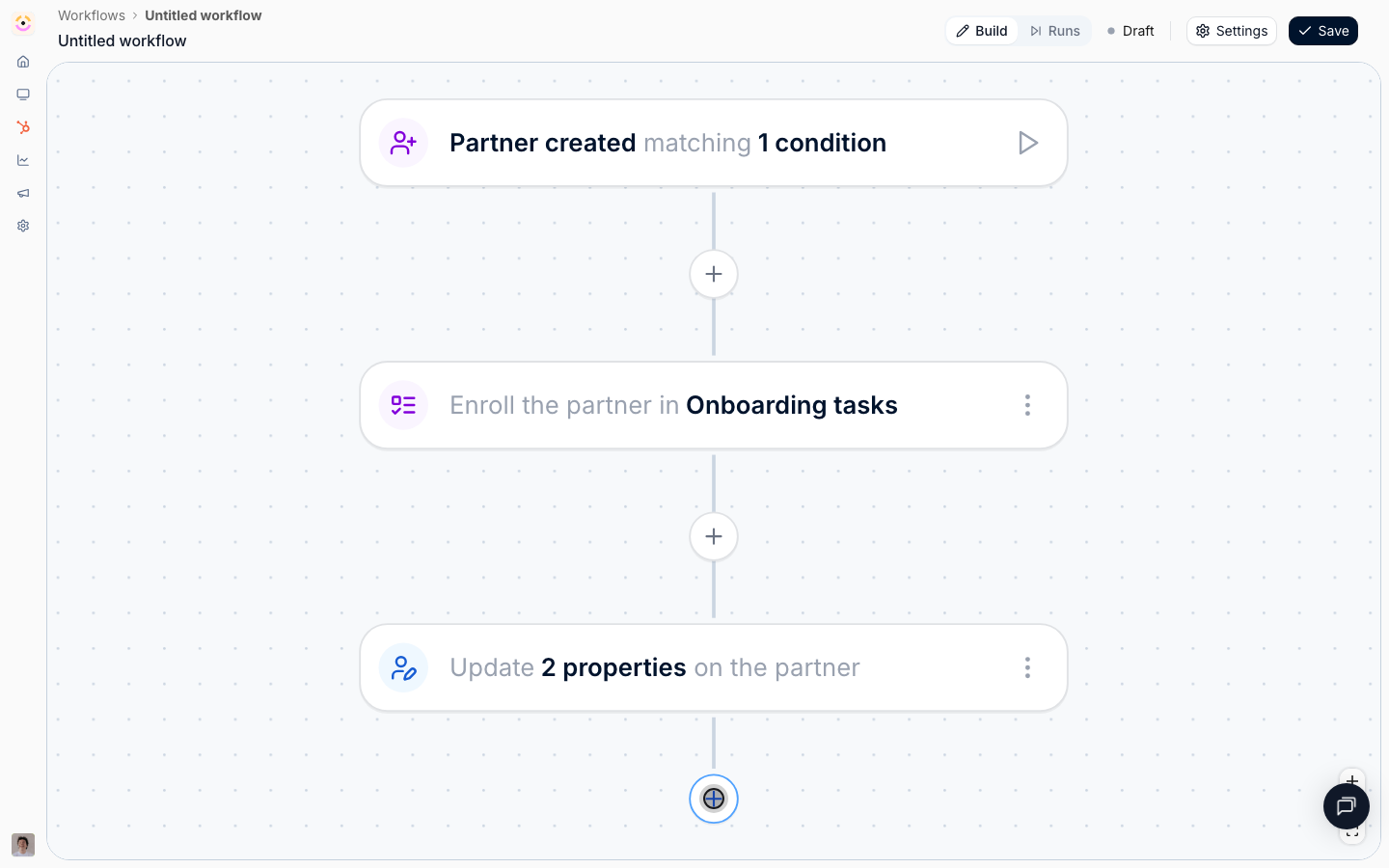
Put every new partner on the onboarding journey, welcome them, and chase the ones who stall, from the moment the partner appears from your CRM.
* 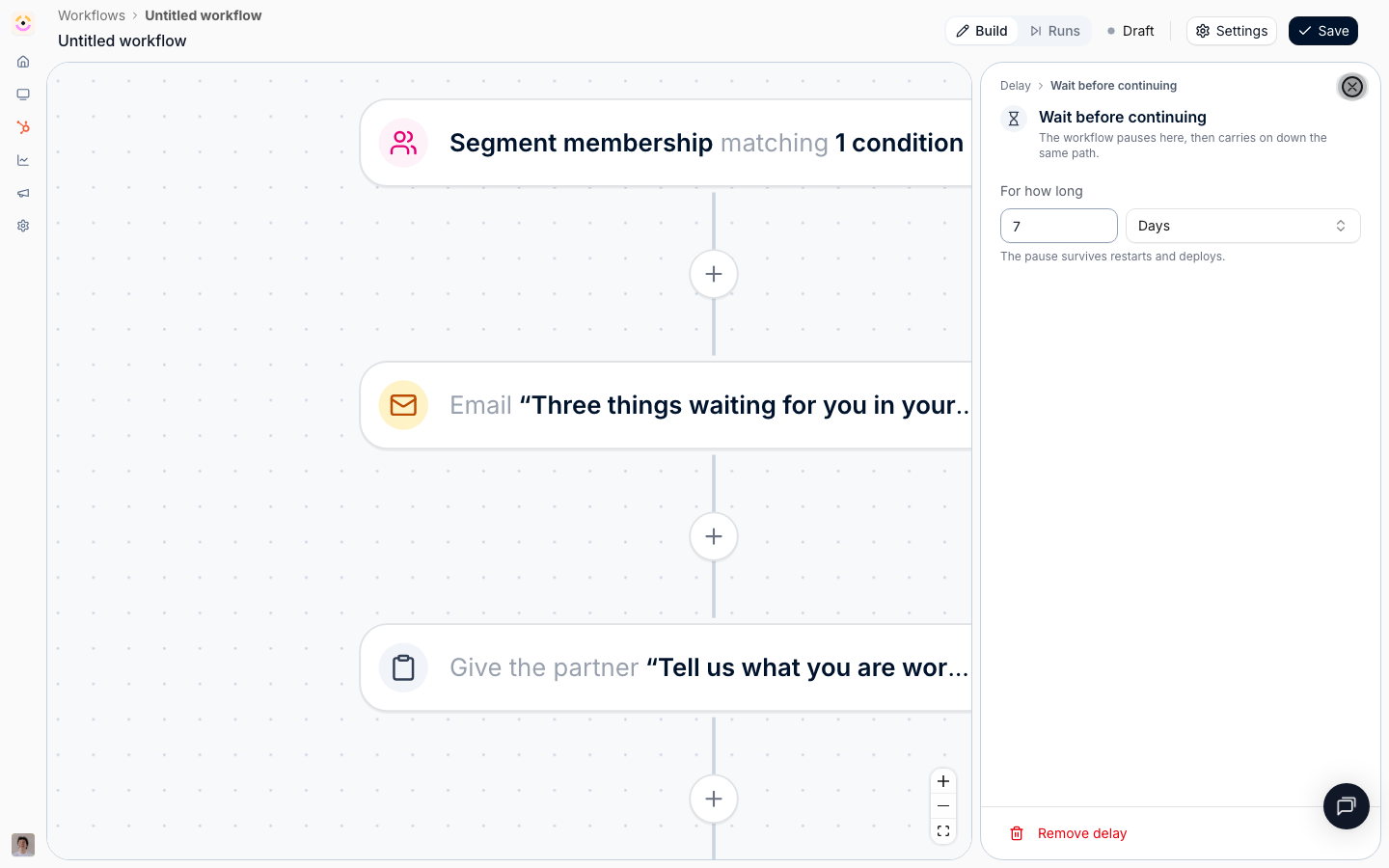
[**Re-engage partners who go quiet**](/features/automation/workflows/guides/re-engage-quiet-partners)
Turn a dynamic segment into a trigger: nudge a partner the moment they go quiet, wait, check whether it worked, and hand the ones who stay quiet to their manager.
* 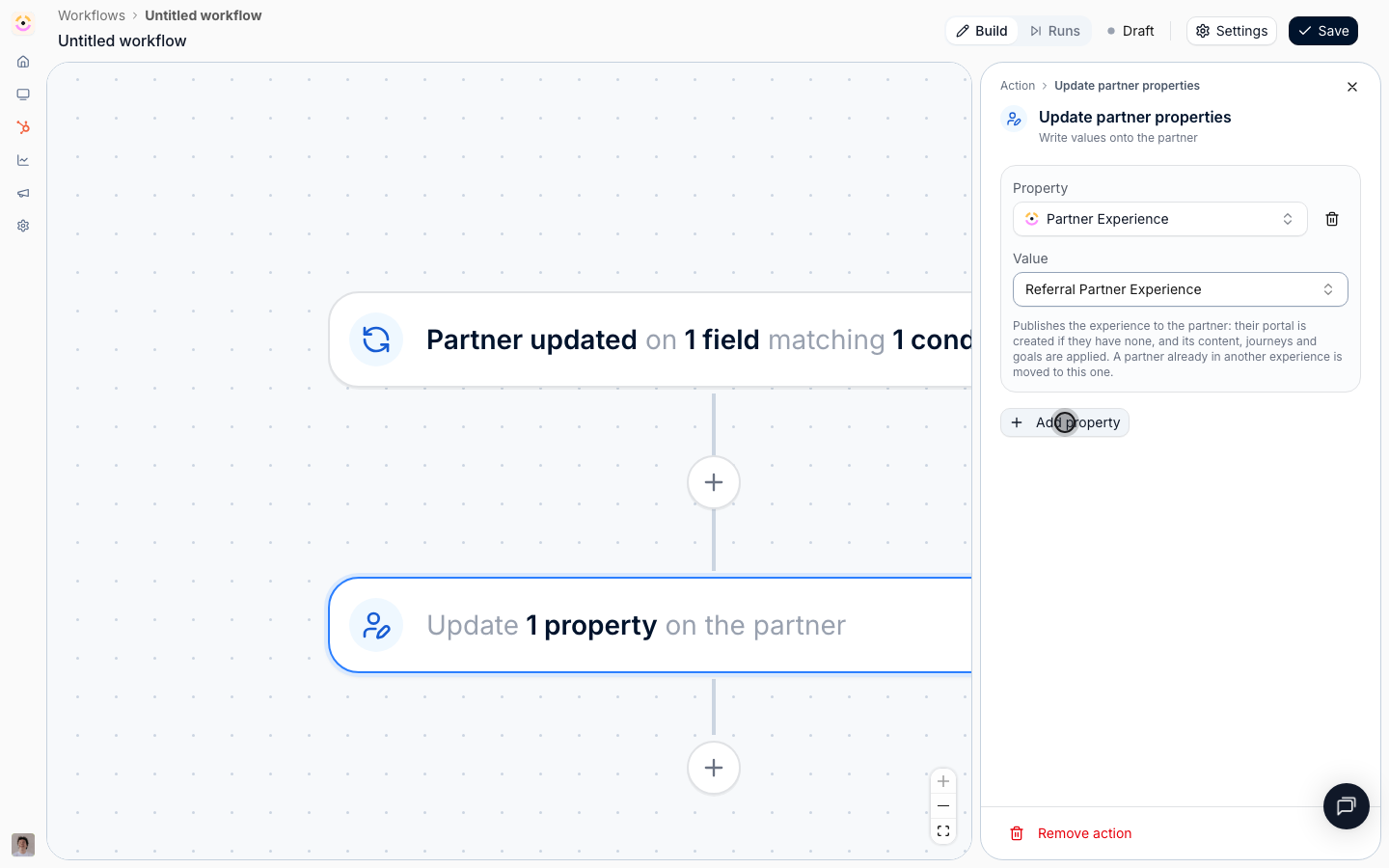
[**React to a CRM change on a partner**](/features/automation/workflows/guides/react-to-a-crm-change-on-a-partner)
Trigger a workflow when a partner field changes in HubSpot or Salesforce, then move that partner onto a different portal experience, retag them, and log it back on the CRM record.
* 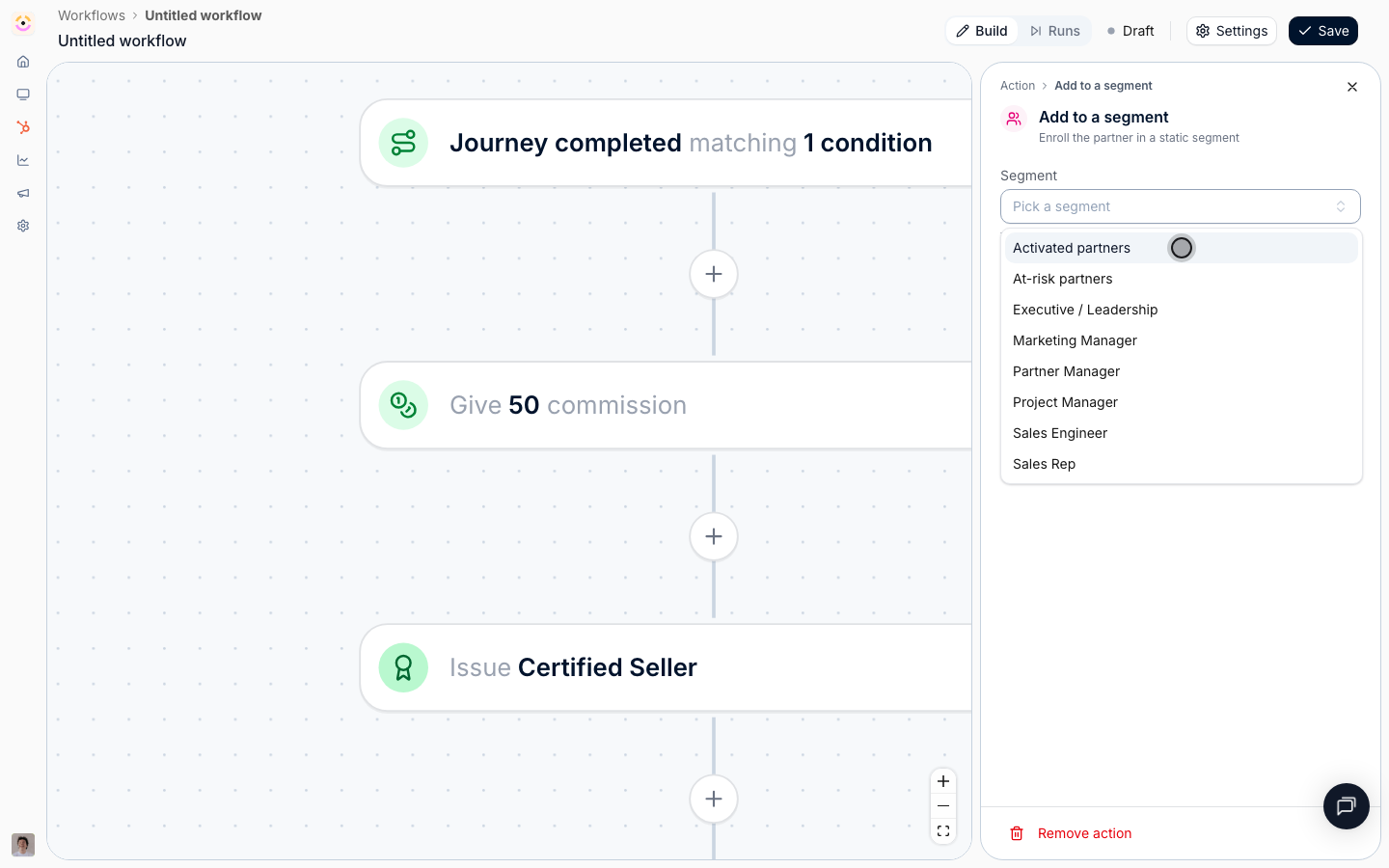
[**Reward a partner for finishing a journey**](/features/automation/workflows/guides/reward-a-finished-journey)
Book a one-off commission bonus, issue a certificate, move the partner into the activated segment, and tell them, the moment they complete an onboarding journey.
* 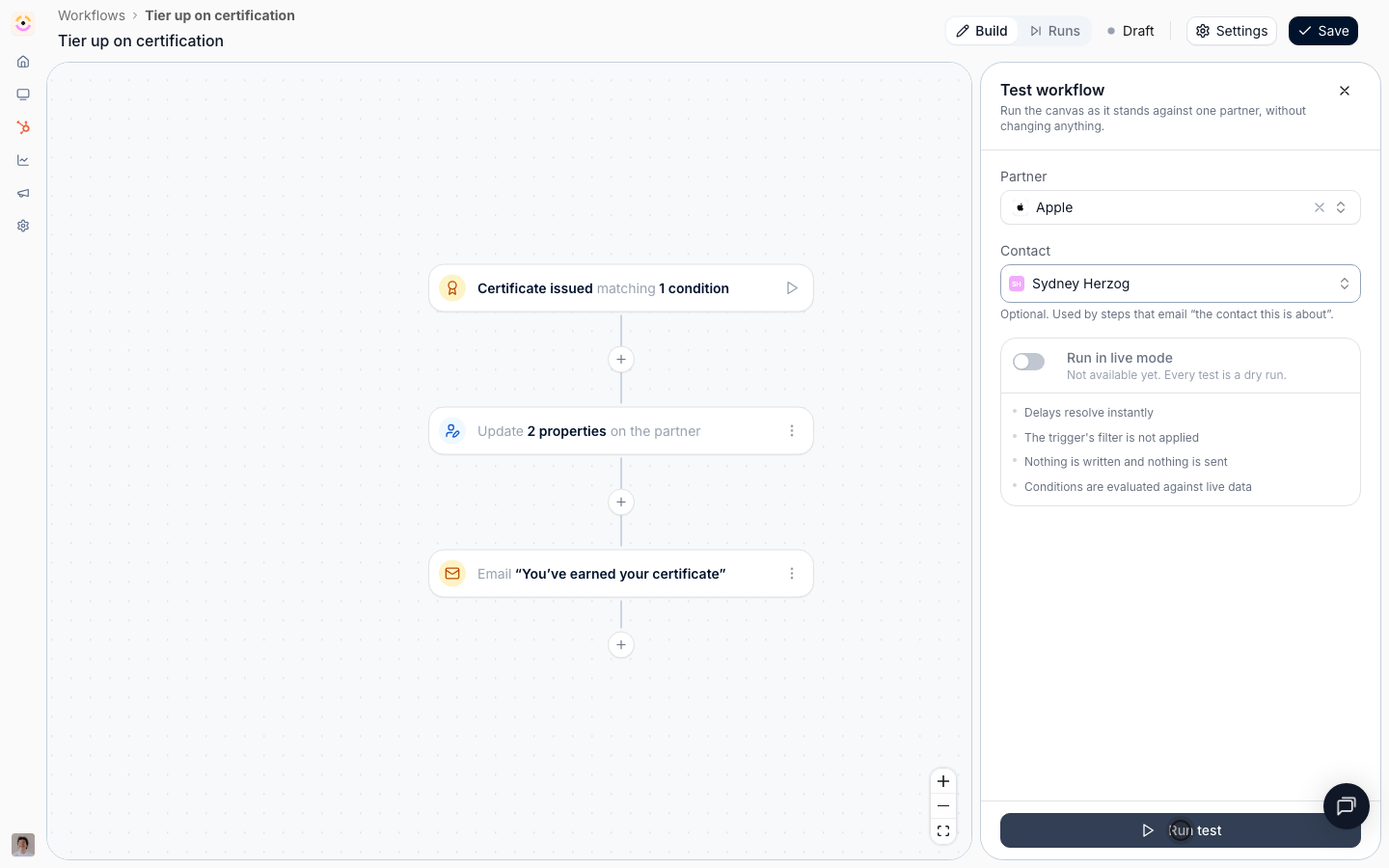
[**Test a workflow and read its runs**](/features/automation/workflows/guides/test-a-workflow-and-read-its-runs)
Rehearse a workflow against a real partner without changing anything, then read every run on the canvas to see which path it took and why it stopped where it did.
## Troubleshooting
Enabling is not retroactive, so a workflow never acts on partners who already met its trigger. Partner and contact properties cannot be used as conditions anywhere on the canvas: filter partners with a segment instead, and a partner filter saved in the wrong block is refused when you save. A condition is always the last step of its chain, because there is no merge node. Delays cap at 180 days, and an anchored delay stops the run when the task or course has no due date set, which is the normal case for some partners rather than a mistake. No single partner starts more than ten runs of the same workflow in an hour; beyond that, triggers are dropped to stop automations looping into each other. Changing a workflow's trigger clears the event conditions written against the old one, because they belong to that trigger's fields; segments stay.
Check it is **Active**, not **Draft**, and remember enabling is not retroactive. Then check the two narrowing blocks on the trigger: a segment that no longer matches the partner, or an event condition on a field the event does not carry, both produce a workflow that looks configured and fires for nobody.
Open **Settings** and read **Not ready to enable yet**, or hover **Draft** in the header. It names the unfinished node.
The node says why. **No due date to wait for** means the task or course had none, so the anchored delay had nothing to wait on. **The partner has no mapped channel** means the chat step could not resolve the partner's shared channel. **The partner has no champion with portal access** and **The partner has no portal contacts** mean the audience resolved to nobody.
The condition above it went the other way. Open the condition node to see which path the run took.
Re-read **Send to**. **Whoever the task is assigned to** can resolve to your own team, and **Your partner team** always does.
The step's **Write mode** is **Overwrite**. Switch it to **Fill in if not known** so manual values are left alone.
A test does not apply the trigger's filter and writes nothing, so it proves the shape of the flow, not the audience. To check the audience, enable the workflow and read the first real runs.
The hourly run cap for that workflow and partner has been reached, usually because two workflows are triggering each other. Check whether one workflow writes a field the other triggers on.
## Before you start
| You need | Why | Fix it |
| ---------------------------------- | ------------------------------- | ----------------------------------------------------------------------------------- |
| Workflows switched on for your org | It is released per organisation | **Request access** |
| A role with Workflows access | Read shows it, write builds it | [Internal roles](/features/access/team-management/guides/create-an-internal-role) |
| Whatever the workflow reaches for | A picker cannot offer nothing | [Build a workflow](/features/automation/workflows/guides/build-your-first-workflow) |
| A connected CRM, for CRM triggers | Only for CRM-driven workflows | [Connect a CRM](/features/integrations/crm/guides/connect-hubspot) |
Not in your left-hand navigation under **Engage**? It is not enabled for your organisation yet.
## How it works
A workflow is one trigger followed by a chain of steps, drawn on a canvas. The trigger says what Introw watches for. Each step is either an **Action** (something done to the partner), a **Condition** (a Yes or No fork), or a **Delay** (a wait).
Every run is about exactly one partner. That is the single most useful thing to hold on to: whatever the trigger was, the run knows which partner it happened to, so every action targets that partner and every email goes to that partner's people. Some triggers also know which **contact**, which **task**, or which **course enrolment** they were about, and a few steps only become available on those.
Narrowing happens in three independent blocks, and mixing them up is the usual reason a workflow never fires:
* **Which partners, by segment.** You pick segments, and any one of them matching is enough. Reach for this when the audience is one you already maintain, or want to reuse.
* **Which partners, by their own fields.** A condition builder over the partner's Introw and CRM properties, for the one-off answer a segment would be overkill for. "The tier changed, and it is now Gold" is this block.
* **Which events.** Conditions on the fields the triggering event itself carries: which journey, which task, which course, which portal access state, when it happened.
The trigger's own narrowing is checked before a run exists, so partners and events outside it leave nothing behind. A condition step narrows a run that is already going, which is what lets one workflow handle both the partner who did the thing and the partner who did not.
```mermaid theme={"theme":{"light":"github-light","dark":"github-dark"}}
flowchart LR
event["Something happens to a partner"] --> trigger["Trigger, narrowed by segments and event conditions"]
trigger --> steps["Actions, conditions, and delays"]
steps --> writes["Partner, portal, CRM, and messages"]
steps --> runs["Painted back onto the canvas under Runs"]
```
### What workflows reach
Workflows do not add a parallel system. Every trigger is an event a feature you already
configure emits, and every action is something you can do by hand on the same feature, which
is the whole reason a workflow needs no code: the vocabulary is the product's own. This is the
map, and each feature's own reference carries the same detail from its side.
| Feature | Triggers it fires | Actions that write to it |
| ----------------------------------------------------------- | -------------------------------------------------- | ------------------------------------------ |
| [Tasks](/features/partners/tasks) | Task assigned, Task completed | Give a task |
| [Journeys](/features/partners/journeys) | Enrolled in journey, Journey completed | Enroll in a journey |
| [Segments](/features/partners/segments) | Segment membership | Add to a segment |
| [Partner management](/features/partners/partner-management) | Partner created, Partner updated | Update partner properties |
| [Tiers](/features/partners/tiers) | | Update partner properties, on Partner tier |
| [Portal experiences](/features/portal/experiences) | | Update partner properties, on Experience |
| [Portal access](/features/portal/portal-access) | Partner contact added, Partner contact updated | |
| [Courses](/features/courses/enrollments) | Course started, Course completed | |
| [Certificates](/features/courses/certificates) | Certificate issued | Issue a certificate |
| [Commission lines](/features/commissions/commission-lines) | | Give commission |
| [Notifications](/features/engagement/notifications) | | Send an email |
| [Chat integrations](/features/integrations/chat) | | Send a chat message |
| [CRM integrations](/features/integrations/crm) | Partner updated, on any partner-level CRM property | Log a CRM note, Update partner properties |
Two gaps in that table are deliberate rather than missing. There is no enroll-in-a-course action,
because course auto-enrollment is decided by segments, so **Add to a segment** is the route. And
nothing writes portal access, because access is granted through your access setup or by inviting the
contact, and a workflow email is not an invitation.
## Settings & configuration
### Creating and finding workflows
**New workflow** on [Workflows](https://app.introw.io/workflows) creates a draft called **Untitled workflow** and opens the canvas straight away. The list is the usual overview table, filterable and sortable on **Name**, **Status** (Active or Draft), **Trigger**, **Steps**, **Runs**, **Owner** (whoever saved it last), and **Last updated**, so you can answer "what do we have running, and who touched it" without opening anything. Select rows to delete several at once.
The canvas header carries the workflow's name (editable in place), a **Build** and **Runs** switch, the Active or Draft status with a tooltip explaining why it is still a draft, **Settings**, and **Save**. The canvas does not save as you type: **Save** commits it.
### Triggers
A workflow has exactly one trigger, picked from three groups. Every trigger also carries the two-part filter described under [Narrowing](#narrowing-which-partners-and-which-events).
#### Tasks & journeys
**Task assigned** runs when a partner acquires a [task](/features/partners/tasks), which means when the task is created. Reassigning an existing task between people does not run it, so a nudge chain does not restart every time a manager tidies up. It is the trigger to start a deadline chase from, and the only one that offers a wait anchored to the task's due date.
**Task completed** runs when a task is marked done.
**Enrolled in journey** runs once when a partner is put on a [journey](/features/partners/journeys). **Which journeys count** narrows it; pick none and any journey qualifies. Adding a task to a journey a partner is already on does not run it again.
**Journey completed** runs when every task of a journey is done. **Which journeys count** narrows it the same way.
#### Learning
**Course started** runs the first time a partner contact opens a [course](/features/courses/enrollments). Being enrolled without opening it does not run it. **Which courses count** narrows it.
**Course completed** runs when the last module is finished. Progress before that does not run it.
**Certificate issued** runs when a [certificate](/features/courses/certificates) is awarded to a partner contact. **Which certificates count** narrows it, and re-issuing the same certificate to the same contact does not run it again.
#### Partners
**Partner created** runs when a new [partner](/features/partners/partner-management) appears, whether added by hand or brought in by [CRM detection](/features/partners/partner-management/guides/detect-partners-from-your-crm).
**Partner updated** runs when a partner's field changes, in Introw or in your [CRM](/features/integrations/crm). **Which changes count** is a searchable list of **Partner tier**, **Partner phase**, **Partner categories**, **Partner owner**, and every partner-level CRM property on the company or your custom partner object. Pick none and any of them changing runs the workflow. Changes the workflow makes itself never re-trigger it.
**Partner contact added** runs when a contact appears on a partner's [portal](/features/portal/portal-access). **Which access states they arrive in** narrows it to **Invited, not signed in yet**, **Has portal access**, **Asked for access**, or **Access removed**.
**Partner contact updated** runs when an existing contact's portal access moves or one of their fields changes. It narrows on both the access state and **Which changes count**, which here lists **Portal access**, **Email address**, **First name**, **Last name**, **Job title**, **Language**, **Email deliverability**, and every CRM contact property. Portal visits and emails sent to the contact do not run it.
**Segment membership** runs when a partner enters or leaves a [segment](/features/partners/segments): **The partner enters the segment** or **The partner leaves the segment**, then **Which segments count**. This is the most useful trigger on the canvas, because a dynamic segment re-evaluates itself against live partner, contact, and CRM data on a schedule. "Has not traded in 30 days", "crossed a revenue threshold", "is certified" are all this one trigger pointed at a different segment. Segments the workflow itself adds partners to never re-trigger it.
### Narrowing: which partners, and which events
Both the trigger panel and every condition step carry the same three blocks, in the same order.
**Segments** answers which partners, reusably. On the trigger it reads **Only for partners in**, on a condition just **Partners in**, and on the trigger it is checked before the workflow starts, so partners outside the chosen segments leave no run behind. Any one of the selected segments matching is enough. Leave it empty for every partner.
**Partner properties** answers which partners, one-off. It reads **Only for partners matching** on the trigger and **Partner matches** on a condition, and it is a condition builder over the partner's own fields: **Partner tier**, **Partner phase**, **Partner categories**, **Partner owner**, each partner team role, and every partner-level CRM property on the company or your custom partner object. Every field carries Introw's mark or your CRM's, so an Introw **Tier** and a CRM property also called Tier are distinguishable.
Use it for the check that would otherwise need a segment per value. On the trigger it is read as the event arrives, so "the tier changed, **and** it is now Gold" is one trigger rather than a trigger plus a maintained segment. On a condition it is read **when that step runs**, so after a ten-day delay a tier condition sees the tier the partner has now. The two blocks are ANDed: a partner has to be in one of the segments *and* match the conditions.
Contact and deal fields are deliberately absent from this block. A run acts on a partner, so those would offer filters the runner cannot answer; contact conditions belong in a segment.
**Event conditions** answers which events, over the fields that trigger carries. The block is labelled for the trigger (**Only for tasks matching**, **Only for certificates matching**, **Only for segments matching**), and the fields on offer change with it:
* Task triggers offer **Journey**, **Task**, and the timestamps (**Due date** and **Assigned at** on an assignment, **Completed at** on a completion). Picking a journey scopes the **Task** list to that journey's tasks.
* Journey triggers offer **Journey** and **Enrolled at** or **Completed at**.
* Course triggers offer **Course** plus **Started at** and **Completed at**.
* **Certificate issued** offers **Certificate**, **Issued at**, and **Expires at**.
* **Partner contact added** offers **Portal access**; **Partner contact updated** adds **Changed fields** and **Updated at**.
* **Segment membership** offers **Segment**.
* **Partner created** and **Partner updated** offer nothing, so the block is not shown at all. Their event *is* the partner: which fields moved is already the trigger's **Which changes count** picker, and everything else worth asking is a question about the partner, which the partner-properties block answers directly.
Conditions use the usual builder: **is**, **is not**, **is any of**, **is none of**, **contains**, **is known**, **is not known**, and comparisons on numbers and dates. Date fields accept a fixed calendar date or a relative one (**Today**, **7 days ago**, **30 days from now**), which is what makes "due within the next week" a condition rather than a calculation. Rows in a group are ANDed and groups are ORed. Leave the block empty and every event of that kind qualifies.
Three fields answer about **right now** rather than about the moment the workflow started, and they are the ones that make a nudge chain honest: **Task status right now**, **Journey progress right now**, and **Course progress right now**. They are read from the current state when the condition is decided, so after a ten-day wait they tell you whether the partner has since done the thing. Every other field answers about the triggering event.
### Actions
Nine actions, in four groups on the picker.
#### Partner
**Update partner properties** writes values onto the partner, one row per property. Each row is a property, a value, and a **Write mode**: **Overwrite** always replaces what is there, **Fill in if not known** leaves an existing value alone. The write mode is the setting that decides whether an automation quietly undoes work a partner manager did by hand, so choose it deliberately. The properties on offer are **Partner tier** (from your [tier program](/features/partners/tiers)), **Partner phase**, **Partner categories**, **Partner owner**, the partner's **Experience** (from your [portal experiences](/features/portal/experiences)), and every writable CRM property on their company or custom partner object, each marked with Introw's logo or your CRM's so you can tell two same-named fields apart.
Setting the **Experience** is not an ordinary field write: it publishes that experience to the partner. Their portal is created if they have none, and its content, journeys, and goals are applied. A partner already in another experience is moved to this one. Because it can create a portal, it is subject to your plan's portal limit: partners who already have a portal still move, and partners without one are skipped until you free up or add portals. The **Experience** row has no write mode for that reason.
**Add to a segment** enrolls the partner in a **static** [segment](/features/partners/segments). Only static segments are offered: a dynamic segment's members are whoever matches its audience, so an enrollment there would be undone at the next evaluation. The partner keeps every segment they are already in, and adding a partner twice does nothing.
#### Tasks & journeys
**Give a task** creates one portal [task](/features/partners/tasks), for the partner or for your own team. It is the same task detail a journey's tasks have: **Task name**, a **Due date** expressed as days after assigned (assignment being this step running, so the date is right for every run rather than only the first), **Assignee**, **Visibility**, **Status**, an **Action** the partner must complete, a rich **Description**, and an attachment. On a trigger that names a contact, the assignee list also offers **The contact this is about**, resolved per run.
**Enroll in a journey** gives the partner the tasks of a [journey](/features/partners/journeys). It is the same operation as **Apply** on the partner page, so a partner already on that journey keeps their progress and only the steps they do not have yet are added.
#### Rewards
**Give commission** books a one-off [commission line](/features/commissions/commission-lines) for the partner: an **Amount**, a **Currency**, and a **Description**. Leave the currency on **Partner's currency** and it resolves per partner when the run happens, so one workflow stays correct across a program that bills in several. This is the "500 for the referral" case, not a plan: it lands as a manual line, created as pending, so it still goes through your normal approval and payout run. Plans that earn lines from CRM or billing data live under [Commission plans](/features/commissions/commission-plans).
**Issue a certificate** awards a [certificate](/features/courses/certificates) to **The contact this is about** (only on a trigger that names one), **The partner champion**, or **All contacts of the partner**. Recipients are notified exactly as they are for a certificate issued by hand.
#### Messages
**Send an email** emails the partner's contacts, alongside the [notifications](/features/engagement/notifications) Introw already sends on its own. **Send to** offers **All contacts of the partner**, **The partner champion**, **Contacts in a segment** (which narrows this partner's contacts, not other partners), and two options that appear only on the triggers that can answer them: **The contact this is about** on a contact trigger, and **Whoever the task is assigned to** on a task trigger. The task assignee is read fresh when the email sends and can be one of your own team if the task is assigned internally. **Your partner team** is the one audience that is always internal: your own colleagues assigned to this partner, optionally narrowed by the partner team roles they hold, which is how a chain escalates to the partner manager. The body is written in the announcement editor, so variables and CTA buttons behave exactly as they do in an [announcement](/features/engagement/announcements), and it is stored with the step, so it cannot be edited or deleted from under a live workflow. The **Subject** is its own field and stays plain text.
**Send a chat message** posts a short plain-text nudge to Slack or Microsoft Teams. **The partner's channel** posts to the shared channel mapped on the partner's page, resolved at send time so remapping a partner moves every workflow with it; **One fixed channel** posts every run into the same place. Write `{{partner}}` for the partner's name. Only connected and active providers are offered, and with one connected there is no provider choice to make. See [Chat integrations](/features/integrations/chat).
**Log a CRM note** writes a note on the partner's own [CRM](/features/integrations/crm) record, their company or your custom partner object. There is no record picker, because that is the one record every run can name. `{{partner}}` works here too.
### Conditions
A **Condition** step splits the flow: everything matching takes the **Yes** path, everything else takes **No**, and exactly one path runs. It uses the same two-block filter as the trigger, labelled **Partners in** and the trigger's own event-condition label, so you can branch on the partner's segments, on the event's fields, or on both.
There is no merge node by design: each side runs to its own end. A condition is therefore always the last step of the chain it sits in, and both paths can hold further steps, including further conditions. Adding a condition in the middle of an existing chain moves the steps that followed it onto the **Yes** path.
### Delays
A **Delay** pauses the run and then carries on down the same path. The pause survives restarts and deploys.
**Wait** chooses what the pause is measured from:
* **After the previous step** is a plain wait: an amount and a unit of **Minutes**, **Hours**, or **Days**.
* **Around the task's due date**, offered only on **Task assigned**, waits until an offset from that task's due date.
* **Around the course's due date**, offered only on **Course started**, does the same for a course enrolment's due date.
On an anchored wait the same two inputs stop meaning "how long to pause" and start meaning **How far from the due date**, and a third control appears: **Before due** or **After due**. Zero waits until the due date itself. This is the only way to express "three days before it is due", because that instant is not knowable when the workflow is written and moves when someone edits the date. The moment is read fresh each run, so moving a due date moves the wait.
Keep a plain delay, and the offset on an anchored one, at 180 days or less.
### Workflow settings
**Settings** in the canvas header holds the **Name**, the **Description** for whoever reads the workflow next, the **Enable** switch, and **Delete workflow**.
**Enabling is not retroactive.** Only partners who meet the trigger from the moment you switch it on enter the workflow. Nothing replays history.
**Enable** is unavailable while the canvas is unfinished, and the dialog lists exactly what is missing under **Not ready to enable yet**: a trigger, at least one action, an unset value on a step, or a pairing that cannot work, such as an email addressed to the contact the trigger is about on a trigger that does not name one. The same list is behind the **Draft** tooltip in the header.
**Generate with AI** writes the name and description from the canvas as it stands, even unsaved. There is a matching **Generate with AI** in the email editor that drafts a subject and body from where the step sits in the flow, greeting and sign-off added for you. Both leave the result in the form for you to edit before saving, and both need AI to be configured for your environment.
### Testing and run history
**Test workflow**, on the play button beside the trigger, rehearses the canvas as it stands against one partner you pick, and optionally one of their contacts. Every test is a dry run: delays resolve instantly, nothing is written and nothing is sent, conditions are evaluated against live data, and the trigger's own filter is not applied, because you chose the partner by hand. Nodes the run touched are badged **Simulated** on the canvas.
**Runs** in the header switches the canvas from building to reading. The panel lists every time the workflow fired, newest first, named by the partner it was about, with a **Test** marker on rehearsals and a status: **Completed**, **Failed**, **Running**, **Queued**, **Waiting**, **Needs approval**, or **Cancelled**. Picking a run paints it onto the canvas: each node reads **Ran**, **Failed**, **Running**, **Waited**, **Waiting**, **Not taken** (the fork went the other way), or **Not reached**, and a node that stopped the run short says why.
## How-to guides
* 
[**Build your first workflow**](/features/automation/workflows/guides/build-your-first-workflow)
Create a workflow that moves a partner up a tier the moment they earn a certification, from an empty canvas through a rehearsal to an enabled automation.
* 
[**Chase a task to its due date and escalate**](/features/automation/workflows/guides/chase-a-task-to-its-due-date)
Build a nudge chain that reminds a partner three days before a task is due, again two days after it slips, and hands it to the partner manager five days after.
* 
[**Onboard a new partner automatically**](/features/automation/workflows/guides/onboard-a-new-partner-automatically)
Put every new partner on the onboarding journey, welcome them, and chase the ones who stall, from the moment the partner appears from your CRM.
* 
[**Re-engage partners who go quiet**](/features/automation/workflows/guides/re-engage-quiet-partners)
Turn a dynamic segment into a trigger: nudge a partner the moment they go quiet, wait, check whether it worked, and hand the ones who stay quiet to their manager.
* 
[**React to a CRM change on a partner**](/features/automation/workflows/guides/react-to-a-crm-change-on-a-partner)
Trigger a workflow when a partner field changes in HubSpot or Salesforce, then move that partner onto a different portal experience, retag them, and log it back on the CRM record.
* 
[**Reward a partner for finishing a journey**](/features/automation/workflows/guides/reward-a-finished-journey)
Book a one-off commission bonus, issue a certificate, move the partner into the activated segment, and tell them, the moment they complete an onboarding journey.
* 
[**Test a workflow and read its runs**](/features/automation/workflows/guides/test-a-workflow-and-read-its-runs)
Rehearse a workflow against a real partner without changing anything, then read every run on the canvas to see which path it took and why it stopped where it did.
## Troubleshooting
Enabling is not retroactive, so a workflow never acts on partners who already met its trigger. Partner and contact properties cannot be used as conditions anywhere on the canvas: filter partners with a segment instead, and a partner filter saved in the wrong block is refused when you save. A condition is always the last step of its chain, because there is no merge node. Delays cap at 180 days, and an anchored delay stops the run when the task or course has no due date set, which is the normal case for some partners rather than a mistake. No single partner starts more than ten runs of the same workflow in an hour; beyond that, triggers are dropped to stop automations looping into each other. Changing a workflow's trigger clears the event conditions written against the old one, because they belong to that trigger's fields; segments stay.
Check it is **Active**, not **Draft**, and remember enabling is not retroactive. Then check the two narrowing blocks on the trigger: a segment that no longer matches the partner, or an event condition on a field the event does not carry, both produce a workflow that looks configured and fires for nobody.
Open **Settings** and read **Not ready to enable yet**, or hover **Draft** in the header. It names the unfinished node.
The node says why. **No due date to wait for** means the task or course had none, so the anchored delay had nothing to wait on. **The partner has no mapped channel** means the chat step could not resolve the partner's shared channel. **The partner has no champion with portal access** and **The partner has no portal contacts** mean the audience resolved to nobody.
The condition above it went the other way. Open the condition node to see which path the run took.
Re-read **Send to**. **Whoever the task is assigned to** can resolve to your own team, and **Your partner team** always does.
The step's **Write mode** is **Overwrite**. Switch it to **Fill in if not known** so manual values are left alone.
A test does not apply the trigger's filter and writes nothing, so it proves the shape of the flow, not the audience. To check the audience, enable the workflow and read the first real runs.
The hourly run cap for that workflow and partner has been reached, usually because two workflows are triggering each other. Check whether one workflow writes a field the other triggers on.