> ## Documentation Index
> Fetch the complete documentation index at: https://docs.introw.io/llms.txt
> Use this file to discover all available pages before exploring further.
# AI Training
> How AI course authoring, the in-course AI tutor, and AI quiz grading work in Introw's LMS, and where to use each - grounded in your knowledge base.
## Where it lives
AI Training sits under **Portal**, at [Courses](https://app.introw.io/courses).
 ## Before you start
| You need | Why | Fix it |
| ------------------------ | --------------------------------- | ------------------------------------------------------------------------------------- |
| The Courses (LMS) module | Authoring and tutoring live there | **Request access** |
| Knowledge sources added | They ground what AI writes | [Fill the knowledge base](/features/ai/knowledge-base/guides/fill-the-knowledge-base) |
| Write access to Courses | To publish what it drafts | [Internal roles](/features/access/team-management/guides/create-an-internal-role) |
## How it works
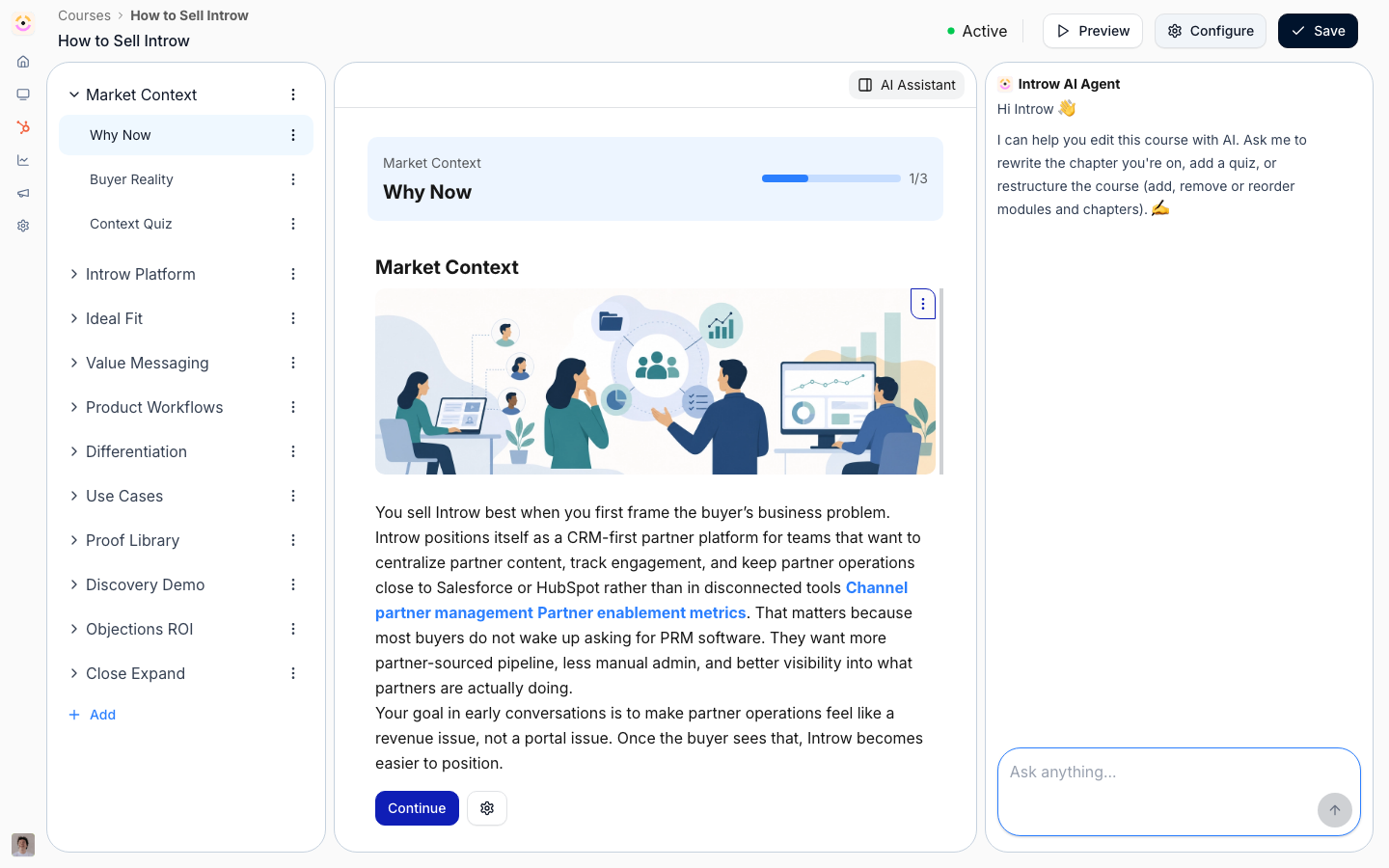
The three training AIs live inside the [Courses](/features/courses) area:
* **Authoring** - from the course create flow, give a prompt, pick a preset, or start from a deck. Introw runs a multi-stage pipeline: it drafts an outline against your [knowledge base](/features/ai/knowledge-base), researches and writes each module, adds illustrative images where your content has none, and reviews and optimizes the result into a draft you own. From the course builder you keep refining it conversationally, and you can generate a matching certificate from the course.
* **Tutor** - once a course is live, learners get an in-course AI tutor. It answers their questions about the material and guides them, grounded in the course content, so a stuck learner gets help without leaving the lesson.
* **Grading** - quizzes with open-ended or uploaded answers are graded by AI. It assesses the answer against the question and course content, decides pass/fail, and returns an explanation that guides the learner to the right understanding. Multiple-choice grades deterministically.
Authoring and refinement are for your team; the tutor and grading are learner-facing. Everything grounds in your knowledge base and the course's own content, so nothing is generic.
### Grounding
Course drafts and tutoring pull from your knowledge base and the course content itself, not the open web, so training reflects your product and program.
```mermaid theme={"theme":{"light":"github-light","dark":"github-dark"}}
flowchart LR
prompt["Prompt / preset / deck"] --> draft["AI drafts the course"]
draft --> publish["Your team publishes"]
publish --> tutor["AI tutors learners"]
publish --> grade["AI grades open answers"]
```
## Settings & configuration
There's nothing to switch on - the training AIs are part of the LMS. To get the most from them:
### Fill the knowledge base
Richer sources make richer courses and better tutoring. See [Fill the knowledge base](/features/ai/knowledge-base/guides/fill-the-knowledge-base).
### Author from a source
Generate from a prompt, a preset, or an uploaded deck; the closer the source, the less editing.
### Add open-ended quizzes
Use open questions where you want real understanding checked - the AI grades them with feedback.
## Guides
Draft a full partner course from a prompt, preset, or deck, then refine it.
Author or edit a course by hand alongside the AI.
## Troubleshooting
AI-authored courses are drafts - review them before publishing to partners. Authoring and tutoring reflect your knowledge base, so a thin knowledge base produces generic content. Open-answer grading is a judgment aid; spot-check it when the stakes are certification.
The knowledge base is thin, or the source prompt/deck was light.
It's outside the course content and your knowledge base.
Tighten the question and the expected answer so the AI has a clearer target.
## Before you start
| You need | Why | Fix it |
| ------------------------ | --------------------------------- | ------------------------------------------------------------------------------------- |
| The Courses (LMS) module | Authoring and tutoring live there | **Request access** |
| Knowledge sources added | They ground what AI writes | [Fill the knowledge base](/features/ai/knowledge-base/guides/fill-the-knowledge-base) |
| Write access to Courses | To publish what it drafts | [Internal roles](/features/access/team-management/guides/create-an-internal-role) |
## How it works
The three training AIs live inside the [Courses](/features/courses) area:
* **Authoring** - from the course create flow, give a prompt, pick a preset, or start from a deck. Introw runs a multi-stage pipeline: it drafts an outline against your [knowledge base](/features/ai/knowledge-base), researches and writes each module, adds illustrative images where your content has none, and reviews and optimizes the result into a draft you own. From the course builder you keep refining it conversationally, and you can generate a matching certificate from the course.
* **Tutor** - once a course is live, learners get an in-course AI tutor. It answers their questions about the material and guides them, grounded in the course content, so a stuck learner gets help without leaving the lesson.
* **Grading** - quizzes with open-ended or uploaded answers are graded by AI. It assesses the answer against the question and course content, decides pass/fail, and returns an explanation that guides the learner to the right understanding. Multiple-choice grades deterministically.
Authoring and refinement are for your team; the tutor and grading are learner-facing. Everything grounds in your knowledge base and the course's own content, so nothing is generic.
### Grounding
Course drafts and tutoring pull from your knowledge base and the course content itself, not the open web, so training reflects your product and program.
```mermaid theme={"theme":{"light":"github-light","dark":"github-dark"}}
flowchart LR
prompt["Prompt / preset / deck"] --> draft["AI drafts the course"]
draft --> publish["Your team publishes"]
publish --> tutor["AI tutors learners"]
publish --> grade["AI grades open answers"]
```
## Settings & configuration
There's nothing to switch on - the training AIs are part of the LMS. To get the most from them:
### Fill the knowledge base
Richer sources make richer courses and better tutoring. See [Fill the knowledge base](/features/ai/knowledge-base/guides/fill-the-knowledge-base).
### Author from a source
Generate from a prompt, a preset, or an uploaded deck; the closer the source, the less editing.
### Add open-ended quizzes
Use open questions where you want real understanding checked - the AI grades them with feedback.
## Guides
Draft a full partner course from a prompt, preset, or deck, then refine it.
Author or edit a course by hand alongside the AI.
## Troubleshooting
AI-authored courses are drafts - review them before publishing to partners. Authoring and tutoring reflect your knowledge base, so a thin knowledge base produces generic content. Open-answer grading is a judgment aid; spot-check it when the stakes are certification.
The knowledge base is thin, or the source prompt/deck was light.
It's outside the course content and your knowledge base.
Tighten the question and the expected answer so the AI has a clearer target.