> ## Documentation Index
> Fetch the complete documentation index at: https://docs.introw.io/llms.txt
> Use this file to discover all available pages before exploring further.
# AI Copilot
> Where Introw AI lives, the actions it can take, how it's grounded in your CRM and knowledge base, and how it's scoped to your team's permissions.
## Where it lives
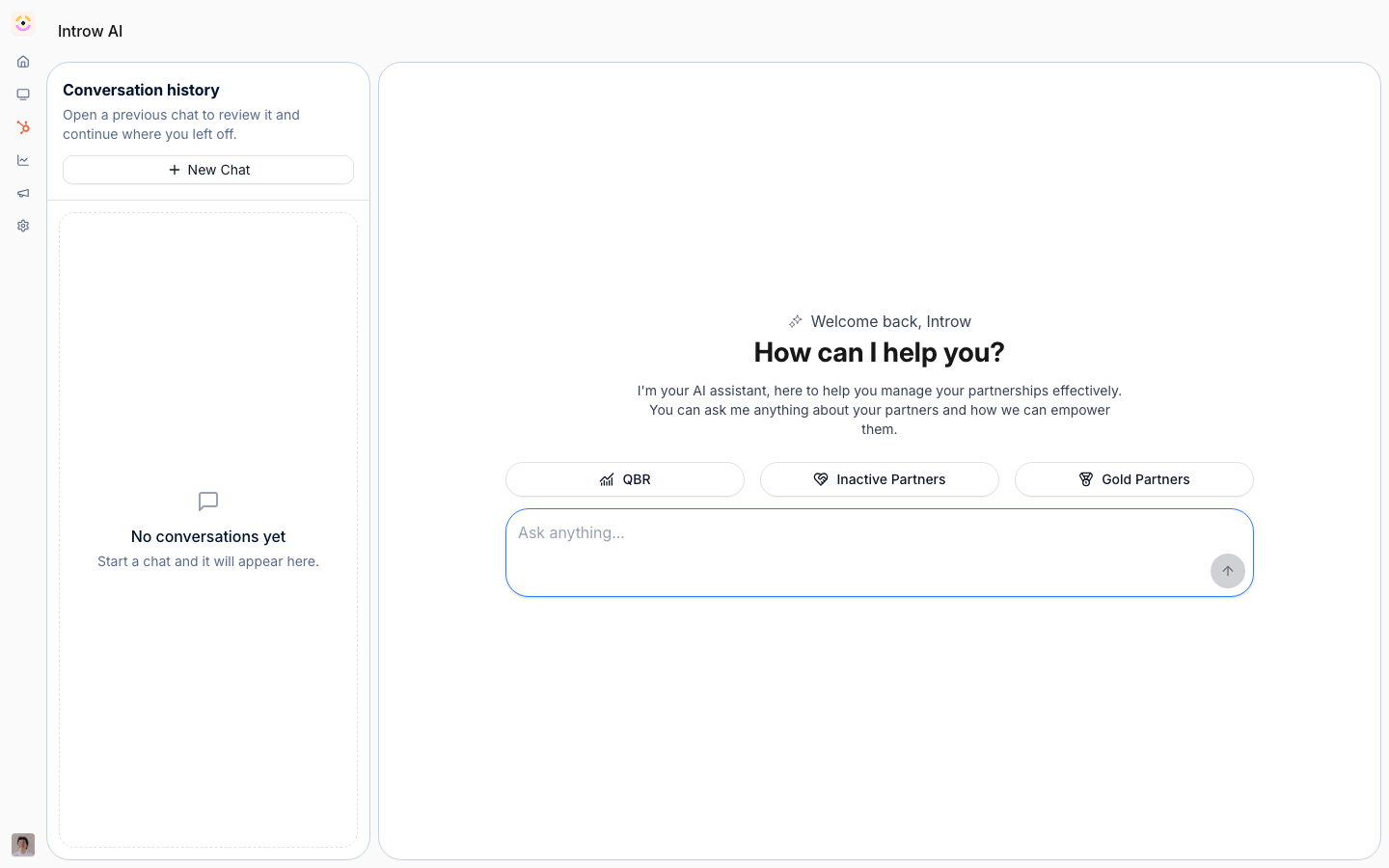
AI Copilot lives at [Introw AI](https://app.introw.io/agent).
 ## Before you start
| You need | Why | Fix it |
| ----------------------- | -------------------------------------- | ------------------------------------------------------------------------------------- |
| The AI Agent module | On by default on your plan | **Request access** |
| A connected CRM | The copilot reads and writes live data | [Connect a CRM](/features/integrations/crm/guides/connect-hubspot) |
| Knowledge sources added | So answers are grounded, not guessed | [Fill the knowledge base](/features/ai/knowledge-base/guides/fill-the-knowledge-base) |
## How it works
The copilot ships as **Introw AI**, reachable from the top of Introw and as a full page with conversation history. Ask a question or give an instruction in plain language and it does three things: reads your live CRM and [knowledge base](/features/ai/knowledge-base), composes an answer, and - when you ask it to - takes an action on the same records.
It runs on the secure Introw toolset. In one conversation it can search partners and CRM objects, read commissions, marketing funds, goals, and tiers, gather a partner business review, search tasks and activity, and write back: update partner fields, update CRM object properties, create and update tasks, and add comments. Starter suggestions (for example a QBR, inactive partners, or partners in a given tier) get you moving in a click. This is the same toolset available over [MCP](/features/developer/mcp), so the copilot inside Introw and your own AI assistant do the same work.
### Grounding and actions
The copilot never improvises from outside knowledge. Answers come from your CRM records plus the sources in your knowledge base (websites, snippets, documents, and portal content). Actions call the same permissioned APIs your team uses in the UI, so a write from the copilot is identical to a write you'd make by hand - and it's recorded the same way.
### Security and scoping
Introw AI is scoped to your organization and the acting user's access. It reads and writes only what that user could reach in the product, and every conversation is traced. You can leave feedback on answers to tune quality over time.
```mermaid theme={"theme":{"light":"github-light","dark":"github-dark"}}
flowchart LR
ask["Team asks Introw AI"] --> ground["Reads CRM + knowledge base"]
ground --> answer["Answers"]
ground --> act["Takes scoped action"]
```
## Settings & configuration
Introw AI is available to your team out of the box - there's no separate build step. To make its answers richer:
### Fill the knowledge base
Add websites, snippets, and documents so program questions resolve against your own content. See [Fill the knowledge base](/features/ai/knowledge-base/guides/fill-the-knowledge-base).
### Connect your CRM
The copilot's reach mirrors your CRM sync - the more of your program lives in the CRM, the more the copilot can answer and do.
### Extend with MCP
Connect your own MCP server to give the copilot custom context and live tools from your systems. See [Knowledge Base](/features/ai/knowledge-base).
## How-to guides
*None yet.*
## Troubleshooting
The copilot only answers and acts within the acting user's permissions and the data in your CRM and knowledge base. Thin CRM sync or an empty knowledge base means thinner answers. Writes it makes are real CRM writes - review actions the same way you'd review your own.
It isn't synced from your CRM, or the acting user can't access it.
The knowledge base is thin; add websites, snippets, or documents.
The acting user lacks permission for that write.
## Before you start
| You need | Why | Fix it |
| ----------------------- | -------------------------------------- | ------------------------------------------------------------------------------------- |
| The AI Agent module | On by default on your plan | **Request access** |
| A connected CRM | The copilot reads and writes live data | [Connect a CRM](/features/integrations/crm/guides/connect-hubspot) |
| Knowledge sources added | So answers are grounded, not guessed | [Fill the knowledge base](/features/ai/knowledge-base/guides/fill-the-knowledge-base) |
## How it works
The copilot ships as **Introw AI**, reachable from the top of Introw and as a full page with conversation history. Ask a question or give an instruction in plain language and it does three things: reads your live CRM and [knowledge base](/features/ai/knowledge-base), composes an answer, and - when you ask it to - takes an action on the same records.
It runs on the secure Introw toolset. In one conversation it can search partners and CRM objects, read commissions, marketing funds, goals, and tiers, gather a partner business review, search tasks and activity, and write back: update partner fields, update CRM object properties, create and update tasks, and add comments. Starter suggestions (for example a QBR, inactive partners, or partners in a given tier) get you moving in a click. This is the same toolset available over [MCP](/features/developer/mcp), so the copilot inside Introw and your own AI assistant do the same work.
### Grounding and actions
The copilot never improvises from outside knowledge. Answers come from your CRM records plus the sources in your knowledge base (websites, snippets, documents, and portal content). Actions call the same permissioned APIs your team uses in the UI, so a write from the copilot is identical to a write you'd make by hand - and it's recorded the same way.
### Security and scoping
Introw AI is scoped to your organization and the acting user's access. It reads and writes only what that user could reach in the product, and every conversation is traced. You can leave feedback on answers to tune quality over time.
```mermaid theme={"theme":{"light":"github-light","dark":"github-dark"}}
flowchart LR
ask["Team asks Introw AI"] --> ground["Reads CRM + knowledge base"]
ground --> answer["Answers"]
ground --> act["Takes scoped action"]
```
## Settings & configuration
Introw AI is available to your team out of the box - there's no separate build step. To make its answers richer:
### Fill the knowledge base
Add websites, snippets, and documents so program questions resolve against your own content. See [Fill the knowledge base](/features/ai/knowledge-base/guides/fill-the-knowledge-base).
### Connect your CRM
The copilot's reach mirrors your CRM sync - the more of your program lives in the CRM, the more the copilot can answer and do.
### Extend with MCP
Connect your own MCP server to give the copilot custom context and live tools from your systems. See [Knowledge Base](/features/ai/knowledge-base).
## How-to guides
*None yet.*
## Troubleshooting
The copilot only answers and acts within the acting user's permissions and the data in your CRM and knowledge base. Thin CRM sync or an empty knowledge base means thinner answers. Writes it makes are real CRM writes - review actions the same way you'd review your own.
It isn't synced from your CRM, or the acting user can't access it.
The knowledge base is thin; add websites, snippets, or documents.
The acting user lacks permission for that write.