> ## Documentation Index
> Fetch the complete documentation index at: https://docs.introw.io/llms.txt
> Use this file to discover all available pages before exploring further.
# AI Copilot
> Run your partner program in plain language: prep QBRs, find inactive partners, spot tier bumps, and update records, grounded in your CRM data.
export const Headless = ({children, intro = true}) => {
const [copied, setCopied] = useState(null);
const copy = event => {
const row = event.target.closest("li");
if (!row) return;
const text = row.textContent.trim();
try {
navigator.clipboard?.writeText(text);
} catch {}
setCopied(text);
setTimeout(() => setCopied(null), 1600);
};
return <>
{intro ?
Introw is headless by design: run everything here in plain language from Claude, ChatGPT,
Slack, Teams, or your own CRM through Introw's MCP server, with every
action written straight back to your CRM source of truth. The portal is one surface, never the only one.
:
The agentic motion - lifecycle deep dives and a Claude Code skill library that run your partner program from
Claude, ChatGPT, Slack, and your CRM.
}
;
};
export const Tour = ({children}) => {
const [active, setActive] = useState(0);
const wrappers = (Array.isArray(children) ? children : [children]).filter(c => c && c.props);
const frames = wrappers.length === 1 && Array.isArray(wrappers[0].props.children) ? wrappers[0].props.children.filter(c => c && c.props) : [];
if (frames.length < 2) {
return
;
> Your team runs the program by clicking through the CRM, the portal, and a stack of reports. The AI Copilot lets them run it in plain language instead: ask a question or give an instruction, and it reads your data, assembles the answer, and takes the action.
## The problem it solves
Running a partner program means knowing where everything lives:
| Without Introw | With Introw |
| ----------------------------------- | ------------------------------- |
| Answers are scattered everywhere | Ask, and it pulls them together |
| Prep is manual and slow | A QBR assembled in seconds |
| Routine updates eat the day | It updates and comments for you |
| Insight needs knowing where to look | It surfaces who needs attention |
## Impact
The partner-facing effect of a copilot is that their manager always knows their account. That is what turns a quarterly call from a status update into a plan.
for your business
* **AI, not admin**
The copilot does the mechanical program work: prep, lookups, updates, tasks and comments
* **In your CRM**
It reads and writes the same CRM records, so it never creates a parallel version of reality
* **No new tool**
It is built into Introw, and the same actions run from your own assistant over MCP
for your partners
* **Self-serve**
The same engine powers their own assistant, scoped to their own data
* **Enabled**
Their manager arrives at a review already knowing their numbers, not asking for them
* **Efficient**
A question about their commission or their tier is answered while they are still asking
[A day in the life of your partners](/days-in-the-life)
* **Partner Operations** - the day's work by asking
* **Partnership Leadership** - program health, instantly
## How it works
The AI Copilot - **Introw AI** in the product - is a conversational assistant for your team, always a click away at the top of Introw. Ask it to prep a QBR for a partner, list partners who've gone quiet, show who's close to a tier promotion, pull a partner's commission status, or update a record. It does the work: it reads your CRM and knowledge base, composes the answer, and takes scoped actions on your behalf.
It runs on the same engine and the same secure toolset your team can drive from [Claude, ChatGPT, or Gemini over MCP](/features/developer/mcp). The copilot is simply that power built into Introw, so you don't have to leave the product to use it. Every answer is grounded in your data, and every action stays inside your permissions.
Instead of hunting through screens to answer "which partners need attention this week?", your team asks the copilot and gets the answer - and the next action - immediately. It turns program operations into a conversation.
```mermaid theme={"theme":{"light":"github-light","dark":"github-dark"}}
flowchart LR
ask["Ask in plain language"] --> read["Copilot reads CRM + knowledge base"]
read --> act["Answers and takes scoped action"]
```
## Run it from your AI assistant
* Prep a QBR for Acme - pipeline, commissions, and open tasks.
* Which partners have had no activity in the last 30 days?
* Who's closest to hitting the next tier, and what do they still need?
## Going deeper
Where the copilot lives, what it can do, and how it's scoped.
Integration surface and code.
**Works with**
Grounds the copilot in your sources.
Run the same actions from your own AI assistant.
The partner-facing counterpart to your copilot.
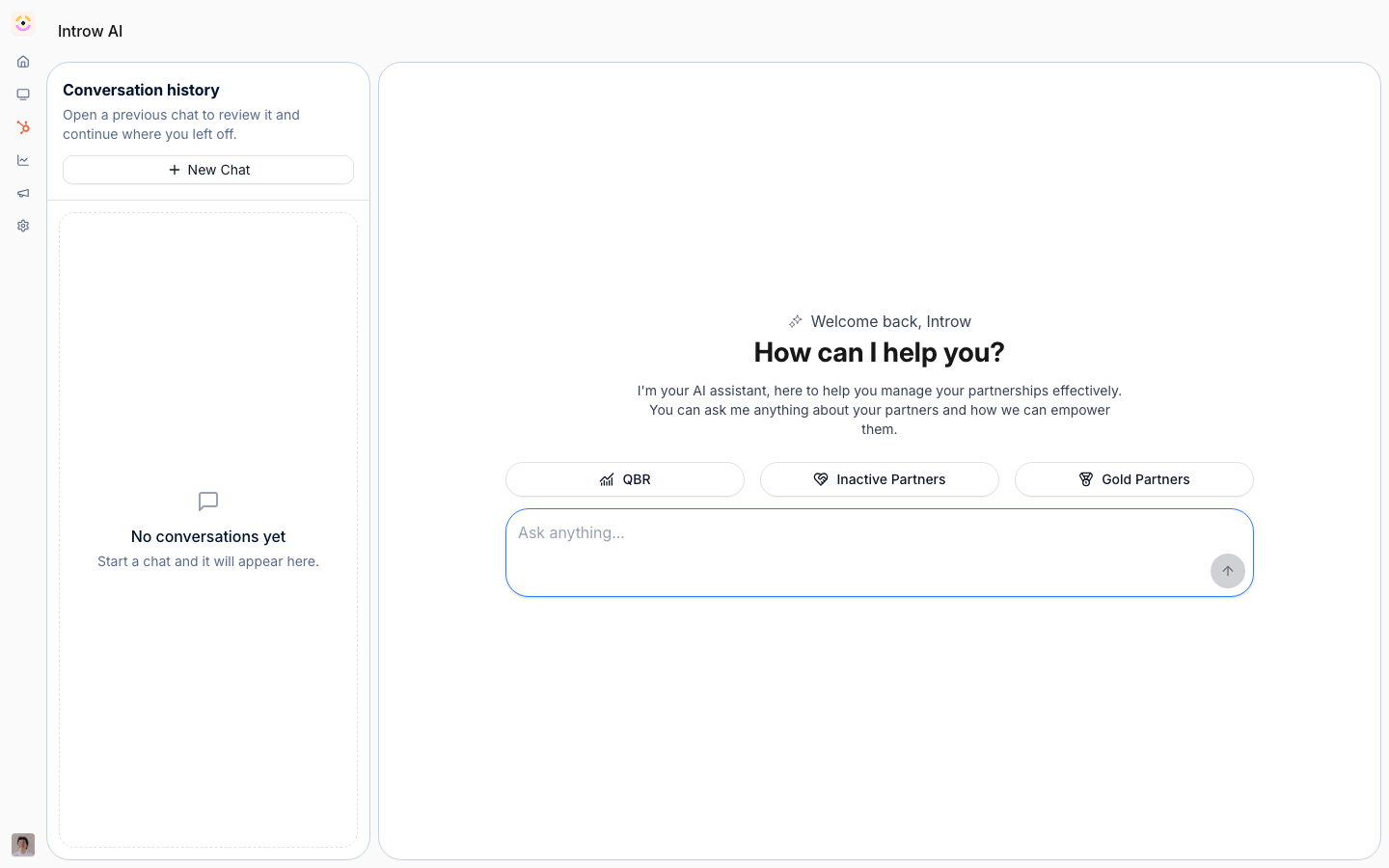 It runs on the same engine and the same secure toolset your team can drive from [Claude, ChatGPT, or Gemini over MCP](/features/developer/mcp). The copilot is simply that power built into Introw, so you don't have to leave the product to use it. Every answer is grounded in your data, and every action stays inside your permissions.
Instead of hunting through screens to answer "which partners need attention this week?", your team asks the copilot and gets the answer - and the next action - immediately. It turns program operations into a conversation.
```mermaid theme={"theme":{"light":"github-light","dark":"github-dark"}}
flowchart LR
ask["Ask in plain language"] --> read["Copilot reads CRM + knowledge base"]
read --> act["Answers and takes scoped action"]
```
## Run it from your AI assistant
It runs on the same engine and the same secure toolset your team can drive from [Claude, ChatGPT, or Gemini over MCP](/features/developer/mcp). The copilot is simply that power built into Introw, so you don't have to leave the product to use it. Every answer is grounded in your data, and every action stays inside your permissions.
Instead of hunting through screens to answer "which partners need attention this week?", your team asks the copilot and gets the answer - and the next action - immediately. It turns program operations into a conversation.
```mermaid theme={"theme":{"light":"github-light","dark":"github-dark"}}
flowchart LR
ask["Ask in plain language"] --> read["Copilot reads CRM + knowledge base"]
read --> act["Answers and takes scoped action"]
```
## Run it from your AI assistant