> ## Documentation Index
> Fetch the complete documentation index at: https://docs.introw.io/llms.txt
> Use this file to discover all available pages before exploring further.
# AI Announcements
> How AI drafting and recommended announcements work in Introw: start from a URL, prompt, or preset, refine conversationally, and review proactive drafts.
## Where it lives
AI Announcements sits under **Engage**, at [Announcements](https://app.introw.io/announcements).
 ## Before you start
| You need | Why | Fix it |
| ----------------------------- | ------------------------------- | -------------------------------------------------------------------------------------------------- |
| The AI Agent module | On by default on your plan | **Request access** |
| Announcements in your portal | The draft has to land somewhere | [Publish an experience](/features/portal/experiences/guides/build-and-publish-a-portal-experience) |
| Write access to announcements | To send what the AI drafts | [Internal roles](/features/access/team-management/guides/create-an-internal-role) |
## How it works
There are two ways AI creates [announcements](/features/engagement/announcements):
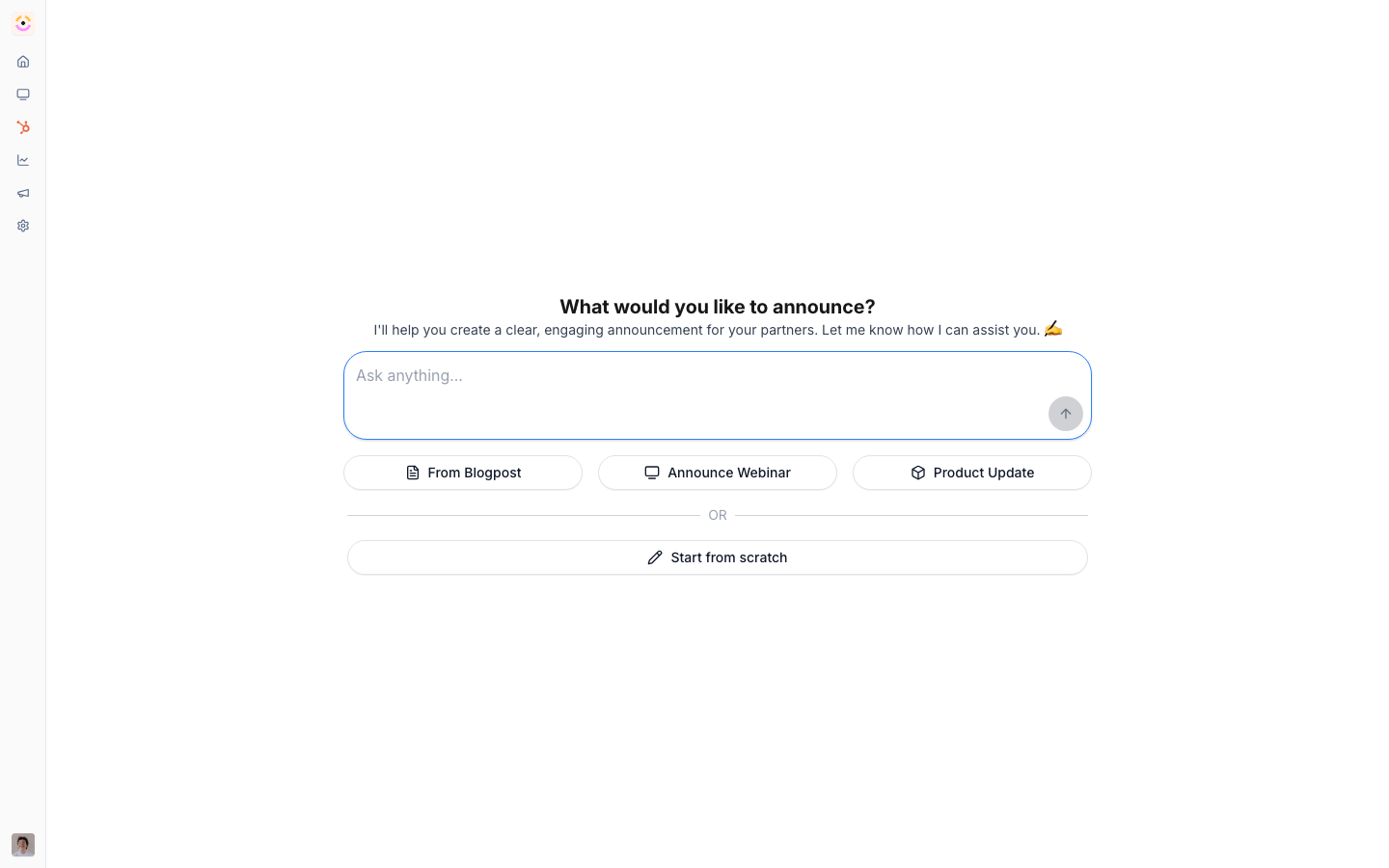
* **Start with AI** - in the announcement editor, choose to start with AI and give a URL, a prompt, or a preset (product update, webinar, blog post). The AI drafts the announcement - pulling from your [knowledge base](/features/ai/knowledge-base) and adding an image where it helps - and you refine it in a chat panel before publishing, scheduling, and targeting it like any announcement.
* **Recommended announcements** - Introw watches your recent content and drafts announcements it thinks you should send, surfacing them as a highlight on your home screen. Each is a ready-to-review draft you can open and publish, adjust, or dismiss.
Both paths produce a normal announcement draft - the AI writes the first version; you own publishing, scheduling, and audience.
```mermaid theme={"theme":{"light":"github-light","dark":"github-dark"}}
flowchart LR
input["URL / prompt / preset"] --> draft["AI drafts"]
recent["Recent content"] --> rec["Recommended draft on home"]
draft --> publish["Refine, publish, target"]
rec --> publish
```
## Settings & configuration
Nothing to enable - AI drafting is built into the announcement editor, and recommended drafts appear on home automatically.
### Start with AI
In a new announcement, choose start with AI and provide a URL, prompt, or preset.
### Refine in chat
Use the chat panel to adjust tone, length, and content before publishing.
### Review recommendations
Open recommended announcements from your home screen and publish, edit, or dismiss.
## Guides
Draft a partner announcement from a URL or prompt, then refine and publish.
Publish, schedule, and target partner announcements.
## Troubleshooting
AI drafts are starting points - review and edit before publishing to partners. Drafts reflect your knowledge base and the source you give, so a thin source produces a thin draft. Recommended announcements are suggestions, not scheduled sends; nothing goes out until you publish it.
Give a more specific URL or prompt, or enrich the knowledge base.
There's little recent content to draft from yet.
Check its audience and targeting when you publish.
## Before you start
| You need | Why | Fix it |
| ----------------------------- | ------------------------------- | -------------------------------------------------------------------------------------------------- |
| The AI Agent module | On by default on your plan | **Request access** |
| Announcements in your portal | The draft has to land somewhere | [Publish an experience](/features/portal/experiences/guides/build-and-publish-a-portal-experience) |
| Write access to announcements | To send what the AI drafts | [Internal roles](/features/access/team-management/guides/create-an-internal-role) |
## How it works
There are two ways AI creates [announcements](/features/engagement/announcements):
* **Start with AI** - in the announcement editor, choose to start with AI and give a URL, a prompt, or a preset (product update, webinar, blog post). The AI drafts the announcement - pulling from your [knowledge base](/features/ai/knowledge-base) and adding an image where it helps - and you refine it in a chat panel before publishing, scheduling, and targeting it like any announcement.
* **Recommended announcements** - Introw watches your recent content and drafts announcements it thinks you should send, surfacing them as a highlight on your home screen. Each is a ready-to-review draft you can open and publish, adjust, or dismiss.
Both paths produce a normal announcement draft - the AI writes the first version; you own publishing, scheduling, and audience.
```mermaid theme={"theme":{"light":"github-light","dark":"github-dark"}}
flowchart LR
input["URL / prompt / preset"] --> draft["AI drafts"]
recent["Recent content"] --> rec["Recommended draft on home"]
draft --> publish["Refine, publish, target"]
rec --> publish
```
## Settings & configuration
Nothing to enable - AI drafting is built into the announcement editor, and recommended drafts appear on home automatically.
### Start with AI
In a new announcement, choose start with AI and provide a URL, prompt, or preset.
### Refine in chat
Use the chat panel to adjust tone, length, and content before publishing.
### Review recommendations
Open recommended announcements from your home screen and publish, edit, or dismiss.
## Guides
Draft a partner announcement from a URL or prompt, then refine and publish.
Publish, schedule, and target partner announcements.
## Troubleshooting
AI drafts are starting points - review and edit before publishing to partners. Drafts reflect your knowledge base and the source you give, so a thin source produces a thin draft. Recommended announcements are suggestions, not scheduled sends; nothing goes out until you publish it.
Give a more specific URL or prompt, or enrich the knowledge base.
There's little recent content to draft from yet.
Check its audience and targeting when you publish.